
Simple and extensible admin interface framework for Flask
Verified details
These details have been verified by PyPIProject links
Owner
GitHub Statistics
Maintainers

Project description
Flask-Admin
Flask-Admin is now part of Pallets-Eco, an open source organization managed by the
Pallets team to facilitate community maintenance of Flask extensions. Please update
your references to https://github.com/pallets-eco/flask-admin.git.

Pallets Community Ecosystem
[!IMPORTANT]
This project is part of the Pallets Community Ecosystem. Pallets is the open source organization that maintains Flask; Pallets-Eco enables community maintenance of related projects. If you are interested in helping maintain this project, please reach out on the Pallets Discord server.
Introduction
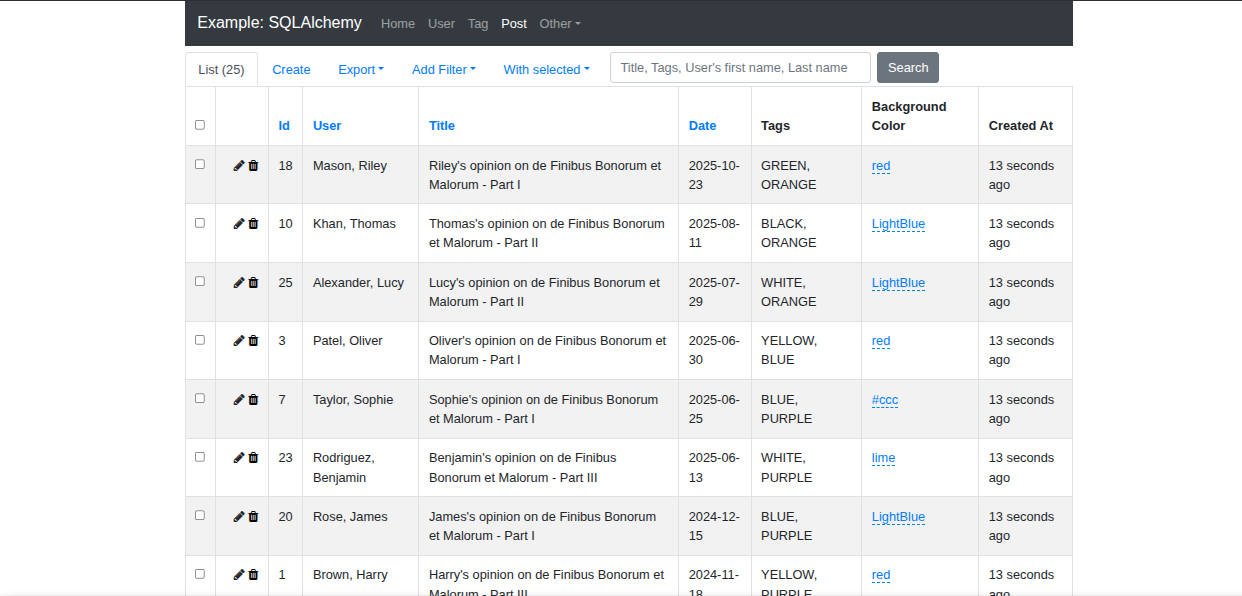
Flask-Admin is a batteries-included, simple-to-use Flask extension that lets you add admin interfaces to Flask applications. It is inspired by the django-admin package, but implemented in such a way that the developer has total control over the look, feel, functionality and user experience of the resulting application.
Out-of-the-box, Flask-Admin plays nicely with various ORM's, including
It also boasts a simple file management interface and a Redis client console.
The biggest feature of Flask-Admin is its flexibility. It aims to provide a set of simple tools that can be used to build admin interfaces of any complexity. To start off, you can create a very simple application in no time, with auto-generated CRUD-views for each of your models. Then you can further customize those views and forms as the need arises.
Flask-Admin is an active project, well-tested and production-ready.
Examples
Several usage examples are included in the /examples folder. Please add your own, or improve on the existing examples, and submit a pull-request.
How to run an example
Clone the repository and navigate to an example (for this example we are using SQLAlchemy Example):
git clone https://github.com/pallets-eco/flask-admin.git
cd flask-admin/examples/sqla
All examples use
uvto manage their dependencies and the developer environment.
Run the example using uv, which will manage the environment and dependencies automatically:
uv run main.py
Check the Flask app running on http://localhost:5000.
Documentation
Flask-Admin is extensively documented, you can find all of the documentation at https://flask-admin.readthedocs.io/en/latest/.
The docs are auto-generated from the .rst files in the /doc folder. If you come across any errors or if you think of anything else that should be included, feel free to make the changes and submit a pull-request.
To build the docs in your local environment, from the project directory:
tox -e docs
Installation
To install Flask-Admin using pip, simply:
pip install flask-admin
Contributing
If you are a developer working on and maintaining Flask-Admin, checkout the repo by doing:
git clone https://github.com/pallets-eco/flask-admin.git
cd flask-admin
Flask-Admin uses uv to manage its dependencies and developer environment. With
the repository checked out, to install the minimum version of Python that Flask-Admin supports, create your
virtual environment, and install the required dependencies, run:
uv sync
This will install Flask-Admin but without any of the optional extra dependencies, such as those for sqlalchemy or mongoengine support. To install all extras, run:
uv sync --extra all
Finally, enable pre-commit hooks:
pre-commit install
Tests
Tests are run with pytest. If you are not familiar with this package, you can find out more on their website.
### Running tests inside the devcontainer (eg when using VS Code)
If you are developing with the devcontainer configuration, then you can run tests directly using either of the following commands.
To just run the test suite with the default python installation, use:
uv run pytest
To run the test suite against all supported python versions, and also run other checks performed by CI, use:
uv run tox
Running tests as a one-off via docker-compose run / make test
If you don't use devcontainers then you can run the tests using docker (you will need to install and setup docker yourself). Then you can use:
make test-in-docker
This will use the devcontainer docker-compose configuration to start up postgres, azurite and mongo.
You can also run the full test suite including CI checks with:
make tox-in-docker
3rd Party Stuff
Flask-Admin is built with the help of Bootstrap, Select2 and Bootswatch.
If you want to localize your application, install the Flask-Babel package.
You can help improve Flask-Admin's translations by opening a PR.
As a developer who's changed some text in Flask-Admin
uv sync --group docs
cd babel
./babel.sh --update
As a translator who's updated some .po/.mo files
Run cd babel
Run ./babel.sh
Project details
Verified details
These details have been verified by PyPIProject links
Owner
GitHub Statistics
Maintainers
Release history Release notifications | RSS feed


Download files
Download the file for your platform. If you're not sure which to choose, learn more about installing packages.
Source Distribution
Built Distribution
Filter files by name, interpreter, ABI, and platform.
If you're not sure about the file name format, learn more about wheel file names.
Copy a direct link to the current filters
File details
Details for the file flask_admin-2.0.2.tar.gz.
File metadata
- Download URL: flask_admin-2.0.2.tar.gz
- Upload date:
- Size: 5.5 MB
- Tags: Source
- Uploaded using Trusted Publishing? Yes
- Uploaded via: twine/6.1.0 CPython/3.13.7
File hashes
| Algorithm | Hash digest | |
|---|---|---|
| SHA256 |
1d06aec7efee957972b43f6b08a0bd08d5f4cf9a337d4ece2f17c98abc2a214e
|
|
| MD5 |
86cebb452892734e53738d8150603073
|
|
| BLAKE2b-256 |
ccb778a1534b4fe1a40bccf79e8e274e1ace6ee1678c804e4c178b1c96e6c8d6
|
Provenance
The following attestation bundles were made for flask_admin-2.0.2.tar.gz:
Publisher:
publish.yaml on pallets-eco/flask-admin
-
Statement:
-
Statement type:
https://in-toto.io/Statement/v1 -
Predicate type:
https://docs.pypi.org/attestations/publish/v1 -
Subject name:
flask_admin-2.0.2.tar.gz -
Subject digest:
1d06aec7efee957972b43f6b08a0bd08d5f4cf9a337d4ece2f17c98abc2a214e - Sigstore transparency entry: 693136776
- Sigstore integration time:
-
Permalink:
pallets-eco/flask-admin@e26bee40d0aaddf7aaf2bc9d1f8949cfed3a709c -
Branch / Tag:
refs/tags/v2.0.2 - Owner: https://github.com/pallets-eco
-
Access:
public
-
Token Issuer:
https://token.actions.githubusercontent.com -
Runner Environment:
github-hosted -
Publication workflow:
publish.yaml@e26bee40d0aaddf7aaf2bc9d1f8949cfed3a709c -
Trigger Event:
push
-
Statement type:
File details
Details for the file flask_admin-2.0.2-py3-none-any.whl.
File metadata
- Download URL: flask_admin-2.0.2-py3-none-any.whl
- Upload date:
- Size: 6.5 MB
- Tags: Python 3
- Uploaded using Trusted Publishing? Yes
- Uploaded via: twine/6.1.0 CPython/3.13.7
File hashes
| Algorithm | Hash digest | |
|---|---|---|
| SHA256 |
4b3c44068de0fe4630dfcd190cc11231cbbdd7bac315c74c55d1764087b8b273
|
|
| MD5 |
626d6085b3340c7eb9e794df16160e62
|
|
| BLAKE2b-256 |
2b25a379b8dc388630f1d173544c8b3ebbdb2ad5b60992e531b724d7f8a7ea03
|
Provenance
The following attestation bundles were made for flask_admin-2.0.2-py3-none-any.whl:
Publisher:
publish.yaml on pallets-eco/flask-admin
-
Statement:
-
Statement type:
https://in-toto.io/Statement/v1 -
Predicate type:
https://docs.pypi.org/attestations/publish/v1 -
Subject name:
flask_admin-2.0.2-py3-none-any.whl -
Subject digest:
4b3c44068de0fe4630dfcd190cc11231cbbdd7bac315c74c55d1764087b8b273 - Sigstore transparency entry: 693136779
- Sigstore integration time:
-
Permalink:
pallets-eco/flask-admin@e26bee40d0aaddf7aaf2bc9d1f8949cfed3a709c -
Branch / Tag:
refs/tags/v2.0.2 - Owner: https://github.com/pallets-eco
-
Access:
public
-
Token Issuer:
https://token.actions.githubusercontent.com -
Runner Environment:
github-hosted -
Publication workflow:
publish.yaml@e26bee40d0aaddf7aaf2bc9d1f8949cfed3a709c -
Trigger Event:
push
-
Statement type:






