
Flask-Admin
Flask-Admin is now part of Pallets-Eco, an open source organization managed by the
Pallets team to facilitate community maintenance of Flask extensions. Please update
your references to https://github.com/pallets-eco/flask-admin.git.

Pallets Community Ecosystem
Introduction
Flask-Admin is a batteries-included, simple-to-use Flask extension that lets you add admin interfaces to Flask applications. It is inspired by the django-admin package, but implemented in such a way that the developer has total control over the look, feel, functionality and user experience of the resulting application.
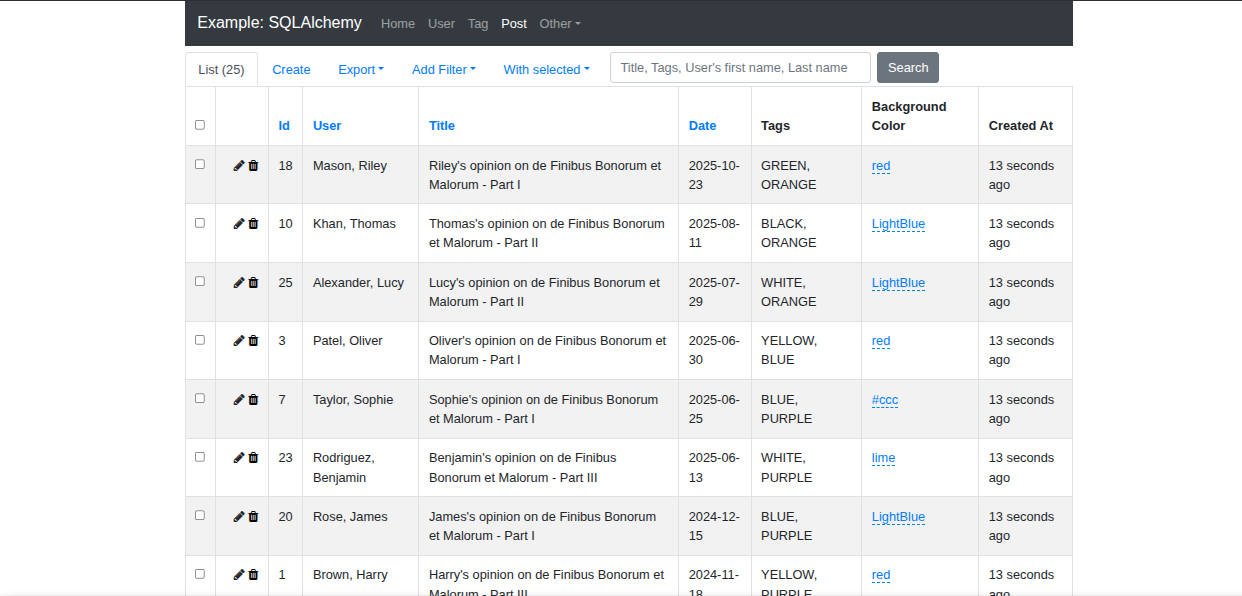
Out-of-the-box, Flask-Admin plays nicely with various ORM's, including
- SQLAlchemy (via either Flask-SQLAlchemy or Flask-SQLAlchemy-Lite)
- pymongo
- MongoEngine
- and Peewee.
It also boasts a simple file management interface and a Redis client console.
The biggest feature of Flask-Admin is its flexibility. It aims to provide a set of simple tools that can be used to build admin interfaces of any complexity. To start off, you can create a very simple application in no time, with auto-generated CRUD-views for each of your models. Then you can further customize those views and forms as the need arises.
Flask-Admin is an active project, well-tested and production-ready.
Examples
Several usage examples are included in the /examples folder. Please add your own, or improve on the existing examples, and submit a pull-request.
How to run an example
Clone the repository and navigate to an example (for this example we are using SQLAlchemy Example):
git clone https://github.com/pallets-eco/flask-admin.git
cd flask-admin/examples/sqla
All examples use
uvto manage their dependencies and the developer environment.
Run the example using uv, which will manage the environment and dependencies automatically:
uv run main.py
Check the Flask app running on http://localhost:5000.
Documentation
Flask-Admin is extensively documented, you can find all of the documentation at https://flask-admin.readthedocs.io/en/latest/.
The docs are auto-generated from the .rst files in the /doc folder. If you come across any errors or if you think of anything else that should be included, feel free to make the changes and submit a pull-request.
To build the docs in your local environment, from the project directory:
tox -e docs
Installation
To install Flask-Admin using pip, simply:
pip install flask-admin
Contributing
If you are a developer working on and maintaining Flask-Admin, checkout the repo by doing:
git clone https://github.com/pallets-eco/flask-admin.git
cd flask-admin
Flask-Admin uses uv to manage its dependencies and developer environment. With
the repository checked out, to install the minimum version of Python that Flask-Admin supports, create your
virtual environment, and install the required dependencies, run:
uv sync
This will install Flask-Admin but without any of the optional extra dependencies, such as those for sqlalchemy or mongoengine support. To install all extras, run:
uv sync --extra all
Finally, enable pre-commit hooks:
pre-commit install
Tests
Tests are run with pytest. If you are not familiar with this package, you can find out more on their website.
### Running tests inside the devcontainer (eg when using VS Code)
If you are developing with the devcontainer configuration, then you can run tests directly using either of the following commands.
To just run the test suite with the default python installation, use:
uv run pytest
To run the test suite against all supported python versions, and also run other checks performed by CI, use:
uv run tox
Running tests as a one-off via docker-compose run / make test
If you don't use devcontainers then you can run the tests using docker (you will need to install and setup docker yourself). Then you can use:
make test-in-docker
This will use the devcontainer docker-compose configuration to start up postgres, azurite and mongo.
You can also run the full test suite including CI checks with:
make tox-in-docker
3rd Party Stuff
Flask-Admin is built with the help of Bootstrap, Select2 and Bootswatch.
If you want to localize your application, install the Flask-Babel package.
You can help improve Flask-Admin's translations by opening a PR.
As a developer who's changed some text in Flask-Admin
uv sync --group docs
cd babel
./babel.sh --update
As a translator who's updated some .po/.mo files
Run cd babel
Run ./babel.sh
1 maintainer

Release files for Flask-Admin 2.2.1
For a detailed explanation of source distributions (sdists) and built distributions (wheels), please see the package formats documentation.
Source distribution (sdist)
| File | Size | Uploaded | |
|---|---|---|---|
| flask_admin-2.2.1.tar.gz | 5.2 MB | Details |
Built distribution (wheel)
| File | Interpreter | ABI | Platform | Reset |
|---|---|---|---|---|
| flask_admin-2.2.1-py3-none-any.whl | Python 3 | none | any | Details |
Total release size: 11.2 MB
Release files / flask_admin-2.2.1.tar.gz
| Download URL | flask_admin-2.2.1.tar.gz |
|---|---|
| Size | 5.2 MB |
| Tags | Source |
|
SHA-256 checksum How to use checksums |
08b4b6b63d2100598add70c1dc9a695f484e3c16c894c09ac70af26acb26a87d
|
|
BLAKE2b-256 checksum How to use checksums |
088692b2f706fa49a06a546381e809d84a082f70fe782f6f2d50a72e185422ae
|
| Upload date | |
|
Uploaded using Trusted Publishing? What is trusted publishing? |
Yes |
| Uploaded via |
twine/7.0.0 CPython/3.13.14
|
Provenance
Provenance describes where a file came from. On PyPI, provenance is shared via attestations, which provide a verifiable record of the build or publishing details. View details, limitations and caveats.


PyPI Publish Attestation
PyPI verified that this artifact, at this checksum, originated from the publisher listed below.
Signed by GitHub Actions, verified by PyPI on Sep 21, 2026.
Transparency logRelease files / flask_admin-2.2.1-py3-none-any.whl
| Download URL | flask_admin-2.2.1-py3-none-any.whl |
|---|---|
| Size | 6.1 MB |
| Tags | Python 3 |
|
SHA-256 checksum How to use checksums |
a0533fd1968543fc621733316bb9c30774b501c119816f1e83d7dcedacb99895
|
|
BLAKE2b-256 checksum How to use checksums |
afa67adc0885b5178d13b7b7ee72b8999a808163f382f156dc864b9e2fd1dec5
|
| Upload date | |
|
Uploaded using Trusted Publishing? What is trusted publishing? |
Yes |
| Uploaded via |
twine/7.0.0 CPython/3.13.14
|
Provenance
Provenance describes where a file came from. On PyPI, provenance is shared via attestations, which provide a verifiable record of the build or publishing details. View details, limitations and caveats.
PyPI Publish Attestation
PyPI verified that this artifact, at this checksum, originated from the publisher listed below.
Signed by GitHub Actions, verified by PyPI on Sep 21, 2026.
Transparency log













