
Panel for the Flask Debug toolbar to capture and view line-by-line profiling stats

Project description
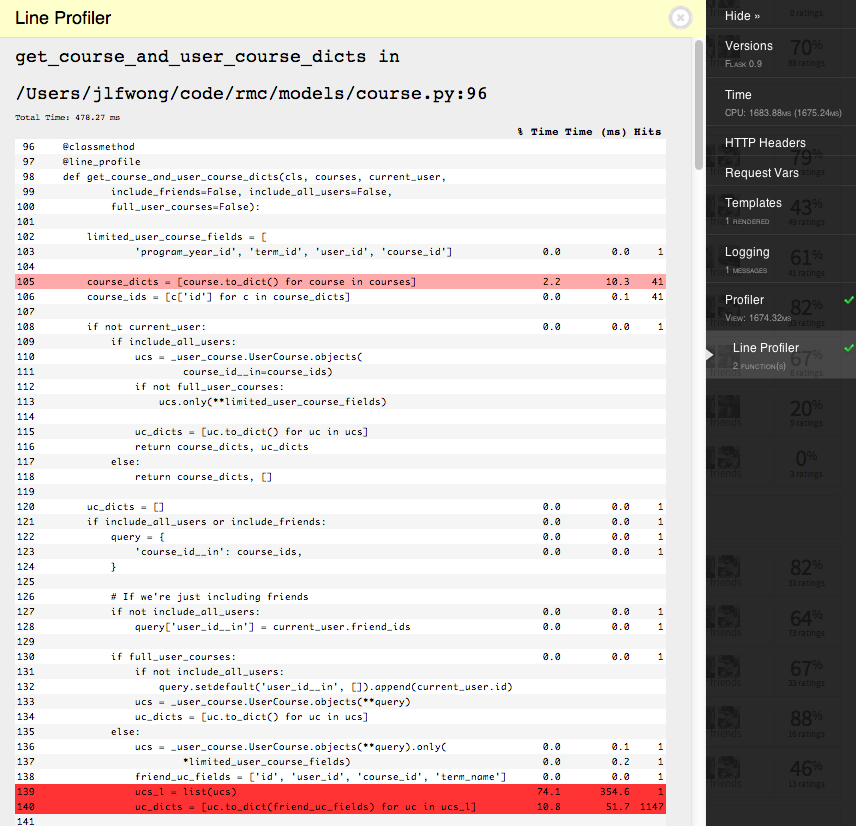
This is a panel for flask_debugtoolbar which enables the ability to view line profiling information from selected functions.
The line profile information comes from the line_profiler module, but you don’t need to worry about that.
Installation
First, you need to get the package. Install it with pip:
pip install flask-debugtoolbar-lineprofilerpanel
Somewhere after you’ve set app.debug = True and before app.run, you need to specify the flask_debugtoolbar panels that you want to use and include 'flask_debugtoolbar_lineprofilerpanel.panels.LineProfilerPanel' in that list.
For example, here’s a small flask app with the panel installed and with line profiling enabled for the hello_world:
from flask import Flask
app = Flask(__name__)

import flask_debugtoolbar

from flask_debugtoolbar_lineprofilerpanel.profile import line_profile

@app.route('/')
@line_profile
def hello_world():
    return flask.render_template('hello_world.html')

if __name__ == '__main__':
    app.debug = True

    # Specify the debug panels you want
    app.config['DEBUG_TB_PANELS'] = [
        'flask_debugtoolbar.panels.versions.VersionDebugPanel',
        'flask_debugtoolbar.panels.timer.TimerDebugPanel',
        'flask_debugtoolbar.panels.headers.HeaderDebugPanel',
        'flask_debugtoolbar.panels.request_vars.RequestVarsDebugPanel',
        'flask_debugtoolbar.panels.template.TemplateDebugPanel',
        'flask_debugtoolbar.panels.sqlalchemy.SQLAlchemyDebugPanel',
        'flask_debugtoolbar.panels.logger.LoggingPanel',
        'flask_debugtoolbar.panels.profiler.ProfilerDebugPanel',
        # Add the line profiling
        'flask_debugtoolbar_lineprofilerpanel.panels.LineProfilerPanel'
    ]
    toolbar = flask_debugtoolbar.DebugToolbarExtension(app)

    app.run()
Usage
Unlike the regular profile panel that comes with flask_debugtoolbar, the line profiler will only profile functions you specifically tell it to. You can either use it as a decorator or directly as a function.
from flask_debugtoolbar_lineprofilerpanel.profile import line_profile

# Using it as a decorator
@app.route('/profile')
@line_profile
def profile_page():
    ...
    return flask.render_template('profile_page')

# Explicit argument
line_profile(some_function)
Note that if I had done line_profile(profile_page) in the example above, it would’ve profiled the wrapper created by app.route. In general, you probably just want to use line_profile as a decorator.
Also note that the following will profile the decorator wrapper, not the inner function.
# Using it incorrectly as a decorator
@line_profile
@app.route('/profile')
def profile_page():
    ...
    return flask.render_template('profile_page')
Always use @line_profile as the inner-most decorator.
0.0.6 (2012-11-13)
No longer polluting the template namespace
Show all lines, not just those with profiling information
0.0.5 (2012-11-13)
Table output, ditch the default output given by LineProfiler.print_stats()
Usage instructions in the panel
0.0.1 (2012-11-12)
Got it “working”
Super Ugly


Download files
Download the file for your platform. If you're not sure which to choose, learn more about installing packages.
Source Distribution
File details
Details for the file Flask-DebugToolbar-LineProfilerPanel-0.0.6.tar.gz.
File metadata
- Download URL: Flask-DebugToolbar-LineProfilerPanel-0.0.6.tar.gz
- Upload date:
- Size: 4.5 kB
- Tags: Source
- Uploaded using Trusted Publishing? No
File hashes
| Algorithm | Hash digest | |
|---|---|---|
| SHA256 |
d75b48bb7fc7b8950e3f55f4d6ab042f7b7a10ebb52286e44ddfabe0d4c7906c
|
|
| MD5 |
2a19ac9976cdb16fa537b3b904eb4674
|
|
| BLAKE2b-256 |
805f0099ed7b98ebeee5013393e1b55e656b04d173fb25d193297d4b4ed53925
|






