

Flowfile
Main Repository: Edwardvaneechoud/Flowfile
Documentation:
Website -
Core -
Worker -
Frontend -
Technical Architecture
Flowfile is an open-source data platform that combines a visual pipeline builder, a data catalog with Delta Lake storage, scheduling, Kafka ingestion, sandboxed Python execution, and a Polars-compatible Python API — all in a single pip install.
Quick Start
pip install Flowfile
flowfile run ui
This starts the backend services and opens the visual ETL interface in your browser.
What You Get
- Visual pipeline builder with 30+ nodes for joins, filters, aggregations, fuzzy matching, pivots, and more
- Data catalog with Delta Lake storage, version history, and lineage tracking
- Scheduling — interval-based or triggered by catalog table updates
- Kafka/Redpanda ingestion as a canvas node with automatic schema inference
- Sandboxed Python execution in isolated Docker containers
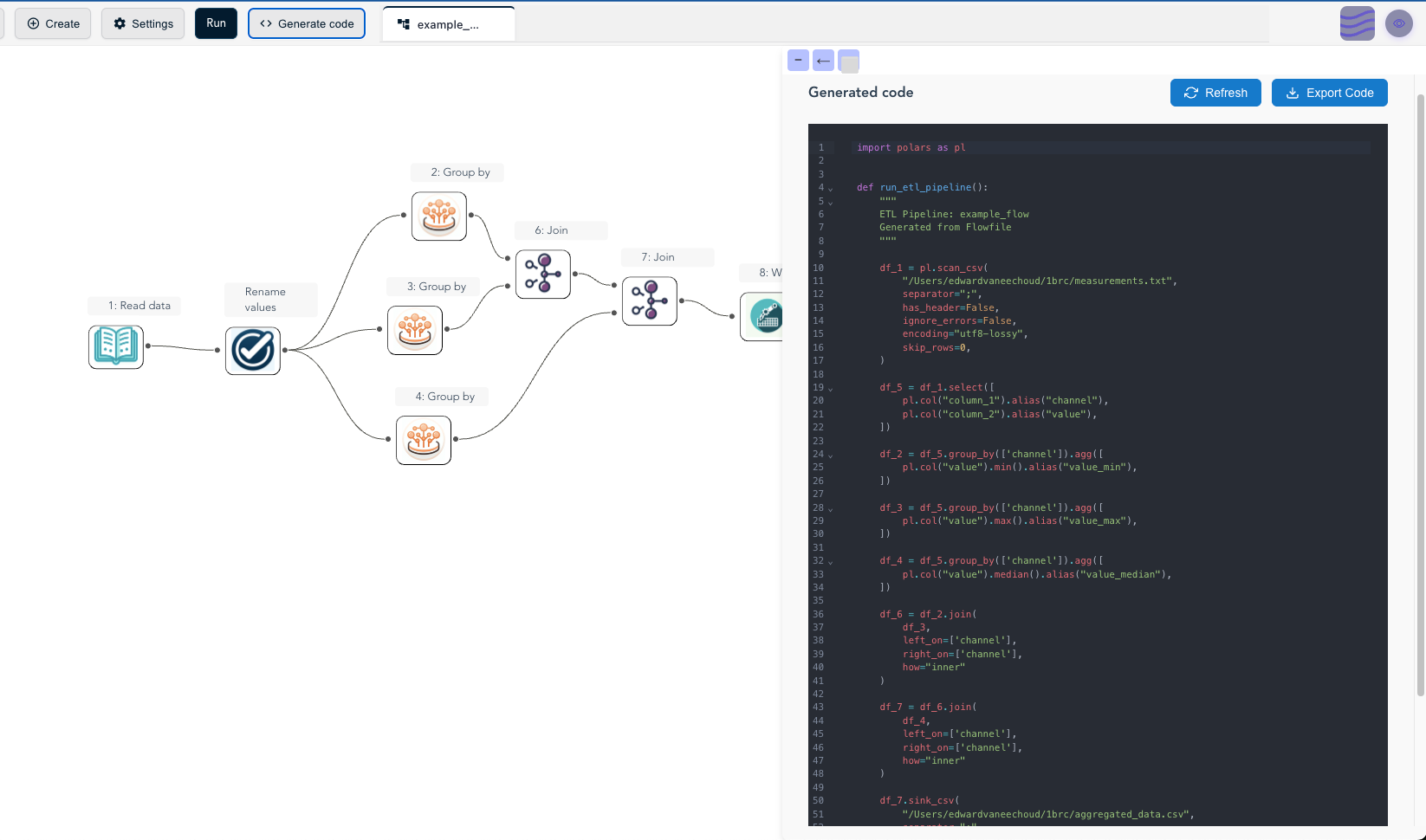
- Code generation — export visual flows as standalone Python/Polars scripts
- Flow parameters —
${variable}substitution, configurable via UI or CLI - Cloud storage — S3, Azure Data Lake Storage, Google Cloud Storage
- Database connectivity — PostgreSQL, MySQL, SQL Server, Oracle, DuckDB, and more
- Python API with Polars-like syntax and visual flow graph generation
Python API
import flowfile as ff
from flowfile import col, open_graph_in_editor

df = ff.from_dict({
    "id": [1, 2, 3, 4, 5],
    "category": ["A", "B", "A", "C", "B"],
    "value": [100, 200, 150, 300, 250]
})

result = df.filter(col("value") > 150).with_columns([
    (col("value") * 2).alias("double_value")
])

# Open the pipeline on the visual canvas
open_graph_in_editor(result.flow_graph)
Common Operations
import flowfile as ff
from flowfile import col, when, lit

# Read from various sources
df = ff.read_csv("data.csv")
df_pq = ff.read_parquet("data.parquet")

# Transform
filtered = df.filter(col("value") > 150)
with_status = df.with_columns([
    when(col("value") > 200).then(lit("High")).otherwise(lit("Low")).alias("status")
])

# Aggregate
by_category = df.group_by("category").agg([
    col("value").sum().alias("total"),
    col("value").mean().alias("average")
])

# Join
joined = df.join(other_df, left_on="id", right_on="product_id")

# Visualize any pipeline
ff.open_graph_in_editor(joined.flow_graph)
Code Generation
Export visual flows as standalone Python/Polars scripts:
Package Components
- Core Service (
flowfile_core) — ETL engine, catalog, scheduler, auth - Worker Service (
flowfile_worker) — CPU-intensive data processing - Web UI — Browser-based visual pipeline builder
- FlowFrame API (
flowfile_frame) — Polars-compatible Python library - Scheduler (
flowfile_scheduler) — Interval and table-trigger scheduling
CLI
flowfile run ui                              # Start web UI
flowfile run core --host 0.0.0.0             # Start core service
flowfile run worker --host 0.0.0.0           # Start worker service
flowfile run flow pipeline.json              # Run a flow
flowfile run flow pipeline.json --param key=value  # Run with parameters
More Options
- Desktop App: Download from GitHub Releases
- Docker:
docker compose up -dfor self-hosted deployments - Browser Demo: demo.flowfile.org (WASM, no server)
Resources
- Documentation: Comprehensive guides
- Main Repository: Latest code and examples
- Technical Architecture: Design overview
1 maintainer

Release files for Flowfile 0.17.5
For a detailed explanation of source distributions (sdists) and built distributions (wheels), please see the package formats documentation.
Source distribution (sdist)
| File | Size | Uploaded | |
|---|---|---|---|
| flowfile-0.17.5.tar.gz | 9.3 MB | Details |
Built distribution (wheel)
| File | Interpreter | ABI | Platform | Reset |
|---|---|---|---|---|
| flowfile-0.17.5-py3-none-any.whl | Python 3 | none | any | Details |
Total release size: 19.2 MB
Release files / flowfile-0.17.5.tar.gz
| Download URL | flowfile-0.17.5.tar.gz |
|---|---|
| Size | 9.3 MB |
| Tags | Source |
|
SHA-256 checksum How to use checksums |
9df45a90236d47c09a46057f4b3e5dbb62a84a29dab01619354ae6f24f1087d3
|
|
BLAKE2b-256 checksum How to use checksums |
c9af788eb5591b93b5ad5344a2e94c74305ff281e98cc3599e13bee01f111613
|
| Upload date | |
|
Uploaded using Trusted Publishing? What is trusted publishing? |
Yes |
| Uploaded via |
twine/7.0.0 CPython/3.13.14
|
Provenance
Provenance describes where a file came from. On PyPI, provenance is shared via attestations, which provide a verifiable record of the build or publishing details. View details, limitations and caveats.


PyPI Publish Attestation
PyPI verified that this artifact, at this checksum, originated from the publisher listed below.
Signed by GitHub Actions, verified by PyPI on Sep 14, 2026.
Transparency logRelease files / flowfile-0.17.5-py3-none-any.whl
| Download URL | flowfile-0.17.5-py3-none-any.whl |
|---|---|
| Size | 9.9 MB |
| Tags | Python 3 |
|
SHA-256 checksum How to use checksums |
ff3923df966d0ef26315c09dd5e2b08741f91cf4b650604a2385df1233a55cbc
|
|
BLAKE2b-256 checksum How to use checksums |
666ac4c58803f770fba1da66f0a7e31110bf81937989411f0545d6c1746cf262
|
| Upload date | |
|
Uploaded using Trusted Publishing? What is trusted publishing? |
Yes |
| Uploaded via |
twine/7.0.0 CPython/3.13.14
|
Provenance
Provenance describes where a file came from. On PyPI, provenance is shared via attestations, which provide a verifiable record of the build or publishing details. View details, limitations and caveats.
PyPI Publish Attestation
PyPI verified that this artifact, at this checksum, originated from the publisher listed below.
Signed by GitHub Actions, verified by PyPI on Sep 14, 2026.
Transparency log













