
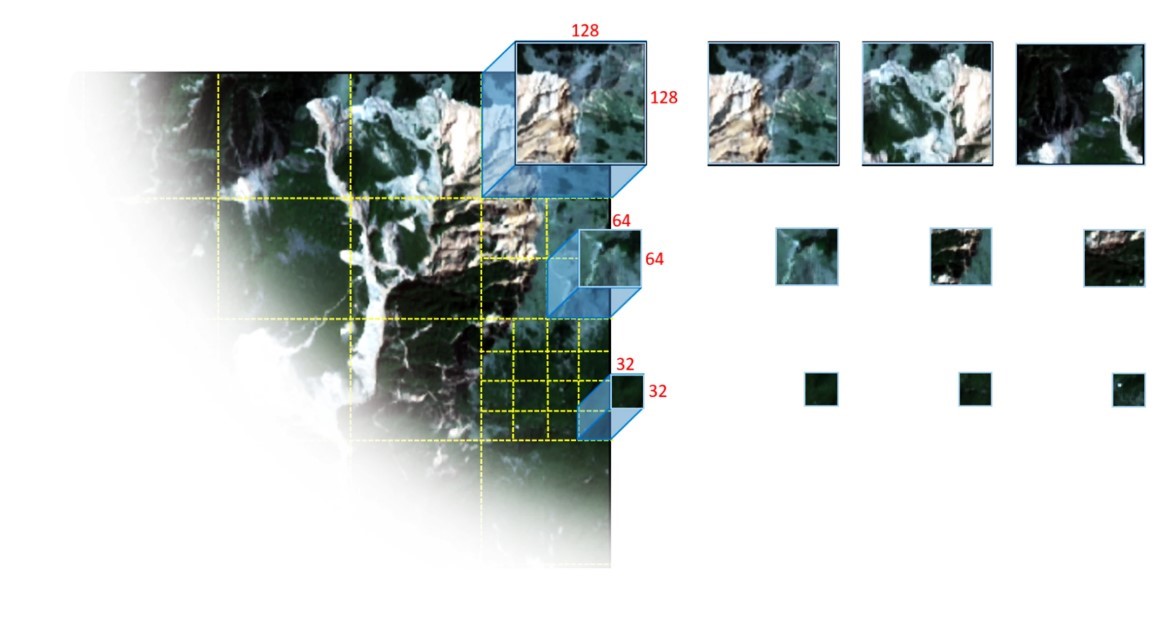
GeoPatch is a package for generating patches from remote sensing data

Project description
GeoPatch is a package for generating patches from remote sensing data 




GeoPatch enables the user to read, process and export GeoTIFFs in various patch sizes. The module is built on the Rasterio library but is much more convenient when it comes to reading and exporting GeoTIFs patches for training deep learning models.
Using this package user is able to feed satellite imagery and corresponding label data and exports patches in both Geotiff and Numpy array.
Any feedback from users is welcome and you can write to me at hejarshahabi@gmail.com in case of any contribution or suggestion.
Quick tutorial on how to use GeoPatch
1- Installation :
pip install GeoPatch
2- Calling the Package:
from GeoPatch import TrainPatch
3- Feeding data
for image and label variables both string and array
can be passed and the function automatically process and read dataset.
patch= TrainPatch( image="xxx/image.tif", label="xxx/label.tif",

patch_size=128, stride=64, channel_first=True)
4- Input data specifications
Using follwoing code the the shape and size of data can be displayed
patch.data_dimension()
5- Patch details
To display the number of orginal image patches can be generated based on given patch size and stride values.
patch.patch_info()
6- Saving image patch as a Geotiff file
To save image patches as Geotiff files in the current working directory with the given "folder_name", and if "only_label" pass as True, only patches will be save that has labelled data.
patch.save_Geotif(folder_name="tif", only_label=True)
7- Saving image patch as a Numpy array
Using this function image patches will be generated in Numpy format with data augmentation options. V_flip and H_flip are used to vertically and horizontally flip patches, respectively, and rotation is used to rotate patches in 90,180 and 270 degree.
patch.save_numpy(folder_name="npy", only_label=False, return_stacked=False, save_stack=False, V_flip=True, H_flip=True, Rotation=True)

#to return numpy patches as a stack file:

patch, label= patch.save_numpy(folder_name="npy", only_label=False, return_stacked=True, save_stack=False, V_flip=True, H_flip=True, Rotation=True)
8- Patch visualization
Patches with their corresponding labels can be displayed using this line of code.
In "folder_name" the exact name of the folder that patches are located in should be passed.
patch.visualize(folder_name='npy',patches_to_show=2,band_num=1,

fig_size=(10, 20),dpi=96)
9- Generating Prediction Patch
Using the following line of codes prediction patches can be generated.
from GeoPatch import PredictionPatch
Prediction= PredictionPatch( image="xxx/test_image.tif", patch_size=128, stride=128, channel_first=True)
Prediction.data_dimension()
Prediction.patch_info()
10- Saving Prediction Patches
Using the following line of code prediction patches can be saved as GeoTIF format in the provided folder.
Prediction.save_Geotif('folder_name')
Release history Release notifications | RSS feed


Download files
Download the file for your platform. If you're not sure which to choose, learn more about installing packages.
Source Distribution
Built Distribution
Filter files by name, interpreter, ABI, and platform.
If you're not sure about the file name format, learn more about wheel file names.
Copy a direct link to the current filters
File details
Details for the file geopatch-1.2.3.tar.gz.
File metadata
- Download URL: geopatch-1.2.3.tar.gz
- Upload date:
- Size: 12.7 kB
- Tags: Source
- Uploaded using Trusted Publishing? No
- Uploaded via: twine/6.2.0 CPython/3.13.5
File hashes
| Algorithm | Hash digest | |
|---|---|---|
| SHA256 |
fd9c4db319c6cca0ed052cbcf6d620d7d8b1fcc6aa105a9133c0ae55dac963a1
|
|
| MD5 |
76687bf2dd70f60f7da68fca3a7d839d
|
|
| BLAKE2b-256 |
10d17403f09917f58b78c8d229e663fc754312c94776ff5e345e5862186477ce
|
File details
Details for the file geopatch-1.2.3-py3-none-any.whl.
File metadata
- Download URL: geopatch-1.2.3-py3-none-any.whl
- Upload date:
- Size: 9.2 kB
- Tags: Python 3
- Uploaded using Trusted Publishing? No
- Uploaded via: twine/6.2.0 CPython/3.13.5
File hashes
| Algorithm | Hash digest | |
|---|---|---|
| SHA256 |
82b720c0aed4dd2dac8dcace33614e849a0b2933065406f1f42d499abd9fe40c
|
|
| MD5 |
94e71e31e213535f7d3c3ddc711cb36d
|
|
| BLAKE2b-256 |
c6636839f5f2da24f71c44b34b17e142be60500ae34af5d4ad21860536453b62
|






