
This release is a pre-release and may not be stable for production use.
Invoke - Professional Creative AI Tools for Visual Media
To learn more about Invoke, or implement our Business solutions, visit invoke.com









Invoke is a leading creative engine built to empower professionals and enthusiasts alike. Generate and create stunning visual media using the latest AI-driven technologies. Invoke offers an industry leading web-based UI, and serves as the foundation for multiple commercial products.
Invoke is available in two editions:
| Community Edition | Professional Edition |
|---|---|
| For users looking for a locally installed, self-hosted and self-managed service | For users or teams looking for a cloud-hosted, fully managed service |
| - Free to use under a commercially-friendly license | - Monthly subscription fee with three different plan levels |
| - Download and install on compatible hardware | - Offers additional benefits, including multi-user support, improved model training, and more |
| - Includes all core studio features: generate, refine, iterate on images, and build workflows | - Hosted in the cloud for easy, secure model access and scalability |
| Quick Start -> Installation and Updates | More Information -> www.invoke.com/pricing |
Documentation
| Quick Links |
|---|
| Installation and Updates - Documentation and Tutorials - Bug Reports - Contributing |
Quick Start
-
Download and unzip the installer from the bottom of the latest release.
-
Run the installer script.
- Windows: Double-click on the
install.batscript. - macOS: Open a Terminal window, drag the file
install.shfrom Finder into the Terminal, and press enter. - Linux: Run
install.sh.
- Windows: Double-click on the
-
When prompted, enter a location for the install and select your GPU type.
-
Once the install finishes, find the directory you selected during install. The default location is
C:\Users\Username\invokeaifor Windows or~/invokeaifor Linux/macOS. -
Run the launcher script (
invoke.batfor Windows,invoke.shfor macOS and Linux) the same way you ran the installer script in step 2. -
Select option 1 to start the application. Once it starts up, open your browser and go to http://localhost:9090.
-
Open the model manager tab to install a starter model and then you'll be ready to generate.
More detail, including hardware requirements and manual install instructions, are available in the installation documentation.
Docker Container
We publish official container images in Github Container Registry: https://github.com/invoke-ai/InvokeAI/pkgs/container/invokeai. Both CUDA and ROCm images are available. Check the above link for relevant tags.
[!IMPORTANT] Ensure that Docker is set up to use the GPU. Refer to NVIDIA or AMD documentation.
Generate!
Run the container, modifying the command as necessary:
docker run --runtime=nvidia --gpus=all --publish 9090:9090 ghcr.io/invoke-ai/invokeai
Then open http://localhost:9090 and install some models using the Model Manager tab to begin generating.
For ROCm, add --device /dev/kfd --device /dev/dri to the docker run command.
Persist your data
You will likely want to persist your workspace outside of the container. Use the --volume /home/myuser/invokeai:/invokeai flag to mount some local directory (using its absolute path) to the /invokeai path inside the container. Your generated images and models will reside there. You can use this directory with other InvokeAI installations, or switch between runtime directories as needed.
DIY
Build your own image and customize the environment to match your needs using our docker-compose stack. See README.md in the docker directory.
Troubleshooting, FAQ and Support
Please review our FAQ for solutions to common installation problems and other issues.
For more help, please join our Discord.
Features
Full details on features can be found in our documentation.
Web Server & UI
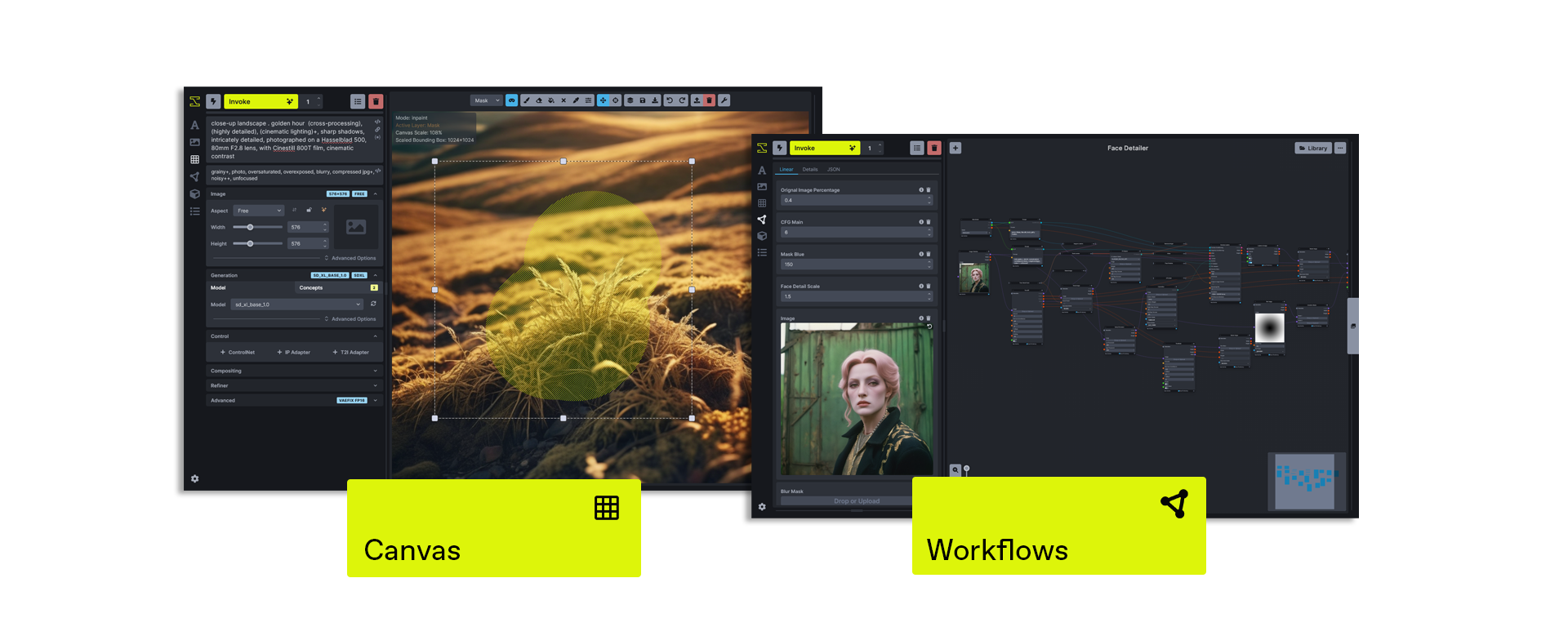
Invoke runs a locally hosted web server & React UI with an industry-leading user experience.
Unified Canvas
The Unified Canvas is a fully integrated canvas implementation with support for all core generation capabilities, in/out-painting, brush tools, and more. This creative tool unlocks the capability for artists to create with AI as a creative collaborator, and can be used to augment AI-generated imagery, sketches, photography, renders, and more.
Workflows & Nodes
Invoke offers a fully featured workflow management solution, enabling users to combine the power of node-based workflows with the easy of a UI. This allows for customizable generation pipelines to be developed and shared by users looking to create specific workflows to support their production use-cases.
Board & Gallery Management
Invoke features an organized gallery system for easily storing, accessing, and remixing your content in the Invoke workspace. Images can be dragged/dropped onto any Image-base UI element in the application, and rich metadata within the Image allows for easy recall of key prompts or settings used in your workflow.
Other features
- Support for both ckpt and diffusers models
- SD1.5, SD2.0, and SDXL support
- Upscaling Tools
- Embedding Manager & Support
- Model Manager & Support
- Workflow creation & management
- Node-Based Architecture
Contributing
Anyone who wishes to contribute to this project - whether documentation, features, bug fixes, code cleanup, testing, or code reviews - is very much encouraged to do so.
Get started with contributing by reading our contribution documentation, joining the #dev-chat or the GitHub discussion board.
We hope you enjoy using Invoke as much as we enjoy creating it, and we hope you will elect to become part of our community.
Thanks
Invoke is a combined effort of passionate and talented people from across the world. We thank them for their time, hard work and effort.
Original portions of the software are Copyright © 2024 by respective contributors.
3 maintainers


Metadata
3 maintainers
Release files for InvokeAI 4.2.9.dev20240823
For a detailed explanation of source distributions (sdists) and built distributions (wheels), please see the package formats documentation.
Source distribution (sdist)
| File | Size | Uploaded | |
|---|---|---|---|
| InvokeAI-4.2.9.dev20240823.tar.gz | 4.2 MB | Details |
Built distribution (wheel)
| File | Interpreter | ABI | Platform | Reset |
|---|---|---|---|---|
| InvokeAI-4.2.9.dev20240823-py3-none-any.whl | Python 3 | none | any | Details |
Total release size: 8.5 MB
Release files / InvokeAI-4.2.9.dev20240823.tar.gz
| Download URL | InvokeAI-4.2.9.dev20240823.tar.gz |
|---|---|
| Size | 4.2 MB |
| Tags | Source |
|
SHA-256 checksum How to use checksums |
40dec837b8f8d1748ee6613fffda84ea825e05f01036bcce2974a1d793394a73
|
|
BLAKE2b-256 checksum How to use checksums |
b94441d16108af4725466c7900423001ec4ec6afda37d0647603095e54e3cb57
|
| Upload date | |
|
Uploaded using Trusted Publishing? What is trusted publishing? |
Yes |
| Uploaded via |
twine/5.1.0 CPython/3.12.5
|
Release files / InvokeAI-4.2.9.dev20240823-py3-none-any.whl
| Download URL | InvokeAI-4.2.9.dev20240823-py3-none-any.whl |
|---|---|
| Size | 4.4 MB |
| Tags | Python 3 |
|
SHA-256 checksum How to use checksums |
6922ca8189e4fcc90f4ceb216f51935cd65fd70af87956fde6fdba463d9d0974
|
|
BLAKE2b-256 checksum How to use checksums |
f915e436fbefc643926f0516d7af59df3aced9f1337a013cb8ce30c258b3b5fd
|
| Upload date | |
|
Uploaded using Trusted Publishing? What is trusted publishing? |
Yes |
| Uploaded via |
twine/5.1.0 CPython/3.12.5
|














