
A full-featured AI-assisted image generation environment designed for creatives and enthusiasts.
Verified details
These details have been verified by PyPIProject links
GitHub Statistics
Maintainers


Project description










Invoke is a leading creative engine built to empower professionals and enthusiasts alike. Generate and create stunning visual media using the latest AI-driven technologies. Invoke offers an industry leading web-based UI, and serves as the foundation for multiple commercial products.
- Free to use under a commercially-friendly license
- Download and install on compatible hardware
- Generate, refine, iterate on images, and build workflows
📣 Are you a new or returning InvokeAI user?
Take our first annual User's Survey
Documentation
| Quick Links |
|---|
| Installation and Updates - Documentation and Tutorials - Bug Reports - Contributing |
Installation
To get started with Invoke, Download the Launcher.
Troubleshooting, FAQ and Support
Please review our FAQ for solutions to common installation problems and other issues.
For more help, please join our Discord.
Features
Full details on features can be found in our documentation.
Web Server & UI
Invoke runs a locally hosted web server & React UI with an industry-leading user experience.
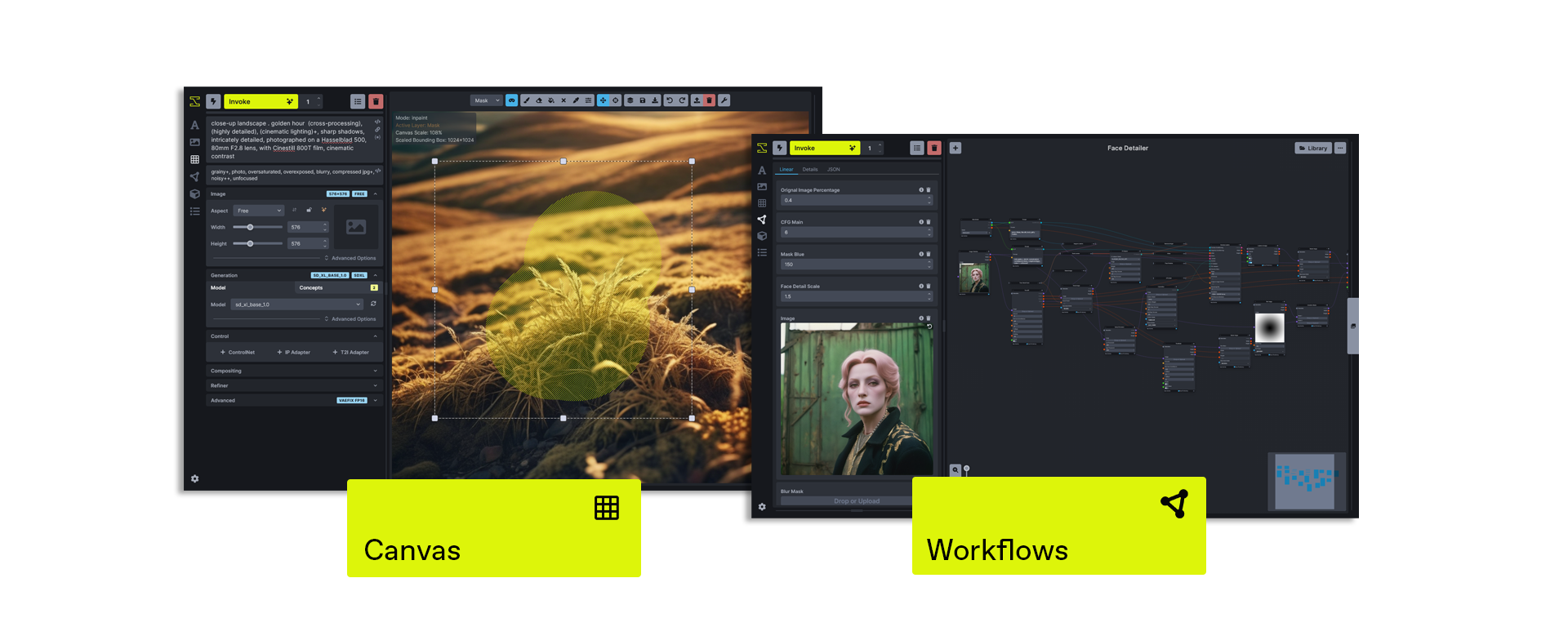
Unified Canvas
The Unified Canvas is a fully integrated canvas implementation with support for all core generation capabilities, in/out-painting, brush tools, and more. This creative tool unlocks the capability for artists to create with AI as a creative collaborator, and can be used to augment AI-generated imagery, sketches, photography, renders, and more.
Workflows & Nodes
Invoke offers a fully featured workflow management solution, enabling users to combine the power of node-based workflows with the ease of a UI. This allows for customizable generation pipelines to be developed and shared by users looking to create specific workflows to support their production use-cases.
Board & Gallery Management
Invoke features an organized gallery system for easily storing, accessing, and remixing your content in the Invoke workspace. Images can be dragged/dropped onto any Image-base UI element in the application, and rich metadata within the Image allows for easy recall of key prompts or settings used in your workflow.
Model Support
- SD 1.5
- SD 2.0
- SDXL
- SD 3.5 Medium
- SD 3.5 Large
- CogView 4
- Flux.1 Dev
- Flux.1 Schnell
- Flux.1 Kontext
- Flux.1 Krea
- Flux Redux
- Flux Fill
- Flux.2 Klein 4B
- Flux.2 Klein 9B
- Z-Image Turbo
- Z-Image Base
- Anima
- Qwen Image
- Qwen Image Edit
- Nano Banana (API Only)
- GPT Image (API Only)
- Wan (API Only)
Other features
- Support for ckpt, diffusers, and some gguf models
- Upscaling Tools
- Embedding Manager & Support
- Model Manager & Support
- Workflow creation & management
- Node-Based Architecture
- Object Segmentation & Selection Models (SAM / SAM2)
Contributing
Anyone who wishes to contribute to this project - whether documentation, features, bug fixes, code cleanup, testing, or code reviews - is very much encouraged to do so.
Get started with contributing by reading our contribution documentation, joining the #dev-chat or the GitHub discussion board.
We hope you enjoy using Invoke as much as we enjoy creating it, and we hope you will elect to become part of our community.
Thanks
Invoke is a combined effort of passionate and talented people from across the world. We thank them for their time, hard work and effort.
Original portions of the software are Copyright © 2024 by respective contributors.
Project details
Verified details
These details have been verified by PyPIProject links
GitHub Statistics
Maintainers
Release history Release notifications | RSS feed


Download files
Download the file for your platform. If you're not sure which to choose, learn more about installing packages.
Source Distribution
Built Distribution
Filter files by name, interpreter, ABI, and platform.
If you're not sure about the file name format, learn more about wheel file names.
Copy a direct link to the current filters
File details
Details for the file invokeai-6.13.0.tar.gz.
File metadata
- Download URL: invokeai-6.13.0.tar.gz
- Upload date:
- Size: 8.7 MB
- Tags: Source
- Uploaded using Trusted Publishing? Yes
- Uploaded via: twine/6.1.0 CPython/3.13.12
File hashes
| Algorithm | Hash digest | |
|---|---|---|
| SHA256 |
b46fabfa45093bb9e76612915c574bb90645e4d53ff909d32a8009030d618831
|
|
| MD5 |
7e0ceb6760e513ef0a9b3d5755b95d7e
|
|
| BLAKE2b-256 |
6163fef709672746058a6287f626b0f658e7b0ccd166d6d26439a55d5f722fa5
|
Provenance
The following attestation bundles were made for invokeai-6.13.0.tar.gz:
Publisher:
release.yml on invoke-ai/InvokeAI
-
Statement:
-
Statement type:
https://in-toto.io/Statement/v1 -
Predicate type:
https://docs.pypi.org/attestations/publish/v1 -
Subject name:
invokeai-6.13.0.tar.gz -
Subject digest:
b46fabfa45093bb9e76612915c574bb90645e4d53ff909d32a8009030d618831 - Sigstore transparency entry: 1643285626
- Sigstore integration time:
-
Permalink:
invoke-ai/InvokeAI@4554e8585fa68a089f20a38df23e0d19d29f151b -
Branch / Tag:
refs/tags/v6.13.0 - Owner: https://github.com/invoke-ai
-
Access:
public
-
Token Issuer:
https://token.actions.githubusercontent.com -
Runner Environment:
github-hosted -
Publication workflow:
release.yml@4554e8585fa68a089f20a38df23e0d19d29f151b -
Trigger Event:
push
-
Statement type:
File details
Details for the file invokeai-6.13.0-py3-none-any.whl.
File metadata
- Download URL: invokeai-6.13.0-py3-none-any.whl
- Upload date:
- Size: 9.0 MB
- Tags: Python 3
- Uploaded using Trusted Publishing? Yes
- Uploaded via: twine/6.1.0 CPython/3.13.12
File hashes
| Algorithm | Hash digest | |
|---|---|---|
| SHA256 |
e1c9fa92264bc34f572fd1e4f869f8202621fdcf6e05b033e82c2ee809378543
|
|
| MD5 |
d2affa9a6d4e6c41d97d067bd304c451
|
|
| BLAKE2b-256 |
26af7628b565d5d64c02e15c7603417dccc14487a62a730ce02e8a5089468731
|
Provenance
The following attestation bundles were made for invokeai-6.13.0-py3-none-any.whl:
Publisher:
release.yml on invoke-ai/InvokeAI
-
Statement:
-
Statement type:
https://in-toto.io/Statement/v1 -
Predicate type:
https://docs.pypi.org/attestations/publish/v1 -
Subject name:
invokeai-6.13.0-py3-none-any.whl -
Subject digest:
e1c9fa92264bc34f572fd1e4f869f8202621fdcf6e05b033e82c2ee809378543 - Sigstore transparency entry: 1643285732
- Sigstore integration time:
-
Permalink:
invoke-ai/InvokeAI@4554e8585fa68a089f20a38df23e0d19d29f151b -
Branch / Tag:
refs/tags/v6.13.0 - Owner: https://github.com/invoke-ai
-
Access:
public
-
Token Issuer:
https://token.actions.githubusercontent.com -
Runner Environment:
github-hosted -
Publication workflow:
release.yml@4554e8585fa68a089f20a38df23e0d19d29f151b -
Trigger Event:
push
-
Statement type:






