



JSONSki_python
JSONSki_python is the Python binding port for JSONSki
JSONSki is a streaming JSONPath processor with fast-forward functionality. During the streaming, it can automatically fast-forward over certain JSON substructures that are irrelavent to the query evaluation, without parsing them in detail. To make the fast-forward efficient, JSONSki features a highly bit-parallel solution that intensively utilizes bitwise and SIMD operations that are prevelent on modern CPUs to implement the fast-forward APIs.
Github
You can check out the github from here - https://github.com/AutomataLab/JSONSki_python
Installation
pip install JSONSki
Quick Start
import jsonski as jski
print(jski.loadSingleRecord("$.features[150].actor.login", "datasets/test.json"))
- We interface the following method:
jski.loadSingleRecord(args1, args2) //args1 - String(query) and args2 - String(file_location)
Requirements
Hardware requirements
- CPUs: 64-bit ALU instructions, 256-bit SIMD instruction set, and the carry-less multiplication instruction (pclmulqdq)
- Operating System: Linux, MacOs (Intel Chips only)
- C++ Compiler: g++ (7.4.0 or higher)
Software requirements
Before starting to use JSONSki-API you need to assure you have the following prerequisites:
-
Python (v3.7) see: Installing Python
-
C++ : g++ (v7.4.0 and above) see: Installing C++
Getting Started with Querying using JSONSki
JSONPath
JSONPath is the basic query language of JSON data. It refers to substructures of JSON data in a similar way as XPath queries are used for XML data. For the details of JSONPath syntax, please refer to Stefan Goessner's article.
JSONSki Queries Operators
| Operator | Description |
|---|---|
$ |
root object |
. |
child object |
[] |
child array |
* |
wildcard, all objects or array members |
[index] |
array index |
[start:end] |
array slice operator |
Path Examples
Consider a piece of geo-referenced tweet in JSON
{
    "coordinates": [
        40.74118764, -73.9998279
    ],
    "user": {
        "id": 6253282
    },
    "place": {
        "name": "Manhattan",
        "bounding_box": {
            "type": "Ploygon",
            "pos": [
                [-74.026675, 40.683935],
                ......
            ]
        }
    }
}
| JsonPath | Result |
|---|---|
$.coordinates[*] |
all coordinates |
$.place.name |
place name |
$.place.bounding_box.pos[0] |
first position of the bounding box in place |
$.place.bounding_box.pos[0:2] |
first two positions of the bounding box in place |
APIs
Records Loading
JSONSki API: Simplifying Data Handling
JSONski is a powerful and user-friendly API designed to streamline data handling and processing tasks, particularly when dealing with JSON-based data. It offers a range of functions to manipulate and manage data, making complex operations effortless. Two key functions within the JSONski API are jski.loadSingleRecord and jski.loadRecords:
-
loadSingleRecord(args1, args2) //args1 - String(query) and args2 - String(file_location): loads the whole input file as one single record (allow newlines in strings and other legal places). -
loadRecords(args1, args2) //args1 - String(query) and args2 - String(file_location): loads multiple records from the input file (all newlines are treated as delimiters; no newlines (except for\nand\rin JSON strings) are allowed within a record);.
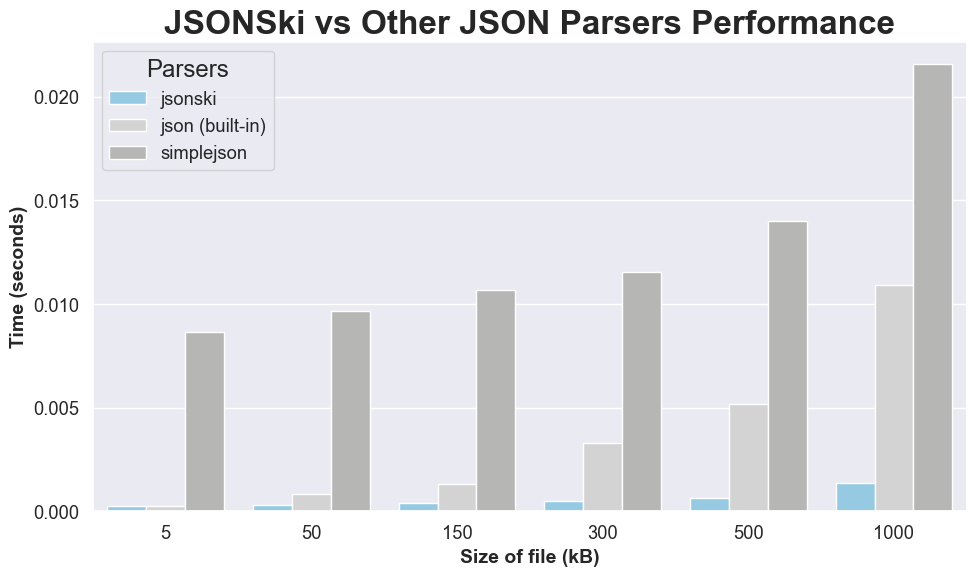
Performance Comparison with Python Parsing
Below is an example usage of JSONSki pip package.
#JSONSki
import jsonski as jski
import time

start_time = time.time()
print(jski.loadSingleRecord("$[*].entities.urls[*].url","./JSONSki/dataset/twitter_sample_large_record.json"))
end_time = time.time()
elapsed_time = end_time - start_time
print("Elapsed jsonski time:", elapsed_time, "seconds")


#Python`s inbuilt JSON parser
import json as j

start_time = time.time()
def parse_json_file(file_path):
    with open(file_path, 'r') as file:
        json_data = j.load(file)
        return json_data
json_file_path = './JSONSki/dataset/twitter_sample_large_record.json'
print(parse_json_file(json_file_path))
end_time = time.time()
elapsed_time = end_time - start_time
print("Elapsed default_python_json time:", elapsed_time, "seconds")
- Note: The code snippet above benchmarks performance for JSONSki parsing VS Python in-built parsing.
Publication
[1] Lin Jiang and Zhijia Zhao. JSONSki: Streaming Semi-structured Data with Bit-Parallel Fast-Forwarding. In Proceedings of the Twenty-Third International Conference on Architectural Support for Programming Languages and Operating Systems (ASPLOS), 2022.
@inproceedings{jsonski,
  title={JSONSki: Streaming Semi-structured Data with Bit-Parallel Fast-Forwarding},
  author={Lin Jiang and Zhijia Zhao},
  booktitle={Proceedings of the Twenty-Third International Conference on Architectural Support for Programming Languages and Operating Systems (ASPLOS)},
  year={2022}
}
Performance
1 maintainer

Metadata
1 maintainer
Release files for JSONSki 1.0.1
For a detailed explanation of source distributions (sdists) and built distributions (wheels), please see the package formats documentation.
Source distribution (sdist)
| File | Size | Uploaded | |
|---|---|---|---|
| JSONSki-1.0.1.tar.gz | 237.0 kB | Details |
Built distribution (wheel)
| File | Interpreter | ABI | Platform | Reset |
|---|---|---|---|---|
| JSONSki-1.0.1-cp39-cp39-macosx_13_0_universal2.whl | CPython 3.9 | CPython 3.9 | macOS 13.0+ universal2 (ARM64, x86-64) | Details |
Total release size: 310.2 kB
Release files / JSONSki-1.0.1.tar.gz
| Download URL | JSONSki-1.0.1.tar.gz |
|---|---|
| Size | 237.0 kB |
| Tags | Source |
|
SHA-256 checksum How to use checksums |
78f06002aee2f56b632c4d59e20c4340a63974da838ae5abc335c49c85a2a75d
|
|
BLAKE2b-256 checksum How to use checksums |
5428bc680cf65d1e07b1f270ad6856e94608d41717c240066289b916761705e2
|
| Upload date | |
|
Uploaded using Trusted Publishing? What is trusted publishing? |
No |
| Uploaded via |
twine/4.0.2 CPython/3.11.4
|
Release files / JSONSki-1.0.1-cp39-cp39-macosx_13_0_universal2.whl
| Download URL | JSONSki-1.0.1-cp39-cp39-macosx_13_0_universal2.whl |
|---|---|
| Size | 73.2 kB |
| Tags | CPython 3.9 macOS 13.0+ universal2 (ARM64, x86-64) |
|
SHA-256 checksum How to use checksums |
801df0eaa271f1ac42ebfc96631b27ac63172ea0c39b9ffa246f505a12e846f7
|
|
BLAKE2b-256 checksum How to use checksums |
5bd65cafdad8110daf36647ffe70b1484c9d17563816d11f38d59f7ac1b561fb
|
| Upload date | |
|
Uploaded using Trusted Publishing? What is trusted publishing? |
No |
| Uploaded via |
twine/4.0.2 CPython/3.11.4
|














