
Python binding port for JSONSki

Project description



JSONSki_python
JSONSki_python is the Python binding port for JSONSki
JSONSki is a streaming JSONPath processor with fast-forward functionality. During the streaming, it can automatically fast-forward over certain JSON substructures that are irrelavent to the query evaluation, without parsing them in detail. To make the fast-forward efficient, JSONSki features a highly bit-parallel solution that intensively utilizes bitwise and SIMD operations that are prevelent on modern CPUs to implement the fast-forward APIs.
PIP Package
You can download the PIP package from here - https://pypi.org/project/JSONSki/
Installation
pip install JSONSki
Quick Start
import jsonski as jski
print(jski.loadSingleRecord("$.features[150].actor.login", "datasets/test.json"))
- We interface the following method:
jski.loadSingleRecord(args1, args2) //args1 - String(query) and args2 - String(file_location)
Requirements
Hardware requirements
- CPUs: 64-bit ALU instructions, 256-bit SIMD instruction set, and the carry-less multiplication instruction (pclmulqdq)
- Operating System: Linux, MacOs (Intel Chips only)
- C++ Compiler: g++ (7.4.0 or higher)
Software requirements
Before starting to use JSONSki-API you need to assure you have the following prerequisites:
-
Python (v3.7) see: Installing Python
-
C++ : g++ (v7.4.0 and above) see: Installing C++
Getting Started with Querying using JSONSki
JSONPath
JSONPath is the basic query language of JSON data. It refers to substructures of JSON data in a similar way as XPath queries are used for XML data. For the details of JSONPath syntax, please refer to Stefan Goessner's article.
JSONSki Queries Operators
| Operator | Description |
|---|---|
$ |
root object |
. |
child object |
[] |
child array |
* |
wildcard, all objects or array members |
[index] |
array index |
[start:end] |
array slice operator |
Path Examples
Consider a piece of geo-referenced tweet in JSON
{
    "coordinates": [
        40.74118764, -73.9998279
    ],
    "user": {
        "id": 6253282
    },
    "place": {
        "name": "Manhattan",
        "bounding_box": {
            "type": "Ploygon",
            "pos": [
                [-74.026675, 40.683935],
                ......
            ]
        }
    }
}
| JsonPath | Result |
|---|---|
$.coordinates[*] |
all coordinates |
$.place.name |
place name |
$.place.bounding_box.pos[0] |
first position of the bounding box in place |
$.place.bounding_box.pos[0:2] |
first two positions of the bounding box in place |
APIs
Records Loading
JSONSki API: Simplifying Data Handling
JSONski is a powerful and user-friendly API designed to streamline data handling and processing tasks, particularly when dealing with JSON-based data. It offers a range of functions to manipulate and manage data, making complex operations effortless. Two key functions within the JSONski API are jski.loadSingleRecord and jski.loadRecords:
-
loadSingleRecord(args1, args2) //args1 - String(query) and args2 - String(file_location): loads the whole input file as one single record (allow newlines in strings and other legal places). -
loadRecords(args1, args2) //args1 - String(query) and args2 - String(file_location): loads multiple records from the input file (all newlines are treated as delimiters; no newlines (except for\nand\rin JSON strings) are allowed within a record);.
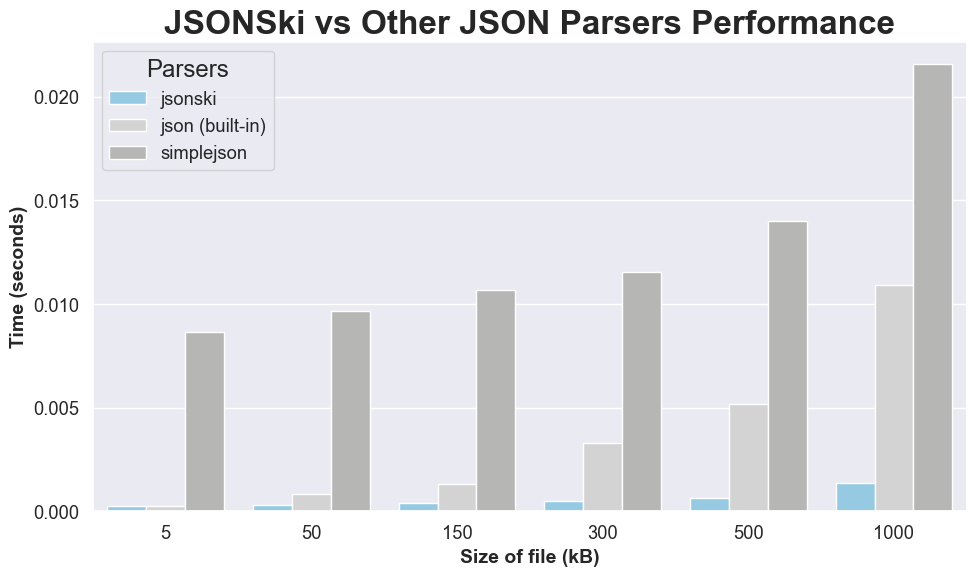
Performance Comparison with Python Parsing
Below is an example usage of JSONSki pip package.
#JSONSki
import jsonski as jski
import time

start_time = time.time()
print(jski.loadSingleRecord("$[*].entities.urls[*].url","./JSONSki/dataset/twitter_sample_large_record.json"))
end_time = time.time()
elapsed_time = end_time - start_time
print("Elapsed jsonski time:", elapsed_time, "seconds")


#Python`s inbuilt JSON parser
import json as j

start_time = time.time()
def parse_json_file(file_path):
    with open(file_path, 'r') as file:
        json_data = j.load(file)
        return json_data
json_file_path = './JSONSki/dataset/twitter_sample_large_record.json'
print(parse_json_file(json_file_path))
end_time = time.time()
elapsed_time = end_time - start_time
print("Elapsed default_python_json time:", elapsed_time, "seconds")
- Note: The code snippet above benchmarks performance for JSONSki parsing VS Python in-built parsing.
Publication
[1] Lin Jiang and Zhijia Zhao. JSONSki: Streaming Semi-structured Data with Bit-Parallel Fast-Forwarding. In Proceedings of the Twenty-Third International Conference on Architectural Support for Programming Languages and Operating Systems (ASPLOS), 2022.
@inproceedings{jsonski,
  title={JSONSki: Streaming Semi-structured Data with Bit-Parallel Fast-Forwarding},
  author={Lin Jiang and Zhijia Zhao},
  booktitle={Proceedings of the Twenty-Third International Conference on Architectural Support for Programming Languages and Operating Systems (ASPLOS)},
  year={2022}
}
Performance
Release history Release notifications | RSS feed


Download files
Download the file for your platform. If you're not sure which to choose, learn more about installing packages.
Source Distribution
Built Distribution
Filter files by name, interpreter, ABI, and platform.
If you're not sure about the file name format, learn more about wheel file names.
Copy a direct link to the current filters
File details
Details for the file JSONSki-0.0.32.tar.gz.
File metadata
- Download URL: JSONSki-0.0.32.tar.gz
- Upload date:
- Size: 228.0 kB
- Tags: Source
- Uploaded using Trusted Publishing? No
- Uploaded via: twine/4.0.2 CPython/3.11.4
File hashes
| Algorithm | Hash digest | |
|---|---|---|
| SHA256 |
147505cea96776293d1000af272eba2a388bade8e455d33e26cf7fb82d3fd2cb
|
|
| MD5 |
98f81468555243af787a67f93fd3339f
|
|
| BLAKE2b-256 |
9b09fd470ecf699de2921c3e86a352ff76e3197f7c126fd516d030cefb404f3f
|
File details
Details for the file JSONSki-0.0.32-cp39-cp39-macosx_13_0_universal2.whl.
File metadata
- Download URL: JSONSki-0.0.32-cp39-cp39-macosx_13_0_universal2.whl
- Upload date:
- Size: 73.2 kB
- Tags: CPython 3.9, macOS 13.0+ universal2 (ARM64, x86-64)
- Uploaded using Trusted Publishing? No
- Uploaded via: twine/4.0.2 CPython/3.11.4
File hashes
| Algorithm | Hash digest | |
|---|---|---|
| SHA256 |
d1b95004f10562613c4928d8df18a0f9b386ee6965d52cd0b3706beaec8a2463
|
|
| MD5 |
f4a1ec88832ed6d0a3b4f8b6839292e8
|
|
| BLAKE2b-256 |
a8712bcb35db424c8d4b37f9a60abe9cad91609ec06aab4b29b265cb0c62a280
|






