



Hello, folks! 
This project is created only for those who are interested in building a Virtual Assistant. Generally, it took lots of time to write code from scratch to build a Virtual Assistant. So, I have built a Library called "JarvisAI", which gives you easy functionality to build your own Virtual Assistant.
Content-
- What is JarvisAI?
- Prerequisite
- Architecture
- Getting Started- How to use it?
- What it can do (Features it supports)
- Future / Request Features
- Contribute
- Contact me
- Donate
- Thank me on-
Premium Plan-
What is our premium plan?
-
AI will be able to understand all your commands. It will answer all your questions apart from below basic intent.
-
It will be able to handle intent- 'others / Unknown Intent'. Free plan doesn't support this.
-
It will be automatically upgraded to use GPT-3 based model in the future. Currently, it uses other advance custom AI models to answer queries.
-
Currently unlimited API calls. Later we might change / limit.
-
Currently, it doesn't remember the previous context of the chat, but soon it will be. We don't store your personal chat information.
Check out our plan: https://jarvisai.in/dashboard
YouTube Tutorial-
Click on the image below to watch the tutorial on YouTube-
Tutorial 1-

Tutorial 2-

1. What is Jarvis AI?
Jarvis AI is a Python Module that is able to perform tasks like Chatbot, Assistant, etc. It provides base functionality for any assistant application. This JarvisAI is built using Tensorflow, Pytorch, Transformers, and other open-source libraries and frameworks. Well, you can contribute to this project to make it more powerful.
-
Official Website: Click Here
-
Official Instagram Page: Click Here
2. Prerequisite
-
Get your Free API key from https://jarvisai.in
-
To use it only Python (> 3.6) is required.
-
To contribute to the project: Python is the only prerequisite for basic scripting, Machine Learning, and Deep Learning knowledge will help this model to do tasks like AI-ML. Read the How to Contribute section of this page.
3. Architecture
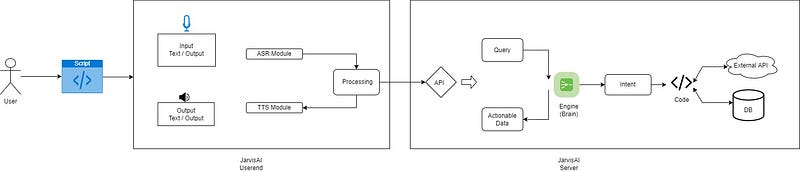
The JarvisAI’s architecture is divided into two parts.
-
User End- It is basically responsible for getting input from the user and after preprocessing input it sends input to JarvisAI’s server. And once the server sends its response back, it produces output on the user screen/system.
-
Server Side- The server is responsible to handle various kinds of AI-ML, and NLP tasks. It mainly identifies user intent by analyzing user input and interacting with other external APIs and handling user input.
4. Getting Started- How to use it?
NOTE: Old version is depreciated use latest version of JarvisAI
4.1. Installation-
-
Install the latest version-
pip install JarvisAI
Optional Steps (Common Installation Issues)-
-
[Optional Step] If Pyaudio is not working or not installed you might need to install it separately-
In the case of Mac OSX do the following:
 brew install portaudio
 pip install pyaudio
In the case of Windows or Linux do the following:
-
Download pyaudio from: lfd.uci.edu/~gohlke/pythonlibs/#pyaudio
-
pip install PyAudio-0.2.11-cp310-cp310-win_amd64.whl
-
[Optional Step] If pycountry is not working or not installed then Install "python3-pycountry" Package on Ubuntu/Linux-
sudo apt-get update -y sudo apt-get install -y python3-pycountry -
[Optional Step] You might need to Install Microsoft Visual C++ Redistributable for Visual Studio 2022
4.2. Code You Need-
You need only this piece of code-
def custom_function(*args, **kwargs):
    command = kwargs.get('query')
    entities = kwargs.get('entities')
    print(entities)
    # write your code here to do something with the command
    # perform some tasks # return is optional
    return command + ' Executed'


jarvis = JarvisAI.Jarvis(input_mechanism='voice', output_mechanism='both',
                google_speech_api_key=None, backend_tts_api='pyttsx3',
                use_whisper_asr=False, display_logs=False,
                api_key='527557f2-0b67-4500-8ca0-03766ade589a')
# add_action("general", custom_function)  # OPTIONAL
jarvis.start()
4.3. What's now?
It will start your AI, it will ask you to give input and accordingly it will produce output.
You can configure input_mechanism and output_mechanism parameter for voice input/output or text input/output.
4.4. Let's understand the Parameters-
READ MORE: Google Speech API (Pricing and Key) at: https://cloud.google.com/speech-to-text
5. What it can do (Features it supports)-
- Currently, it supports only english language
- Supports voice and text input/output.
- Supports AI based voice input (using whisper asr) and by using google api voice input.
- All intellectual task is process in JarvisAI server so there is no load on your system.
- Lightweight and able to understand natural language (commands)
- Ability to add your own custom functions.
5.1. Supported Commands-
These are below supported intent that AI can handle, you can ask in natural language.
Example- "What is the time now", "make me laugh", "click a photo", etc.
Note: Some features / command might not work. WIP. Tell me bugs.
- asking time
- asking date
- greet and hello hi kind of things goodbye
- tell me joke
- tell me about
- i am bored
- volume control
- tell me news
- click photo
- places near me
- play on youtube
- play games
- what can you do
- send email
- download youtube video
- asking weather
- take screenshot
- open website
- send whatsapp message
- covid cases
- check internet speed
- others / Unknown Intent (Premium Feature)
5.2. Supported Input/Output Methods (Which option do I need to choose?)-
You can set below parameter while creating object of JarvisAI-
jarvis = JarvisAI.Jarvis(input_mechanism='voice', output_mechanism='both',
                google_speech_api_key=None, backend_tts_api='pyttsx3',
                use_whisper_asr=False, display_logs=False,
                api_key='527557f2-0b67-4500-8ca0-03766ade589a')
-
For text input-'
input_mechanism='text' -
For voice input-
input_mechanism='voice' -
For text output-
output_mechanism='text' -
For voice output-
output_mechanism='text' -
For voice and text output-
output_mechanism='both'
6. Future/Request Features-
WIP
You tell me
at dipeshpal17@gmail.com or my social media.
7. Contribute-
Instructions Coming Soon
8. Contact me-
9. Donate-
Consider donating to JarvisAI to support our mission of keeping our servers running 24/7. Your contribution will enable us to continue doing great things and providing valuable services. Every little bit helps!
Feel free to use my code, don't forget to mention credit. All the contributors will get credits in this repo.
Mention below line for credits-
Credits-
10. Thank me on-
-
Follow me on Instagram: https://www.instagram.com/dipesh_pal17
-
Subscribe me on YouTube: https://www.youtube.com/dipeshpal17
License
1 maintainer

Release files for JarvisAI 4.7
For a detailed explanation of source distributions (sdists) and built distributions (wheels), please see the package formats documentation.
Source distribution (sdist)
| File | Size | Uploaded | |
|---|---|---|---|
| JarvisAI-4.7.tar.gz | 21.4 kB | Details |
Built distribution (wheel)
| File | Interpreter | ABI | Platform | Reset |
|---|---|---|---|---|
| JarvisAI-4.7-py3-none-any.whl | Python 3 | none | any | Details |
Total release size: 50.8 kB
Release files / JarvisAI-4.7.tar.gz
| Download URL | JarvisAI-4.7.tar.gz |
|---|---|
| Size | 21.4 kB |
| Tags | Source |
|
SHA-256 checksum How to use checksums |
06022c262f3054d45b96d5adc7947937fff8163cdc0876bbfd806892e331b81e
|
|
BLAKE2b-256 checksum How to use checksums |
28da805fc2b6451da8d036783b9fe7f419d25ef1128912df16c9495cf2df0a2f
|
| Upload date | |
|
Uploaded using Trusted Publishing? What is trusted publishing? |
No |
| Uploaded via |
twine/4.0.1 CPython/3.9.12
|
Release files / JarvisAI-4.7-py3-none-any.whl
| Download URL | JarvisAI-4.7-py3-none-any.whl |
|---|---|
| Size | 29.3 kB |
| Tags | Python 3 |
|
SHA-256 checksum How to use checksums |
02e584b40892ae47c8bc405e6f29b37d37eb52097ede56f11032bc49f532f93e
|
|
BLAKE2b-256 checksum How to use checksums |
fdb185dd47371b39ac21dbd6bd2d2df4997bff160557d8c5ad605d88324ee377
|
| Upload date | |
|
Uploaded using Trusted Publishing? What is trusted publishing? |
No |
| Uploaded via |
twine/4.0.1 CPython/3.9.12
|














