
KRATOS Multiphysics ("Kratos") is a framework for building parallel, multi-disciplinary simulation software, aiming at modularity, extensibility, and high performance. Kratos is written in C++, and counts with an extensive Python interface.

Project description
Statistics Application
Statistics application consist of widely used methods to calculate statistics in various containers of KratosMultiphysics. There are mainly two groups of statistical methods namely Spatial and Temporal. Spatial methods calculate statistics on spatial containers and output the values whenever they are called. Temporal methods calculate statistics on the fly in a transient simulation. All the temporal methods gurantee that, the resultant statistics will be same as the ones if one calculates accumulating all the data upto that time instance and calculate the same statistics. All of these methods in each group is OpenMP and MPI compatible, and tested.
Following table summarize capabilities of Statistics Application.
| Statistical Methods | Norm Types | Spatial Domain | Temporal Domain | Data types |
|---|---|---|---|---|
| Sum | Value | Spatial methods | Temporal methods | Double |
| Mean | Magnitude | Spatial containers | Temporal containers | Array 3D |
| Root mean square | Euclidean | nodal_historical | nodal_historical_historical | Vector |
| Variance | Infinity | nodal_non_historical | nodal_historical_non_historical | Matrix |
| Min | P-Norm | condition_non_historical | nodal_non_historical | |
| Max | Lpq-Norm | element_non_historical | element_non_historical | |
| Median | Frobenius | Spatial statistics process | condition_non_historical | |
| Distribution | Trace | Temporal statistics process | ||
| Norm methods | Index | |||
| Component |
JSON Examples
If you prefer to use statistics of a simulation using StatisticsApplication, there is spatial_statistics_process for spatial statistics calculations and temporal_statistics_process for temporal statistics. These processes can be included via JSON settings under auxiliary_processes.
Spatial statistics process examples
Following example illustrates different methods used in different containers with different norms. input_variable_settings holds an array of methods for specified containers, specified norm and specified variables. They can be customized for your requirement. output_settings holds information about how the output should be handled.
{
                "kratos_module" : "KratosMultiphysics.StatisticsApplication",
                "python_module" : "spatial_statistics_process",
                "Parameters" : {
                    "model_part_name" : "test_model_part",
                    "input_variable_settings" : [
                        {
                            "method_name"    : "sum",
                            "norm_type"      : "none",
                            "container"      : "nodal_historical",
                            "variable_names" : ["PRESSURE", "VELOCITY"],
                            "method_settings": {}
                        },
                        {
                            "method_name"    : "mean",
                            "norm_type"      : "none",
                            "container"      : "nodal_non_historical",
                            "variable_names" : ["PRESSURE", "VELOCITY"],
                            "method_settings": {}
                        },
                        {
                            "method_name"    : "variance",
                            "norm_type"      : "none",
                            "container"      : "element_non_historical",
                            "variable_names" : ["PRESSURE", "VELOCITY"],
                            "method_settings": {}
                        },
                        {
                            "method_name"    : "rootmeansquare",
                            "norm_type"      : "none",
                            "container"      : "condition_non_historical",
                            "variable_names" : ["PRESSURE", "VELOCITY"],
                            "method_settings": {}
                        },
                        {
                            "method_name"    : "sum",
                            "norm_type"      : "magnitude",
                            "container"      : "nodal_historical",
                            "variable_names" : ["PRESSURE", "VELOCITY", "LOAD_MESHES", "GREEN_LAGRANGE_STRAIN_TENSOR"],
                            "method_settings": {}
                        },
                        {
                            "method_name"    : "mean",
                            "norm_type"      : "pnorm_2.5",
                            "container"      : "nodal_non_historical",
                            "variable_names" : ["VELOCITY", "LOAD_MESHES", "GREEN_LAGRANGE_STRAIN_TENSOR"],
                            "method_settings": {}
                        },
                        {
                            "method_name"    : "variance",
                            "norm_type"      : "component_x",
                            "container"      : "condition_non_historical",
                            "variable_names" : ["VELOCITY"],
                            "method_settings": {}
                        },
                        {
                            "method_name"    : "rootmeansquare",
                            "norm_type"      : "index_3",
                            "container"      : "nodal_non_historical",
                            "variable_names" : ["LOAD_MESHES"],
                            "method_settings": {}
                        },
                        {
                            "method_name"    : "min",
                            "norm_type"      : "frobenius",
                            "container"      : "nodal_non_historical",
                            "variable_names" : ["GREEN_LAGRANGE_STRAIN_TENSOR"],
                            "method_settings": {}
                        }
                    ],
                    "output_settings" : {
                        "output_control_variable": "STEP",
                        "output_time_interval"   : 1,
                        "write_kratos_version"   : false,
                        "write_time_stamp"       : false,
                        "output_file_settings"   : {
                            "file_name"  : "<model_part_name>_<container>_<norm_type>_<method_name>.dat",
                            "output_path": "spatial_statistics_process",
                            "write_buffer_size" : -1
                        }
                    }
                }
            }
Temporal statistics process example
Following is an example on how to use temporal_statistics_process in json. The output variables data type should be matched with the input variables order and the data type for "norm_type" = "none". If "norm_type" != "none", then output variables should be scalars. If "container" = "nodal_historical_historical" is used as the container type, then output variables should be added to NodalSolutionStepVariables list in Kratos since this container type outputs temporal statistics variables to nodal historical container. This json settings also can be added to auxiliary_processes list.
For details about all the available statistical methods, norm_types, etc, please refer to rest of the README.md file.
        {
            "kratos_module": "KratosMultiphysics.StatisticsApplication",
            "python_module": "temporal_statistics_process",
            "Parameters": {
                "model_part_name": "FluidModelPart.fluid_computational_model_part",
                "input_variable_settings": [
                    {
                        "method_name": "variance",
                        "norm_type": "none",
                        "container": "nodal_historical_non_historical",
                        "echo_level": 1,
                        "method_settings": {
                            "input_variables": [
                                "VELOCITY",
                                "PRESSURE"
                            ],
                            "output_mean_variables": [
                                "VECTOR_3D_MEAN",
                                "SCALAR_MEAN"
                            ],
                            "output_variance_variables": [
                                "VECTOR_3D_VARIANCE",
                                "SCALAR_VARIANCE"
                            ]
                        }
                    }
                ],
                "statistics_start_point_control_variable_name": "TIME",
                "statistics_start_point_control_value": 2.5
            }
        }
Method definitions
There are two types of methods under each Spatial and Temporal method groups. They are namely Value and Norm methods. In these methods, i index refers to spatial domain element index, and k index refers to time step.
Value methods
Sum
In the case of spatial domain, it adds up all the variable values for a given container and returns summed up value as shown in following equation. xi is the ith element's variable value of the corresponding container. Result will have the same type as the type of the variable specified by the user

Following is an example of summation of non historical VELOCITY over the whole model part's nodes
import KratosMultiphysics as Kratos
import KratosMultiphysics.StatisticsApplication as KratosStats
model = Kratos.Model()
model_part = model.CreateModelPart("test_model_part")
sum = KratosStats.SpatialMethods.NonHistorical.Nodes.ValueMethods.Sum(model_part, Kratos.VELOCITY)
In the case of temporal domain, Sum methods is the time integrated quantity for a specific variable. It will be stored each element under user specified variable and a user specified container. xi is the ith element's variable value of the corresponding container. Result will have the same type as the type of the variable specified by the user.

Following is an example of integration calculation of non historical velocity. Input variable is node's non-historical container's VELOCITY and output variable is same containers DISPLACEMENT where integrated value will be stored for each node. The 0 represents echo level for this method object. Blank "" indicates that value method is used.
import KratosMultiphysics as Kratos
import KratosMultiphysics.StatisticsApplication as KratosStats
model = Kratos.Model()
model_part = model.CreateModelPart("test_model_part")
sum_method = KratosStats.TemporalMethods.NonHistorical.Nodes.ValueMethods.Sum.Array(model_part, "", Kratos.VELOCITY, 0, Kratos.DISPLACEMENT)
integration_starting_time = 2.0
sum_method.InitializeStatisticsMethod(integration_starting_time)
for t in range(3, 6):
    sum_method.CalculateStatistics()
Mean
In the case of spatial domain, it calculates mean of a given variable for a given container and returns it as shown in following equation. xi is the ith element's variable value of the corresponding container. Result will have the same type as the type of the variable specified by the user. (If it has higher dimension than a scalar, mean of each dimension will be calculated seperately resulting with a mean having same dimension as the input dimension)

Following is an example of mean calculation of non historical VELOCITY over the whole model part's nodes
import KratosMultiphysics as Kratos
import KratosMultiphysics.StatisticsApplication as KratosStats
model = Kratos.Model()
model_part = model.CreateModelPart("test_model_part")
mean = KratosStats.SpatialMethods.NonHistorical.Nodes.ValueMethods.Mean(model_part, Kratos.VELOCITY)
In the case of temporal domain, Mean methods is the time integrated quantity's mean for a specific variable. It will be stored each element under user specified variable and a user specified container. xi is the ith element's variable value of the corresponding container. Result will have the same type as the type of the variable specified by the user preserving the dimensionality as in the spatial case.

Following is an example of mean calculation of non historical velocity. Input variable is node's non-historical container's VELOCITY and output variable is same containers VECTOR_3D_MEAN where mean will be stored for each node. The 0 represents echo level for this method object. Blank "" indicates that value method is used.
import KratosMultiphysics as Kratos
import KratosMultiphysics.StatisticsApplication as KratosStats
model = Kratos.Model()
model_part = model.CreateModelPart("test_model_part")
mean_method = KratosStats.TemporalMethods.NonHistorical.Nodes.ValueMethods.Mean.Array(model_part, "", Kratos.VELOCITY, 0, KratosStats.VECTOR_3D_MEAN)
integration_starting_time = 2.0
mean_method.InitializeStatisticsMethod(integration_starting_time)
for t in range(3, 6):
    mean_method.CalculateStatistics()
Root mean square
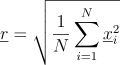
In the case of spatial domain, it calculates root mean square of a given variable for a given container and returns it as shown in following equation. xi is the ith element's variable value of the corresponding container. Result will have the same type as the type of the variable specified by the user. (If it has higher dimension than a scalar, root mean square of each dimension will be calculated seperately resulting with a mean having same dimension as the input dimension)
Following is an example of root mean square calculation of non historical VELOCITY over the whole model part's nodes
import KratosMultiphysics as Kratos
import KratosMultiphysics.StatisticsApplication as KratosStats
model = Kratos.Model()
model_part = model.CreateModelPart("test_model_part")
rms = KratosStats.SpatialMethods.NonHistorical.Nodes.ValueMethods.RootMeanSquare(model_part, Kratos.VELOCITY)
In the case of temporal domain, Root Mean Square methods is the time integrated quantity's root mean square for a specific variable. It will be stored each element under user specified variable and a user specified container. xi is the ith element's variable value of the corresponding container. Result will have the same type as the type of the variable specified by the user preserving the dimensionality as in the spatial case.

Following is an example of root mean square calculation of non historical velocity. Input variable is node's non-historical container's VELOCITY and output variable is same containers VECTOR_3D_MEAN where root mean square value will be stored for each node. The 0 represents echo level for this method object. Blank "" indicates that value method is used.
import KratosMultiphysics as Kratos
import KratosMultiphysics.StatisticsApplication as KratosStats
model = Kratos.Model()
model_part = model.CreateModelPart("test_model_part")
rms_method = KratosStats.TemporalMethods.NonHistorical.Nodes.ValueMethods.RootMeanSquare.Array(model_part, "", Kratos.VELOCITY, 0, KratosStats.VECTOR_3D_MEAN)
integration_starting_time = 2.0
rms_method.InitializeStatisticsMethod(integration_starting_time)
for t in range(3, 6):
    rms_method.CalculateStatistics()
Variance
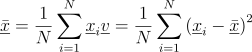
In the case of spatial domain, it calculates variance of a given variable for a given container and returns mean and variance as shown in following equations. xi is the ith element's variable value of the corresponding container. Results will have the same type as the type of the variable specified by the user. (If it has higher dimension than a scalar, mean of each dimension will be calculated seperately resulting with a mean having same dimension as the input dimension)
Following is an example of variance calculation of non historical VELOCITY over the whole model part's nodes
import KratosMultiphysics as Kratos
import KratosMultiphysics.StatisticsApplication as KratosStats
model = Kratos.Model()
model_part = model.CreateModelPart("test_model_part")
mean, variance = KratosStats.SpatialMethods.NonHistorical.Nodes.ValueMethods.Variance(model_part, Kratos.VELOCITY)
In the case of temporal domain, Variance method is the time integrated quantity's variance for a specific variable. Mean and variance will be stored each element under user specified variables and a user specified container. xi is the ith element's variable value of the corresponding container. Results will have the same type as the type of the variable specified by the user preserving the dimensionality as in the spatial case.

Following is an example of root mean square calculation of non historical velocity. Input variable is node's non-historical container's VELOCITY and output variable VECTOR_3D_MEAN will store mean and VECTOR_3D_VARIANCE will store variance in same container for each node. The 0 represents echo level for this method object. Blank "" indicates that value method is used.
import KratosMultiphysics as Kratos
import KratosMultiphysics.StatisticsApplication as KratosStats
model = Kratos.Model()
model_part = model.CreateModelPart("test_model_part")
variance_method = KratosStats.TemporalMethods.NonHistorical.Nodes.ValueMethods.Variance.Array(model_part, "", Kratos.VELOCITY, 0, KratosStats.VECTOR_3D_MEAN, KratosStats.VECTOR_3D_VARIANCE)
integration_starting_time = 2.0
variance_method.InitializeStatisticsMethod(integration_starting_time)
for t in range(3, 6):
    variance_method.CalculateStatistics()
Min
In the case of spatial domain, it returns minimum of a given variable's norm for a given container, and the corresponding items id. xi is the ith element's variable value of the corresponding container. Results will be double and integer, irrespective of the input type, since higher dimensional variable types will be reduced to scalars by the use of norms.

Following is an example of min method of non historical VELOCITY's magnitude over the whole model part's nodes. It returns a tuple, first argument being the minimum, and the second argument being the id of the node where the minimum is found.
import KratosMultiphysics as Kratos
import KratosMultiphysics.StatisticsApplication as KratosStats
model = Kratos.Model()
model_part = model.CreateModelPart("test_model_part")
min_value, min_id = KratosStats.SpatialMethods.NonHistorical.Nodes.NormMethods.Min(model_part, Kratos.VELOCITY, "magnitude")
In the case of temporal domain, Min method returns minimum value in the temporal domain, and the time minimum is found. Minimum and its occurring time will be stored each element under user specified variables and a user specified container. xk is the kth time step element's variable value of the corresponding container. Results will have the same type as the type of the variable specified by the user preserving the dimensionality as in the spatial case.

Following is an example of min method in non historical velocity. Input variable is node's non-historical container's VELOCITY and output variable VECTOR_3D_NORM will store minimum and TIME will store the time minimum occured for each node. The 0 represents echo level for this method object. "magnitude" indicates that magnitude norm is used.
import KratosMultiphysics as Kratos
import KratosMultiphysics.StatisticsApplication as KratosStats
model = Kratos.Model()
model_part = model.CreateModelPart("test_model_part")
min_method = KratosStats.TemporalMethods.NonHistorical.Nodes.NormMethods.Min.Array(model_part, "magnitude", Kratos.VELOCITY, 0, KratosStats.VECTOR_3D_NORM, Kratos.TIME)
integration_starting_time = 2.0
min_method.InitializeStatisticsMethod(integration_starting_time)
for t in range(3, 6):
    min_method.CalculateStatistics()
Max
In the case of spatial domain, it returns maximum of a given variable's norm for a given container, and the corresponding items id. xi is the ith element's variable value of the corresponding container. Results will be double and integer, irrespective of the input type, since higher dimensional variable types will be reduced to scalars by the use of norms.

Following is an example of max method of non historical VELOCITY's magnitude over the whole model part's nodes. It returns a tuple, first argument being the maximum, and the second argument being the id of the node where the maximum is found.
import KratosMultiphysics as Kratos
import KratosMultiphysics.StatisticsApplication as KratosStats
model = Kratos.Model()
model_part = model.CreateModelPart("test_model_part")
max_value, max_id = KratosStats.SpatialMethods.NonHistorical.Nodes.NormMethods.Max(model_part, Kratos.VELOCITY, "magnitude")
In the case of temporal domain, Max method returns maximum value in the temporal domain, and the time maximum is found. Maximum and its occurring time will be stored each element under user specified variables and a user specified container. xk is the kth time step element's variable value of the corresponding container. Results will have the same type as the type of the variable specified by the user preserving the dimensionality as in the spatial case.

Following is an example of max method in non historical velocity. Input variable is node's non-historical container's VELOCITY and output variable VECTOR_3D_NORM will store maximum and TIME will store the time maximum occured for each node. The 0 represents echo level for this method object. "magnitude" indicates that magnitude norm is used.
import KratosMultiphysics as Kratos
import KratosMultiphysics.StatisticsApplication as KratosStats
model = Kratos.Model()
model_part = model.CreateModelPart("test_model_part")
max_method = KratosStats.TemporalMethods.NonHistorical.Nodes.NormMethods.Max.Array(model_part, "magnitude", Kratos.VELOCITY, 0, KratosStats.VECTOR_3D_NORM, Kratos.TIME)
integration_starting_time = 2.0
max_method.InitializeStatisticsMethod(integration_starting_time)
for t in range(3, 6):
    max_method.CalculateStatistics()
Median
Median returns the median value in spatial domain of a given variable's norm for a given container. xi is the ith element's variable value of the corresponding container. Results will be double value type, irrespective of the input type, since higher dimensional variable types will be reduced to scalars by the use of norms.
Following is an example of median method of non historical VELOCITY's magnitude over the whole model part's nodes. It returns a double which is the median.
import KratosMultiphysics as Kratos
import KratosMultiphysics.StatisticsApplication as KratosStats
model = Kratos.Model()
model_part = model.CreateModelPart("test_model_part")
median_value = KratosStats.SpatialMethods.NonHistorical.Nodes.NormMethods.Median(model_part, Kratos.VELOCITY, "magnitude")
Distribution
Distribution methods calculates distribution of a given variable with respect to given norm in a given container in spatial domain. xi is the ith element's variable value of the corresponding container. Result will be a tuple with followings in the same order:
- min in the domain or user specified min value
- max in the domain or user specified min value
- group limits of the distribution (only upper limit) (double array)
- number of occurences of items within each group (int array)
- percentage distribution of number of occurences of items within each group (double array)
- Each group's seperate means
- Eash group's seperate variances
This method requires followings as the parameters as a object of Kratos.Parameters, if nothing is provided, then followings are assumed as defaults.
{
    "number_of_value_groups" : 10,
    "min_value"              : "min",
    "max_value"              : "max"
}
In here, "min_value" can either be "min" or a double value. In the case of a double, it will be used as the minimum when creating groups to identify distribution. "max_value" also can either be "max" of double value, which will determine the maximum value when creating the groups. This will create 2 additional groups to represent values below the specified "min_value" and "max_value" apart from the "number_of_value_groups" specified by the user.
Following is an example of median method of non historical VELOCITY's magnitude over the whole model part's nodes.
import KratosMultiphysics as Kratos
import KratosMultiphysics.StatisticsApplication as KratosStats
model = Kratos.Model()
model_part = model.CreateModelPart("test_model_part")
min_value, max_value, group_upper_values, group_histogram, group_percentage_distribution, group_means, group_variances = KratosStats.SpatialMethods.NonHistorical.Nodes.NormMethods.Distribution(model_part, Kratos.VELOCITY, "magnitude")
Norm methods
All of the value methods mentioned before supports norm version of it, in these methods, higher dimensional values are transformed in to scalar values by a use specified norm, and then statistics are calculated based on the chosen method. Supported norm types may differ based on the variable data type being used. There are few methods, which only supports norm methods. Following table summarize availability of value and norm methods.
| Statistical Methods | Value Method | Norm Method |
|---|---|---|
| Sum | [x] | [x] |
| Mean | [x] | [x] |
| Root mean square | [x] | [x] |
| Variance | [x] | [x] |
| Min | [x] | |
| Max | [x] | |
| Median | [x] | |
| Distribution | [x] |
Following example shows variance method, under value category and norm category for nodal non historical velocity. Norm method uses "magnitude" as the norm to reduce VELOCITY to a scalar value. value_mean and value_variance will be of Array 3D type, whereas norm_mean and norm_variance will be of Double type.
import KratosMultiphysics as Kratos
import KratosMultiphysics.StatisticsApplication as KratosStats
model = Kratos.Model()
model_part = model.CreateModelPart("test_model_part")
value_mean, value_variance = KratosStats.SpatialMethods.NonHistorical.Nodes.ValueMethods.Variance(model_part, Kratos.VELOCITY)
norm_mean, norm_variance = KratosStats.SpatialMethods.NonHistorical.Nodes.NormMethods.Variance(model_part, Kratos.VELOCITY, "magnitude")
Norm definitions
Few different norms are predefined in this application. Following table summarize
| Double | Array 3D | Vector | Matrix | |
|---|---|---|---|---|
| Value | [x] | |||
| Magnitude | [x] | [x] | [x] | [x] |
| Euclidean | [x] | [x] | ||
| Infinity | [x] | [x] | [x] | |
| P-Norm | [x] | [x] | [x] | |
| Lpq-Norm | [x] | |||
| Frobenius | [x] | |||
| Trace | [x] | |||
| Index | [x] | [x] | ||
| Component | [x] |
Value
This returns the exact value. Only available for Double type variables.
Magnitude
This returns the second norm of the variable.
- For a
Doubletype, it returns the absolute value. - For a
Array 3Dtype, it returns the magnitude of the 3D vector. - For a
Vectortype, it returns root square sum of the vector. - For a
Matrixtype, it returns the frobenius norm.
Euclidean
This again returns the second norm of the variable for following variable types.
- For a
Array 3Dtype, it returns the magnitude of the 3D vector. - For a
Vectortype, it returns root square sum of the vector.
Frobenius
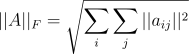
This is only available for Matrix data type variables only. Following equation illustrates the norm, where A is the matrix and aij is the ith row, jth column value.
Infinity
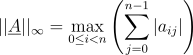
This is infinity (i.e. max norm) which is available for Array 3D, Vector and Matrix type.
For an Array 3D variable following equation is used.

For a Vector variable following equation is used.

For a Matrix variable following equation is used.
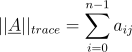
Trace
Trace is only for Matrix type variables. If the given matrix is not squre, an error is thrown.
P norm
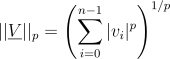
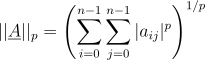
P norm is applicable for Array 3D, Vector and Matrix variables. The p-norm is used as pnorm_p where, p represents the value to be used as p in the p-norm equation given below. p should be greater than or equal to 1.0.
For Array 3D and Vector:
For Matrix:
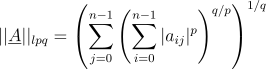
Lpq norm
This norm is only applicable to Matrix type variables.
Index based
Index based norms are available for both Vector and Matrix based variable types. index_i is used for Vector variables, where i represents the index of the vector to be used as the scalar representing a corresponding vector. index_(i,j) is used for Matrix variables, where i represents the row index and j represents the column index of the matrix value which to be used as the scalar representation of the given matrix.
Component based
Component based norms are available only for Array 3D type variables. component_x represents the x component of 3D variable, component_y represents y component, component_z represents the z component.
Spatial methods
All the spatial statistical methods can be found in the SpatialMethods submodule. ValueMethods container will contain all available spatial value methods, and NormMethods container will contain all available norm methods.
Following example illustrates all the available value methods executed on nodal non historical variable velocity.
import KratosMultiphysics as Kratos
import KratosMultiphysics.StatisticsApplication as KratosStats
model = Kratos.Model()
model_part = model.CreateModelPart("test_model_part")
sum_value = KratosStats.SpatialMethods.NonHistorical.Nodes.ValueMethods.Sum(model_part, Kratos.VELOCITY)
mean_value = KratosStats.SpatialMethods.NonHistorical.Nodes.ValueMethods.Mean(model_part, Kratos.VELOCITY)
rms_value = KratosStats.SpatialMethods.NonHistorical.Nodes.ValueMethods.RootMeanSquare(model_part, Kratos.VELOCITY)
mean_value, variance_value = KratosStats.SpatialMethods.NonHistorical.Nodes.ValueMethods.Variance(model_part, Kratos.VELOCITY)
Following example illustrates all the available norm methods executed on nodal non historical variable velocity's magnitude.
import KratosMultiphysics as Kratos
import KratosMultiphysics.StatisticsApplication as KratosStats
model = Kratos.Model()
model_part = model.CreateModelPart("test_model_part")
sum_norm = KratosStats.SpatialMethods.NonHistorical.Nodes.NormMethods.Sum(model_part, Kratos.VELOCITY, "magnitude")
mean_norm = KratosStats.SpatialMethods.NonHistorical.Nodes.NormMethods.Mean(model_part, Kratos.VELOCITY, "magnitude")
rms_norm = KratosStats.SpatialMethods.NonHistorical.Nodes.NormMethods.RootMeanSquare(model_part, Kratos.VELOCITY, "magnitude")
mean_norm, variance_norm = KratosStats.SpatialMethods.NonHistorical.Nodes.NormMethods.Variance(model_part, Kratos.VELOCITY, "magnitude")
min_norm, min_norm_id = KratosStats.SpatialMethods.NonHistorical.Nodes.NormMethods.Min(model_part, Kratos.VELOCITY, "magnitude")
max_norm, max_norm_id = KratosStats.SpatialMethods.NonHistorical.Nodes.NormMethods.Max(model_part, Kratos.VELOCITY, "magnitude")
min_norm, max_norm, group_upper_norms, group_histogram, group_percentage_distribution = KratosStats.SpatialMethods.NonHistorical.Nodes.NormMethods.Distribution(model_part, Kratos.VELOCITY, "magnitude")
Spatial containers
Four different types of containers are supported for spatial methods.
Spatial nodal historical
Nodal historical containers methods can be accessed through Historical submodule in SpatialMethods. This calculates chosen statistics of the variable in the nodal historical data. Following example illustrates use of value and norm methods.
import KratosMultiphysics as Kratos
import KratosMultiphysics.StatisticsApplication as KratosStats
model = Kratos.Model()
model_part = model.CreateModelPart("test_model_part")
model_part.AddNodalSolutionStepVariable(Kratos.VELOCITY)
sum_value = KratosStats.SpatialMethods.Historical.ValueMethods.Sum(model_part, Kratos.VELOCITY)
sum_norm = KratosStats.SpatialMethods.Historical.NormMethods.Sum(model_part, Kratos.VELOCITY, "magnitude")
Spatial nodal non historical
Nodal non historical containers methods can be accessed through NonHistorical.Nodes submodule in SpatialMethods. This calculates chosen statistics of the variable in the nodal non historical data. Following example illustrates use of value and norm methods.
import KratosMultiphysics as Kratos
import KratosMultiphysics.StatisticsApplication as KratosStats
model = Kratos.Model()
model_part = model.CreateModelPart("test_model_part")
sum_value = KratosStats.SpatialMethods.NonHistorical.Nodes.ValueMethods.Sum(model_part, Kratos.VELOCITY)
sum_norm = KratosStats.SpatialMethods.NonHistorical.Nodes.NormMethods.Sum(model_part, Kratos.VELOCITY, "magnitude")
Spatial condition non historical
Condition non historical containers methods can be accessed through NonHistorical.Conditions submodule in SpatialMethods. This calculates chosen statistics of the variable in the condition non historical data. Following example illustrates use of value and norm methods.
import KratosMultiphysics as Kratos
import KratosMultiphysics.StatisticsApplication as KratosStats
model = Kratos.Model()
model_part = model.CreateModelPart("test_model_part")
sum_value = KratosStats.SpatialMethods.NonHistorical.Conditions.ValueMethods.Sum(model_part, Kratos.VELOCITY)
sum_norm = KratosStats.SpatialMethods.NonHistorical.Conditions.NormMethods.Sum(model_part, Kratos.VELOCITY, "magnitude")
Spatial element non historical
Element non historical containers methods can be accessed through NonHistorical.Elements submodule in SpatialMethods. This calculates chosen statistics of the variable in the element non historical data. Following example illustrates use of value and norm methods.
import KratosMultiphysics as Kratos
import KratosMultiphysics.StatisticsApplication as KratosStats
model = Kratos.Model()
model_part = model.CreateModelPart("test_model_part")
sum_value = KratosStats.SpatialMethods.NonHistorical.Elements.ValueMethods.Sum(model_part, Kratos.VELOCITY)
sum_norm = KratosStats.SpatialMethods.NonHistorical.Elements.NormMethods.Sum(model_part, Kratos.VELOCITY, "magnitude")
Spatial statistics process
This is a seperate process, which can be included in the json file as an auxiliary process. Followings are the defaults used in this process.
{
    "model_part_name" : "PLEASE_SPECIFY_MODEL_PART_NAME",
    "input_variable_settings" : [
        {
            "method_name"    : "sum",
            "norm_type"      : "none",
            "container"      : "nodal_historical",
            "variable_names" : [],
            "method_settings": {}
        }
    ],
    "output_settings" : {
        "output_control_variable": "STEP",
        "output_time_interval"   : 1,
        "write_kratos_version"   : true,
        "write_time_stamp"       : true,
        "output_file_settings"   : {
            "file_name"  : "<model_part_name>_<container>_<norm_type>_<method_name>.dat",
            "output_path": "spatial_statistics_output",
            "write_buffer_size" : -1
        }
    }
}
model_part_name indicates which model part to be operated on for statistics calculation. input_variable_settings contains list of statistics and/or norm methods along with their acting containers of the model part. method_name is the statistics method name (always everything is in lower case). norm_type is the applied norm, none means, value methods are used, otherwise specified norm is used. container is the container to be specified for statistical value calculation. method_settings is used to pass additional information required by statistics method such as in Distribution method. Output is written to a file in the format given at file_name, under the folder folder_name. This process can be used, if someone prefers not to modify their python scripts to calculate statistics as mentioned in the previous sections
Temporal methods
All the temporal methods are available through TemporalMethods submodule under StatisticsApplication. In the case of temporal methods, seperate objects needs to be created for each input variable for different type of variables as shown in following example for nodal non historical data container value methods.
import KratosMultiphysics as Kratos
import KratosMultiphysics.StatisticsApplication as KratosStats
model = Kratos.Model()
model_part = model.CreateModelPart("test_model_part")
sum_double_method = KratosStats.TemporalMethods.NonHistorical.Nodes.ValueMethods.Sum.Double(model_part, "", Kratos.PRESSURE, 0, Kratos.DENSITY)
sum_array_method = KratosStats.TemporalMethods.NonHistorical.Nodes.ValueMethods.Sum.Array(model_part, "", Kratos.VELOCITY, 0, Kratos.DISPLACEMENT)
sum_vector_method = KratosStats.TemporalMethods.NonHistorical.Nodes.ValueMethods.Sum.Vector(model_part, "", Kratos.LOAD_MESHES, 0, Kratos.MATERIAL_PARAMETERS)
sum_matrix_method = KratosStats.TemporalMethods.NonHistorical.Nodes.ValueMethods.Sum.Matrix(model_part, "", Kratos.GREEN_LAGRANGE_STRAIN_TENSOR, 0, Kratos.CAUCHY_STRESS_TENSOR)
In order to remove the hassle of using different names (such as Double, Array...), one can get the advantage of common methods available in each of the containers. Following example will create the same objects as in the previous example in one go using simplified sum method.
import KratosMultiphysics as Kratos
import KratosMultiphysics.StatisticsApplication as KratosStats
model = Kratos.Model()
model_part = model.CreateModelPart("test_model_part")
params = Kratos.Parameters(r"""
{
    "input_variables" : ["PRESSURE", "VELOCITY", "LOAD_MESHES", "GREEN_LAGRANGE_STRAIN_TENSOR"],
    "output_variables" : ["DENSITY", "DISPLACEMENT", "MATERIAL_PARAMETERS", "CAUCHY_STRESS_TENSOR"]
}""")
sum_methods = KratosStats.TemporalMethods.NonHistorical.Nodes.Sum(model_part, "none", 0, params)
For Sum, Mean, RootMeanSquare methods, above Kratos.Parameters object keys will remain the same. But for Variance method following json parameters are used.
{
    "input_variables"           : [],
    "output_mean_variables"     : [],
    "output_variance_variables" : []
}
When using these simplified, one needs to take care of compatibility of input and output variables depending on the method and norm type, otherwise runtime errors will be thrown.
Temporal containers
In the temporal domain, there are five different containers available for user to calculate temporal statistics. They are,
- nodal_historical_historical
- nodal_historical_non_historical
- nodal_non_historical
- condition_non_historical
- element_non_historical
Temporal nodal historical historical
In this container, statistics are calculated on user specified variables in the nodal historical container and, output is also written to the nodal historical container. Example is given below.
import KratosMultiphysics as Kratos
import KratosMultiphysics.StatisticsApplication as KratosStats
model = Kratos.Model()
model_part = model.CreateModelPart("test_model_part")
sum_value = KratosStats.TemporalMethods.Historical.HistoricalOutput.ValueMethods.Sum.Array(model_part, "", Kratos.VELOCITY, 0, Kratos.DISPLACEMENT)
sum_norm = KratosStats.TemporalMethods.Historical.HistoricalOutput.NormMethods.Sum.Array(model_part, "magnitude", Kratos.VELOCITY, 0, Kratos.DENSITY)
Temporal nodal historical non historical
In this container, statistics are calculated on user specified variables in the nodal historical container and, output is also written to the nodal non historical container. Example is given below.
import KratosMultiphysics as Kratos
import KratosMultiphysics.StatisticsApplication as KratosStats
model = Kratos.Model()
model_part = model.CreateModelPart("test_model_part")
sum_value = KratosStats.TemporalMethods.Historical.NonHistoricalOutput.ValueMethods.Sum.Array(model_part, "", Kratos.VELOCITY, 0, Kratos.DISPLACEMENT)
sum_norm = KratosStats.TemporalMethods.Historical.NonHistoricalOutput.NormMethods.Sum.Array(model_part, "magnitude", Kratos.VELOCITY, 0, Kratos.DENSITY)
Temporal nodal non historical
In this container, statistics are calculated on user specified variables in the nodal non historical container and, output is also written to the nodal non historical container. Example is given below.
import KratosMultiphysics as Kratos
import KratosMultiphysics.StatisticsApplication as KratosStats
model = Kratos.Model()
model_part = model.CreateModelPart("test_model_part")
sum_value = KratosStats.TemporalMethods.NonHistorical.Nodes.ValueMethods.Sum.Array(model_part, "", Kratos.VELOCITY, 0, Kratos.DISPLACEMENT)
sum_norm = KratosStats.TemporalMethods.NonHistorical.Nodes.NormMethods.Sum.Array(model_part, "magnitude", Kratos.VELOCITY, 0, Kratos.DENSITY)
Temporal condition non historical
In this container, statistics are calculated on user specified variables in the condition non historical container and, output is also written to the condition non historical container. Example is given below.
import KratosMultiphysics as Kratos
import KratosMultiphysics.StatisticsApplication as KratosStats
model = Kratos.Model()
model_part = model.CreateModelPart("test_model_part")
sum_value = KratosStats.TemporalMethods.NonHistorical.Conditions.ValueMethods.Sum.Array(model_part, "", Kratos.VELOCITY, 0, Kratos.DISPLACEMENT)
sum_norm = KratosStats.TemporalMethods.NonHistorical.Conditions.NormMethods.Sum.Array(model_part, "magnitude", Kratos.VELOCITY, 0, Kratos.DENSITY)
Temporal element non historical
In this container, statistics are calculated on user specified variables in the element non historical container and, output is also written to the element non historical container. Example is given below.
import KratosMultiphysics as Kratos
import KratosMultiphysics.StatisticsApplication as KratosStats
model = Kratos.Model()
model_part = model.CreateModelPart("test_model_part")
sum_value = KratosStats.TemporalMethods.NonHistorical.Elements.ValueMethods.Sum.Array(model_part, "", Kratos.VELOCITY, 0, Kratos.DISPLACEMENT)
sum_norm = KratosStats.TemporalMethods.NonHistorical.Elements.NormMethods.Sum.Array(model_part, "magnitude", Kratos.VELOCITY, 0, Kratos.DENSITY)
Temporal statistics process
This is a seperate process, which can be included in the json file as an auxiliary process. Followings are the defaults used in this process.
    "model_part_name" : "PLEASE_SPECIFY_MODEL_PART_NAME",
    "input_variable_settings" : [
        {
            "method_name"     : "sum",
            "norm_type"       : "none",
            "container"       : "nodal_historical_non_historical",
            "echo_level"      : 0,
            "method_settings" : {}
        }
    ],
    "echo_level" : 0,
    "statistics_start_point_control_variable_name" : "TIME",
    "statistics_start_point_control_value"         : 0.0
model_part_name is the model part which all of the mentioned statistics will be calculated. input_variable_settings contains list of statistical methods, their norms and container combinations where statistics will be calculated. under each input_variable_settings_block, method_name is the statistics method, norm_type is the norm type ("none" for value methods, other wise norms are used), container to tell from which container to read/write, method_settings to specifiy input/output variables for the method. Apart from that, there are few global settings. statistics_start_point_control_variable_name is the temporal statistics calculation start control variable name. This variable should be present in the model_part specified in order to calculate temporal statistics. Statistics calculation will start when this variable's value passes user specified value in statistics_start_point_control_value.
Release history Release notifications | RSS feed


Download files
Download the file for your platform. If you're not sure which to choose, learn more about installing packages.
Source Distributions
Built Distributions
Filter files by name, interpreter, ABI, and platform.
If you're not sure about the file name format, learn more about wheel file names.
Copy a direct link to the current filters
File details
Details for the file kratosstatisticsapplication-10.4.3-cp314-cp314-win_amd64.whl.
File metadata
- Download URL: kratosstatisticsapplication-10.4.3-cp314-cp314-win_amd64.whl
- Upload date:
- Size: 871.5 kB
- Tags: CPython 3.14, Windows x86-64
- Uploaded using Trusted Publishing? No
- Uploaded via: twine/6.1.0 CPython/3.9.11
File hashes
| Algorithm | Hash digest | |
|---|---|---|
| SHA256 |
4ffcc1ab33d40e83ba1c1605aae125f8dbc70fecd54b102c0894fcc25c18fad9
|
|
| MD5 |
324ba75f0d004f5660f390206cf800df
|
|
| BLAKE2b-256 |
5a9536242450a19726a9fcf6af5cc5af20843484b7ea0f0da6cf65be91b8eb10
|
File details
Details for the file kratosstatisticsapplication-10.4.3-cp314-cp314-manylinux_2_28_x86_64.whl.
File metadata
- Download URL: kratosstatisticsapplication-10.4.3-cp314-cp314-manylinux_2_28_x86_64.whl
- Upload date:
- Size: 2.4 MB
- Tags: CPython 3.14, manylinux: glibc 2.28+ x86-64
- Uploaded using Trusted Publishing? No
- Uploaded via: twine/6.1.0 CPython/3.9.11
File hashes
| Algorithm | Hash digest | |
|---|---|---|
| SHA256 |
caadf62aec41531f82973dc8b976c69921c75f797fb12deb3c5f2aa1000cbf37
|
|
| MD5 |
03978fe7b0d0b76cd44b502bb965ec3c
|
|
| BLAKE2b-256 |
0eed214d9adc3c884830ad23f1fdf10f2fbca3221bf30b3d40c3ec8d1bb0cdc3
|
File details
Details for the file kratosstatisticsapplication-10.4.3-cp313-cp313-win_amd64.whl.
File metadata
- Download URL: kratosstatisticsapplication-10.4.3-cp313-cp313-win_amd64.whl
- Upload date:
- Size: 844.9 kB
- Tags: CPython 3.13, Windows x86-64
- Uploaded using Trusted Publishing? No
- Uploaded via: twine/6.1.0 CPython/3.9.11
File hashes
| Algorithm | Hash digest | |
|---|---|---|
| SHA256 |
197c8a20067f6a47e2d34ec6e9a7cdb860e924451c9693147b5550b3b0d29695
|
|
| MD5 |
4e8ddf1fc6d0e9ffbe31834f6d1d3e47
|
|
| BLAKE2b-256 |
a39793350e4b97c76f5b6added33258bc6f0eb4eaba54e96b5d534a0c2543c5b
|
File details
Details for the file kratosstatisticsapplication-10.4.3-cp313-cp313-manylinux_2_28_x86_64.whl.
File metadata
- Download URL: kratosstatisticsapplication-10.4.3-cp313-cp313-manylinux_2_28_x86_64.whl
- Upload date:
- Size: 2.5 MB
- Tags: CPython 3.13, manylinux: glibc 2.28+ x86-64
- Uploaded using Trusted Publishing? No
- Uploaded via: twine/6.1.0 CPython/3.9.11
File hashes
| Algorithm | Hash digest | |
|---|---|---|
| SHA256 |
28bff4f7388d09acb64da4972389832a5a11618a7b6d71a7bf965a012f1ab18f
|
|
| MD5 |
daa5946f357c41710df2daf81ce48c81
|
|
| BLAKE2b-256 |
5095cc0554da58253c61bcefaa1a33f925cafbcab47c8015dadc77326a1eb01a
|
File details
Details for the file kratosstatisticsapplication-10.4.3-cp312-cp312-win_amd64.whl.
File metadata
- Download URL: kratosstatisticsapplication-10.4.3-cp312-cp312-win_amd64.whl
- Upload date:
- Size: 844.7 kB
- Tags: CPython 3.12, Windows x86-64
- Uploaded using Trusted Publishing? No
- Uploaded via: twine/6.1.0 CPython/3.9.11
File hashes
| Algorithm | Hash digest | |
|---|---|---|
| SHA256 |
c2edcc07a66447878ed57bb064dc78ffc56d882e7d8000f36ec0d16eeb71893e
|
|
| MD5 |
92fa6b2f990b8b2b6924d7461ae09388
|
|
| BLAKE2b-256 |
0ffc956093ba00b84d411da967b2c5621ff8f184b9dab9b0fe3ede2ce43e161e
|
File details
Details for the file kratosstatisticsapplication-10.4.3-cp312-cp312-manylinux_2_28_x86_64.whl.
File metadata
- Download URL: kratosstatisticsapplication-10.4.3-cp312-cp312-manylinux_2_28_x86_64.whl
- Upload date:
- Size: 2.5 MB
- Tags: CPython 3.12, manylinux: glibc 2.28+ x86-64
- Uploaded using Trusted Publishing? No
- Uploaded via: twine/6.1.0 CPython/3.9.11
File hashes
| Algorithm | Hash digest | |
|---|---|---|
| SHA256 |
b5d3df322df26e2284482698f4798eae09cb13af43e8e895d3217f67c8213fda
|
|
| MD5 |
cdbd9ec22691fa677d6e277f08dc7d5d
|
|
| BLAKE2b-256 |
42645b91ac67f348c06c370414ae97703f05083d97ed590ed4d99299a6ec42f3
|
File details
Details for the file kratosstatisticsapplication-10.4.3-cp311-cp311-win_amd64.whl.
File metadata
- Download URL: kratosstatisticsapplication-10.4.3-cp311-cp311-win_amd64.whl
- Upload date:
- Size: 844.3 kB
- Tags: CPython 3.11, Windows x86-64
- Uploaded using Trusted Publishing? No
- Uploaded via: twine/6.1.0 CPython/3.9.11
File hashes
| Algorithm | Hash digest | |
|---|---|---|
| SHA256 |
a98e11dbc747813fcdfefa5e97f2a792675b53e279e9145d016ac37b8f7efbf8
|
|
| MD5 |
ef8f63ee5dc2e95a5200a199e1ca5987
|
|
| BLAKE2b-256 |
dc1a8c377734d6aa8f161efd78dc945fe35938e2f1e1226f3cf6aa23687e24a8
|
File details
Details for the file kratosstatisticsapplication-10.4.3-cp311-cp311-manylinux_2_28_x86_64.whl.
File metadata
- Download URL: kratosstatisticsapplication-10.4.3-cp311-cp311-manylinux_2_28_x86_64.whl
- Upload date:
- Size: 2.5 MB
- Tags: CPython 3.11, manylinux: glibc 2.28+ x86-64
- Uploaded using Trusted Publishing? No
- Uploaded via: twine/6.1.0 CPython/3.9.11
File hashes
| Algorithm | Hash digest | |
|---|---|---|
| SHA256 |
e3c554a2c195791672e6cef51c16732cca99436819017e003d51e3913cdc4e34
|
|
| MD5 |
7b427358cb357d504c04af4d536a73ca
|
|
| BLAKE2b-256 |
560273ab0f4b534373a9e9a369386ced41d311b284cc1461fb463e83df7a7aa8
|
File details
Details for the file kratosstatisticsapplication-10.4.3-cp310-cp310-win_amd64.whl.
File metadata
- Download URL: kratosstatisticsapplication-10.4.3-cp310-cp310-win_amd64.whl
- Upload date:
- Size: 843.7 kB
- Tags: CPython 3.10, Windows x86-64
- Uploaded using Trusted Publishing? No
- Uploaded via: twine/6.1.0 CPython/3.9.11
File hashes
| Algorithm | Hash digest | |
|---|---|---|
| SHA256 |
491d2c3c9210a2a84de01b8cce8f78d4948d515a8b143be670ae87fcee812452
|
|
| MD5 |
c872af24855a45e1e80ac7096875394f
|
|
| BLAKE2b-256 |
68f1a03ddc3896921e64fe850c7a751fb1904a71236faea6e39231b328944489
|
File details
Details for the file kratosstatisticsapplication-10.4.3-cp310-cp310-manylinux_2_28_x86_64.whl.
File metadata
- Download URL: kratosstatisticsapplication-10.4.3-cp310-cp310-manylinux_2_28_x86_64.whl
- Upload date:
- Size: 2.5 MB
- Tags: CPython 3.10, manylinux: glibc 2.28+ x86-64
- Uploaded using Trusted Publishing? No
- Uploaded via: twine/6.1.0 CPython/3.9.11
File hashes
| Algorithm | Hash digest | |
|---|---|---|
| SHA256 |
26637ad3880efa0e004d40b8dcb0577a5610d9d5a0862d8ce3766194dc95d0ac
|
|
| MD5 |
428f2f69b49fe01b64f5dd42745f4e79
|
|
| BLAKE2b-256 |
d0ae137746fe886926dfaec35ebd6271bce3746059d6b8569b283c283a8d8136
|
File details
Details for the file kratosstatisticsapplication-10.4.3-cp39-cp39-win_amd64.whl.
File metadata
- Download URL: kratosstatisticsapplication-10.4.3-cp39-cp39-win_amd64.whl
- Upload date:
- Size: 831.0 kB
- Tags: CPython 3.9, Windows x86-64
- Uploaded using Trusted Publishing? No
- Uploaded via: twine/6.1.0 CPython/3.9.11
File hashes
| Algorithm | Hash digest | |
|---|---|---|
| SHA256 |
fcc6bbbd7a9f7f743c7a9b53651a050db411cefd9a73d55fc2f430d8fe7fb770
|
|
| MD5 |
e919a72861b6362d1fe9040a31f9d1c3
|
|
| BLAKE2b-256 |
060d0078600fda20cd322c043ff23910c617c14eaba546a3bcefd3dd7ed1b842
|
File details
Details for the file kratosstatisticsapplication-10.4.3-cp39-cp39-manylinux_2_28_x86_64.whl.
File metadata
- Download URL: kratosstatisticsapplication-10.4.3-cp39-cp39-manylinux_2_28_x86_64.whl
- Upload date:
- Size: 2.5 MB
- Tags: CPython 3.9, manylinux: glibc 2.28+ x86-64
- Uploaded using Trusted Publishing? No
- Uploaded via: twine/6.1.0 CPython/3.9.11
File hashes
| Algorithm | Hash digest | |
|---|---|---|
| SHA256 |
9ad0d8a875a088f36ad612eae977eba659c644d61ab427ed024f803f853acf48
|
|
| MD5 |
ba94a625a30289b11c018db1b6137ab0
|
|
| BLAKE2b-256 |
fd18095bfeb5d5ba787925fc2af106ef31e8bc074aa73f4de77a9499407fcf8b
|
File details
Details for the file kratosstatisticsapplication-10.4.3-cp38-cp38-win_amd64.whl.
File metadata
- Download URL: kratosstatisticsapplication-10.4.3-cp38-cp38-win_amd64.whl
- Upload date:
- Size: 843.8 kB
- Tags: CPython 3.8, Windows x86-64
- Uploaded using Trusted Publishing? No
- Uploaded via: twine/6.1.0 CPython/3.9.11
File hashes
| Algorithm | Hash digest | |
|---|---|---|
| SHA256 |
29330afc1eb8e887a421a840e74de2fc56d2bdd81f5025bf5195957bbb7c8a2c
|
|
| MD5 |
ec0860cc478d1a2a9ff3f556c03b04e0
|
|
| BLAKE2b-256 |
a62c106aa0ab68773c818ba026ceb785d42f408d963b2cfaaafe318a3fa9a8d5
|
File details
Details for the file kratosstatisticsapplication-10.4.3-cp38-cp38-manylinux_2_28_x86_64.whl.
File metadata
- Download URL: kratosstatisticsapplication-10.4.3-cp38-cp38-manylinux_2_28_x86_64.whl
- Upload date:
- Size: 2.4 MB
- Tags: CPython 3.8, manylinux: glibc 2.28+ x86-64
- Uploaded using Trusted Publishing? No
- Uploaded via: twine/6.1.0 CPython/3.9.11
File hashes
| Algorithm | Hash digest | |
|---|---|---|
| SHA256 |
f3fe63488ff60f9465774fed694457d6ee16b7affbb3139a4de8d3fde4e587e6
|
|
| MD5 |
a453e3a85d6ec9dc5f8fc9411087350f
|
|
| BLAKE2b-256 |
edb3219566d5599312cc2c650f6ae86800b7a364a40f716669a4c9a09dbca998
|






