
LLMlight is a Python library for ...

Project description
LLMlight











LLMlight is a Python package for running Large Language Models (LLMs) locally with minimal dependencies. It provides a simple interface to interact with various LLM models, including support for GGUF models and local API endpoints. ⭐️Star it if you like it⭐️
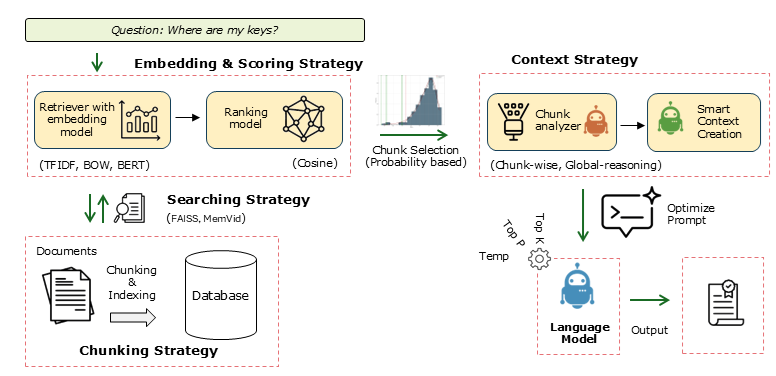
Key Features
| Feature | Description |
|---|---|
| Local LLM Support | Run LLMs locally with minimal dependencies. |
| Full Prompt Control | Fine-grained control over prompts including Query, Instructions, System, Context, Response Format, Automatic formatting, Temperature, and Top P. |
| Single Endpoint for All Local Models | One unified endpoint to connect different local models. |
| Flexible Embedding Methods | Multiple embedding strategies: TF-IDF for structured documents, Bag of Words (BOW), BERT for free text, BGE-Small. |
| Advanced Retrieval Methods | Supports Naive RAG with fixed chunking and RSE (Relevant Segment Extraction). |
| Context Strategies | Advanced reasoning for complex queries using Global-reasoning and Chunk-wise approaches. |
| Local Memory | Video memory storage for efficient local use. |
| PDF Processing | Native support for reading and processing PDF documents. |
Documentation & Resources
Quick Start
Installation
# Install from PyPI
pip install LLMlight
## Examples


### 1. Check Available Models at Endpoint

```python
from LLMlight import LLMlight

# Initialize client
from LLMlight import LLMlight
# Initialize with LM Studio endpoint
client = LLMlight(model='mistralai/mistral-small-3.2',
                  endpoint="http://localhost:1234/v1/chat/completions")

modelnames = client.get_available_models(validate=False)
print(modelnames)
2. Basic Usage with Endpoint
from LLMlight import LLMlight

# Initialize with default settings
client = LLMlight(model='openai/gpt-oss-20b', endpoint='http://localhost:1234/v1/chat/completions')

# Run a simple query
response = client.prompt('What is the capital of France?',
                         context='The capital of France is Amsterdam.',
                         instructions='Do not argue with the information in the context. Only return the information from the context.')
print(response)
# According to the provided context, the capital of France is Amsterdam.


### 3. Using with LM Studio

```python
# Import library
from LLMlight import LLMlight

# Initialize with LM Studio endpoint
client = LLMlight(model='mistralai/mistral-small-3.2',
                  endpoint="http://localhost:1234/v1/chat/completions")

# Run queries
response = client.prompt('Explain quantum computing in simple terms')
3. Query against PDF files
# Load library
from LLMlight import LLMlight

# Initialize with default settings
client = LLMlight(model='mistralai/mistral-small-3.2',
                  context_strategy='chunk-wise',
                  retrieval_method='naive_rag',
                  embedding={'memory': 'memvid', 'context': 'bert'},
                  top_chunks=5)

# Read pdf
path = 'https://proceedings.neurips.cc/paper_files/paper/2017/file/3f5ee243547dee91fbd053c1c4a845aa-Paper.pdf'
pdf_text = client.read_pdf(path, return_type='text')
context = pdf_text + '\n More text can be appended in this manner'

# Make a prompt
response = client.prompt('What is an attention network?',
                         context=context,
                         instructions='Answer the question using only the information from the context. If the answer can not be found, tell that.')

print(response)
4. Global Reasoning
from LLMlight import LLMlight
client = LLMlight(model='microsoft/phi-4', context_strategy='global-reasoning')

path = 'https://proceedings.neurips.cc/paper_files/paper/2017/file/3f5ee243547dee91fbd053c1c4a845aa-Paper.pdf'
pdf_text = client.read_pdf(path, return_type='text')

# Make a prompt
response = client.prompt('What is an attention network?',
                         context=pdf_text,
                         instructions='Answer the question using only the information from the context. If the answer can not be found, tell that.')
print(response)
5. Creating Local Memory Database
# Load library
from LLMlight import LLMlight

# Initialize with default settings
client = LLMlight(model='mistralai/mistral-small-3.2', file_path='local_database.mp4')

url1 = 'https://proceedings.neurips.cc/paper_files/paper/2017/file/3f5ee243547dee91fbd053c1c4a845aa-Paper.pdf'
url2 = 'https://erdogant.github.io/publications/papers/2020%20-%20Taskesen%20et%20al%20-%20HNet%20Hypergeometric%20Networks.pdf'

# Add multiple PDF files to the database
client.memory_add(files=[url1, url2])

# Add more chunks of information
client.memory_add(text=['Small chunk that is also added to the database.',
                        'The capital of France is Amsterdam.'],
                  overwrite=True)

# Add all file types from a directory
client.memory_add(dirpath='c:/my_documents/',
                  filetypes = ['.pdf', '.txt', '.epub', '.md', '.doc', '.docx', '.rtf', '.html', '.htm'],
                  )

# Store to disk
client.memory_save()


# =============================================================================
# Load from database
# =============================================================================

# Import
from LLMlight import LLMlight
# Initialize with local database
client = LLMlight(model='mistralai/mistral-small-3.2', file_path='local_database.mp4')

# Get the top 5 chunks
client.memory_chunks(n=5)

# Search through the chunks using a query
out1 = client.memory.retriever.search('Attention Is All You Need', top_k=3)
out2 = client.memory.retriever.search('Enrichment analysis, Hypergeometric Networks', top_k=3)
out3 = client.memory.retriever.search('Capital of Amsterdam', top_k=3)
6. Load Local Memory Database
# Import library
from LLMlight import LLMlight

# Initialize with default settings
client = LLMlight(preprocessing=None, retrieval_method=None, path_to_memory="knowledge_base.mp4")

# Create queries
response = client.prompt('What do apes like?', instructions='Only return the information from the context. Answer with maximum of 3 words, and starts with "Apes like: "')
print(response)
Maintainer
- Erdogan Taskesen, github: erdogant
- Contributions are welcome.
- Yes! This library is entirely free but it runs on coffee! :) Feel free to support with a Coffee.


Download files
Download the file for your platform. If you're not sure which to choose, learn more about installing packages.
Source Distribution
llmlight-0.5.0.tar.gz
(47.5 kB
view details)
Built Distribution
Filter files by name, interpreter, ABI, and platform.
If you're not sure about the file name format, learn more about wheel file names.
Copy a direct link to the current filters
llmlight-0.5.0-py3-none-any.whl
(50.2 kB
view details)
File details
Details for the file llmlight-0.5.0.tar.gz.
File metadata
- Download URL: llmlight-0.5.0.tar.gz
- Upload date:
- Size: 47.5 kB
- Tags: Source
- Uploaded using Trusted Publishing? No
- Uploaded via: twine/6.2.0 CPython/3.12.11
File hashes
| Algorithm | Hash digest | |
|---|---|---|
| SHA256 |
143ea9270fcc195686b7a88b7bc1692da31be7128f905e6abd246e2c54ccdfbd
|
|
| MD5 |
55cf42bf94adbb480e6b45c097535508
|
|
| BLAKE2b-256 |
ac423d95a79b28e21f59974d8e2474e73d4dcfbe16fd6e823f70dbe535219138
|
File details
Details for the file llmlight-0.5.0-py3-none-any.whl.
File metadata
- Download URL: llmlight-0.5.0-py3-none-any.whl
- Upload date:
- Size: 50.2 kB
- Tags: Python 3
- Uploaded using Trusted Publishing? No
- Uploaded via: twine/6.2.0 CPython/3.12.11
File hashes
| Algorithm | Hash digest | |
|---|---|---|
| SHA256 |
a01f2039f2d5dd0dc262a4e6412c277b28ae084208fda7cb033a160871a90a5f
|
|
| MD5 |
799dc3f0ab51293ea0146a4ae0c86800
|
|
| BLAKE2b-256 |
33e4f65e911438b35ec66b1981770f5a2ed579cc52c7226cfd8a41678eaaf19b
|






