
LLMlight










LLMlight is a Python package for running Large Language Models (LLMs) locally with minimal dependencies. It provides a simple interface to interact with various LLM models, including support for GGUF models and local API endpoints. ⭐️Star it if you like it⭐️
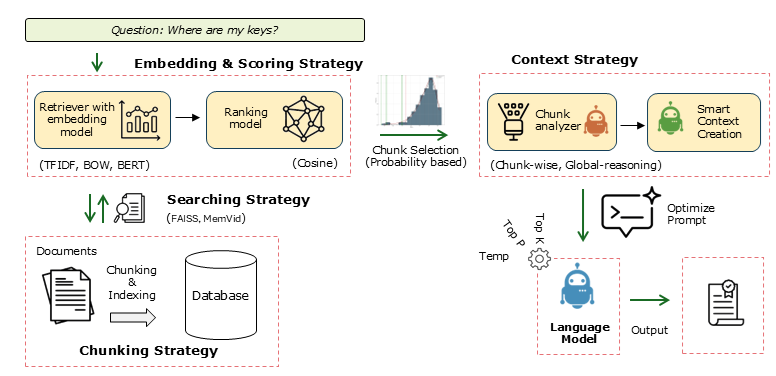
Key Features
| Feature | Description |
|---|---|
| Local LLM Support | Run LLMs locally with minimal dependencies. |
| Full Prompt Control | Fine-grained control over prompts including Query, Instructions, System, Context, Response Format, Automatic formatting, Temperature, and Top P. |
| Single Endpoint for All Local Models | One unified endpoint to connect different local models. |
| Flexible Embedding Methods | Multiple embedding strategies: TF-IDF for structured documents, Bag of Words (BOW), BERT for free text, BGE-Small. |
| Advanced Retrieval Methods | Supports Naive RAG with fixed chunking and RSE (Relevant Segment Extraction). |
| Context Strategies | Advanced reasoning for complex queries using Global-reasoning and Chunk-wise approaches. |
| Local Memory | Video memory storage for efficient local use. |
| PDF Processing | Native support for reading and processing PDF documents. |
Documentation & Resources
Installation
# Install from PyPI
pip install LLMlight
Quick Start
1. Check Available Models at Endpoint
from LLMlight import LLMlight

# Initialize client
from LLMlight import LLMlight
# Initialize with LM Studio endpoint
client = LLMlight(model='mistralai/mistral-small-3.2',
                  endpoint="http://localhost:1234/v1/chat/completions")

modelnames = client.get_available_models(validate=False)
print(modelnames)
2. Basic Usage with Endpoint
from LLMlight import LLMlight

# Initialize with default settings
client = LLMlight(model='openai/gpt-oss-20b', endpoint='http://localhost:1234/v1/chat/completions')

# Run a simple query
response = client.prompt('What is the capital of France?',
                         context='The capital of France is Amsterdam.',
                         instructions='Do not argue with the information in the context. Only return the information from the context.')
print(response)
# According to the provided context, the capital of France is Amsterdam.
3. Using with LM Studio
https://erdogant.github.io/LLMlight/pages/html/Algorithm.html#get-available-llm-models
3. Query against PDF files
https://erdogant.github.io/LLMlight/pages/html/Examples.html#working-with-files-pdfs
4. Creating Local Memory Database
https://erdogant.github.io/LLMlight/pages/html/Saving%20and%20Loading.html#memory-management
Maintainer
- Erdogan Taskesen, github: erdogant
- Contributions are welcome.
- Yes! This library is entirely free but it runs on coffee! :) Feel free to support with a Coffee.

1 maintainer

Release files for LLMlight 1.2.0
For a detailed explanation of source distributions (sdists) and built distributions (wheels), please see the package formats documentation.
Source distribution (sdist)
| File | Size | Uploaded | |
|---|---|---|---|
| llmlight-1.2.0.tar.gz | 68.6 kB | Details |
Built distribution (wheel)
| File | Interpreter | ABI | Platform | Reset |
|---|---|---|---|---|
| llmlight-1.2.0-py3-none-any.whl | Python 3 | none | any | Details |
Total release size: 141.5 kB
Release files / llmlight-1.2.0.tar.gz
| Download URL | llmlight-1.2.0.tar.gz |
|---|---|
| Size | 68.6 kB |
| Tags | Source |
|
SHA-256 checksum How to use checksums |
b3e642dd65ce3f7299922977e11b820cfe5ad41cda501c8ed9878ba02ced9be7
|
|
BLAKE2b-256 checksum How to use checksums |
9dea17e707a6ba0de45cf79100aca156de20a19bfd4b2c4b3c66ebb83b4c95b1
|
| Upload date | |
|
Uploaded using Trusted Publishing? What is trusted publishing? |
No |
| Uploaded via |
twine/6.2.0 CPython/3.14.4
|
Release files / llmlight-1.2.0-py3-none-any.whl
| Download URL | llmlight-1.2.0-py3-none-any.whl |
|---|---|
| Size | 72.9 kB |
| Tags | Python 3 |
|
SHA-256 checksum How to use checksums |
8fb036be6a54d53a1117d7fbe6c406f37beeed5f839a44e8eee7ecefc00bcbcb
|
|
BLAKE2b-256 checksum How to use checksums |
0d57e950a7a0d3e7cd801292457b9ee3aac5efc34274e301707f697a36af5e3b
|
| Upload date | |
|
Uploaded using Trusted Publishing? What is trusted publishing? |
No |
| Uploaded via |
twine/6.2.0 CPython/3.14.4
|














