
LLMlight is a Python library for ...

Project description
LLMlight










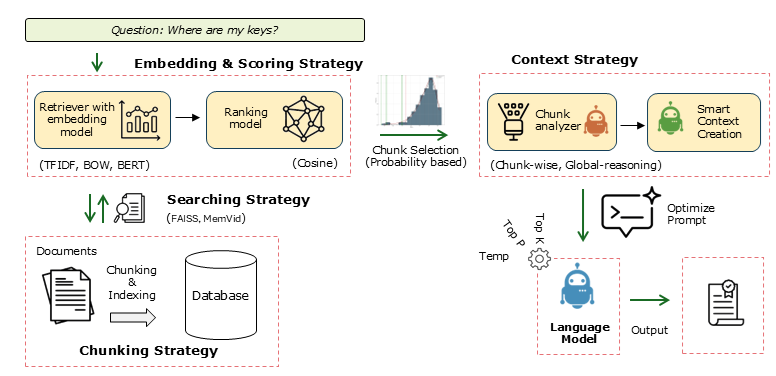
Key Features
| Feature | Description |
|---|---|
| Local LLM Support | Run LLMs locally with minimal dependencies. |
| Full Prompt Control | Fine-grained control over prompts including Query, Instructions, System, Context, Response Format, Automatic formatting, Temperature, and Top P. |
| Single Endpoint for All Local Models | One unified endpoint to connect different local models. |
| Flexible Embedding Methods | Multiple embedding strategies: TF-IDF for structured documents, Bag of Words (BOW), BERT for free text, BGE-Small. |
| Advanced Retrieval Methods | Supports Naive RAG with fixed chunking and RSE (Relevant Segment Extraction). |
| Context Strategies | Advanced reasoning for complex queries using Global-reasoning and Chunk-wise approaches. |
| Local Memory | Video memory storage for efficient local use. |
| PDF Processing | Native support for reading and processing PDF documents. |
Documentation & Resources
Installation
# Install from PyPI
pip install LLMlight
Quick Start
1. Check Available Models at Endpoint
from LLMlight import LLMlight

# Initialize client
from LLMlight import LLMlight
# Initialize with LM Studio endpoint
client = LLMlight(model='mistralai/mistral-small-3.2',
                  endpoint="http://localhost:1234/v1/chat/completions")

modelnames = client.get_available_models(validate=False)
print(modelnames)
2. Basic Usage with Endpoint
from LLMlight import LLMlight

# Initialize with default settings
client = LLMlight(model='openai/gpt-oss-20b', endpoint='http://localhost:1234/v1/chat/completions')

# Run a simple query
response = client.prompt('What is the capital of France?',
                         context='The capital of France is Amsterdam.',
                         instructions='Do not argue with the information in the context. Only return the information from the context.')
print(response)
# According to the provided context, the capital of France is Amsterdam.
3. Using with LM Studio
https://erdogant.github.io/LLMlight/pages/html/Algorithm.html#get-available-llm-models
3. Query against PDF files
https://erdogant.github.io/LLMlight/pages/html/Examples.html#working-with-files-pdfs
4. Creating Local Memory Database
https://erdogant.github.io/LLMlight/pages/html/Saving%20and%20Loading.html#memory-management
Maintainer
- Erdogan Taskesen, github: erdogant
- Contributions are welcome.
- Yes! This library is entirely free but it runs on coffee! :) Feel free to support with a Coffee.

Release history Release notifications | RSS feed


Download files
Download the file for your platform. If you're not sure which to choose, learn more about installing packages.
Source Distribution
Built Distribution
Filter files by name, interpreter, ABI, and platform.
If you're not sure about the file name format, learn more about wheel file names.
Copy a direct link to the current filters
File details
Details for the file llmlight-1.1.1.tar.gz.
File metadata
- Download URL: llmlight-1.1.1.tar.gz
- Upload date:
- Size: 60.9 kB
- Tags: Source
- Uploaded using Trusted Publishing? No
- Uploaded via: twine/6.2.0 CPython/3.14.3
File hashes
| Algorithm | Hash digest | |
|---|---|---|
| SHA256 |
5e27e999a36fe8b701981e91b94a1df8e99f5daad5610a9038bedb121bf3b41b
|
|
| MD5 |
5b59d26ac0d4900e4e6126cafddc7ef2
|
|
| BLAKE2b-256 |
1cf0a27914143efb8db8b06aaf533a66279db475e21ee1686104557354c713ee
|
File details
Details for the file llmlight-1.1.1-py3-none-any.whl.
File metadata
- Download URL: llmlight-1.1.1-py3-none-any.whl
- Upload date:
- Size: 64.1 kB
- Tags: Python 3
- Uploaded using Trusted Publishing? No
- Uploaded via: twine/6.2.0 CPython/3.14.3
File hashes
| Algorithm | Hash digest | |
|---|---|---|
| SHA256 |
24dcd0a0bee780ec449246733f97a8459d083e48281e642d96afc990ac6d0e1f
|
|
| MD5 |
e13a57a28c62fbb2f73b9ead66d88db8
|
|
| BLAKE2b-256 |
100871d4286c65806e609d0f6add626ecd187868e035c3bd20796ccf490a948a
|






