
MMV-playground






This plugin is aimed at researchers in biology and medicine who want to segment and analyze 2D microscopy images. It offers intuitive tools for common pre-processing and analysis tasks.
This napari plugin was generated with Cookiecutter using @napari's cookiecutter-napari-plugin template.
Installation
You can install MMV-playground via pip:
pip install MMV-playground
To install latest development version :
pip install git+https://github.com/MMV-Lab/MMV-playground.git
Documentation
This plugin for the graphics software Napari is designed to analyze two-dimensional microscopy images. Images should be provided in grayscale format, as colored images are not supported. The plugin includes seven core functions for image analysis:
- Intensity normalization
- Smoothing
- Background correction
- Spot-shape filter
- Filament-shape filter
- Thresholding
- Topology-preserving thinning
We provide an introduction to explain the different functions of this plugin.
How to Start and Use the Plugin
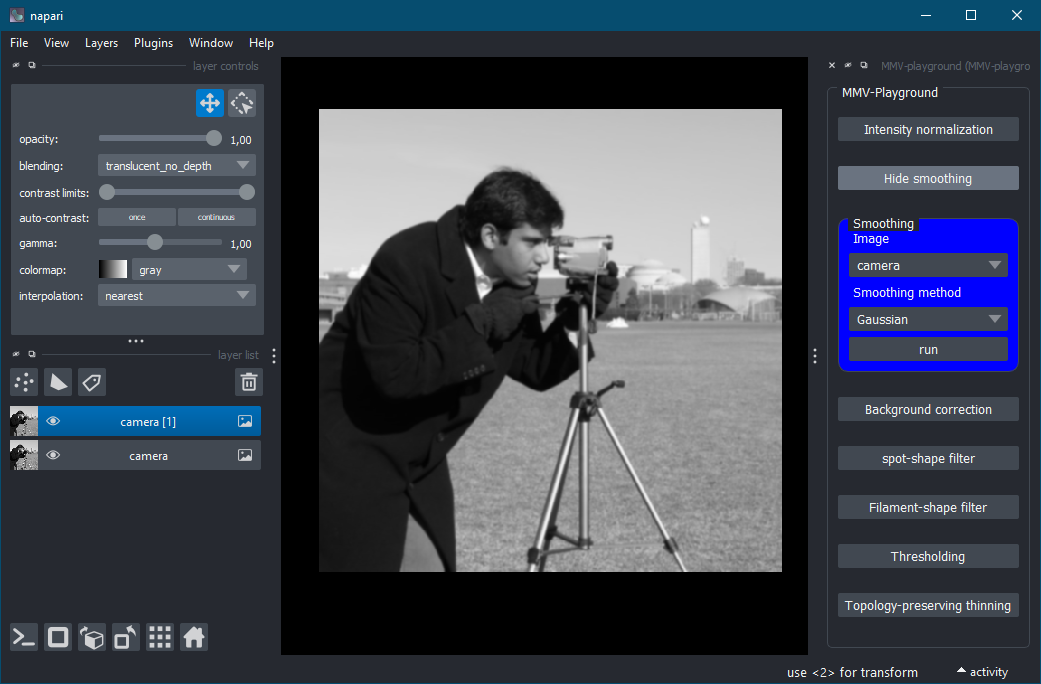
To start the plugin, open Napari, go to the "Plugins" menu, and select "MMV-playground (MMV-playground)." The MMV-playground interface will appear on the right-hand side of the Napari window, displaying seven buttons, each corresponding to one of the available functions. Clicking a button opens a dialog box where you can select an image, adjust the parameters for the chosen function, and execute it by pressing the "Run" button. Clicking the function button again collapses the dialog box.
Screenshot
Here is a preview of the MMV-playground plugin in action:
Intensity Normalization
This function adjusts the image intensity to enhance contrast and improve uniformity. Two percentage values are required:
- Lower percentage (0–5%): Defines the darkest portion of the image to ignore as background noise, which is set to a fixed value.
- Upper percentage (95–100%): Specifies the brightest portion of the image to be capped, preventing overexposure.
The plugin calculates the respective percentiles based on these values. Intensities below the lower percentile are clipped, and those above the upper percentile are also capped. Finally, all pixel intensities are rescaled to the range [0, 1].
Smoothing
This function reduces noise to enhance image clarity. Two methods are available:
- Gaussian smoothing
- Edge-preserving smoothing: Retains edges (e.g., cell boundaries) while reducing noise.
Background Correction
This function removes uneven illumination or background artifacts using a filter. The key parameter is:
- Kernel size (1–100): Determines the spatial scale of the background correction. Smaller kernel sizes remove local noise, while larger sizes correct for broader illumination variations.
The scipy.ndimage.white_tophat function is used to perform the correction, making this method effective for images with dark backgrounds.
Spot-Shape Filter
This filter detects circular structures, such as cell nuclei or fluorescent spots. It is based on the scipy.ndimage.gaussian_laplace function and requires:
- Sigma (σ): Controls the size of the spots to detect. Smaller sigma values target smaller spots, while larger values focus on larger structures.
Filament-Shape Filter
This filter highlights elongated structures like cytoskeletal fibers or blood vessels. Using the aicssegmentation.core.vessel.vesselness2D function, the key parameter is:
- Sigma (σ): Specifies the width of the detected filaments. Lower values detect thinner structures, while higher values identify thicker ones.
Thresholding
This function segments the image into binary regions by separating the signal from the background. Users can choose one of four thresholding methods:
- Otsu: Best for images with clear separation between background and signal intensities.
- Li: Suitable for uniformly illuminated images.
- Triangle: Effective for asymmetrical intensity distributions.
- Sauvola: Ideal for images with uneven illumination.
The result is a binary image where pixels above the threshold are set to 1 (signal), and all others are set to 0 (background).
Topology-Preserving Thinning
This function extracts the skeleton of structures while maintaining their connectivity. Two parameters are required:
- Minimum thickness (0.5–5): Defines the smallest allowable thickness of structures before thinning.
- Thin (1–5): Controls the degree of thinning, reducing structure width while preserving topology (e.g., network connections).
This is particularly useful for analyzing vascular or cellular networks.
What Is Missing?
Currently, unit tests are not implemented, and internal documentation of the source code is still in progress.
Contributing
Contributions are very welcome. Tests can be run with tox, please ensure the coverage at least stays the same before you submit a pull request.
License
Distributed under the terms of the BSD-3 license, "MMV-playground" is free and open source software
Issues
If you encounter any problems, please file an issue along with a detailed description.
1 maintainer

Metadata
1 maintainer
Release files for MMV-playground 0.1.4
For a detailed explanation of source distributions (sdists) and built distributions (wheels), please see the package formats documentation.
Source distribution (sdist)
| File | Size | Uploaded | |
|---|---|---|---|
| mmv_playground-0.1.4.tar.gz | 13.0 kB | Details |
Built distribution (wheel)
| File | Interpreter | ABI | Platform | Reset |
|---|---|---|---|---|
| MMV_playground-0.1.4-py3-none-any.whl | Python 3 | none | any | Details |
Total release size: 25.6 kB
Release files / mmv_playground-0.1.4.tar.gz
| Download URL | mmv_playground-0.1.4.tar.gz |
|---|---|
| Size | 13.0 kB |
| Tags | Source |
|
SHA-256 checksum How to use checksums |
343c4b8542c523cc6f7e1cffc97fc205a534b81d2c15e96978d29ba5aaa64be3
|
|
BLAKE2b-256 checksum How to use checksums |
58f7d91f3bfa8278a5168b3b27f92dc3bd849548762eebf84967270090424054
|
| Upload date | |
|
Uploaded using Trusted Publishing? What is trusted publishing? |
No |
| Uploaded via |
twine/6.1.0 CPython/3.10.16
|
Release files / MMV_playground-0.1.4-py3-none-any.whl
| Download URL | MMV_playground-0.1.4-py3-none-any.whl |
|---|---|
| Size | 12.6 kB |
| Tags | Python 3 |
|
SHA-256 checksum How to use checksums |
47110ba34ab05b3baa6ef42a7b397b64542450a40086b559621b24785bb9881f
|
|
BLAKE2b-256 checksum How to use checksums |
2faea843ead093ac304b3c0a6054b32d0d92067f3d388cd1ab49b0435939c9a8
|
| Upload date | |
|
Uploaded using Trusted Publishing? What is trusted publishing? |
No |
| Uploaded via |
twine/6.1.0 CPython/3.10.16
|














