
Mathematica lexer and highlighter for Pygments



A lexer and highlighter for Mathematica/Wolfram Language source code using the pygments engine.
This code is based on pygments-mathematica but has been specially revised so it interacts with mathicsscript. As such, it works better than Pygments-Mathematica for this use, and possibly might not be as good in other contexts. Over time, though, this should get addressed.
Another difference is the fact that this package delegates knowledge about operator names to Mathics-Scanner.
Features
It can currently lex and highlight:
- All built-in functions in the
Systemcontext, including Unicode symbols likeπ, except those that use characters from the private Unicode space (e.g.\[FormalA]). - User-defined symbols, including those in a context.
- All operators, including Unicode operators like
∈and⊕. - Comments, including multi-line and nested.
- Strings, including multi-line and escaped quotes.
- Patterns, slots (including named slots
#nameintroduced in version 10), and slot sequences. - Message names (e.g., the
ivarinGeneral::ivar) - Numbers including base notation (e.g.
8 ^^ 23 == 19) and scientific notation (e.g.1 *^ 3 == 1000). - Local variables in
Block,With, andModule.
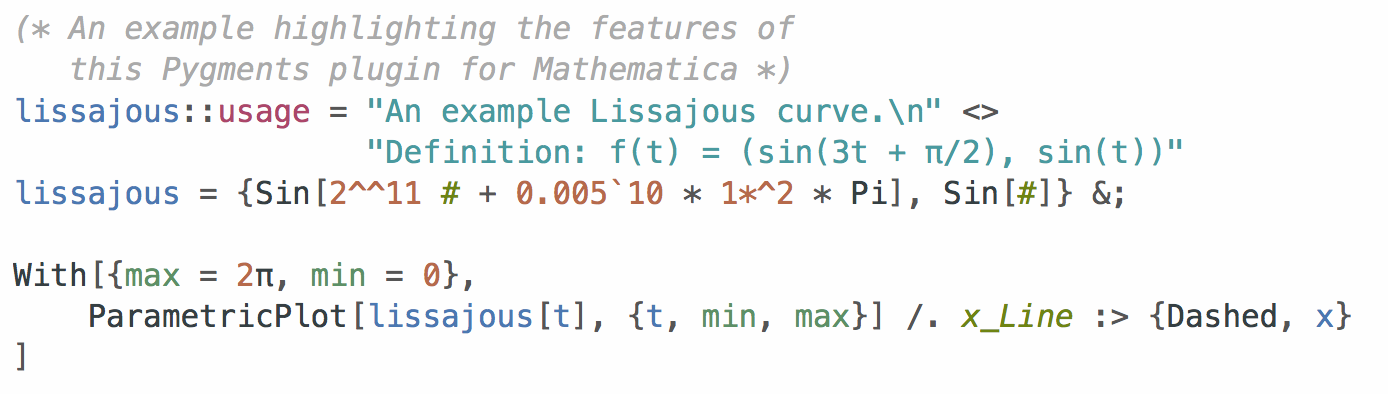
Example:
(* An example highlighting the features of
   this Pygments plugin for Mathematica *)
lissajous::usage = "An example Lissajous curve.\n" <>
                   "Definition: f(t) = (sin(3t + π/2), sin(t))"
lissajous = {Sin[2^^11 # + 0.005`10 * 1*^2 * Pi], Sin[#]} &;

With[{max = 2 Pi, min = 0},
    ParametricPlot[lissajous[t], {t, min, max}] /. x_Line :> {Dashed, x}
]
Installation
Using pip
Run pip install mathics-pygments from the command line. That's it!
From source code
If you'd like to make modifications to the color scheme for personal use or if you'd like to try the most recent release that might not yet be available in PyPi, download and unzip the source code from the latest release. After
you've installed Pygments (pip install Pygments works well if you already have Python set up on your system), run the following from the repo's root directory:
python setup.py install
Usage
Server-side syntax highlighting in Jekyll, Octopress, and other static websites
To highlight Mathematica code using this lexer, enclose the code between these liquid tags:
{% highlight wl %}
<your code here>
{% endhighlight %}
You can also use wolfram and wolfram-language as the language hint. (See the note at the end of the section.)
If you are using Jekyll, depending on your setup, you might need to add the following in your _plugins/ext.rb:
require 'pygments'
Pygments.start('<path to your python env>/site-packages/pygments/')
NOTE: Although this lexer is registered with the names
mathematicaandmmafor use as language hints, the default lexer that ships with Pygments overrides this. Hence, until this is incorporated into the main Pygments repository, please usewlorwolframorwolfram-languageas the language hint.
Highlighting in LaTeX documents
Mathematica code can be highlighted in LaTeX documents using the minted (PDF) package. The following minimal example shows how:
\documentclass{article}
\usepackage[english]{babel}
\usepackage{fontspec}
\setmonofont{Menlo}

\usepackage{minted}
\usemintedstyle{mathematica}

\begin{document}
\begin{minted}[linenos=true]{wolfram}
(* An example highlighting the features of
   this Pygments plugin for Mathematica *)
lissajous::usage = "An example Lissajous curve.\n" <>
                   "Definition: f(t) = (sin(3t + Pi/2), sin(t))"
lissajous = {Sin[2^^11 # + 0.005`10 * 1*^2 * π], Sin[#]} &;

ParametricPlot[lissajous[t], {t, 0, 2 π}] /. x_Line :> {Dashed, x}
\end{minted}
\end{document}
Saving the above as mma.tex and running xelatex --shell-escape mma.tex should produce a PDF with highlighted code.
NOTE: If your LaTeX colors don't show up properly, try deleting your
*.aux,*.logfiles and any_minted-mma/directory before running XeLaTeX again.
Pelican static page generator
The Pelican static generator is written in Python and uses Pygments by default. To use it there, you mark code blocks with the usual 4 spaces indent and you prepend it with :::wl if you are using Markdown
    :::wl
    FileNames["CodeGenerator.m", {$InstallationDirectory}, 4]
    (*
      {"/Applications/Development/Mathematica.app/SystemFiles/Links/GPUTools/CodeGenerator.m"}
    *)
If you are using ReStructuredText, please mark your Mathematica code with
.. code-block:: wl

   <indented code block goes here>
Command line usage
The pygmentize command can be used to invoke this lexer and convert any Mathematica file to an appropriately highlighted file in a different format. For example, to convert a file package.m to an HTML file, run
pygmentize -O full,style=mathematica -f html -l wl -o package.html package.m
Styles
The default styles that come with Pygments do not go well with Mathematica code. If you're using this lexer
for highlighting source code on a website, use the mma.scss Sass file in this repository to obtain good default colors (as shown in the
screenshot). You can, if you choose, modify the colors in the SCSS file and then convert it to CSS
using the sass compiler as:
make mma.css # Same thing as: sass mma.scss mma.css
For other applications, including command line usage, the lexer ships with a style named mathematica.
(See the arguments to the pygmentize command in the section above.) To use different colors, modify
the style in mathics_pygemnts/style.py and run python setup.py install again.
If you fancy the default style that ships with the Mathematica notebook, use the mathematica-notebook scheme.
Limitations
It cannot highlight lexically and dynamically scoped variables (e.g., the x in With[{x = 1}, x + 1] or the Plus in Block[{Plus = Times}, 2 + 3], etc.) consistently throughout their scope. This would require a parser that further processes the stream of tokens and builds an AST that captures the semantics of the language.
This is currently not a high priority since it is non-trivial to implement within the framework by Pygments, but I am interested in supporting this eventually, so collaborations/pull requests are welcome :)
Acknowledgments
The lexing rules for Mathematica syntax are largely based on two prior projects:
rsmenon's vim-mathematica syntax highlighting plugin.- Patrick Scheibe's Mathematica plugin for IntelliJ IDEA (if you develop in Mathematica and haven't seen this yet, please do try it out. It's wonderful!).
1 maintainer

Metadata
1 maintainer
Release files for Mathics3-pygments 10.0.0
For a detailed explanation of source distributions (sdists) and built distributions (wheels), please see the package formats documentation.
Source distribution (sdist)
| File | Size | Uploaded | Provenance | |
|---|---|---|---|---|
| mathics3_pygments-10.0.0.tar.gz | 58.7 kB | Without provenance | Details |
Built distribution (wheel)
| File | Interpreter | ABI | Platform | Reset |
|---|---|---|---|---|
| mathics3_pygments-10.0.0-py3-none-any.whl | Python 3 | none | any | Details |
Total release size: 111.5 kB
Release files / mathics3_pygments-10.0.0.tar.gz
| Download URL | mathics3_pygments-10.0.0.tar.gz |
|---|---|
| Size | 58.7 kB |
| Tags | Source |
|
SHA-256 checksum How to use checksums |
4a4ea7787fef9f5f086b4bd900b3a7ca5c8f083e9e4619b8864edc0514994255
|
|
BLAKE2b-256 checksum How to use checksums |
4634749fe076d0643bca8d478b5e0250079f17c30d4f9cb6aa6b4b94ba545419
|
| Upload date | |
|
Uploaded using Trusted Publishing? What is trusted publishing? |
No |
| Uploaded via |
twine/6.2.0 CPython/3.13.12
|
Release files / mathics3_pygments-10.0.0-py3-none-any.whl
| Download URL | mathics3_pygments-10.0.0-py3-none-any.whl |
|---|---|
| Size | 52.8 kB |
| Tags | Python 3 |
|
SHA-256 checksum How to use checksums |
77b1ae9064e995903741940460f532ba1334568fa533df23a3d733bbbd17b418
|
|
BLAKE2b-256 checksum How to use checksums |
a2d7dbc69a6e9c849f8c20fc0e02f66a1dc4864c64e652087e7afc96243cac8a
|
| Upload date | |
|
Uploaded using Trusted Publishing? What is trusted publishing? |
No |
| Uploaded via |
twine/6.2.0 CPython/3.13.12
|
Security for Mathics3-pygments 10.0.0
Provenance
Provenance describes where a file came from. On PyPI, provenance is shared via attestations, which provide a verifiable record of the build or publishing details. View details, limitations and caveats.
No provenance found
None of the files in this release were uploaded with provenance metadata.
A note on package security
PyPI is a repository for distributing packages, not a service for auditing them. While third-party security researchers and our staff do their best to detect and remove malicious packages, PyPI cannot guarantee the quality, security or suitability of any given package.













