
NMODL has been fully integrated into the NEURON repository. There will be no further development efforts on NMODL as an independent project.
All future development will happen at: https://github.com/neuronsimulator/nrn.
The NMODL Framework is a code generation engine for NEURON MODeling Language (NMODL). It is designed with modern compiler and code generation techniques to:
Provide modular tools for parsing, analysing and transforming NMODL
Provide easy to use, high level Python API
Generate optimised code for modern compute architectures including CPUs, GPUs
Flexibility to implement new simulator backends
Support for full NMODL specification
About NMODL
Simulators like NEURON use NMODL as a domain specific language (DSL) to describe a wide range of membrane and intracellular submodels. Here is an example of exponential synapse specified in NMODL:
NEURON {
    POINT_PROCESS ExpSyn
    RANGE tau, e, i
    NONSPECIFIC_CURRENT i
}
UNITS {
    (nA) = (nanoamp)
    (mV) = (millivolt)
    (uS) = (microsiemens)
}
PARAMETER {
    tau = 0.1 (ms) <1e-9,1e9>
    e = 0 (mV)
}
ASSIGNED {
    v (mV)
    i (nA)
}
STATE {
    g (uS)
}
INITIAL {
    g = 0
}
BREAKPOINT {
    SOLVE state METHOD cnexp
    i = g*(v - e)
}
DERIVATIVE state {
    g' = -g/tau
}
NET_RECEIVE(weight (uS)) {
    g = g + weight
}
Installation
See INSTALL.rst for detailed instructions to build the NMODL from source.
Try NMODL with Docker
To quickly test the NMODL Framework’s analysis capabilities we provide a docker image, which includes the NMODL Framework python library and a fully functional Jupyter notebook environment. After installing docker and docker-compose you can pull and run the NMODL image from your terminal.
To try Python interface directly from CLI, you can run docker image as:
docker run -it --entrypoint=/bin/sh bluebrain/nmodl
And try NMODL Python API discussed later in this README as:
$ python3
Python 3.6.8 (default, Apr  8 2019, 18:17:52)
>>> from nmodl import dsl
>>> import os
>>> examples = dsl.list_examples()
>>> nmodl_string = dsl.load_example(examples[-1])
...
To try Jupyter notebooks you can download docker compose file and run it as:
wget "https://raw.githubusercontent.com/BlueBrain/nmodl/master/docker/docker-compose.yml"
DUID=$(id -u) DGID=$(id -g) HOSTNAME=$(hostname) docker-compose up
If all goes well you should see at the end status messages similar to these:
[I 09:49:53.923 NotebookApp] The Jupyter Notebook is running at:
[I 09:49:53.923 NotebookApp] http://(4c8edabe52e1 or 127.0.0.1):8888/?token=a7902983bad430a11935
[I 09:49:53.923 NotebookApp] Use Control-C to stop this server and shut down all kernels (twice to skip confirmation).
    To access the notebook, open this file in a browser:
        file:///root/.local/share/jupyter/runtime/nbserver-1-open.html
    Or copy and paste one of these URLs:
        http://(4c8edabe52e1 or 127.0.0.1):8888/?token=a7902983bad430a11935
Based on the example above you should then open your browser and navigate to the URL http://127.0.0.1:8888/?token=a7902983bad430a11935.
You can open and run all example notebooks provided in the examples folder. You can also create new notebooks in my_notebooks, which will be stored in a subfolder notebooks at your current working directory.
Using the Python API
Once the NMODL Framework is installed, you can use the Python parsing API to load NMOD file as:
from nmodl import dsl

examples = dsl.list_examples()
nmodl_string = dsl.load_example(examples[-1])
driver = dsl.NmodlDriver()
modast = driver.parse_string(nmodl_string)
The parse_file API returns Abstract Syntax Tree (AST) representation of input NMODL file. One can look at the AST by converting to JSON form as:
>>> print (dsl.to_json(modast))
{
  "Program": [
    {
      "NeuronBlock": [
        {
          "StatementBlock": [
            {
              "Suffix": [
                {
                  "Name": [
                    {
                      "String": [
                        {
                          "name": "POINT_PROCESS"
                        }
                    ...
Every key in the JSON form represent a node in the AST. You can also use visualization API to look at the details of AST as:
from nmodl import ast
ast.view(modast)
which will open AST view in web browser:
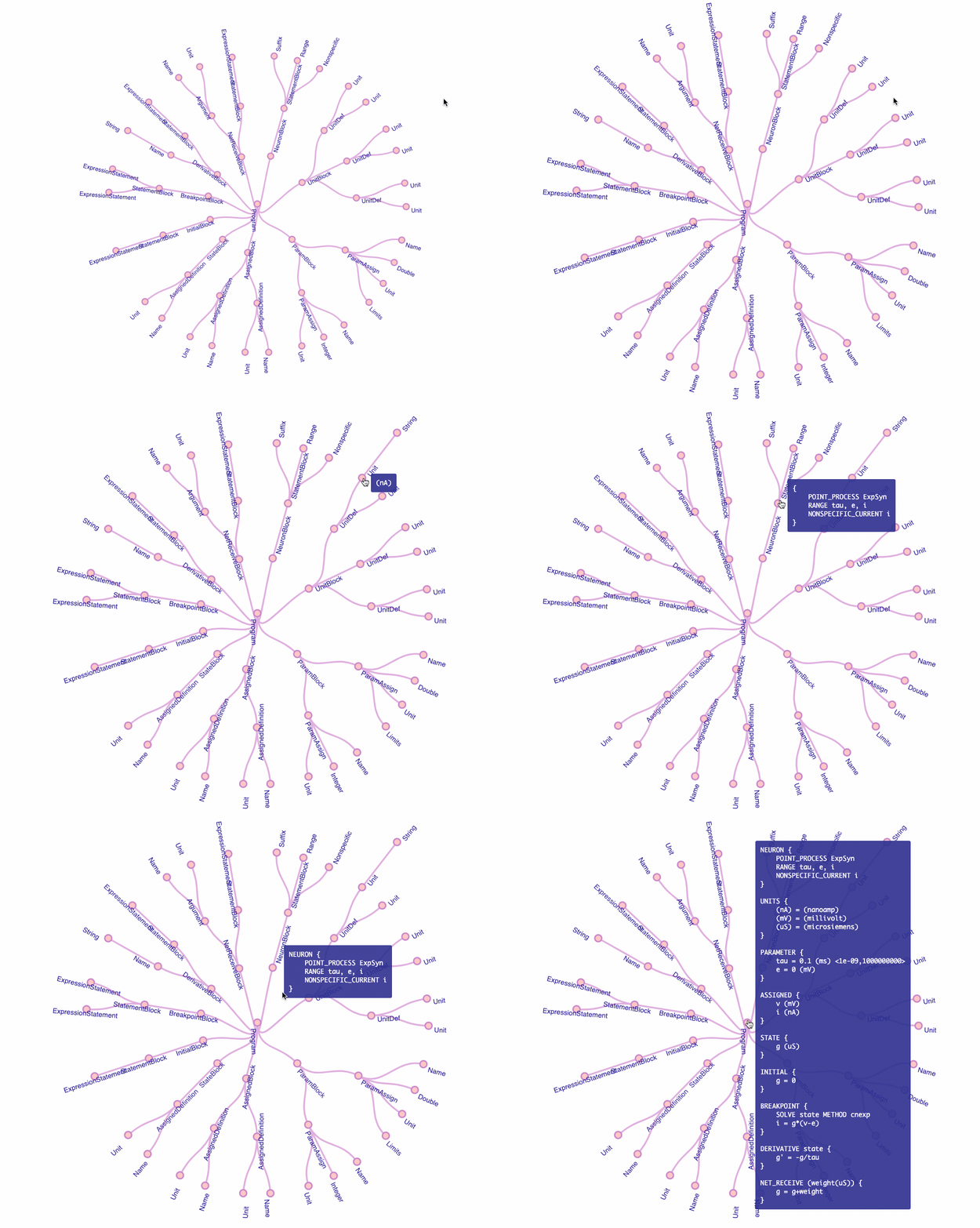
Vizualisation of the AST in the NMODL Framework
The central Program node represents the whole MOD file and each of it’s children represent the block in the input NMODL file. Note that this requires X-forwarding if you are using the Docker image.
Once the AST is created, one can use exisiting visitors to perform various analysis/optimisations. One can also easily write his own custom visitor using Python Visitor API. See Python API tutorial for details.
The NMODL Framework also allows us to transform the AST representation back to NMODL form as:
>>> print (dsl.to_nmodl(modast))
NEURON {
    POINT_PROCESS ExpSyn
    RANGE tau, e, i
    NONSPECIFIC_CURRENT i
}

UNITS {
    (nA) = (nanoamp)
    (mV) = (millivolt)
    (uS) = (microsiemens)
}

PARAMETER {
    tau = 0.1 (ms) <1e-09,1000000000>
    e = 0 (mV)
}
...
High Level Analysis and Code Generation
The NMODL Framework provides rich model introspection and analysis capabilities using various visitors. Here is an example of theoretical performance characterisation of channels and synapses from rat neocortical column microcircuit published in 2015:
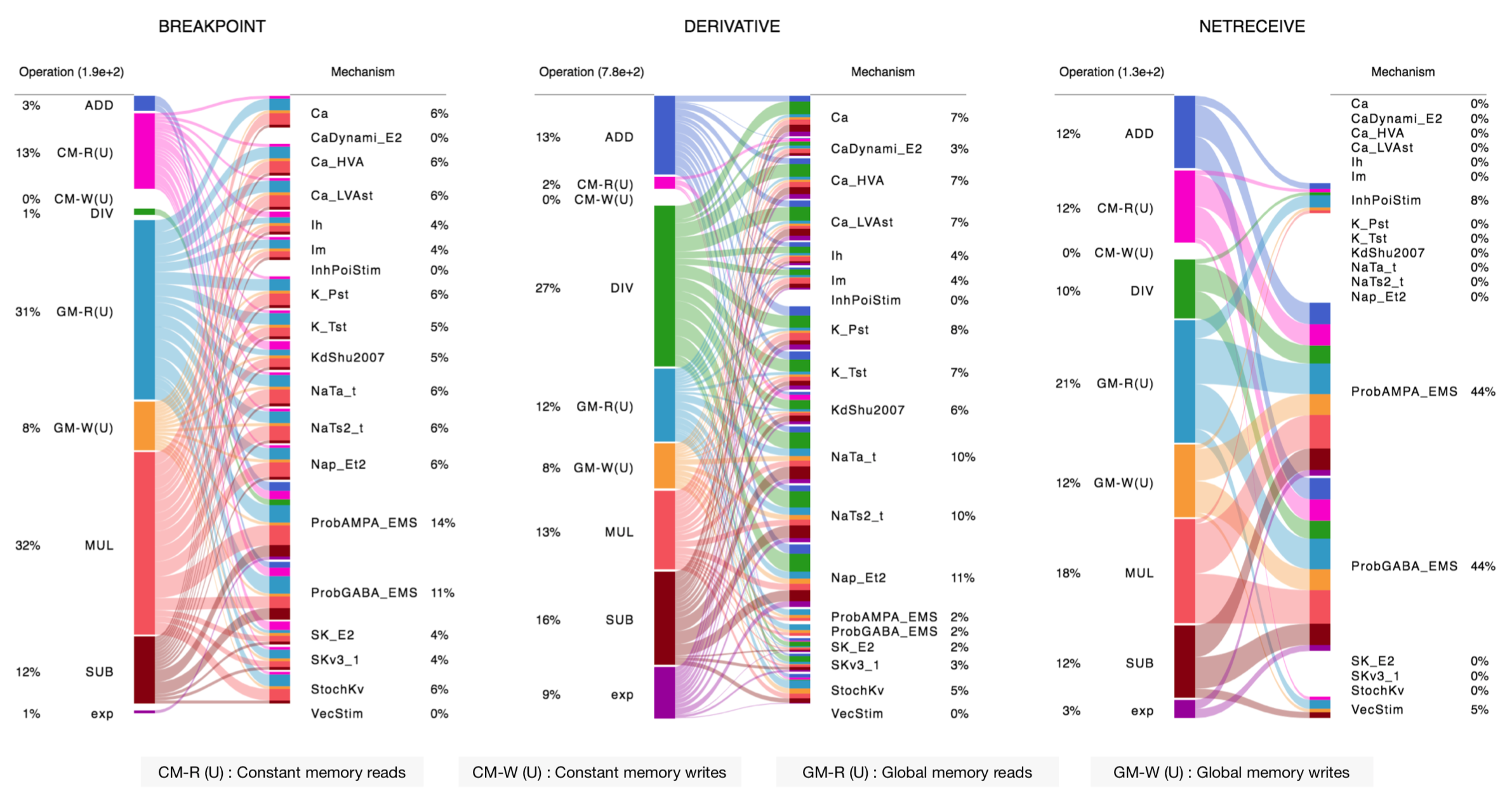
Performance results of the NMODL Framework
To understand how you can write your own introspection and analysis tool, see this tutorial.
Once analysis and optimization passes are performed, the NMODL Framework can generate optimised code for modern compute architectures including CPUs (Intel, AMD, ARM) and GPUs (NVIDIA, AMD) platforms. For example, C++, OpenACC and OpenMP backends are implemented and one can choose these backends on command line as:
$ nmodl expsyn.mod sympy --analytic
To know more about code generation backends, see here. NMODL Framework provides number of options (for code generation, optimization passes and ODE solver) which can be listed as:
$ nmodl -H
NMODL : Source-to-Source Code Generation Framework [version]
Usage: /path/<>/nmodl [OPTIONS] file... [SUBCOMMAND]

Positionals:
  file TEXT:FILE ... REQUIRED           One or more MOD files to process

Options:
  -h,--help                             Print this help message and exit
  -H,--help-all                         Print this help message including all sub-commands
  --verbose=info                        Verbose logger output (trace, debug, info, warning, error, critical, off)
  -o,--output TEXT=.                    Directory for backend code output
  --scratch TEXT=tmp                    Directory for intermediate code output
  --units TEXT=/path/<>/nrnunits.lib
                                        Directory of units lib file

Subcommands:
host
  HOST/CPU code backends
  Options:
    --c                                   C/C++ backend (true)

acc
  Accelerator code backends
  Options:
    --oacc                                C/C++ backend with OpenACC (false)

sympy
  SymPy based analysis and optimizations
  Options:
    --analytic                            Solve ODEs using SymPy analytic integration (false)
    --pade                                Pade approximation in SymPy analytic integration (false)
    --cse                                 CSE (Common Subexpression Elimination) in SymPy analytic integration (false)
    --conductance                         Add CONDUCTANCE keyword in BREAKPOINT (false)

passes
  Analyse/Optimization passes
  Options:
    --inline                              Perform inlining at NMODL level (false)
    --unroll                              Perform loop unroll at NMODL level (false)
    --const-folding                       Perform constant folding at NMODL level (false)
    --localize                            Convert RANGE variables to LOCAL (false)
    --global-to-range                     Convert GLOBAL variables to RANGE (false)
    --localize-verbatim                   Convert RANGE variables to LOCAL even if verbatim block exist (false)
    --local-rename                        Rename LOCAL variable if variable of same name exist in global scope (false)
    --verbatim-inline                     Inline even if verbatim block exist (false)
    --verbatim-rename                     Rename variables in verbatim block (true)
    --json-ast                            Write AST to JSON file (false)
    --nmodl-ast                           Write AST to NMODL file (false)
    --json-perf                           Write performance statistics to JSON file (false)
    --show-symtab                         Write symbol table to stdout (false)

codegen
  Code generation options
  Options:
    --layout TEXT:{aos,soa}=soa           Memory layout for code generation
    --datatype TEXT:{float,double}=soa    Data type for floating point variables
    --force                               Force code generation even if there is any incompatibility
    --only-check-compatibility            Check compatibility and return without generating code
    --opt-ionvar-copy                     Optimize copies of ion variables (false)
Documentation
We are working on user documentation, you can find current drafts of :
Citation
If you would like to know more about the the NMODL Framework, see the following paper:
Pramod Kumbhar, Omar Awile, Liam Keegan, Jorge Blanco Alonso, James King, Michael Hines, and Felix Schürmann. 2020. An optimizing multi-platform source-to-source compiler framework for the NEURON MODeling Language. In Computational Science – ICCS 2020, Springer, Cham, 45–58. DOI: 10.1007/978-3-030-50371-0_4
Some additional details are covered in the pre-print:
Pramod Kumbhar, Omar Awile, Liam Keegan, Jorge Alonso, James King, Michael Hines and Felix Schürmann. 2019. An optimizing multi-platform source-to-source compiler framework for the NEURON MODeling Language. In Eprint : arXiv:1905.02241
Support / Contribuition
If you see any issue, feel free to raise a ticket. If you would like to improve this framework, see open issues and contribution guidelines.
Examples / Benchmarks
The benchmarks used to test the performance and parsing capabilities of NMODL Framework are currently being migrated to GitHub. These benchmarks will be published soon in following repositories:
Funding & Acknowledgment
The development of this software was supported by funding to the Blue Brain Project, a research center of the École polytechnique fédérale de Lausanne (EPFL), from the Swiss government’s ETH Board of the Swiss Federal Institutes of Technology. In addition, the development was supported by funding from the National Institutes of Health (NIH) under the Grant Number R01NS11613 (Yale University) and the European Union’s Horizon 2020 Framework Programme for Research and Innovation under the Specific Grant Agreement No. 785907 (Human Brain Project SGA2).
Copyright © 2017-2024 Blue Brain Project, EPFL
3 maintainers


Metadata
3 maintainers
Release files for NMODL-nightly 0.6.387
For a detailed explanation of source distributions (sdists) and built distributions (wheels), please see the package formats documentation.
Built distributions (wheels)
Total release size: 28.3 MB
Release files / nmodl_nightly-0.6.387-cp312-cp312-manylinux_2_17_x86_64.manylinux2014_x86_64.whl
| Download URL | nmodl_nightly-0.6.387-cp312-cp312-manylinux_2_17_x86_64.manylinux2014_x86_64.whl |
|---|---|
| Size | 4.1 MB |
| Tags | CPython 3.12 Linux glibc 2.17+ x86-64 |
|
SHA-256 checksum How to use checksums |
7e07f6f84bccddeb88f18f808e329226e8b17e5b390d0b0c5162b7f87194efce
|
|
BLAKE2b-256 checksum How to use checksums |
7f398fd5048d606d6ce576a0136c14da2bf0b8cb3afc490da512e969792b3b4d
|
| Upload date | |
|
Uploaded using Trusted Publishing? What is trusted publishing? |
No |
| Uploaded via |
twine/6.0.1 CPython/3.12.7
|
Release files / nmodl_nightly-0.6.387-cp312-cp312-macosx_10_15_x86_64.whl
| Download URL | nmodl_nightly-0.6.387-cp312-cp312-macosx_10_15_x86_64.whl |
|---|---|
| Size | 3.1 MB |
| Tags | CPython 3.12 macOS 10.15+ x86-64 |
|
SHA-256 checksum How to use checksums |
05aa825f559786116269e762d524998c85c2264ad4a163200488a4d449497492
|
|
BLAKE2b-256 checksum How to use checksums |
3acb8c532429264a143402b3e69a1dfba3707c35a01ff92cb027a66f0ec36f8a
|
| Upload date | |
|
Uploaded using Trusted Publishing? What is trusted publishing? |
No |
| Uploaded via |
twine/6.0.1 CPython/3.12.6
|
Release files / nmodl_nightly-0.6.387-cp311-cp311-manylinux_2_17_x86_64.manylinux2014_x86_64.whl
| Download URL | nmodl_nightly-0.6.387-cp311-cp311-manylinux_2_17_x86_64.manylinux2014_x86_64.whl |
|---|---|
| Size | 4.0 MB |
| Tags | CPython 3.11 Linux glibc 2.17+ x86-64 |
|
SHA-256 checksum How to use checksums |
143752bee2ae626edd19ca72d08312ba2558f81bcbaf0dbf0a9be6ffeb8d78ec
|
|
BLAKE2b-256 checksum How to use checksums |
9c0af1fc196caf3024c715fc34b0cc4eaa647832a78e614848fc6a974d8c59cc
|
| Upload date | |
|
Uploaded using Trusted Publishing? What is trusted publishing? |
No |
| Uploaded via |
twine/6.0.1 CPython/3.12.7
|
Release files / nmodl_nightly-0.6.387-cp311-cp311-macosx_10_15_x86_64.whl
| Download URL | nmodl_nightly-0.6.387-cp311-cp311-macosx_10_15_x86_64.whl |
|---|---|
| Size | 3.0 MB |
| Tags | CPython 3.11 macOS 10.15+ x86-64 |
|
SHA-256 checksum How to use checksums |
d68e48ef2b82ab644137abed0858ad07587b428e52247ff7d94e9f60219036db
|
|
BLAKE2b-256 checksum How to use checksums |
fa9d41617f781b77a7f6047a9efeaffeb9be5f5cfb72c0029f717c9b6ecce391
|
| Upload date | |
|
Uploaded using Trusted Publishing? What is trusted publishing? |
No |
| Uploaded via |
twine/6.0.1 CPython/3.12.6
|
Release files / nmodl_nightly-0.6.387-cp310-cp310-manylinux_2_17_x86_64.manylinux2014_x86_64.whl
| Download URL | nmodl_nightly-0.6.387-cp310-cp310-manylinux_2_17_x86_64.manylinux2014_x86_64.whl |
|---|---|
| Size | 4.0 MB |
| Tags | CPython 3.10 Linux glibc 2.17+ x86-64 |
|
SHA-256 checksum How to use checksums |
f6dd31cd02f63db41689c4507b0d31a342b9f320ea2a09817796a6be40108a85
|
|
BLAKE2b-256 checksum How to use checksums |
d7b8f57ab30120f5c3846ee34dc1ecefb069ee221d1f654436060b17ec42e433
|
| Upload date | |
|
Uploaded using Trusted Publishing? What is trusted publishing? |
No |
| Uploaded via |
twine/6.0.1 CPython/3.12.7
|
Release files / nmodl_nightly-0.6.387-cp310-cp310-macosx_10_15_x86_64.whl
| Download URL | nmodl_nightly-0.6.387-cp310-cp310-macosx_10_15_x86_64.whl |
|---|---|
| Size | 3.0 MB |
| Tags | CPython 3.10 macOS 10.15+ x86-64 |
|
SHA-256 checksum How to use checksums |
68cdff53939c662a3584f99928c85ee223ce0a24ca5ffdfee7b1f3ff01fea9cc
|
|
BLAKE2b-256 checksum How to use checksums |
c95b25da8b4610925ae70efd80c9759c5904f5b6e311963588e3077b62db2c01
|
| Upload date | |
|
Uploaded using Trusted Publishing? What is trusted publishing? |
No |
| Uploaded via |
twine/6.0.1 CPython/3.12.6
|
Release files / nmodl_nightly-0.6.387-cp39-cp39-manylinux_2_17_x86_64.manylinux2014_x86_64.whl
| Download URL | nmodl_nightly-0.6.387-cp39-cp39-manylinux_2_17_x86_64.manylinux2014_x86_64.whl |
|---|---|
| Size | 4.0 MB |
| Tags | CPython 3.9 Linux glibc 2.17+ x86-64 |
|
SHA-256 checksum How to use checksums |
d9440c236170ae37c7a04d3c31f12c5452167c450c43141f3396143f55979088
|
|
BLAKE2b-256 checksum How to use checksums |
1441dd9e15359a668b5bae013941d774073138adc74d546fb1c3121f24d59e44
|
| Upload date | |
|
Uploaded using Trusted Publishing? What is trusted publishing? |
No |
| Uploaded via |
twine/6.0.1 CPython/3.12.7
|
Release files / nmodl_nightly-0.6.387-cp39-cp39-macosx_10_15_x86_64.whl
| Download URL | nmodl_nightly-0.6.387-cp39-cp39-macosx_10_15_x86_64.whl |
|---|---|
| Size | 3.0 MB |
| Tags | CPython 3.9 macOS 10.15+ x86-64 |
|
SHA-256 checksum How to use checksums |
33c3790a7df572beb752bbb247c435e7482441e9bb109da83c2401e1c1f3b24f
|
|
BLAKE2b-256 checksum How to use checksums |
1ef82490fe34b5ab84d1795729472b23046ec23c5a886595be563cb6f52a2dd9
|
| Upload date | |
|
Uploaded using Trusted Publishing? What is trusted publishing? |
No |
| Uploaded via |
twine/6.0.1 CPython/3.12.6
|














