
Neurotorch is a tool designed to extract regions of synaptic activity in neurons tagges with iGluSnFR, but is in general capable to find any kind of local brightness increase due to synaptic activity

Project description




Please note: There is another project called neurotorch on GitHub/PyPI not related to this project. To avoid mix-up, the package is named neurotorchmz with the mz as a refrence to Mainz where the software was developed.
Neurotorch
Neurotorch is a tool designed to extract regions of synaptic activity in neurons tagges with iGluSnFR, but is in general capable to find any kind of local brightness increase due to synaptic activity. It works with microscopic image series / videos and is able to open an variety of formats (for details see below)
- Fiji/ImageJ: Full connectivity provided. Open files in ImageJ and send them to Neurotorch and vice versa.
- Stimulation extraction: Find the frames where stimulation was applied
- ROI finding: Auto detect regions with high synaptic activity. Export data directly or send the ROIs back to ImageJ
- Image analysis: Analyze each frame of the image and get a visual impression where signal of synapse activity was detected
- API: You can access the core functions of Neurotorch also by importing it as an python module
Installation
You need python to run Neurotorch. Also it is recommended to create a virtual enviorenment to not mess up with your other python packages, for example using miniconda. When inside your virtual enviorenment, simply type
pip install neurotorchmz
Also, you need to install OpenJDK and Apache Maven to run PyImageJ. An easy solution is to use the bundled Build from Microsoft you can find here
To update your installation, type
pip install neurotorchmz --upgrade
Documentation
There is neurotorch_documentation.pdf on the GitHub repository, but you can also access it from inside Neurotorch on the tab 'Welcome to Neurotorch'
About
Neurotorch was developed at the AG Heine (Johannes Gutenberg Universität, Mainz/Germany) and is currently under active development.
Development roadmap
Currently in active development:
- released Integration of plugins: Rather than providing an direct binding to TraceSelector, it will be implemented as a plugin
- New ROI finding algorithm based on local maxima
Ideas for future releases:
- Synapse analysis tab: Same algorithm as in the Synapse ROI finder, but for each signal frame separately
Impressions
Please note: Neurotorch is under continuous development. Therefore the visuals provided here may be outdated in future versions.
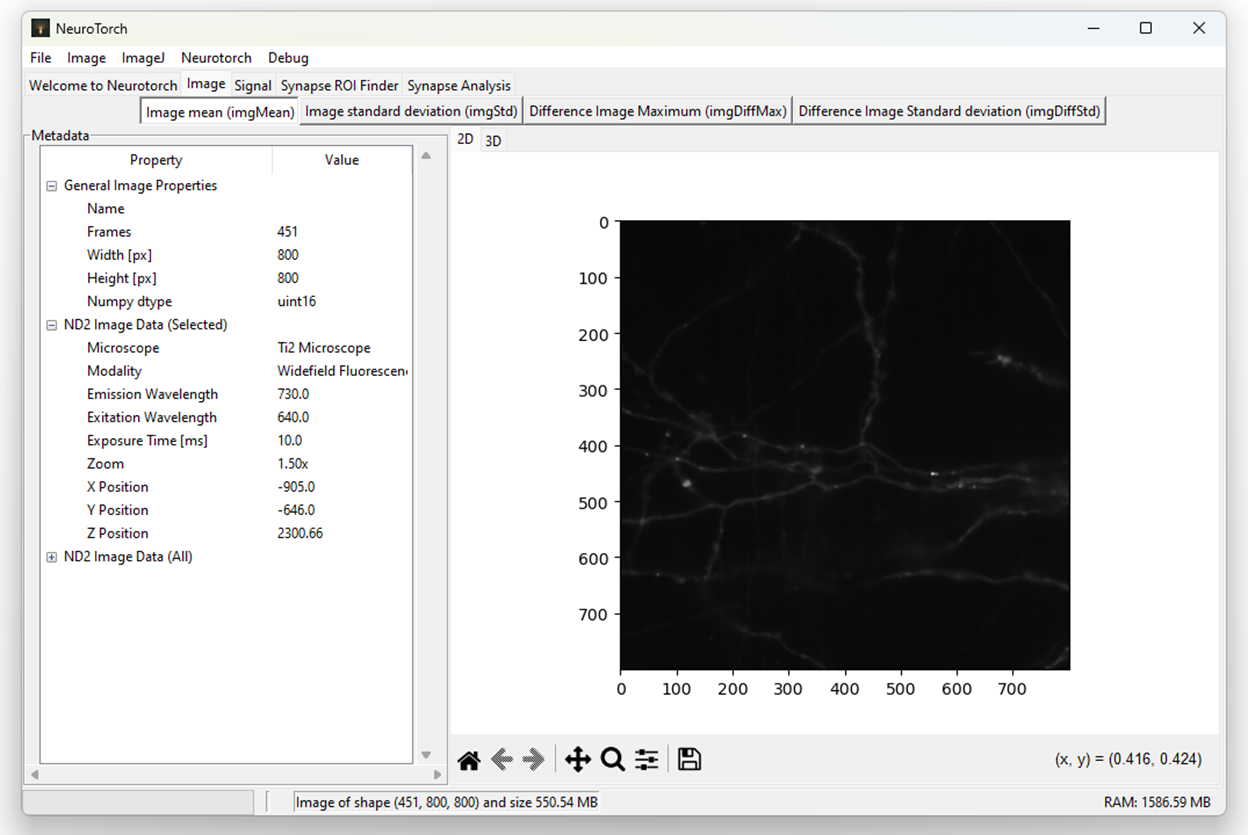
First impression of an file opened in Neurotorch. For specific file formats (here nd2), a variety of metadata can be extracted
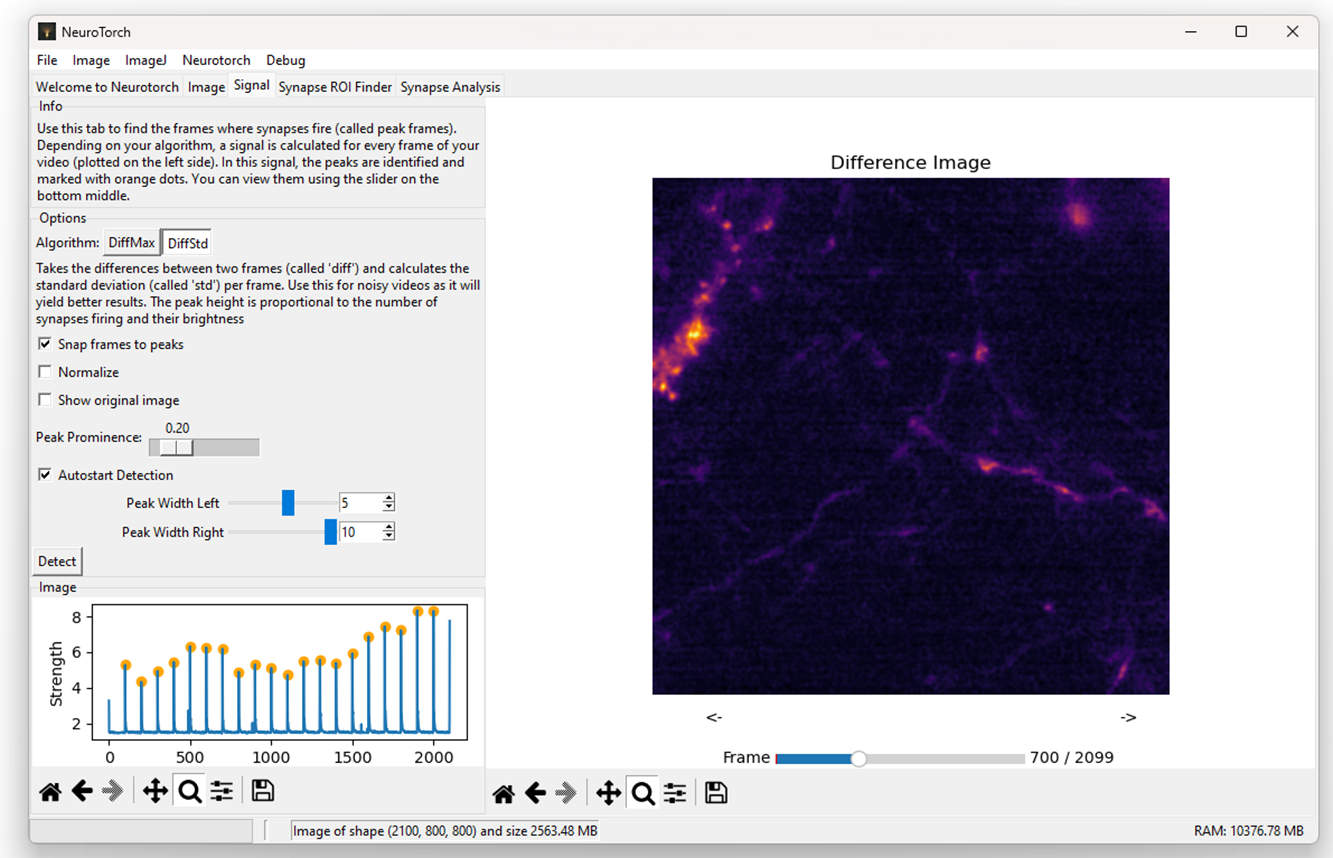
Use the tab 'Signal' to find the timepoints with stimulation (marked in the plot on the left site with yellow dots). You can also use this tab to view the video frame by frame
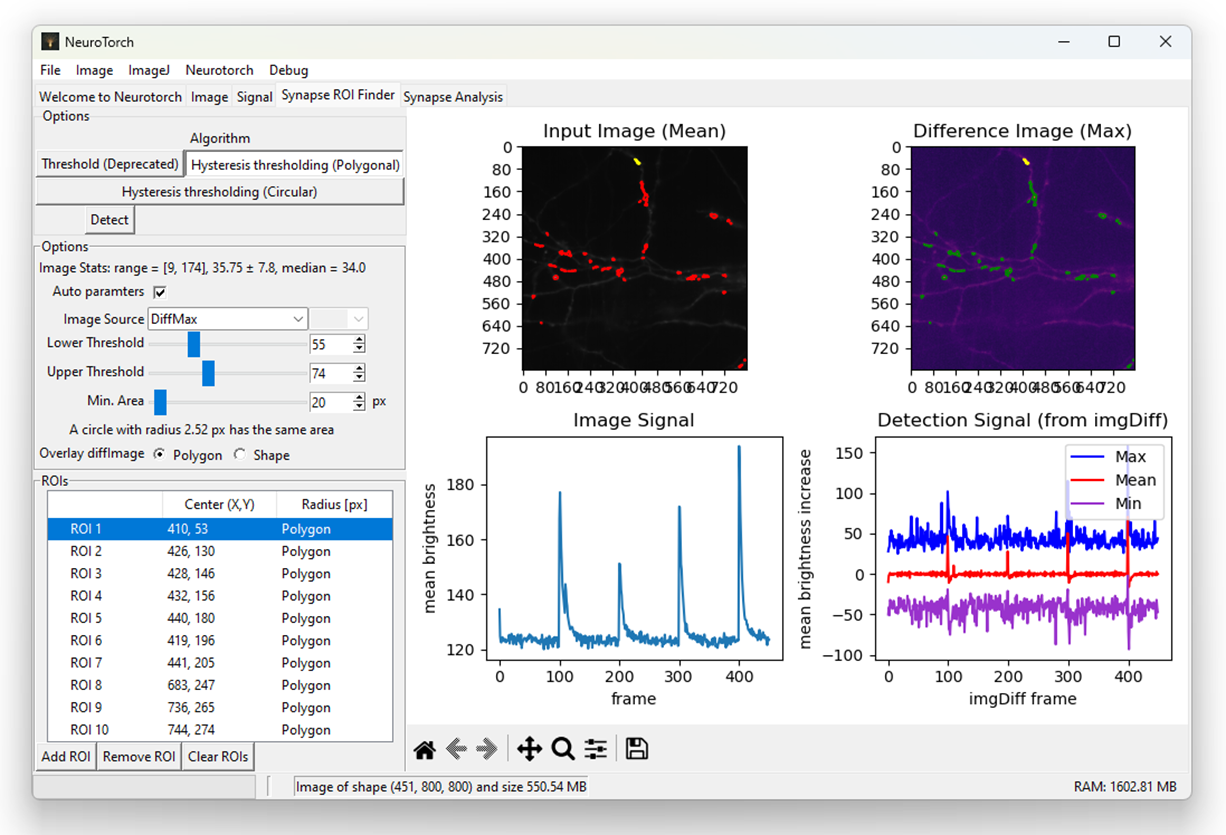
Extraction of regions with high synaptic activity. For the choosen image with good enough signal to noise ratio, all settings were determined automatically by the program and nothing more than pressing 'Detect' was necessary to get this screen. The ROIs are marked in the images with red boundaries while the selected ROI displayed also with the mean value over time is marked with yellow boundaries
Release notes
24.11.6 (27.11.2024)
- New detection algorithm: Added the Local Maximum Algorithm with much better performance than
- GUI: Massively improved the GUI settings by applying a consistent layout
- Detection Algorithms: Complete rewrite of the detection algorithms integration and adjusting of some parameters
- New Tooltip feature: Introduced tooltips and a new libary to handle string ressources in Neurotorch
- Normalized Std, Mean and Median: By default, for ROI detection now normalized values are used
- Colorbar: Added colorbar to all plots
- Improved signal removing: Fixed and improved some inconsistencies creating the imgDiff
- Image Source: Now for all algorithms the image source can be selected (not just Hysteresis Thresholding)
- Massive code review: Massive review of code and improved stability, for example event system, image loading or Tab ROIFinder plotting
24.11.5 (21.11.2024)
- Bugfix The documentation was not included properly
24.11.4 (21.11.2024)
- Introduction of Plugins: Added the ability to add plugins to neurotorch and introduced TraceSelector as preinstalled plugin
- Cache: Added 'Clear cache' option to denoise menu
- Various bugfixes
Release history Release notifications | RSS feed


Download files
Download the file for your platform. If you're not sure which to choose, learn more about installing packages.
Source Distribution
Built Distribution
Filter files by name, interpreter, ABI, and platform.
If you're not sure about the file name format, learn more about wheel file names.
Copy a direct link to the current filters
File details
Details for the file neurotorchmz-24.11.6.tar.gz.
File metadata
- Download URL: neurotorchmz-24.11.6.tar.gz
- Upload date:
- Size: 5.6 MB
- Tags: Source
- Uploaded using Trusted Publishing? No
- Uploaded via: twine/5.1.1 CPython/3.12.7
File hashes
| Algorithm | Hash digest | |
|---|---|---|
| SHA256 |
06dc678dd1fd1b7caa52b46e12de542e2cb75a3fb96768f0bd99a7aff10bc14e
|
|
| MD5 |
bf230b2237473e570622ad8d4e15ff3a
|
|
| BLAKE2b-256 |
6226e329ded18a766eb63ef7c5919d1e54fc466d214f80fef55a3dda6784df67
|
File details
Details for the file neurotorchmz-24.11.6-py3-none-any.whl.
File metadata
- Download URL: neurotorchmz-24.11.6-py3-none-any.whl
- Upload date:
- Size: 1.3 MB
- Tags: Python 3
- Uploaded using Trusted Publishing? No
- Uploaded via: twine/5.1.1 CPython/3.12.7
File hashes
| Algorithm | Hash digest | |
|---|---|---|
| SHA256 |
f9526f3ff37ffe44fea6d1c1ce064aadbbf5564e7138fdb5fabeebe9ca2da804
|
|
| MD5 |
97d46f0ab9742fba2fcff9ea01844ee2
|
|
| BLAKE2b-256 |
8403de824e7dbfdfd3f46aa33b7ba2cf83f5f33e6dfb017a89bd6e9cf15f878b
|






