
Neurotorch is a tool designed to extract regions of synaptic activity in neurons tagges with iGluSnFR, but is in general capable to find any kind of local brightness increase due to synaptic activity
Verified details
These details have been verified by PyPIProject links
GitHub Statistics
Maintainers

Project description







Please note: There is another project called neurotorch on GitHub/PyPI not related to this project. To avoid mix-up, the package is named neurotorchmz with the mz as a refrence to Mainz where the software was developed.
Neurotorch
Neurotorch is a tool designed to extract regions of synaptic activity in neurons tagges with iGluSnFR, but is in general capable to find any kind of local brightness increase due to synaptic activity. It works with microscopic image series / videos and is able to open an variety of formats (for details see below)
- Fiji/ImageJ: Full connectivity provided. Open files in ImageJ and send them to Neurotorch and vice versa.
- Stimulation extraction: Find the frames where stimulation was applied
- ROI finding: Auto detect regions with high synaptic activity. Export data directly or send the ROIs back to ImageJ
- Image analysis: Analyze each frame of the image and get a visual impression where signal of synapse activity was detected
- API: You can access the core functions of Neurotorch also by importing it as an python module
Installation



Neurotorch can be downloaded in a standalone, portable version for Windows and MacOS. The download comes with a compatible Python environment containing all necessary dependencies. Please note that Fiji/ImageJ as well as TraceSelector are not included in the build. However Neurotorch is able to automatically install them once you want to use them.
Installation for advanced users
If you already have Python installed, you can also install it via pip as a very small (~ 1 MB) package:
pip install neurotorchmz
This approach is the recommended way if you are familiar with Python as it minimizes the overhead of downloading and storing Python multiple times. It is recommened to use a virtual environment manager like miniconda. Please refer to the documentation for more details.
If you want to use the Fiji/ImageJ bridge you will need to install OpenJDK and Apacha maven and add them to your system PATH. While Neurotorch is able to install those for you into your AppData folder, you can also install them manually from openjdk.org and maven.apache.org
To run Neurotorch, type
python -m neurotorchmz
You can create a shortcut on your Desktop where you replace the command python with the path to your python executable.
If you want to interact with Neurotorch you can import it as an module
import neurotorchmz
session = neurotorchmz.start_background(headless=False)
To update your installation, type
pip install neurotorchmz --upgrade
Documentation

You can find the full documentation under andreasmz.github.io/neurotorch.
About / Citation
Neurotorch was developed at the AG Heine (Johannes Gutenberg Universität, Mainz/Germany) and is currently under active development.
Impressions
Please note: Neurotorch is under continuous development. Therefore the visuals provided here may be outdated in future versions.
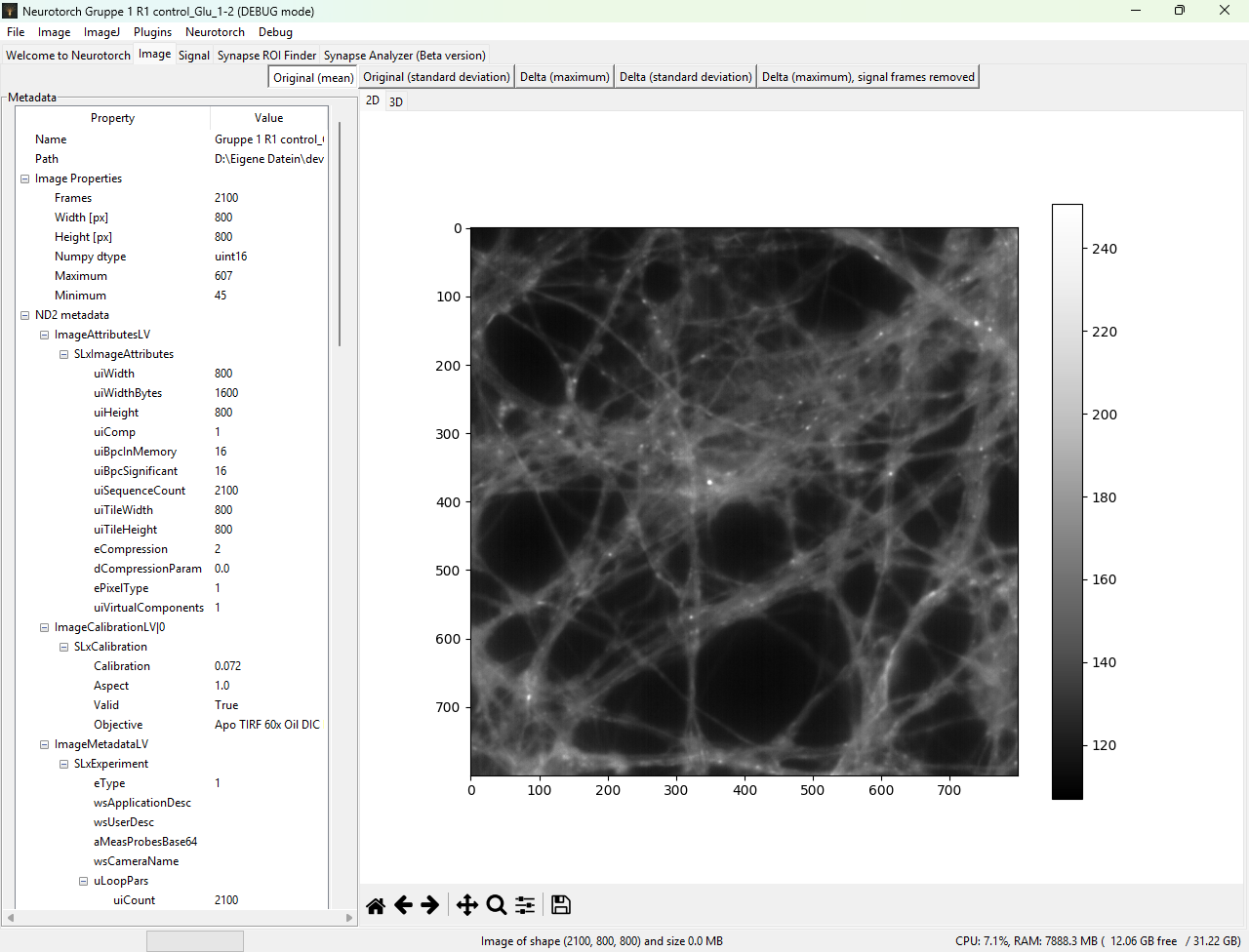
First impression of an file opened in Neurotorch. For specific file formats (here nd2), a variety of metadata can be extracted
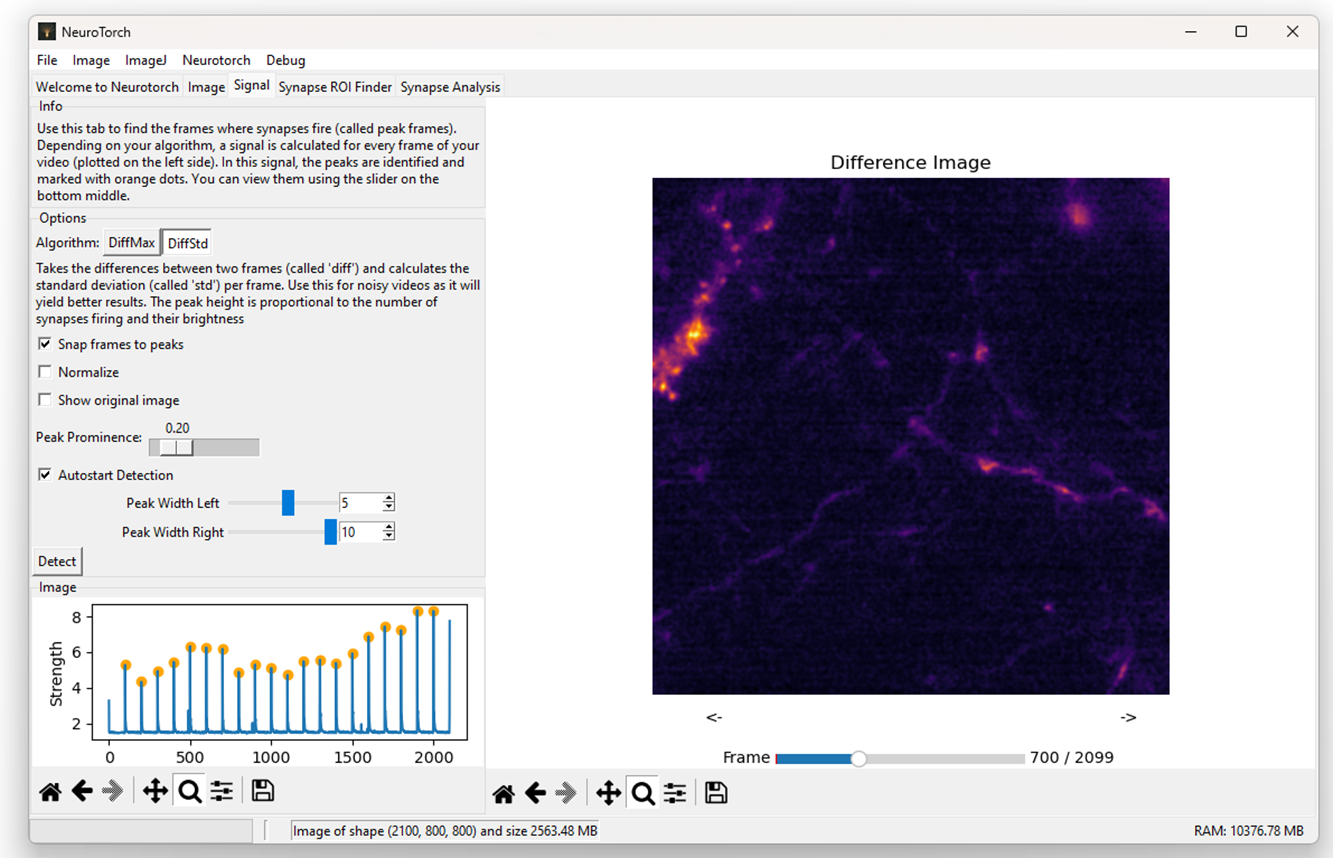
Use the tab 'Signal' to find the timepoints with stimulation (marked in the plot on the left site with yellow dots). You can also use this tab to view the video frame by frame
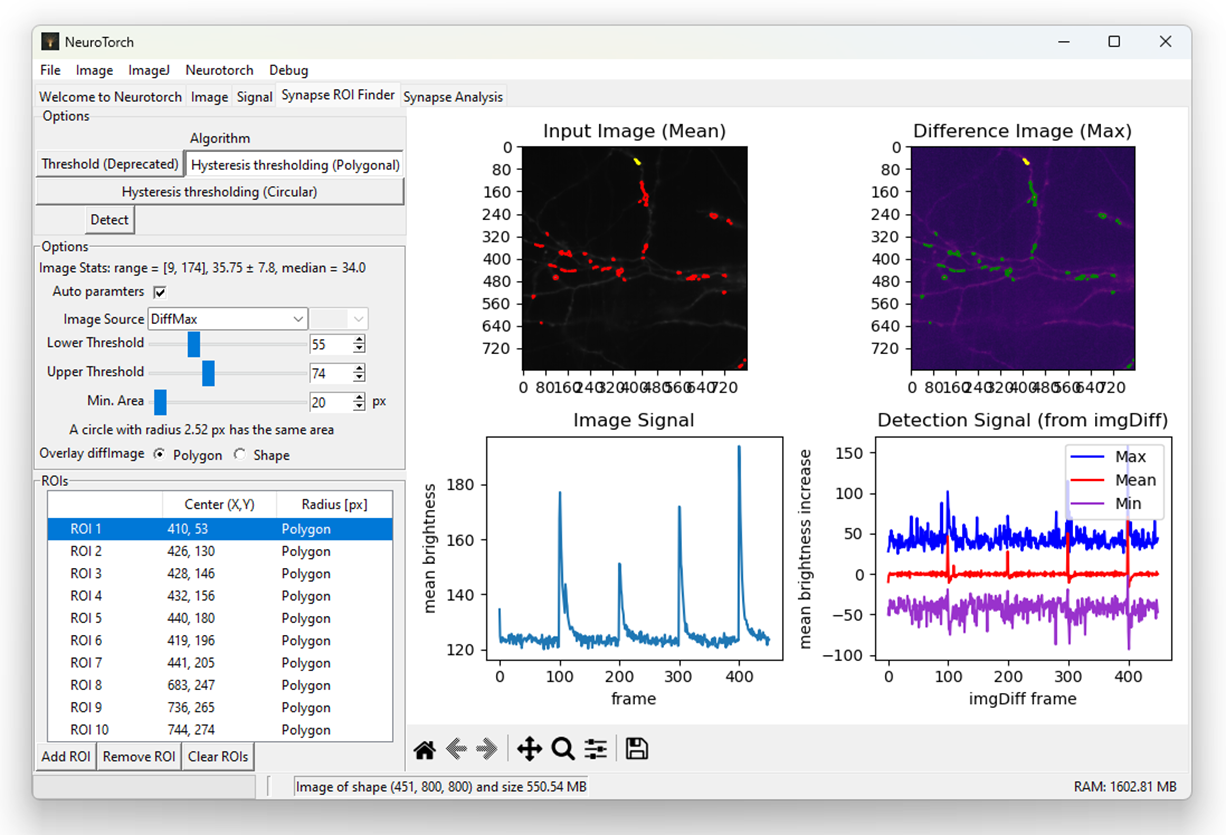
Extraction of regions with high synaptic activity. For the choosen image with good enough signal to noise ratio, all settings were determined automatically by the program and nothing more than pressing 'Detect' was necessary to get this screen. The ROIs are marked in the images with red boundaries while the selected ROI displayed also with the mean value over time is marked with yellow boundaries
Project details
Verified details
These details have been verified by PyPIProject links
GitHub Statistics
Maintainers
Release history Release notifications | RSS feed


Download files
Download the file for your platform. If you're not sure which to choose, learn more about installing packages.
Source Distribution
Built Distribution
Filter files by name, interpreter, ABI, and platform.
If you're not sure about the file name format, learn more about wheel file names.
Copy a direct link to the current filters
File details
Details for the file neurotorchmz-26.1.0.tar.gz.
File metadata
- Download URL: neurotorchmz-26.1.0.tar.gz
- Upload date:
- Size: 854.1 kB
- Tags: Source
- Uploaded using Trusted Publishing? Yes
- Uploaded via: twine/6.1.0 CPython/3.13.7
File hashes
| Algorithm | Hash digest | |
|---|---|---|
| SHA256 |
181a8f9415ff20ee8464051c6fbccb1f5bd2801941751e68ceb736df75bca136
|
|
| MD5 |
28450acd239e6bd0b2a276d25a4ae14f
|
|
| BLAKE2b-256 |
ffd208666d631e2d312b5da4f89188ad57d5a6cd02624d9b18b7e45870316405
|
Provenance
The following attestation bundles were made for neurotorchmz-26.1.0.tar.gz:
Publisher:
build.yml on andreasmz/neurotorch
-
Statement:
-
Statement type:
https://in-toto.io/Statement/v1 -
Predicate type:
https://docs.pypi.org/attestations/publish/v1 -
Subject name:
neurotorchmz-26.1.0.tar.gz -
Subject digest:
181a8f9415ff20ee8464051c6fbccb1f5bd2801941751e68ceb736df75bca136 - Sigstore transparency entry: 844805023
- Sigstore integration time:
-
Permalink:
andreasmz/neurotorch@04a274c2f63f2d0c98a9d50c00d80e95a5b1d376 -
Branch / Tag:
refs/tags/v26.1.0 - Owner: https://github.com/andreasmz
-
Access:
public
-
Token Issuer:
https://token.actions.githubusercontent.com -
Runner Environment:
github-hosted -
Publication workflow:
build.yml@04a274c2f63f2d0c98a9d50c00d80e95a5b1d376 -
Trigger Event:
push
-
Statement type:
File details
Details for the file neurotorchmz-26.1.0-py3-none-any.whl.
File metadata
- Download URL: neurotorchmz-26.1.0-py3-none-any.whl
- Upload date:
- Size: 866.4 kB
- Tags: Python 3
- Uploaded using Trusted Publishing? Yes
- Uploaded via: twine/6.1.0 CPython/3.13.7
File hashes
| Algorithm | Hash digest | |
|---|---|---|
| SHA256 |
1209516449bc842769a96349d01e87c1611577a56b808233bfe08e5ad3be21e1
|
|
| MD5 |
3c4b19fc73bfbac2920b18af73d11118
|
|
| BLAKE2b-256 |
eac9a605cb3f140974827f67e7daf45bd5f9e7ce70126c5da30775c56f91a592
|
Provenance
The following attestation bundles were made for neurotorchmz-26.1.0-py3-none-any.whl:
Publisher:
build.yml on andreasmz/neurotorch
-
Statement:
-
Statement type:
https://in-toto.io/Statement/v1 -
Predicate type:
https://docs.pypi.org/attestations/publish/v1 -
Subject name:
neurotorchmz-26.1.0-py3-none-any.whl -
Subject digest:
1209516449bc842769a96349d01e87c1611577a56b808233bfe08e5ad3be21e1 - Sigstore transparency entry: 844805028
- Sigstore integration time:
-
Permalink:
andreasmz/neurotorch@04a274c2f63f2d0c98a9d50c00d80e95a5b1d376 -
Branch / Tag:
refs/tags/v26.1.0 - Owner: https://github.com/andreasmz
-
Access:
public
-
Token Issuer:
https://token.actions.githubusercontent.com -
Runner Environment:
github-hosted -
Publication workflow:
build.yml@04a274c2f63f2d0c98a9d50c00d80e95a5b1d376 -
Trigger Event:
push
-
Statement type:






