
FT8 Decoding and Encoding in Python with test/loopback code

Project description
PyFT8 
FT8 Decoding and Encoding in Python with CLI and research code
This repository contains Python code to decode and encode (all the way to audio) FT8, plus a minimal Command Line Interface for reception, and a nascent set of research code.
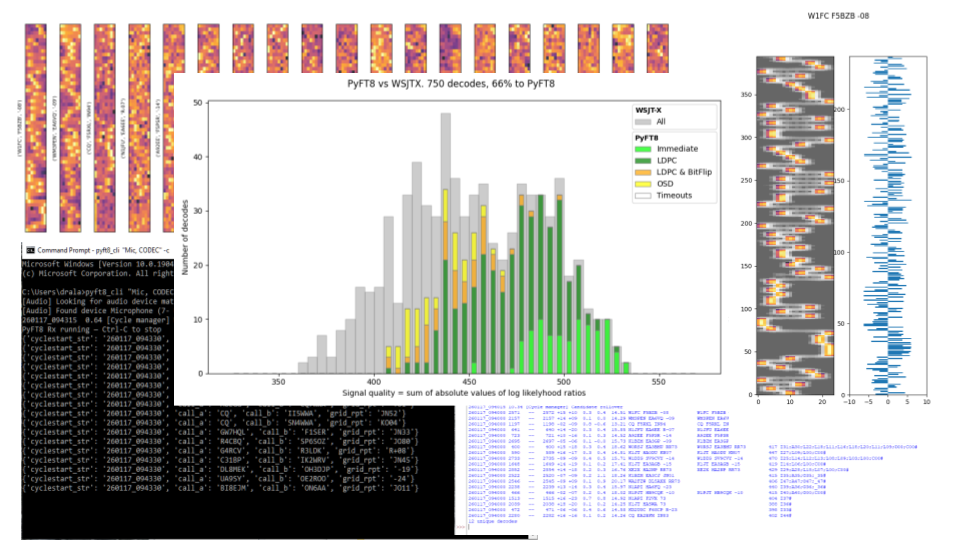
Motivation
This started out as me thinking "How hard can it be, really?" after some frustration with Windows moving sound devices around and wanting to get a minimal decoder running that I can fully control.
I didn’t want to produce yet another port of the original Fortran / C into another language: instead I wanted to see how far I could get following audio -> spectrogram -> symbols -> bits -> error correction without resyncs and special treatments, writing my own code from scratch as far as possible. Also this has been, more than I expected, an exercise in writing Python ‘Pythonically’ for speed, which means absolutely not duplicating the big nested loops of Fortran and C. It also means writing code that is wide and short rather than thin and long, which suits my thinking style perfectly!
My current aim is to push the low SNR performance whilst using only one time/frequency grid and no time-domain processing.
Code I'd like to highlight, all in 100% Python:
- LDPC using just three 5~8 line functions and running 250 us per iteration on a Dell Optiplex
- Ordered Statistics Decoding in about 60 lines of code & similarly fast (not measured yet)
Uses
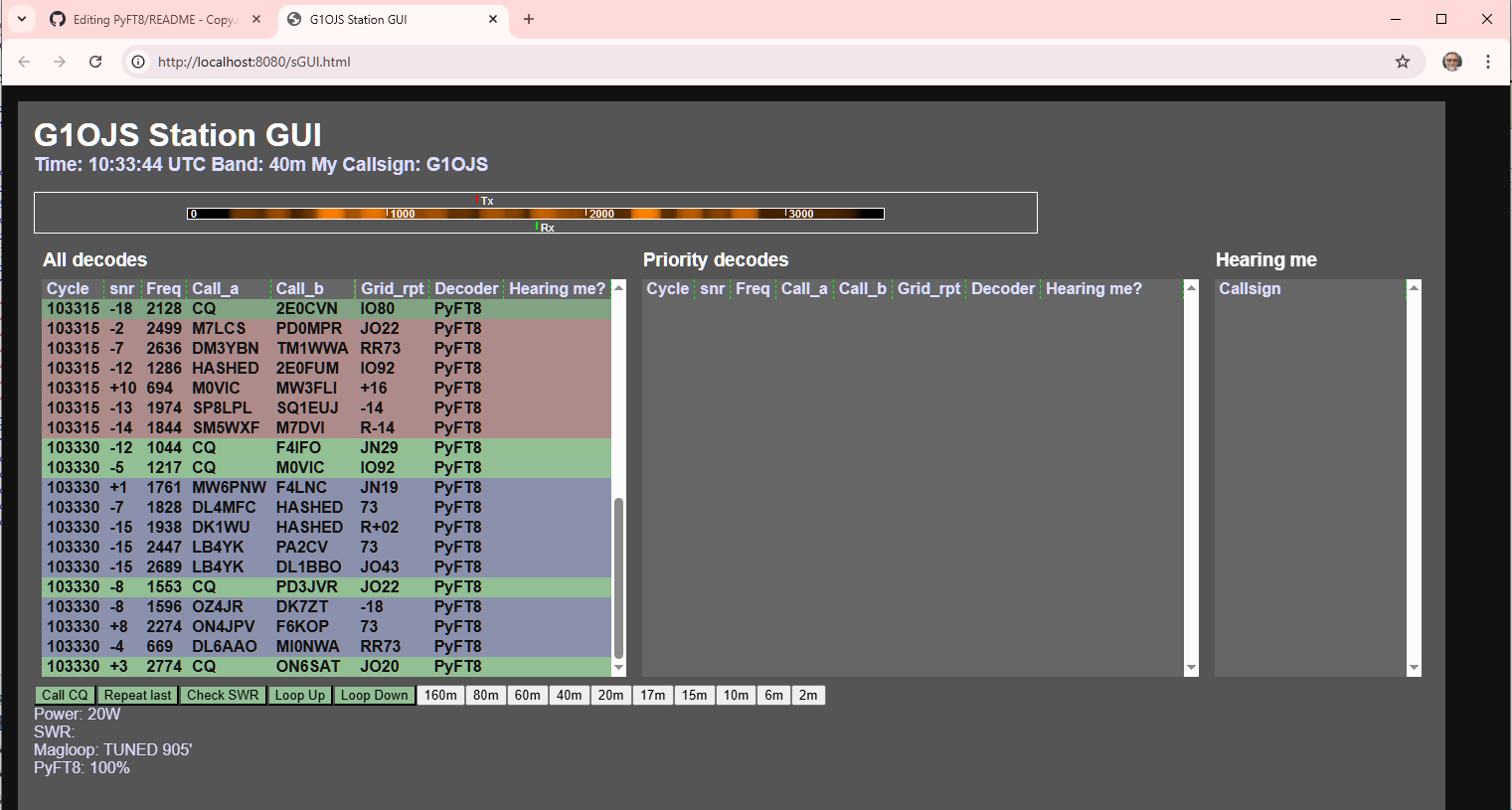
I use this code for my own hobby-level reseearch into FT8 decoding and Python coding techniques, and I'm also building a browser-GUI station controller (image below) which has an FT8 transceiver integrated within it. You can see that here but note that it's focussed on my station, i.e. ICOM-IC-7100 with an Arduino controlling antenna switching and magloop tuning.
Performance
On a quiet band with good signals, PyFT-8 typically gets 70% or 80% and often 100% of WSJT-x decodes. On a crowded band, PyFT8 performs less well. WSJT-x uses signal subtraction to improve performance with overlapping signals. PyFT8 can decode overlapping signals surprisingly well, but not as well as WSJT-x. The plots below show real world performance on 20m respectively over lunchtime, with relatively many signals.
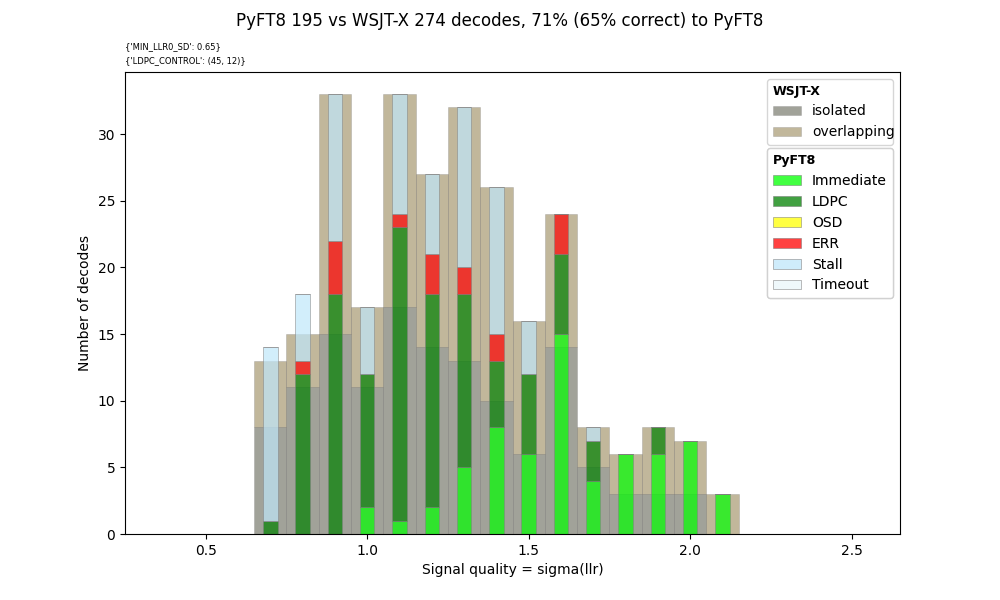
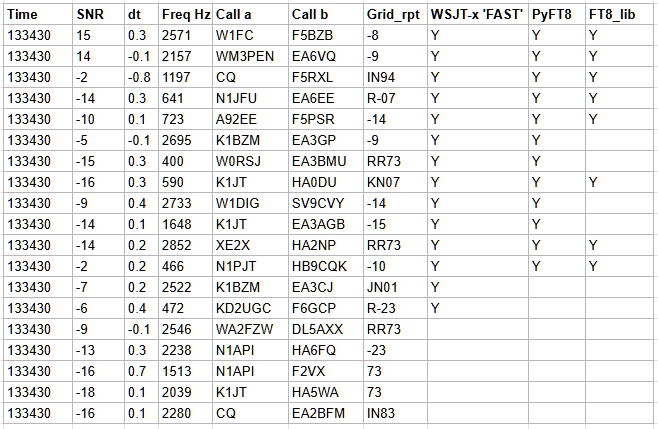
I have been using the file "210703_133430.wav" (third plot above) as a reference. In NORM mode, WSJT-x gets 19 decodes. WSJT-x in FAST mode gets 14 decodes, PyFT8 gets 12(*), and FT8_lib gets 8. The specific decodes are shown in the table below.
(*) When using a Kaiser fft window param 20, 3 bins per tone, 3 bins per symbol, and suitably adjusted thresholds controlling bit-flipping, LDPC and OSD.
However, a single wav file with a single FT8 cycle is not sufficient to characterise performance - it's been good for developing, but it's not enough for characterising. So, I've taken a step further by rewriting the decoding code to allow tests to be run in batch mode using a folder of 15s wav files. The image below shows the number of decodes from PyFT8 and FT8_lib both as a percentage of WSJT-x V2.7.0 running in NORM mode. The source wav files are copied from https://github.com/kgoba/ft8_lib/tree/master/test/wav/20m_busy, and I've run ft8_lib and PyFT8 for all 38 of them, as well as updating the WSJT-X results to version 2.7.0.
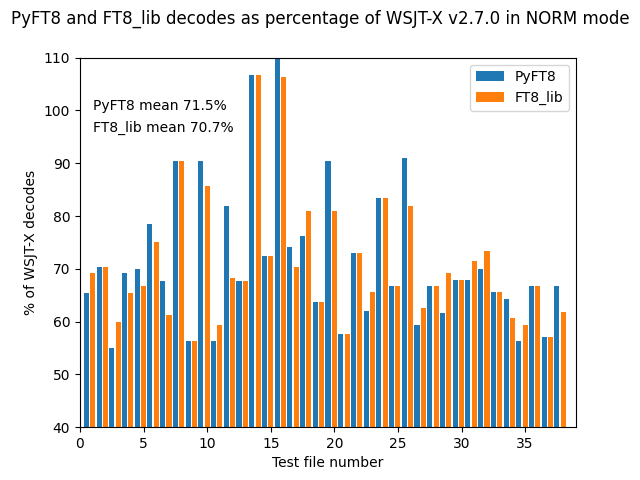
These tests show that PyFT8 is within a few percent of FT8_lib's performance over all 38 'busy' 20m wav file tests. Reading FT8_lib's source code gave me a few good tips to improve performance to this level:
- Swap my previous Kaiser(20) fft window for a Hanning window, at the same time as changing from 3 frequency bins per tone to 2, and from 3 bins per symbol to 4.
- Dial down the use of OSD to improve speed (and after some parametric testing, 'dialled down' = 'removed')
- The killer, lurking in my code and forgotten; expand the timing tolerance for signal start from my previous 0 to +1.9 seconds to a range of -1.12 to +3.48 seconds(*), allowing for signals starting as early as the cycle boundary corresponding to the first data symbol (#8 of 79) and signals ending as late as 15s corresponding to the last data symbol (#72 of 79). I had previously been throwing away good candidates!
(*) How do you sync a signal whose sync block starts before t=0? Simple - use the second Costas block in the middle of the signal.
Contents
[being written]
Installation
This repository is usually a little ahead of the releases I send to PyPI, but you can pip install it from there and just use the Command Line Interface (which can also transmit individual messages) if you want to.
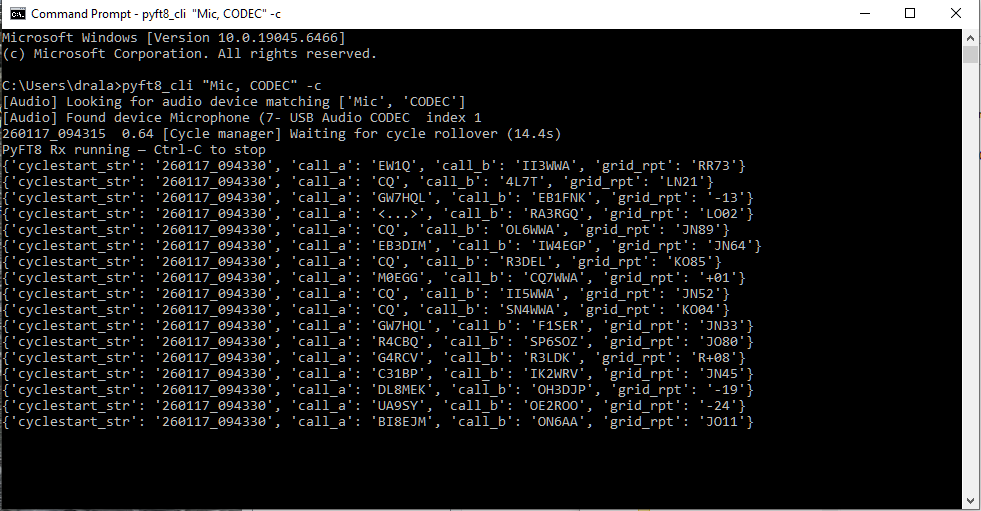
Install using:
pip install PyFT8
And to run, use the following (more info here)
PyFT8_cli "Keyword1, Keyword2" [-c][-v]
* where keywords identify the sound device - partial match is fine - and -c = concise, -v = verbose
Otherwise, please download or browse the code, or fork the repo and play with it! If you do fork it, please check back here as I'm constantly (as of Jan 2026) rewriting and improving.
Limitations
In pursuit of tight code, I've concentrated on core standard messages, leaving out some of the less-used features. The receive part of the code doesn't (yet) have the full capability of the advanced decoders used in WSJT-x, and so gets only about 60% of the decodes that WSJT-x gets, depending on band conditions (on a quiet band with only good signals PyFT8 will get close to 100%).
Acknowledgements
This project implements a decoder for the FT8 digital mode. FT8 was developed by Joe Taylor, K1JT, Steve Franke, K9AN, and others as part of the WSJT-X project. Protocol details are based on information publicly described by the WSJT-X authors and in related open documentation.
Some constants and tables (e.g. Costas synchronization sequence, LDPC structure, message packing scheme) are derived from the publicly available WSJT-X source code and FT8 protocol descriptions. Original WSJT-X source is © the WSJT Development Group and distributed under the GNU General Public License v3 (GPL-3.0), hence the use of GPL-3.0 in this repository.
Also thanks to Robert Morris for basicft8(*1) - the first code I properly read when I was wondering whether to start this journey. (*1 note: applies to FT8 pre V2)
Useful resources:
WSJTx - focussed:
- WSJT-X on Sourceforge
- W4KEK WSJT-x git mirror (searchable)
Other FT8 decoding repos:
- weakmon
- FT8_lib
- 'ft8modem - a command-line software modem for FT8' including source code (C++ and Python) (bottom of page)
FT8 decoding explorations / explanations
- VK3JPK's FT8 notes including comprehensive Python source code
- G4JNT notes on LDPC coding process
FT8 decoding in hardware
- Optimizing the (Web-888) FT8 Skimmer Experience (see also RX-888 project )
- 'DX-FT8-Transceiver' source code, the firmware part of the DX-FT8 Transceiver project
FT8 encode/decode simulators:
Browser-based decoder/encoders
- ft8js - source github, uses FT8_lib
- ChromeFT8 Browser Extension, decoder adapted from ft8js
Release history Release notifications | RSS feed


Download files
Download the file for your platform. If you're not sure which to choose, learn more about installing packages.
Source Distribution
Built Distribution
Filter files by name, interpreter, ABI, and platform.
If you're not sure about the file name format, learn more about wheel file names.
Copy a direct link to the current filters
File details
Details for the file pyft8-1.3.0.tar.gz.
File metadata
- Download URL: pyft8-1.3.0.tar.gz
- Upload date:
- Size: 95.3 MB
- Tags: Source
- Uploaded using Trusted Publishing? No
- Uploaded via: twine/6.1.0 CPython/3.12.2
File hashes
| Algorithm | Hash digest | |
|---|---|---|
| SHA256 |
844ebea4536e1bf01553b39a0d32da44654d4f1753a9094b25bbfb1d6c3194b0
|
|
| MD5 |
d1dca95fdf3a325b0786664a21940b63
|
|
| BLAKE2b-256 |
4a6b9c1ad083cbef7831a1b66353673017074f0053495a7a9ea1a3d9813de39a
|
File details
Details for the file pyft8-1.3.0-py3-none-any.whl.
File metadata
- Download URL: pyft8-1.3.0-py3-none-any.whl
- Upload date:
- Size: 35.5 kB
- Tags: Python 3
- Uploaded using Trusted Publishing? No
- Uploaded via: twine/6.1.0 CPython/3.12.2
File hashes
| Algorithm | Hash digest | |
|---|---|---|
| SHA256 |
38123fba1f7ef60c0f435712b3ca1c038ed65e492e624c2008aba787db5b7f14
|
|
| MD5 |
23cebc596a0891abefcee9cc0b7beb24
|
|
| BLAKE2b-256 |
cdf2ea587586501169c3e9dba9ad7842cd15700b7d20f304d964eccf6c553051
|






