
PyMemoryEditor
A pure-Python library (built on ctypes) that lets you inspect, modify and search the memory of any running process in a few lines of Python — Cheat Engine workflows on Windows, Linux and macOS!

Read, write and scan the memory of any process — straight from Python.
One unified API. Three operating systems. No C compiler. No native build step.





Runs on Windows · Linux · macOS — 32-bit and 64-bit.
Tweak a value in a running game · inspect a live program's state · harvest data straight from RAM.
Install
pip install PyMemoryEditor
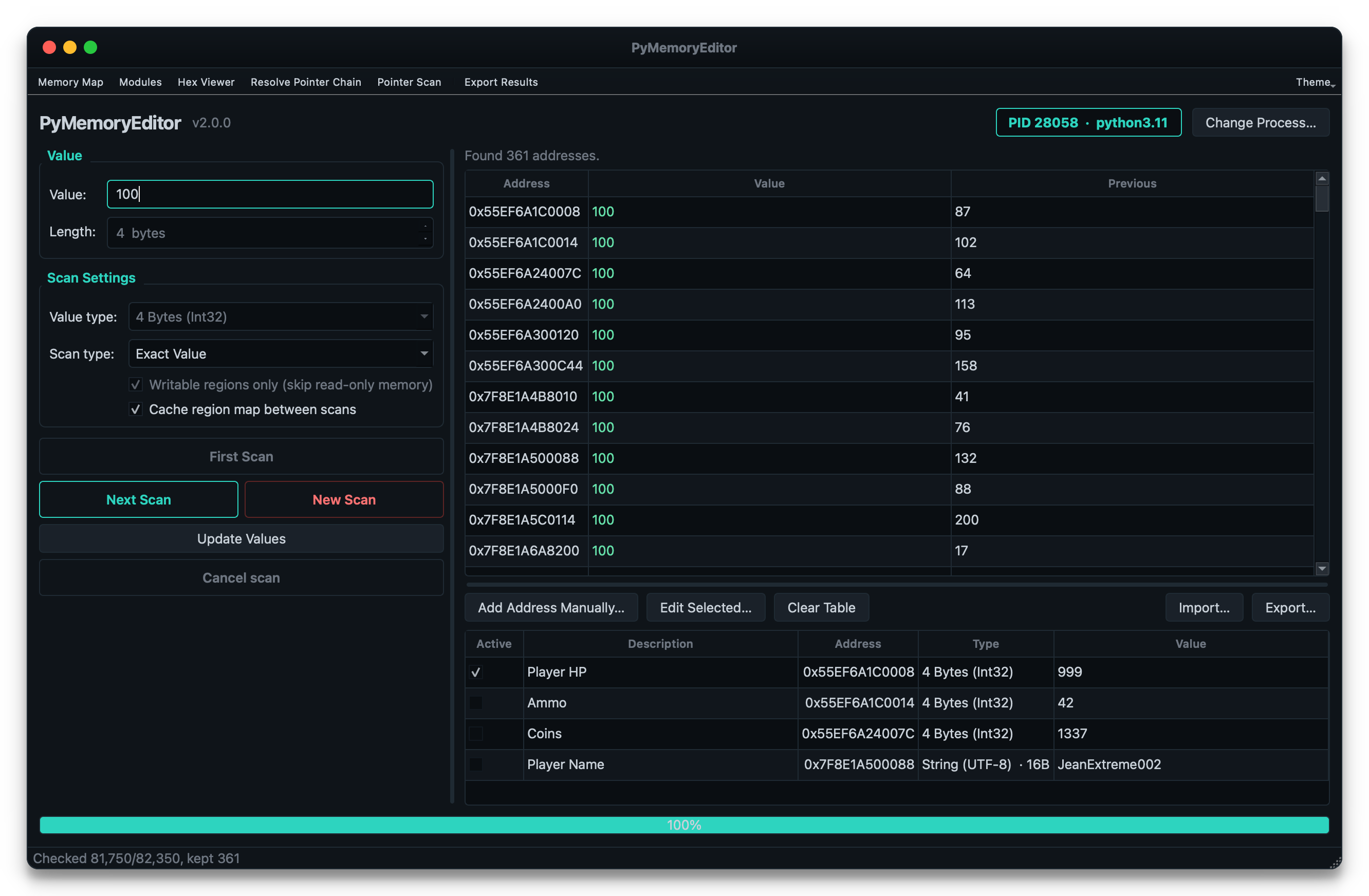
To also install the bundled GUI app (a Cheat Engine-style scanner), use the app extra:
pip install "PyMemoryEditor[app]"
pymemoryeditor
For faster scans on large processes, add the speed extra. It pulls in NumPy
and automatically vectorizes the numeric scan comparison loop — ~10–30× faster on
selective scans:
pip install "PyMemoryEditor[speed]"
To let an AI assistant drive the library over the Model Context Protocol, use
the mcp extra (see below):
pip install "PyMemoryEditor[mcp]"
📖 Full guide at Read the Docs.
See it in action
from PyMemoryEditor import OpenProcess

with OpenProcess(name="game.exe") as process:

    # Scan the whole process for every address holding the value 100.
    for address in process.search_by_value(int, value=100):
        print(f"Found at 0x{address:X}")

    # Read the current value, then write a new one back.
    current = process.read_int(address)
    process.write_int(address, current + 500)
That's it — read, write or scan another process in three lines, the same way on every platform.
Let an AI assistant do it (MCP)
PyMemoryEditor ships a Model Context Protocol server, so an AI assistant can run the whole loop itself:
"Find the health value in my game. It's 100 right now."
It scans, asks you to take damage, refines the matches, and hands you the address.
pip install "PyMemoryEditor[mcp]"
claude mcp add pymemoryeditor -- pymemoryeditor-mcp
Or in any client that reads mcpServers JSON (Claude Desktop, editors, …):
{
  "mcpServers": {
    "pymemoryeditor": {
      "command": "pymemoryeditor-mcp",
      "args": []
    }
  }
}
Fourteen tools cover the full workflow, with scan results kept server-side behind a handle, so a 40 000-hit first scan costs a few tokens instead of your whole context.
Read the MCP guide to learn more.
📖 Documentation
Full documentation lives at pymemoryeditor.readthedocs.io — installation, the Cheat Engine workflow, every method and parameter, the GUI app guide, platform notes and troubleshooting.
A quick map of where to go:
| Quick Start | Open a process, read, write and run your first scan. |
| Searching memory | Value scans, ranges, refining results, the Cheat Engine loop. |
| Pattern scan | Find code/data with byte signatures (AOB) and regex. |
| Pointers | Multi-level pointer chains and the live RemotePointer. |
| Pointer scan | Find static pointers that survive ASLR. |
| The GUI app | The bundled Cheat Engine-style scanner. |
| The MCP server | Let an AI assistant drive the scan/refine loop. |
| API reference | Every public class, method and parameter. |
| Platform notes | Permissions and quirks on Windows, Linux and macOS. |
| Troubleshooting | Common errors and how to fix them. |
What can I build with this?
- 🎮 Game modding & speedrunning tools — the classic Cheat Engine use case.
- 🔬 Debugging & introspection — inspect live state without attaching a debugger.
- 📊 Observability tooling — sample variables in a running process for telemetry.
- 🔐 Security & reverse-engineering research — on systems you own or are authorized to test.
- 🎓 Learning — the bundled app is a great teaching tool for how memory scanning works.
[!NOTE] Responsible use. PyMemoryEditor talks to other processes through OS-level APIs. Only point it at processes you own or have explicit permission to inspect.
🤝 Contributing
Pull requests, bug reports and feature ideas are very welcome. Read
CONTRIBUTING.md for the development setup, test layout and
the small set of platform-specific quirks to be aware of.
If PyMemoryEditor helped your project, please ⭐ the repo — it's the easiest way to support the work and to help others discover the library.
License
Released under the MIT License — free for personal and commercial use.
1 maintainer

Release files for PyMemoryEditor 3.0.0
For a detailed explanation of source distributions (sdists) and built distributions (wheels), please see the package formats documentation.
Source distribution (sdist)
| File | Size | Uploaded | |
|---|---|---|---|
| pymemoryeditor-3.0.0.tar.gz | 1.7 MB | Details |
Built distribution (wheel)
| File | Interpreter | ABI | Platform | Reset |
|---|---|---|---|---|
| pymemoryeditor-3.0.0-py3-none-any.whl | Python 3 | none | any | Details |
Total release size: 2.0 MB
Release files / pymemoryeditor-3.0.0.tar.gz
| Download URL | pymemoryeditor-3.0.0.tar.gz |
|---|---|
| Size | 1.7 MB |
| Tags | Source |
|
SHA-256 checksum How to use checksums |
c3cbb3c3ef167e101fbc986ca12150ff89e9a7e5f4b09efb8dde50848732bb3b
|
|
BLAKE2b-256 checksum How to use checksums |
be88d465de1d21dc2ccb6b11b1b40ee92a6e0c1d798ad9a74aba2ff0b0674618
|
| Upload date | |
|
Uploaded using Trusted Publishing? What is trusted publishing? |
Yes |
| Uploaded via |
twine/7.0.0 CPython/3.13.14
|
Provenance
Provenance describes where a file came from. On PyPI, provenance is shared via attestations, which provide a verifiable record of the build or publishing details. View details, limitations and caveats.


PyPI Publish Attestation
PyPI verified that this artifact, at this checksum, originated from the publisher listed below.
Signed by GitHub Actions, verified by PyPI on Sep 8, 2026.
Transparency logRelease files / pymemoryeditor-3.0.0-py3-none-any.whl
| Download URL | pymemoryeditor-3.0.0-py3-none-any.whl |
|---|---|
| Size | 295.5 kB |
| Tags | Python 3 |
|
SHA-256 checksum How to use checksums |
9d651db6796030f3100c70ebaaefec9235041768e8f0623fd0612e3fe984a92b
|
|
BLAKE2b-256 checksum How to use checksums |
9da99f04845234f52b50a8e4b8e3102560e78aa27bfb811aa8707da36af583d1
|
| Upload date | |
|
Uploaded using Trusted Publishing? What is trusted publishing? |
Yes |
| Uploaded via |
twine/7.0.0 CPython/3.13.14
|
Provenance
Provenance describes where a file came from. On PyPI, provenance is shared via attestations, which provide a verifiable record of the build or publishing details. View details, limitations and caveats.
PyPI Publish Attestation
PyPI verified that this artifact, at this checksum, originated from the publisher listed below.
Signed by GitHub Actions, verified by PyPI on Sep 8, 2026.
Transparency log













