
PyPPL - A Python PiPeLine framework







Documentation | API | Change log
Features
- Process caching.
- Process reusability.
- Process error handling.
- Runner customization.
- Easy running profile switching.
- Plugin system.
Installation
pip install PyPPL
Plugin gallery
(*) shipped with PyPPL
- pyppl_report: Generating reports for PyPPL pipelines
- pyppl_flowchart: Generating flowchart for PyPPL
- pyppl_export*: Exporting outputs generated by PyPPL pipeline
- pyppl_echo*: Echoing script output to PyPPL logs"
- pyppl_rich*: Richer information in logs for PyPPL
- pyppl_strict*: More strict check of job success for PyPPL
- pyppl_lock*: Preventing running processes from running again for PyPPL
- pyppl_annotate: Adding long description/annotation for processes
- pyppl_require: Checking and installing requirements for processes
- pyppl_jobtime: Job running time statistics for PyPPL
- pyppl_notify: Email notifications for PyPPL
- pyppl_runcmd: Allowing to run local command before and after each process for PyPPL
- pyppl_runners: Common runners for PyPPL
Writing pipelines with predefined processes
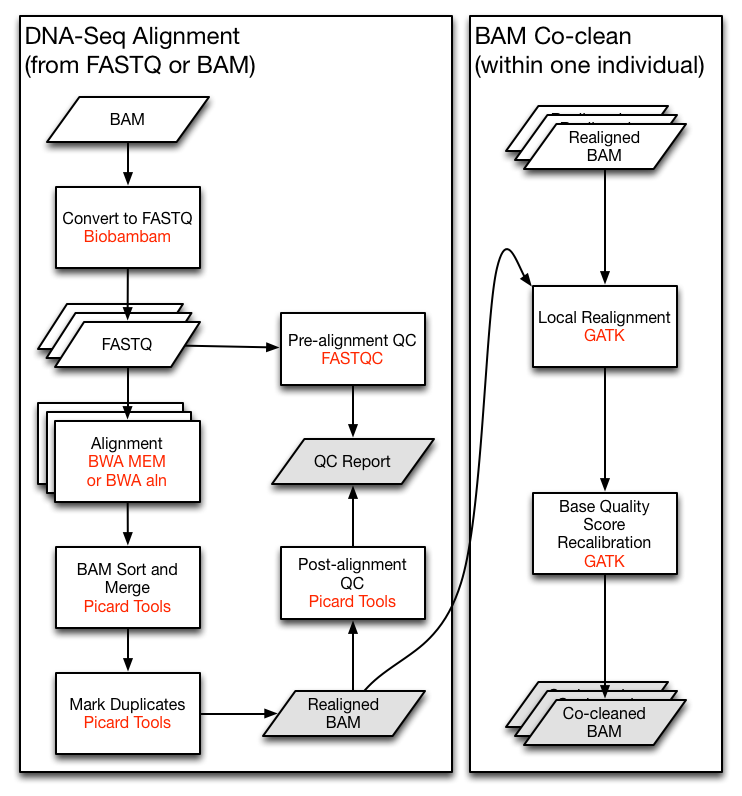
Let's say we are implementing the TCGA DNA-Seq Re-alignment Workflow (The very left part of following figure). For demonstration, we will skip the QC and the co-clean parts here.
demo.py:
from pyppl import PyPPL, Channel
# import predefined processes
from TCGAprocs import pBamToFastq, pAlignment, pBamSort, pBamMerge, pMarkDups

# Load the bam files
pBamToFastq.input = Channel.fromPattern('/path/to/*.bam')
# Align the reads to reference genome
pAlignment.depends = pBamToFastq
# Sort bam files
pBamSort.depends = pAlignment
# Merge bam files
pBamMerge.depends = pBamSort
# Mark duplicates
pMarkDups.depends = pBamMerge
# Export the results
pMarkDups.config.export_dir = '/path/to/realigned_Bams'
# Specify the start process and run the pipeline
PyPPL().start(pBamToFastq).run()
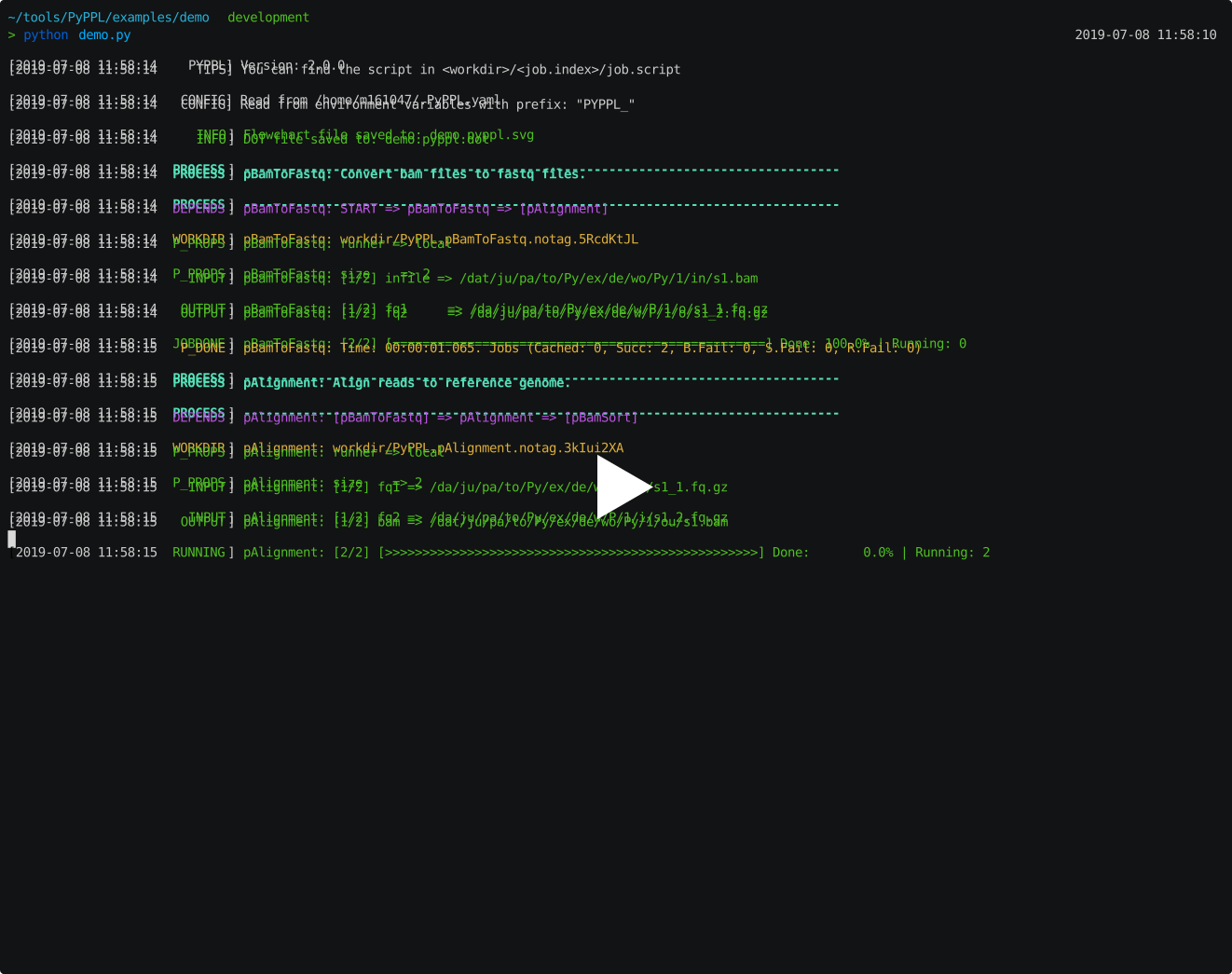
Implementing individual processes
TCGAprocs.py:
from pyppl import Proc
pBamToFastq = Proc(desc = 'Convert bam files to fastq files.')
pBamToFastq.input = 'infile:file'
pBamToFastq.output = [
    'fq1:file:{{i.infile | stem}}_1.fq.gz',
    'fq2:file:{{i.infile | stem}}_2.fq.gz']
pBamToFastq.script = '''
bamtofastq collate=1 exclude=QCFAIL,SECONDARY,SUPPLEMENTARY \
    filename= {{i.infile}} gz=1 inputformat=bam level=5 \
    outputdir= {{job.outdir}} outputperreadgroup=1 tryoq=1 \
    outputperreadgroupsuffixF=_1.fq.gz \
    outputperreadgroupsuffixF2=_2.fq.gz \
    outputperreadgroupsuffixO=_o1.fq.gz \
    outputperreadgroupsuffixO2=_o2.fq.gz \
    outputperreadgroupsuffixS=_s.fq.gz
'''

pAlignment = Proc(desc = 'Align reads to reference genome.')
pAlignment.input = 'fq1:file, fq2:file'
#                             name_1.fq.gz => name.bam
pAlignment.output = 'bam:file:{{i.fq1 | stem | stem | [:-2]}}.bam'
pAlignment.script = '''
bwa mem -t 8 -T 0 -R <read_group> <reference> {{i.fq1}} {{i.fq2}} | \
    samtools view -Shb -o {{o.bam}} -
'''

pBamSort = Proc(desc = 'Sort bam files.')
pBamSort.input = 'inbam:file'
pBamSort.output = 'outbam:file:{{i.inbam | basename}}'
pBamSort.script = '''
java -jar picard.jar SortSam CREATE_INDEX=true INPUT={{i.inbam}} \
    OUTPUT={{o.outbam}} SORT_ORDER=coordinate VALIDATION_STRINGENCY=STRICT
'''

pBamMerge = Proc(desc = 'Merge bam files.')
pBamMerge.input = 'inbam:file'
pBamMerge.output = 'outbam:file:{{i.inbam | basename}}'
pBamMerge.script = '''
java -jar picard.jar MergeSamFiles ASSUME_SORTED=false CREATE_INDEX=true \
    INPUT={{i.inbam}} MERGE_SEQUENCE_DICTIONARIES=false OUTPUT={{o.outbam}} \
    SORT_ORDER=coordinate USE_THREADING=true VALIDATION_STRINGENCY=STRICT
'''

pMarkDups = Proc(desc = 'Mark duplicates.')
pMarkDups.input = 'inbam:file'
pMarkDups.output = 'outbam:file:{{i.inbam | basename}}'
pMarkDups.script = '''
java -jar picard.jar MarkDuplicates CREATE_INDEX=true INPUT={{i.inbam}} \
    OUTPUT={{o.outbam}} VALIDATION_STRINGENCY=STRICT
'''
Each process is indenpendent so that you may also reuse the processes in other pipelines.
Pipeline flowchart
# When try to run your pipline, instead of:
#   PyPPL().start(pBamToFastq).run()
# do:
PyPPL().start(pBamToFastq).flowchart().run()
Then an SVG file endswith .pyppl.svg will be generated under current directory.
Note that this function requires Graphviz and graphviz for python.
See plugin details.

Pipeline report
See plugin details
pPyClone.report = """
## {{title}}
PyClone[1] is a tool using Probabilistic model for inferring clonal population structure from deep NGS sequencing.
}})
```table
caption: Clusters
file: "{{path.join(job.o.outdir, "tables/cluster.tsv")}}"
rows: 10
```
[1]: Roth, Andrew, et al. "PyClone: statistical inference of clonal population structure in cancer." Nature methods 11.4 (2014): 396.
"""
# or use a template file
pPyClone.report = "file:/path/to/template.md"
PyPPL().start(pPyClone).run().report('/path/to/report', title = 'Clonality analysis using PyClone')

Full documentation
1 maintainer

Metadata
1 maintainer
Release files for pyppl 3.2.2
For a detailed explanation of source distributions (sdists) and built distributions (wheels), please see the package formats documentation.
Source distribution (sdist)
| File | Size | Uploaded | Provenance | |
|---|---|---|---|---|
| PyPPL-3.2.2.tar.gz | 62.3 kB | Without provenance | Details |
Built distribution (wheel)
| File | Interpreter | ABI | Platform | Reset |
|---|---|---|---|---|
| PyPPL-3.2.2-py3-none-any.whl | Python 3 | none | any | Details |
Total release size: 130.0 kB
Release files / PyPPL-3.2.2.tar.gz
| Download URL | PyPPL-3.2.2.tar.gz |
|---|---|
| Size | 62.3 kB |
| Tags | Source |
|
SHA-256 checksum How to use checksums |
8a37c56f0aeed8aa72028a6ff29689edd299021427f7e9e87bdae6984b9d6485
|
|
BLAKE2b-256 checksum How to use checksums |
31caef68bb56d23cdf3e961bf1f3edcc49c83f7ea098fff25380aeabdd0bf912
|
| Upload date | |
|
Uploaded using Trusted Publishing? What is trusted publishing? |
No |
| Uploaded via |
poetry/1.0.5 CPython/3.7.3 Linux/3.10.0-1062.12.1.el7.x86_64
|
Release files / PyPPL-3.2.2-py3-none-any.whl
| Download URL | PyPPL-3.2.2-py3-none-any.whl |
|---|---|
| Size | 67.7 kB |
| Tags | Python 3 |
|
SHA-256 checksum How to use checksums |
40a2a79c6dfcfd5848520e9909723c3b1f3a534ac047c55554dde2b920ee8787
|
|
BLAKE2b-256 checksum How to use checksums |
220fc5475ddc0bc5d6e959a4182c875a1864204cf4883960456dc8b34f43cf7e
|
| Upload date | |
|
Uploaded using Trusted Publishing? What is trusted publishing? |
No |
| Uploaded via |
poetry/1.0.5 CPython/3.7.3 Linux/3.10.0-1062.12.1.el7.x86_64
|
Security for pyppl 3.2.2
Provenance
Provenance describes where a file came from. On PyPI, provenance is shared via attestations, which provide a verifiable record of the build or publishing details. View details, limitations and caveats.
No provenance found
None of the files in this release were uploaded with provenance metadata.
A note on package security
PyPI is a repository for distributing packages, not a service for auditing them. While third-party security researchers and our staff do their best to detect and remove malicious packages, PyPI cannot guarantee the quality, security or suitability of any given package.














