
Flat dark theme for PySide and PyQt.

Project description
PyQtDarkTheme
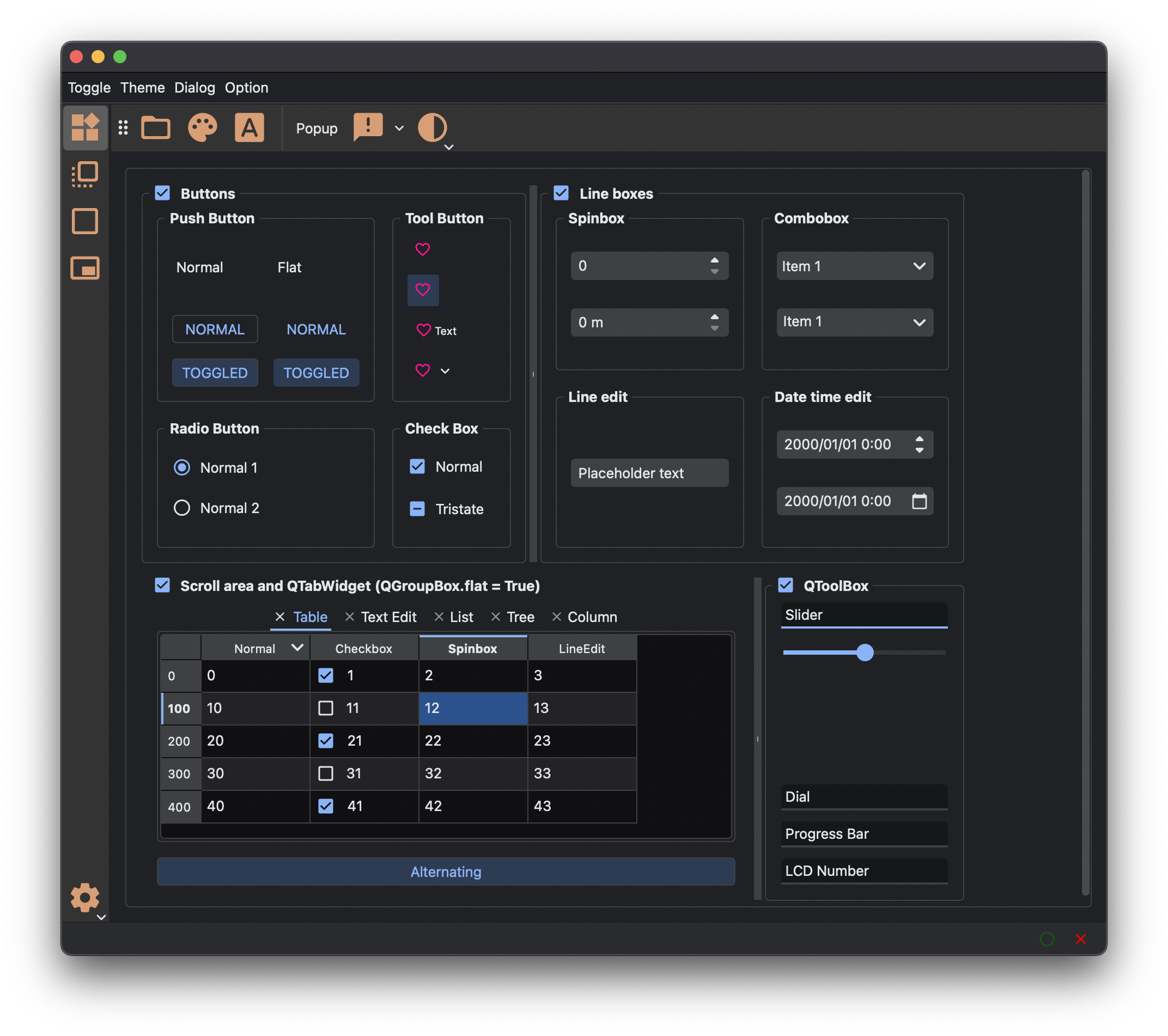
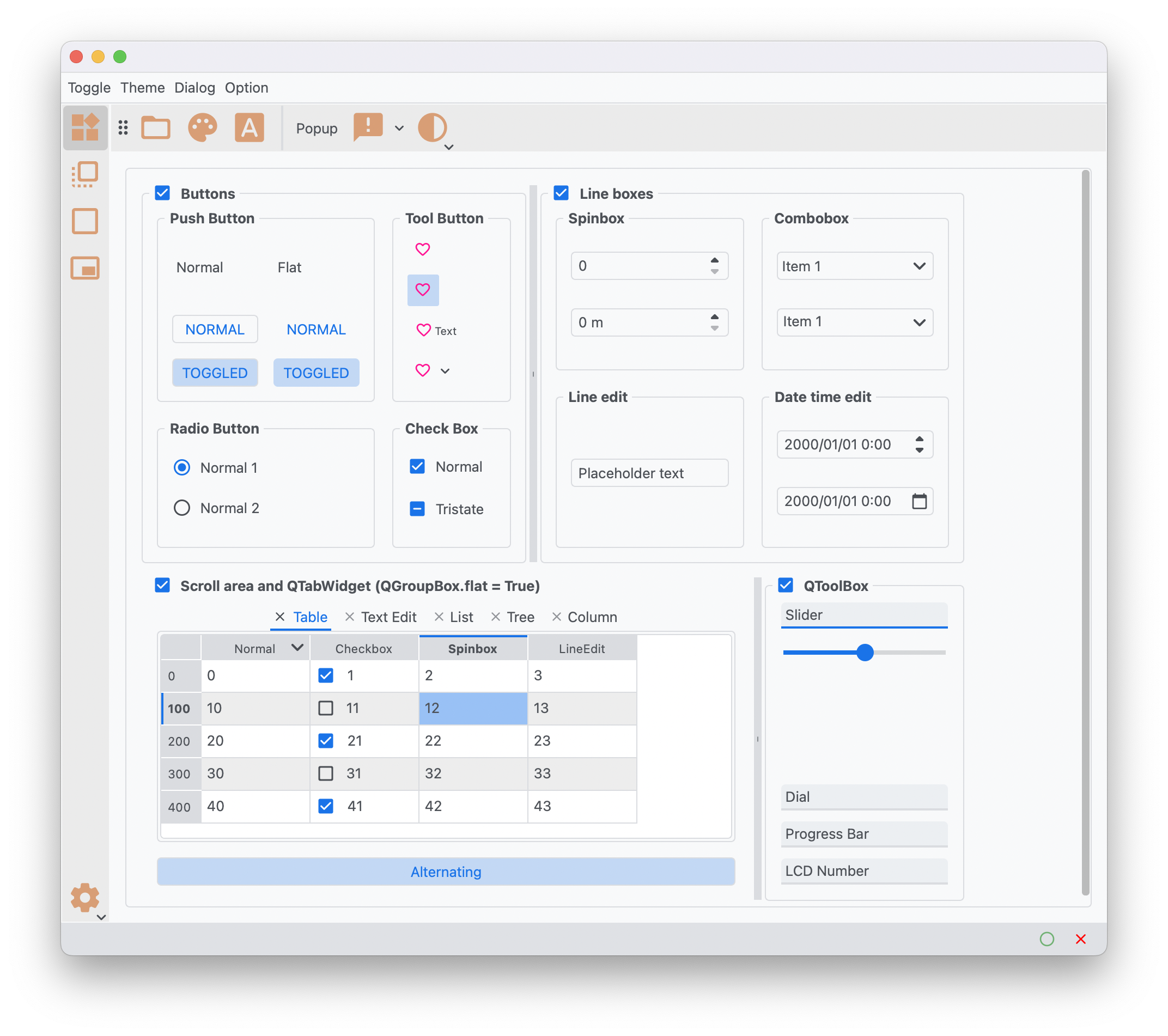
PyQtDarkTheme applies a flat dark theme to QtWidgets application. There's a light theme too. Color balanced from the dark theme for easy viewing in daylight.
Check out the complete documentation.
Project status




Features
- A flat dark and light theme
- Support PySide and PyQt
- Sync with OS's theme and accent (Mac, Windows, Linux)
- Resolve the style differences between Qt versions
- Provide dark/light theme QPalette
- Override Qt old standard icons
Themes
Dark Theme
Light Theme
Requirements
- Python 3.12+
- Qt 5.15+
- PySide6, PyQt6, PyQt5 or PySide2
Installation Method
-
Last released version
pip install pyqtdarktheme
-
Latest development version
pip install git+https://github.com/5yutan5/PyQtDarkTheme.git@main
Usage
import sys

from PySide6.QtWidgets import QApplication, QMainWindow, QPushButton

import qdarktheme

app = QApplication(sys.argv)
# Apply the complete dark theme to your Qt App.
qdarktheme.setup_theme()

main_win = QMainWindow()
push_button = QPushButton("PyQtDarkTheme!!")
main_win.setCentralWidget(push_button)

main_win.show()

app.exec()
Further information can be found in our docs:
Enable HiDPI
# enable_hi_dpi() must be called before the instantiation of QApplication.
qdarktheme.enable_hi_dpi()
app = QApplication(sys.argv)
qdarktheme.setup_theme()
For Qt6 bindings, HiDPI “just works” without using this function.
Light theme
qdarktheme.setup_theme("light")
Sync with OS's theme and accent
qdarktheme.setup_theme("auto")
On macOS, qdarktheme also syncs with accent colors.
Customizing colors
You can customize the theme color.
# Customize accent color.
qdarktheme.setup_theme(custom_colors={"primary": "#D0BCFF"})
For a list of all customizable colors, see the Theme Color Reference:
Sharp frame
You can change the corner style.
# Default is "rounded".
stylesheet = qdarktheme.setup_theme(corner_shape="sharp")
QPalette and stylesheet
You can also only load QPalette and stylesheet. qdarktheme.setup_theme uses the following functions internally.
palette = qdarktheme.load_palette(theme="dark")
stylesheet = qdarktheme.load_stylesheet(theme="dark")
Example
To check all Qt widgets, run:
python -m qdarktheme.widget_gallery
License
The svg files for the PyQtDarkTheme are derived Material design icons(Apache License Version 2.0). Qt stylesheets are originally fork of QDarkStyleSheet(MIT License). Other files are covered by PyQtDarkTheme's MIT license. The accent detector(qdarktheme/_os_appearance/_accent/_mac_detect) is inspired by darkdetect(3-clause BSD License).
Contributing
All contributions, bug reports, bug fixes, documentation improvements, enhancements, and ideas are welcome. You can get started by reading this:
Change log
See Releases.
Release history Release notifications | RSS feed


Download files
Download the file for your platform. If you're not sure which to choose, learn more about installing packages.
Source Distribution
Built Distribution
Filter files by name, interpreter, ABI, and platform.
If you're not sure about the file name format, learn more about wheel file names.
Copy a direct link to the current filters
File details
Details for the file pyqtdarktheme2-2.1.2.tar.gz.
File metadata
- Download URL: pyqtdarktheme2-2.1.2.tar.gz
- Upload date:
- Size: 39.9 kB
- Tags: Source
- Uploaded using Trusted Publishing? No
- Uploaded via: poetry/2.1.3 CPython/3.12.10 Linux/6.11.0-1014-azure
File hashes
| Algorithm | Hash digest | |
|---|---|---|
| SHA256 |
e4027b23384fcccd6f6bf9b2b6344898c76bb9ec9f0aca75b63f8a703c241098
|
|
| MD5 |
2a0ed0fd69f0833208f5f204d1798e61
|
|
| BLAKE2b-256 |
a088cd477b3bd7cfdd674d352c8cef6098de954a3d46d090172a614fc432eda5
|
File details
Details for the file pyqtdarktheme2-2.1.2-py3-none-any.whl.
File metadata
- Download URL: pyqtdarktheme2-2.1.2-py3-none-any.whl
- Upload date:
- Size: 54.1 kB
- Tags: Python 3
- Uploaded using Trusted Publishing? No
- Uploaded via: poetry/2.1.3 CPython/3.12.10 Linux/6.11.0-1014-azure
File hashes
| Algorithm | Hash digest | |
|---|---|---|
| SHA256 |
50fe5fce2a2cfa41d142ba3dd51a636f2d562c8cb203de37175cec65bbf28e53
|
|
| MD5 |
57e1a17e26309ac605ae42a2b03f7336
|
|
| BLAKE2b-256 |
27e0a529d69cb271a9984e26884516117549a696b2adbf0028161935566c85f5
|






