
Qt plotting widgets for Python

Project description
PythonQwt: Qt plotting widgets for Python






ℹ️ Created in 2014 by Pierre Raybaut and maintained by the PlotPyStack organization.
The PythonQwt project was initiated to solve -at least temporarily- the obsolescence issue of PyQwt (the Python-Qwt C++ bindings library) which is no longer maintained. The idea was to translate the original Qwt C++ code to Python and then to optimize some parts of the code by writing new modules based on NumPy and other libraries.
The PythonQwt package consists of a single Python package named qwt and of a few other files (examples, doc, ...).
See documentation online or PDF for more details on the library and changelog for recent history of changes.
Sample
import numpy as np
from qtpy import QtWidgets as QW

import qwt

app = QW.QApplication([])

# Create plot widget
plot = qwt.QwtPlot("Trigonometric functions")
plot.insertLegend(qwt.QwtLegend(), qwt.QwtPlot.BottomLegend)

# Create two curves and attach them to plot
x = np.linspace(-10, 10, 500)
qwt.QwtPlotCurve.make(x, np.cos(x), "Cosine", plot, linecolor="red", antialiased=True)
qwt.QwtPlotCurve.make(x, np.sin(x), "Sine", plot, linecolor="blue", antialiased=True)

# Resize and show plot
plot.resize(600, 300)
plot.show()

app.exec_()

Examples (tests)
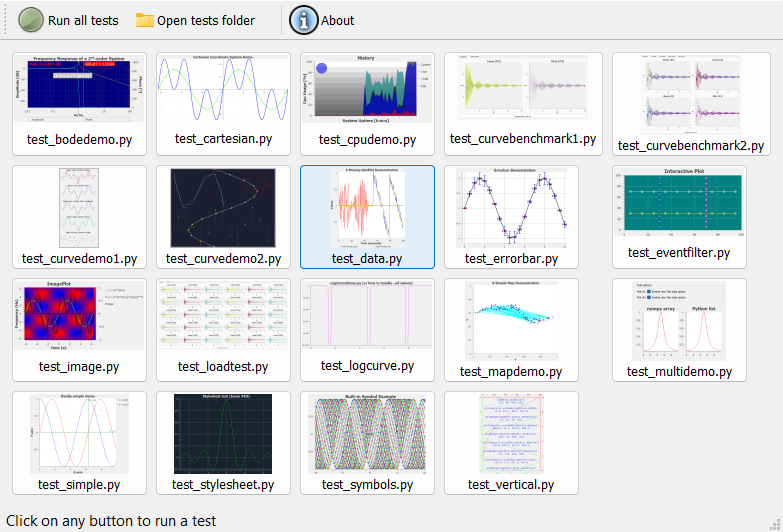
The GUI-based test launcher may be executed from Python:
from qwt import tests
tests.run()
or from the command line:
PythonQwt-tests
Tests may also be executed in unattended mode:
PythonQwt-tests --mode unattended
Overview
The qwt package is a pure Python implementation of Qwt C++ library with the following limitations.
The following Qwt classes won't be reimplemented in qwt because more powerful features already exist in PlotPy: QwtPlotZoomer, QwtCounter, QwtEventPattern, QwtPicker, QwtPlotPicker.
Only the following plot items are currently implemented in qwt (the only plot items needed by PlotPy): QwtPlotItem (base class), QwtPlotGrid, QwtPlotMarker, QwtPlotSeriesItem and QwtPlotCurve.
See "Overview" section in documentation for more details on API limitations when comparing to Qwt.
Roadmap
The qwt package short-term roadmap is the following:
- Drop support for PyQt4 and PySide2
- Drop support for Python <= 3.8
- Replace
setup.pybypyproject.toml, usingsetuptools(e.g. seeguidata) - Add more unit tests: the ultimate goal is to reach 90% code coverage
Dependencies and installation
Supported Qt versions and bindings
The whole PlotPyStack set of libraries relies on the Qt GUI toolkit, thanks to QtPy, an abstraction layer which allows to use the same API to interact with different Python-to-Qt bindings (PyQt5, PyQt6, PySide2, PySide6).
Compatibility table:
| PythonQwt version | PyQt5 | PyQt6 | PySide2 | PySide6 |
|---|---|---|---|---|
| 0.15 and earlier | ✅ | ⚠️ | ❌ | ⚠️ |
| Latest | ✅ | ✅ | ❌ | ✅ |
Requirements
- Python >=3.9
- QtPy >= 1.9 (and a Python-to-Qt binding library, see above)
- NumPy >= 1.21
Optional dependencies
- coverage, pytest (for unit tests)
- sphinx (for documentation generation)
Installation
From PyPI:
pip install PythonQwt
From the source package:
python -m build
Performance investigation
Tooling for performance benchmarks, profiling and visual-regression checks across PyQt5/PyQt6/PySide6 lives in scripts/. See doc/issue93_optimization_summary.md for a worked example.
Copyrights
Main code base
- Copyright © 2002 Uwe Rathmann, for the original Qwt C++ code
- Copyright © 2015 Pierre Raybaut, for the Qwt C++ to Python translation and optimization
- Copyright © 2015 Pierre Raybaut, for the PythonQwt specific and exclusive Python material
Some examples
- Copyright © 2003-2009 Gerard Vermeulen, for the original PyQwt code
- Copyright © 2015 Pierre Raybaut, for the PyQt5/PySide port and further developments (e.g. ported to PythonQwt API)
License
The qwt Python package was partly (>95%) translated from Qwt C++ library: the associated code is distributed under the terms of the LGPL license. The rest of the code was either wrote from scratch or strongly inspired from MIT licensed third-party software.
See included LICENSE file for more details about licensing terms.
Release history Release notifications | RSS feed


Download files
Download the file for your platform. If you're not sure which to choose, learn more about installing packages.
Source Distribution
Built Distribution
Filter files by name, interpreter, ABI, and platform.
If you're not sure about the file name format, learn more about wheel file names.
Copy a direct link to the current filters
File details
Details for the file pythonqwt-0.16.1.tar.gz.
File metadata
- Download URL: pythonqwt-0.16.1.tar.gz
- Upload date:
- Size: 1.2 MB
- Tags: Source
- Uploaded using Trusted Publishing? No
- Uploaded via: twine/6.2.0 CPython/3.9.25
File hashes
| Algorithm | Hash digest | |
|---|---|---|
| SHA256 |
92fa6084c4c1f8dbf387b7abae57ec3bff4fd6cfee29e2c62a08e65a8462cce7
|
|
| MD5 |
aca1abfeb2f67903e67d2f37aa6c86b0
|
|
| BLAKE2b-256 |
1ac55174bf020ec6f06b66e7839652ce25f10a7d8639c517e869945654f8331e
|
File details
Details for the file pythonqwt-0.16.1-py3-none-any.whl.
File metadata
- Download URL: pythonqwt-0.16.1-py3-none-any.whl
- Upload date:
- Size: 1.0 MB
- Tags: Python 3
- Uploaded using Trusted Publishing? No
- Uploaded via: twine/6.2.0 CPython/3.9.25
File hashes
| Algorithm | Hash digest | |
|---|---|---|
| SHA256 |
3753121a996181148ca457c3dfd8151ede022317ad318998437db194bdbdd9c1
|
|
| MD5 |
4e96991e05bc3d2ce32796c0d749d0dd
|
|
| BLAKE2b-256 |
dfaddb0830530f1ecc64965a2e4173aecff732e4b1e27414143495d67dbe002d
|






