






R-AScan (Rusher Automatic Scanner)
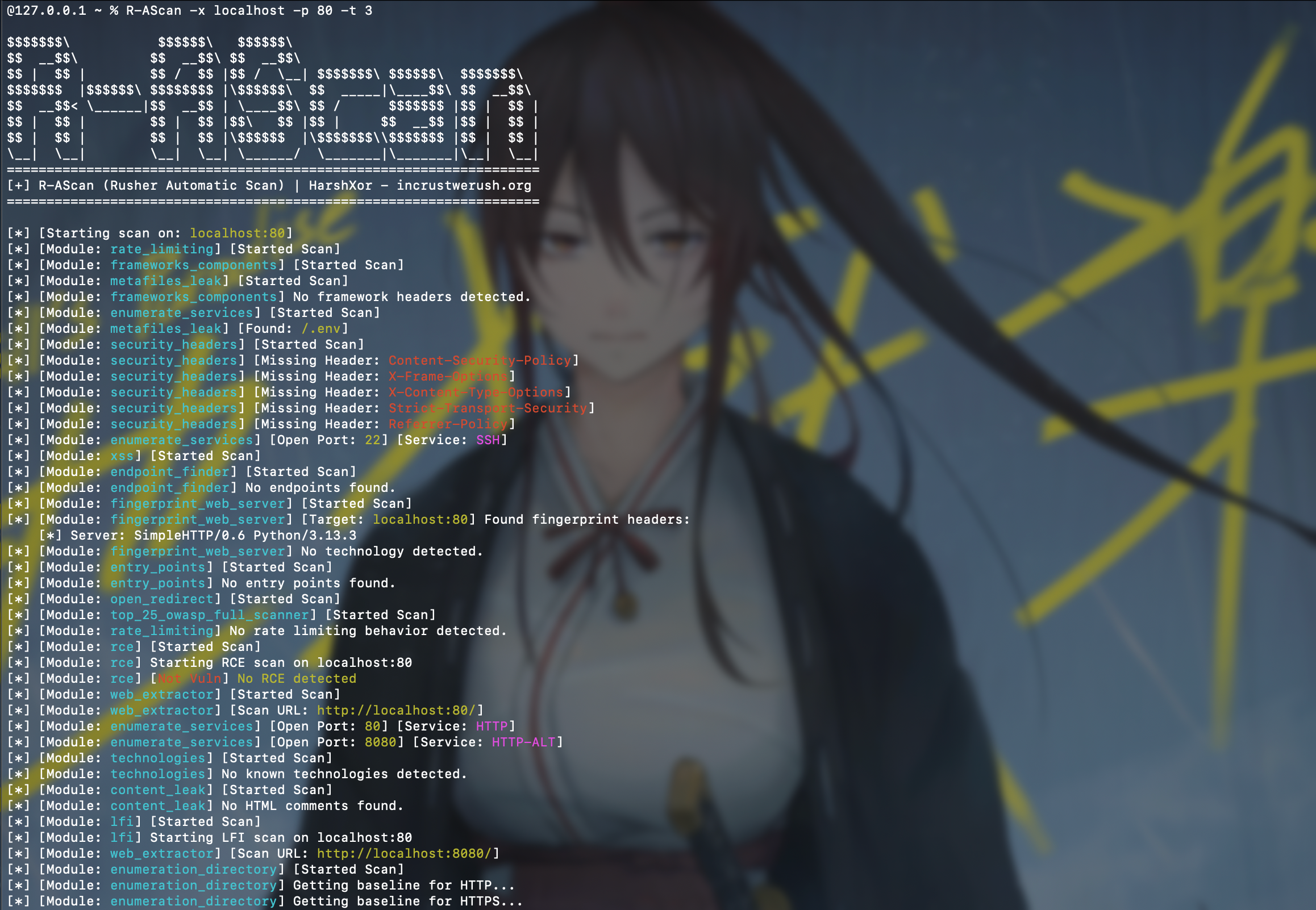
R-AScan is a modular, multithreaded web security scanner written in Python. It discovers scanner modules at runtime, executes them against a target, and stores the combined results as JSON.
Use R-AScan only against systems you own or have explicit permission to test. Several modules send active payloads or state-changing HTTP requests.
Features
- Dynamic scanner discovery from
r_ascan/scanners/ - Globally bounded scanner execution
- Scanner safety modes: passive, safe-active, intrusive, and exploit
- Deterministic scanner/category selection
- HTTP, HTTPS, and raw-socket checks
- JSON scan reports
- Configurable target, port, thread count, and output path
- Optional verbose output
- Optional deterministic risk scoring and prioritization
- Self-contained HTML reports generated from normalized JSON data
- GitHub-based source update command
- Extensible
scan(args)module interface
Included checks cover:
- SQL injection, command injection, LFI, RCE, XSS, SSRF, and SSTI
- LDAP injection and open redirects
- Access-control and rate-limiting behavior
- HTTP request smuggling
- Security headers and sensitive-file exposure
- Directory, endpoint, service, technology, and web-server discovery
- Apache Struts, PHPUnit, and selected CVE-specific checks
Scanner results are heuristic and may contain false positives or false negatives. Validate findings manually before reporting or remediation.
Requirements
- Python 3.10 or newer
- Linux or Windows
- Network access to the authorized target
Python dependencies are installed automatically when installing the package.
Installation
Install from PyPI
python3 -m pip install --upgrade R-AScan
R-AScan --help
On Windows, use py if python3 is unavailable:
py -m pip install --upgrade R-AScan
R-AScan --help
Install with pipx
pipx installs the command in an isolated environment:
pipx install R-AScan
R-AScan --help
Install from source
git clone https://github.com/ICWR-TEAM/R-AScan.git
cd R-AScan
python3 -m venv .venv
Activate the virtual environment:
# Linux/macOS
source .venv/bin/activate
# Windows PowerShell
.\.venv\Scripts\Activate.ps1
Install the local package:
python -m pip install --upgrade pip
python -m pip install -e .
R-AScan --help
The editable installation is recommended for development because changes under r_ascan/ are immediately available to the CLI.
Usage
Basic scan:
R-AScan --target example.com
The basic command runs all discovered scanners, including intrusive and exploit modules, and writes both JSON and HTML reports. Use it only with explicit authorization.
Common examples:
# Increase the worker count
R-AScan --target example.com --threads 10

# Scan a specific port
R-AScan --target 192.0.2.10 --port 8080

# Write to a custom report
R-AScan --target example.com --output reports/example.json

# Print detailed module output
R-AScan --target example.com --verbose

# Apply deterministic risk scoring and prioritization
R-AScan --target example.com --optimize

# Generate matching JSON and self-contained HTML reports
R-AScan --target example.com --optimize --html

# Select the HTML destination
R-AScan --target example.com --html --html-output reports/example.html

# List available scanners and their safety modes
R-AScan --list-scanners

# Run only selected scanners
R-AScan --target example.com --scanners security_headers,sqli

# Send repeatable custom headers to all HTTP scanners
R-AScan --target example.com \
  -H "X-API-Key: secret" \
  -H "Accept: application/json" \
  --headers "Cookie: session=abc"

# Explicitly authorize intrusive scanners
R-AScan --target example.com --mode intrusive

# Restrict execution to passive and safe-active scanners
R-AScan --target example.com --mode safe-active

# Disable the automatically generated HTML report
R-AScan --target example.com --no-html
Command-line options
-h, --help              Show help and exit
-x, --target TARGET     Target hostname or IP address
-t, --threads THREADS   Global worker limit (default: 5)
-o, --output OUTPUT     Custom JSON output path
-p, --port PORT         Custom HTTP/HTTPS port
--path PATH             Base URL path (default: /)
--timeout SECONDS       Request timeout
--max-requests COUNT    Global request budget
--mode MODE             Maximum mode; default exploit runs all scanners
--scanners IDS          Include comma-separated scanner IDs
--exclude IDS           Exclude comma-separated scanner IDs
--category NAMES        Filter scanner categories
--list-scanners         List scanner metadata and exit
--proxy URL             HTTP/S proxy
-H, --header VALUE      Custom `Name: value` HTTP header; repeatable
--headers VALUE         Alias of `--header`; also repeatable
--authorization VALUE   Authorization header value
--cookie VALUE          Cookie header value
--insecure              Disable TLS certificate verification
--update                 Update package source from GitHub
--verbose                Print detailed scanner output
--optimize               Apply deterministic risk scoring
--html                   HTML compatibility flag; HTML is generated by default
--no-html                Disable automatic HTML report generation
--html-output PATH       Custom HTML report path
The target must be a hostname or IP address. URL schemes, embedded ports, paths, queries, and fragments are rejected. Supply ports and base paths separately:
R-AScan -x example.com --port 8443 --path /application
The default exploit mode runs all discovered scanners. To avoid state-changing
or exploit checks, explicitly select --mode safe-active or --mode passive.
Custom headers are merged case-insensitively. When a name is repeated, the last value wins:
R-AScan -x example.com \
  -H "User-Agent: first" \
  -H "user-agent: final"
--authorization and --cookie are convenience options applied after
generic -H values, so they override matching Authorization or Cookie
headers. Custom headers are sent only by HTTP/HTTPS scanners; raw socket
service checks do not use them.
Output
By default, results are written in the current directory:
scan_output-<target>.json
Example structure:
{
  "schema_version": "2.0",
  "scan": {
    "target": {"host": "example.com", "port": null, "base_path": "/"},
    "mode": "safe-active",
    "scanner_count": 1
  },
  "summary": {
    "finding_count": 1,
    "risk_score": 2.0,
    "severity": {"critical": 0, "high": 0, "medium": 0, "low": 1, "info": 0}
  },
  "results": [
    {
      "scanner": {
        "id": "security_headers",
        "category": "reconnaissance",
        "mode": "passive"
      },
      "status": "completed",
      "duration_ms": 42,
      "findings": [
        {
          "id": "stable-finding-id",
          "scanner_id": "security_headers",
          "title": "Missing security control: Content-Security-Policy",
          "target": "example.com",
          "endpoint": "Content-Security-Policy",
          "method": "GET",
          "severity": "low",
          "confidence": "high",
          "status": "confirmed",
          "evidence": {},
          "score": 2.0
        }
      ],
      "observations": [],
      "errors": [],
      "summary": {"finding_count": 1, "error_count": 0, "risk_score": 2.0}
    }
  ]
}
Every scanner result uses the same fields. Legacy scanner payloads are retained
under observations[].data, while actionable items are converted into the
same finding schema. Use --output to select another path:
R-AScan -x example.com -o reports/example.json
Parent output directories are created automatically. The HTML report is
self-contained, uses the same normalized data as JSON, and includes summary
cards, finding prioritization, scanner execution status, remediation, and
escaped evidence. Unless --no-html is supplied, a matching .html file is
always created beside the JSON report.
Updating
For a PyPI installation, use pip or pipx:
python3 -m pip install --upgrade R-AScan
pipx upgrade R-AScan
R-AScan also provides:
R-AScan --update
The built-in updater downloads repository content from the pypi-release branch and overwrites local package files. It does not currently provide signature verification, rollback, or atomic updates. Package-manager upgrades are recommended for normal installations.
Writing a Scanner Module
Create a Python file under r_ascan/scanners/. The file must expose a
module-level scan(args) function and return JSON-serializable data. New
scanners should declare metadata and use the shared context:
SCANNER = {
    "id": "example_check",
    "title": "Example Check",
    "category": "configuration",
    "mode": "passive",
    "version": "1.0",
}


def scan(args):
    url = args.target_model.url("https", "test")
    response = args.http.get(url)
    return {"url": url, "status_code": response.status_code}
Scanner files are discovered recursively. Files whose names begin with __ are ignored. Keep results serializable by json.dump.
Available arguments include:
args.targetargs.portargs.pathargs.threadsargs.outputargs.verboseargs.updateargs.optimizeargs.contextargs.target_modelargs.httpargs.base_urls
Project Structure
r_ascan/
├── app.py                  # CLI and scanner orchestration
├── config.py               # Shared settings and resource paths
├── core/
│   ├── context.py          # Scan configuration and shared context
│   ├── models.py           # Scanner metadata and normalized results
│   ├── registry.py         # Discovery filters and safety modes
│   ├── scheduler.py        # Global request budget
│   ├── target.py           # Host/IP and custom-port validation
│   └── transport.py        # Shared HTTP policy
├── module/
│   ├── ml_optimizer.py     # Experimental result classifier
│   └── other.py            # Terminal formatting
├── resources/              # Payload and wordlist data
└── scanners/               # Scanner plugins
    └── exploits/           # Product/CVE-specific checks
Technical architecture, current limitations, and development priorities are documented in NOTE.md.
Development
git clone https://github.com/ICWR-TEAM/R-AScan.git
cd R-AScan
python3 -m venv .venv
source .venv/bin/activate
python -m pip install -e .
Before changing the project, read NOTE.md. Record completed changes in NOTE.md where relevant and in docs/changelog/YYYY/MM/DD.md.
Release maintainers should follow RELEASE.md for build,
validation, API-token, upload, and clean-install verification steps.
License
R-AScan is available under the MIT License.
Developed by HarshXor — incrustwerush.org
1 maintainer

Metadata
1 maintainer
Release files for R-AScan 0.0.17
For a detailed explanation of source distributions (sdists) and built distributions (wheels), please see the package formats documentation.
Source distribution (sdist)
| File | Size | Uploaded | |
|---|---|---|---|
| r_ascan-0.0.17.tar.gz | 64.5 kB | Details |
Built distribution (wheel)
| File | Interpreter | ABI | Platform | Reset |
|---|---|---|---|---|
| r_ascan-0.0.17-py3-none-any.whl | Python 3 | none | any | Details |
Total release size: 145.2 kB
Release files / r_ascan-0.0.17.tar.gz
| Download URL | r_ascan-0.0.17.tar.gz |
|---|---|
| Size | 64.5 kB |
| Tags | Source |
|
SHA-256 checksum How to use checksums |
63a3ad600cc1075e16341bcca776da08223eb50628aa6592692123bbc4e042c9
|
|
BLAKE2b-256 checksum How to use checksums |
86baf1f852f42e166fcba211f08bcf5fc5aa2490b0540a2763b41d734865b4f5
|
| Upload date | |
|
Uploaded using Trusted Publishing? What is trusted publishing? |
No |
| Uploaded via |
twine/6.2.0 CPython/3.13.14
|
Release files / r_ascan-0.0.17-py3-none-any.whl
| Download URL | r_ascan-0.0.17-py3-none-any.whl |
|---|---|
| Size | 80.6 kB |
| Tags | Python 3 |
|
SHA-256 checksum How to use checksums |
d826a93c5aa13e9f0441b768c3a0cb0eb69be4c7001c7b32ef7398d1720c2558
|
|
BLAKE2b-256 checksum How to use checksums |
b2ed26edda3342d2d5c8fb68ca3020995e9e8f8819d4417850a6490b623e60cc
|
| Upload date | |
|
Uploaded using Trusted Publishing? What is trusted publishing? |
No |
| Uploaded via |
twine/6.2.0 CPython/3.13.14
|














