
Rusher Automatic Scan

Project description






R-AScan (Rusher Automatic Scanner)
Overview
R-AScan is a modular, multithreaded vulnerability scanner framework written in Python. It dynamically loads all .py scanner modules in the scanners/ directory and executes them against a target. Each module returns structured output and is saved to a JSON file for analysis.
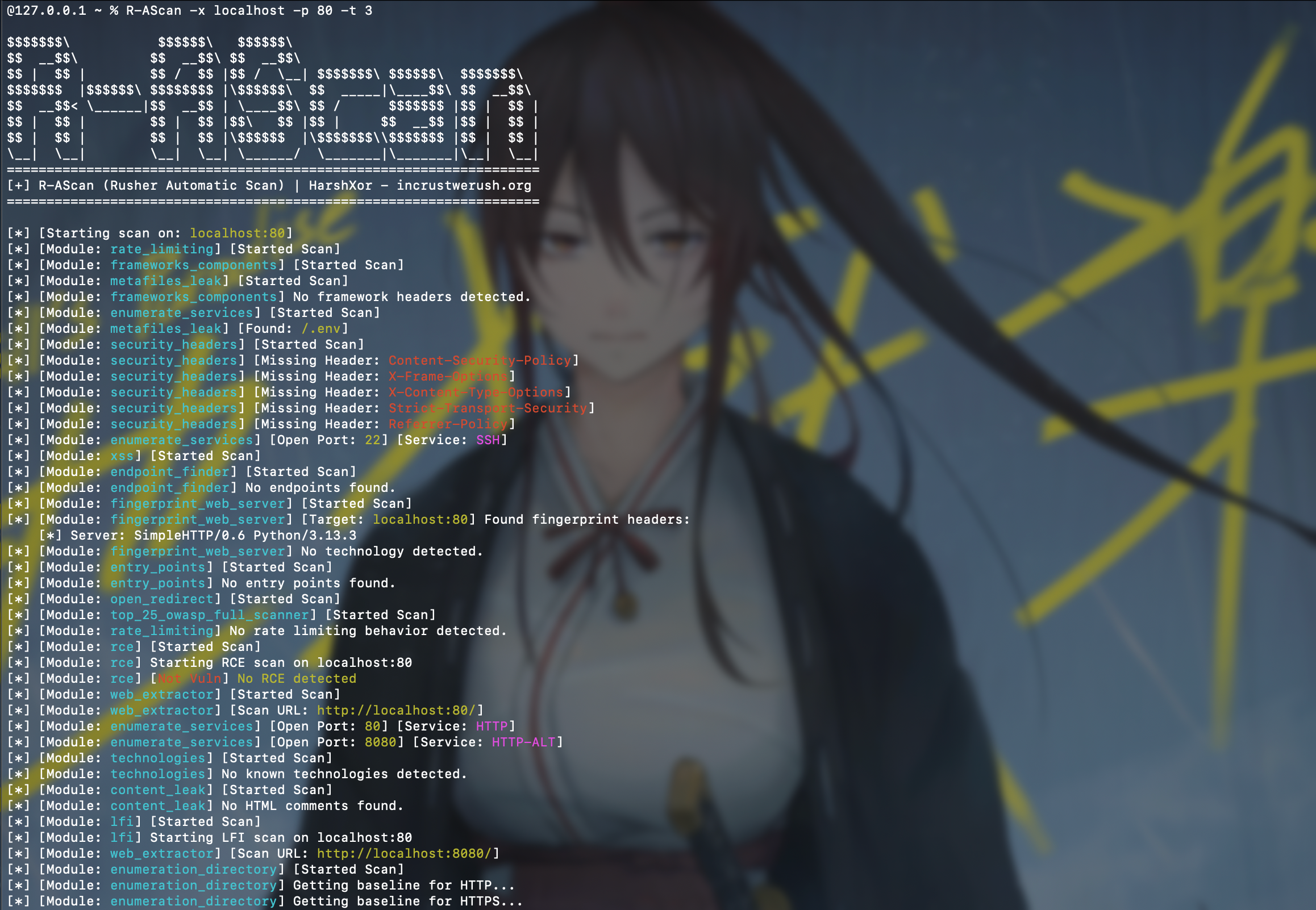
Features
- Modular architecture (drop-in
.pymodules) - Multithreaded execution using thread pool
- Auto-update scanner modules from GitHub
- JSON output format
- CLI-based execution with multiple options
- Includes scanners for:
- Local File Inclusion (LFI)
- Remote Code Execution (RCE)
- Cross-Site Scripting (XSS)
- Server-Side Request Forgery (SSRF)
- SQL Injection (SQLi)
- Open Redirect
- Security Headers
- Sensitive Files
- Fingerprinting
- Admin Panel Finder
- Rate Limiting
- SSTI
- LDAP Injection
- and others
Requirements
- Python 3.8 or newer
requestslibrary
Installation
Repository clone:
git clone https://github.com/ICWR-TEAM/R-AScan
cd R-AScan
pip install -r requirements.txt
python3 R-AScan.py --help
Install with PIP:
python3 -m pip install R-AScan
Usage
python3 R-AScan.py -x <target> [options]
Or (Install with PIP)
R-AScan -x <target> [options]
$$$$$$$\           $$$$$$\   $$$$$$\
$$  __$$\         $$  __$$\ $$  __$$\
$$ |  $$ |        $$ /  $$ |$$ /  \__| $$$$$$$\ $$$$$$\  $$$$$$$\
$$$$$$$  |$$$$$$\ $$$$$$$$ |\$$$$$$\  $$  _____|\____$$\ $$  __$$\
$$  __$$< \______|$$  __$$ | \____$$\ $$ /      $$$$$$$ |$$ |  $$ |
$$ |  $$ |        $$ |  $$ |$$\   $$ |$$ |     $$  __$$ |$$ |  $$ |
$$ |  $$ |        $$ |  $$ |\$$$$$$  |\$$$$$$$\\$$$$$$$ |$$ |  $$ |
\__|  \__|        \__|  \__| \______/  \_______|\_______|\__|  \__|
===================================================================
[+] R-AScan (Rusher Automatic Scan) | HarshXor - incrustwerush.org
===================================================================

[-] [A target must be specified unless the --update option is used]

usage: R-AScan.py [-h] [-x TARGET] [-t THREADS] [-o OUTPUT] [-p PORT] [--path PATH] [--update] [--verbose] [--optimize]

options:
  -h, --help            show this help message and exit
  -x, --target TARGET   Target host (domain or IP)
  -t, --threads THREADS
                        Number of threads to use (default: 5)
  -o, --output OUTPUT   Custom output file path (optional)
  -p, --port PORT       Custom PORT HTTP/S (optional)
  --path PATH           Custom PATH URL HTTP/S (optional)
  --update              Only update scanner modules without scanning
  --verbose             Verbose detail log
  --optimize            Optimize result with machine learning
Examples
python3 R-AScan.py -x example.com
python3 R-AScan.py -x 192.168.1.1 -t 10 -o output.json
python3 R-AScan.py --update
Or (Install with PIP)
R-AScan -x example.com
R-AScan -x 192.168.1.1 -t 10 -o output.json
R-AScan --update
Arguments
-x,--target— Target domain or IP address (required unless using--update)-t,--threads— Number of threads (default: 5)-o,--output— Path to save JSON result (optional)-p,--port- Custom PORT HTTP/S (optional)--path- Custom PATH URL HTTP/S (optional)--update— Update scanner modules from GitHub and exit--verbose— Print detailed output from each module--optimize- Optimize result with machine learning
Output
The scan result will be saved as:
scan_output-<target>.json
If the -o option is specified, it will be saved to the given custom path.
Each scanner module contributes a dictionary entry in the JSON output, grouped under the result key.
Writing a Custom Module
- Create a new Python file in
scanners/, for examplemy_scan.py - Define a function
scan(args)that returns a dictionary or list - Access the target using
args.target
Example
import requests

def scan(args):
    url = f"http://{args.target}/test"
    try:
        response = requests.get(url, timeout=10)
        return {
            "url": url,
            "status_code": response.status_code
        }
    except Exception as e:
        return {"error": str(e)}
The main framework will automatically discover and execute this module.
Updating Modules
To update scanner modules directly from the GitHub repository:
python3 R-AScan.py --update
Or (Install with PIP)
python3 R-AScan.py --update
All .py files in the scanners/ directory will be downloaded and replaced.
License
This project is licensed under the MIT License.
Developed by HarshXor — https://incrustwerush.org


Download files
Download the file for your platform. If you're not sure which to choose, learn more about installing packages.
Source Distribution
Built Distribution
Filter files by name, interpreter, ABI, and platform.
If you're not sure about the file name format, learn more about wheel file names.
Copy a direct link to the current filters
File details
Details for the file r_ascan-0.0.11.tar.gz.
File metadata
- Download URL: r_ascan-0.0.11.tar.gz
- Upload date:
- Size: 31.4 kB
- Tags: Source
- Uploaded using Trusted Publishing? No
- Uploaded via: twine/6.1.0 CPython/3.13.3
File hashes
| Algorithm | Hash digest | |
|---|---|---|
| SHA256 |
a47ddb69a27ef9e51bbe022e72c0dde531e5f0d128902aa306cb38776a4e7e0e
|
|
| MD5 |
f09ee3eca27e182dae177b95dd3f7bae
|
|
| BLAKE2b-256 |
39dc5568cdeb157dc602355da12b02c35ab3bb0d1db43410a54976b409b323aa
|
File details
Details for the file r_ascan-0.0.11-py3-none-any.whl.
File metadata
- Download URL: r_ascan-0.0.11-py3-none-any.whl
- Upload date:
- Size: 54.7 kB
- Tags: Python 3
- Uploaded using Trusted Publishing? No
- Uploaded via: twine/6.1.0 CPython/3.13.3
File hashes
| Algorithm | Hash digest | |
|---|---|---|
| SHA256 |
3889668432047a6713a03c3d5bddd47b14add5e9d06a4e0c7e12d23c1d382c48
|
|
| MD5 |
64f78bbb32c0635fc500b416b5abca13
|
|
| BLAKE2b-256 |
014b50d43f52e56c83474d0c18e1ac7b68a7c88a4cb9f083d83302ed4b156679
|






