
RapidParc




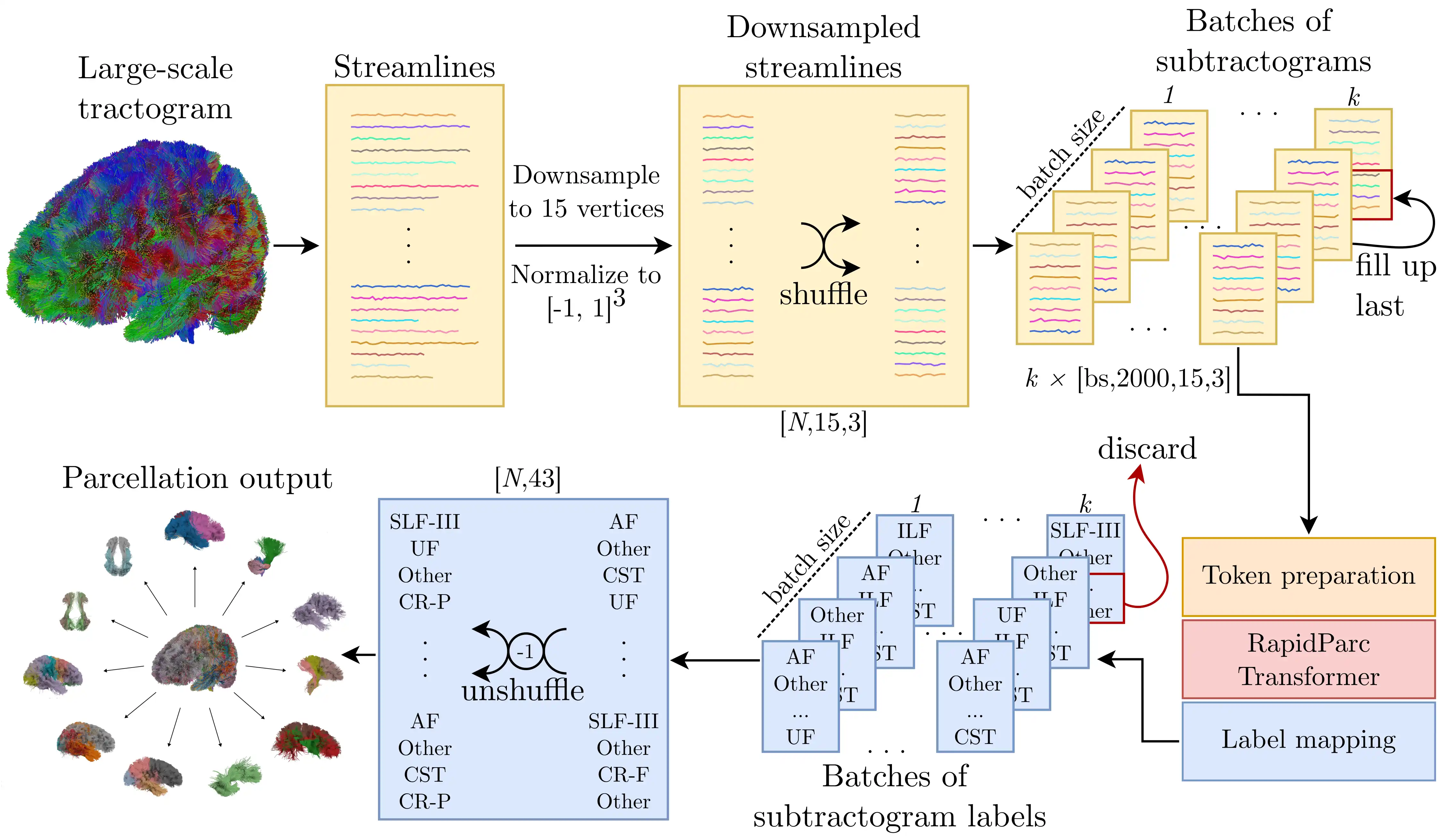
RapidParc is a fast, accurate, and lesion-robust transformer-based algorithm for registration-free parcellation of streamlines from diffusion MRI tractography. It assigns one label to each streamline in a tractogram and is designed for efficient large-scale inference.
If you use this repository, please cite:
Justus Bisten, Valentin von Bornhaupt, Johannes Grün, Tobias Bauer, Theodor Rüber, Thomas Schultz.
RapidParc: A Global-Context Transformer for Parallel, Accurate, and Lesion-Robust Tractogram Parcellation.
Imaging Neuroscience (2026).
DOI: 10.1162/IMAG.a.1168
Table of Contents
Problem description
Tractogram parcellation assigns anatomical labels to streamlines obtained from diffusion MRI tractography. RapidParc performs this task without anatomical registration and uses a transformer architecture to incorporate global context across streamlines.
Method
At inference time, streamlines are shuffled and processed in groups of size eval_context_size. This makes it possible to scale to large tractograms while retaining contextual information beyond the individual streamline. The method is registration-free, which is especially useful when anatomical deformation, lesions, or post-surgical alterations reduce the reliability of registration-based pipelines.
Key Features:
- Registration-free inference
- Fast, parallelized tractogram processing
- Strong benchmark performance on the TractCloud test split
- Improved robustness in anatomically altered or lesioned brains
- Simple usage from both Python and command line
RapidParc predicts one of 43 classes per streamline, including an outlier class, Other.
Pretrained models:
| Model | Intended use |
|---|---|
rapidparc |
Default general-purpose model for standard inference. |
hemiaug |
When your data may contain strong unilateral anatomical changes, lesions, or post-surgical alterations. |
rapidparc_v8 |
When you want to study the effect of using 8 instead of 15 resampled vertices. |
Installation
This project was developed with PyTorch 2.4 on Python 3.12.3 and CUDA 12.4.
1. Install PyTorch
Visit https://pytorch.org/get-started/locally/ and install PyTorch by following the official instructions
2. Install RapidParc
pip install RapidParc
Quick start
Python Interface
To parcellate a tractogram in Python:
from RapidParc import RapidParc

predictions = RapidParc(...)
The RapidParc function accepts multiple input-formats like list, torch.Tensor and numpy.ndarray. Input streamlines do not need to have the same number of supporting points. RapidParc resamples them automatically.
Example:
from RapidParc import RapidParc
import torch

# Your tractogram goes here
inputTractogram = torch.rand([5000, 15, 3])

predictions = RapidParc(
    model_name_or_path = "rapidparc",
    inputTractogram = inputTractogram,
    eval_batch_size = 128,
    eval_context_size = 2000,
    device = torch.device("cpu"),
    print_time = True,
    print_class_distribution = False
)

print(f"Output shape: {predictions.shape}")
print(f"Output: {predictions}")
classes, counts = torch.unique(predictions, return_counts=True)
print(f"Output summary: {[f'{pred}: {num}' for pred, num in zip(classes, counts)]}")
Time to load model: 0.05s
Time to shuffle data: 0.00s
5000 Streamlines are loaded and preprocessed.
100%|█████████████████████████████████████| 1/1 [00:00<00:00,  5.28it/s]
Prediction is done in 0.20s
Total time: 0.27s

Output shape: torch.Size([5000])
Output: tensor([42, 42, 42,  ..., 42, 42, 42])
Output summary: ['33: 1', '42: 4999']
In this example, randomly generated streamlines are mostly classified as outliers, which is expected.
Command-line usage (.tck tractograms)
If your tractogram is stored as a .tck file, you can run parcellation directly from the terminal. Each assigned tract results in a new .tck output file inside the specified directory.
Example:
rapidparc --tck_path tractogram.tck \
 --out_path parcellated_tractogram \
 --model_name_or_path rapidparc \
 --eval_batch_size 64 \
 --eval_context_size 2000 \
 --device cpu \
 --print_time \
 --print_class_distribution
Time to load tck file with 926641 streamlines: 1.50s
Time to shorten streamlines: 5.54s
Time to load model: 0.07s
Time to shuffle data: 0.08s
926641 Streamlines are loaded and preprocessed.
100%|█████████████████████████████████████| 8/8 [00:12<00:00,  1.60s/it]
Prediction is done in 12.83s
Class distribution
      Class       | Count
 0 AF                (6254) ▇▇▇▇▇▇
 1 CB               (14252) ▇▇▇▇▇▇▇▇▇▇▇▇▇
 2 EC                (3795) ▇▇▇▇
 3 EmC               (5990) ▇▇▇▇▇▇
 4 ILF              (17420) ▇▇▇▇▇▇▇▇▇▇▇▇▇▇▇▇
 5 IOFF             (19687) ▇▇▇▇▇▇▇▇▇▇▇▇▇▇▇▇▇▇
 6 MdLF             (10216) ▇▇▇▇▇▇▇▇▇▇
 7 SLF-I            (10937) ▇▇▇▇▇▇▇▇▇▇
 8 SLF-II           (28028) ▇▇▇▇▇▇▇▇▇▇▇▇▇▇▇▇▇▇▇▇▇▇▇▇▇
 9 SLF-III           (5348) ▇▇▇▇▇
10 UF                (4185) ▇▇▇▇
11 CST              (24662) ▇▇▇▇▇▇▇▇▇▇▇▇▇▇▇▇▇▇▇▇▇▇
12 CR-F             (14493) ▇▇▇▇▇▇▇▇▇▇▇▇▇
13 CR-P              (2089) ▇▇
14 SF               (23246) ▇▇▇▇▇▇▇▇▇▇▇▇▇▇▇▇▇▇▇▇▇
15 SO                (5810) ▇▇▇▇▇▇
16 SP                (5294) ▇▇▇▇▇
17 TF               (40690) ▇▇▇▇▇▇▇▇▇▇▇▇▇▇▇▇▇▇▇▇▇▇▇▇▇▇▇▇▇▇▇▇▇▇▇▇
18 TO                (4753) ▇▇▇▇▇
19 TT                (8700) ▇▇▇▇▇▇▇▇
20 TP                (9958) ▇▇▇▇▇▇▇▇▇
21 PLIC              (4345) ▇▇▇▇
22 CC1               (1477) ▇▇
23 CC2              (18125) ▇▇▇▇▇▇▇▇▇▇▇▇▇▇▇▇
24 CC3               (7703) ▇▇▇▇▇▇▇
25 CC4               (9848) ▇▇▇▇▇▇▇▇▇
26 CC5               (7267) ▇▇▇▇▇▇▇
27 CC6              (18489) ▇▇▇▇▇▇▇▇▇▇▇▇▇▇▇▇▇
28 CC7               (8638) ▇▇▇▇▇▇▇▇
29 CPC                (875) ▇
30 ICP                (866) ▇
31 Intra-CBLM-I-P    (6059) ▇▇▇▇▇▇
32 Intra-CBLM-PaT   (10004) ▇▇▇▇▇▇▇▇▇
33 MCP                (929) ▇
34 Sup-F            (56703) ▇▇▇▇▇▇▇▇▇▇▇▇▇▇▇▇▇▇▇▇▇▇▇▇▇▇▇▇▇▇▇▇▇▇▇▇▇▇▇▇▇▇▇▇▇▇▇▇▇▇
35 Sup-FP            (5456) ▇▇▇▇▇
36 Sup-O             (7084) ▇▇▇▇▇▇▇
37 Sup-OT            (6879) ▇▇▇▇▇▇▇
38 Sup-P            (23330) ▇▇▇▇▇▇▇▇▇▇▇▇▇▇▇▇▇▇▇▇▇
39 Sup-PO            (6748) ▇▇▇▇▇▇
40 Sup-PT           (19768) ▇▇▇▇▇▇▇▇▇▇▇▇▇▇▇▇▇▇
41 Sup-T            (11187) ▇▇▇▇▇▇▇▇▇▇
42 Outlier 'Other' (429054) ###################################################
Total time: 13.28s
Files saved in parcellated_tractogram/
The same function is also available from Python:
from RapidParc import RapidParcTckEval

RapidParcTckEval(...)
Reproducing results
To benchmark RapidParc on the TractCloud test split, use RapidParc.test. The RapidParc.test function automatically fetches the TractCloud dataset during evaluation.
Example:
import RapidParc
import torch

acc_43, f1_43 = RapidParc.test(
    model_name_or_path = "rapidparc_v8",
    applyTestSetAugmentations = False,
    eval_batch_size = 128,
    eval_context_size = 2000,
    device = torch.device("cpu"),
    print_classification_report = True
)
print(f"Accuracy: {100 * acc_43:.2f} %, Macro F1 Score: {100 * f1_43:.2f} %")
This prints out a classification report and creates a confusion matrix plot in rapidParc_v8/plots. You can also execute this via the CLI using rapidparc-test.
Retrain RapidParc on the TractCloud train split
To retrain RapidParc on the TractCloud training split, a minimal run can be started using:
rapidparc-train
A list of all configurable attributes can be obtained from cli_train.py. The parameters we used for each model can be found in the .yaml files attached to the GitHub releases.
Known issues
- Orientation Errors: If evaluation results are unexpectedly poor, your tractogram may have an axis flip or coordinate-system mismatch.
- Outlier Class Ratio: The
Otherclass may contain a large fraction of streamlines, especially in whole-brain tractograms. This is often expected and wanted. - PyTorch ImportError: For using this package, you have to install PyTorch. Please visit https://pytorch.org/get-started/locally/ and install PyTorch by following the official instructions.
If you encounter any problems using this package, please do not hesitate to create a GitHub issue.
1 maintainer

Metadata
1 maintainer
Release files for RapidParc 1.0.4
For a detailed explanation of source distributions (sdists) and built distributions (wheels), please see the package formats documentation.
Source distribution (sdist)
| File | Size | Uploaded | Provenance | Actions |
|---|---|---|---|---|
| rapidparc-1.0.4.tar.gz | 326.9 kB | Without provenance | Details for rapidparc-1.0.4.tar.gz |
Built distribution (wheel)
| File | Interpreter | ABI | Platform | Actions Reset |
|---|---|---|---|---|
| rapidparc-1.0.4-py3-none-any.whl | Python 3 | none | any | Details for rapidparc-1.0.4-py3-none-any.whl |
Total release size: 372.5 kB
Release files / rapidparc-1.0.4.tar.gz
| Download URL | rapidparc-1.0.4.tar.gz |
|---|---|
| Size | 326.9 kB |
| Tags | Source |
|
SHA-256 checksum How to use checksums |
a7d04616d20419441a2496a6d3e82bac64294a5b1cf9054f9ed55864ff92ab42
|
|
BLAKE2b-256 checksum How to use checksums |
80d36ea6bad3618bdd9707ecc98cf74b82b4a69a8e6c9ad99a17b8c4fa8bbdcc
|
| Upload date | |
|
Uploaded using Trusted Publishing? What is trusted publishing? |
No |
| Uploaded via |
twine/7.0.0 CPython/3.13.3
|
Release files / rapidparc-1.0.4-py3-none-any.whl
| Download URL | rapidparc-1.0.4-py3-none-any.whl |
|---|---|
| Size | 45.7 kB |
| Tags | Python 3 |
|
SHA-256 checksum How to use checksums |
bc584a3d963fd5c89c6647071e830a1935a2fd36c6b8251c1e12befb51bca690
|
|
BLAKE2b-256 checksum How to use checksums |
65999fe992f276736d41dd3523a2b491a6a387fda63f30fa83cf196e49186a85
|
| Upload date | |
|
Uploaded using Trusted Publishing? What is trusted publishing? |
No |
| Uploaded via |
twine/7.0.0 CPython/3.13.3
|
Security for RapidParc 1.0.4
Provenance
Provenance describes where a file came from. On PyPI, provenance is shared via attestations, which provide a verifiable record of the build or publishing details. View details, limitations and caveats.
No provenance found
None of the files in this release were uploaded with provenance metadata.
A note on package security
PyPI is a repository for distributing packages, not a service for auditing them. While third-party security researchers and our staff do their best to detect and remove malicious packages, PyPI cannot guarantee the quality, security or suitability of any given package.
To learn more about protecting yourself from malicious actors, visit our package security documentation.














