
Rummikub solver console with multi-game support and persistence.

Project description
Rummikub Console
A Rummikub solver console supporting multiple games and persistence, written in Python.
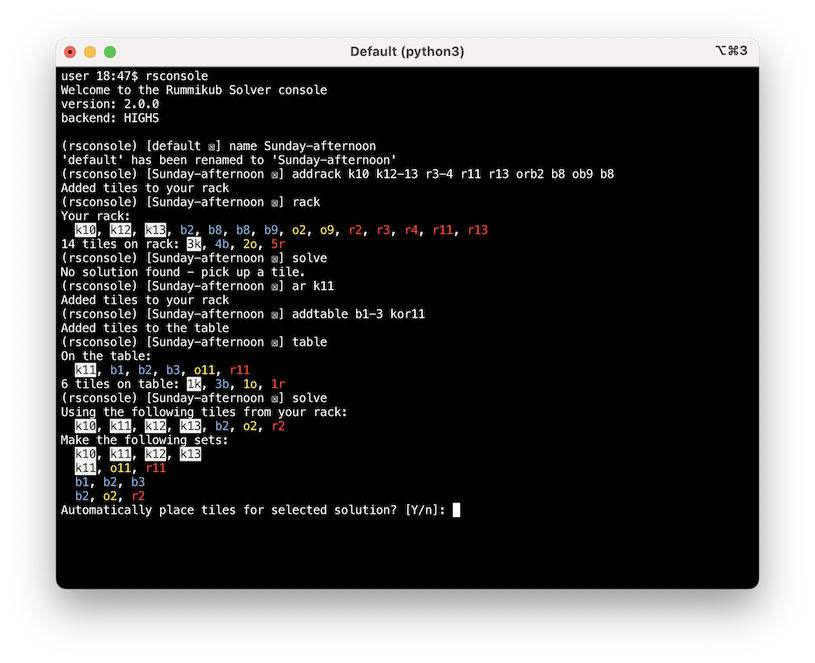
The algorithm used builds on the approach described by D. Den Hertog, P. B. Hulshof (2006), "Solving Rummikub Problems by Integer Linear Programming", The Computer Journal, 49(6), 665-669 (DOI 10.1093/comjnl/bxl033).
Features
- Can track multiple games, letting you switch between named games
- Saves tracked games automatically
- Can work with different Rummikub rules, letting you adjust the number of colours, tiles, and other aspects
- You can freely adjust what tiles are on the rack or on the table, within the limits of what tiles are available according to the current rules
Solver improvements
The original models described by Den Hertog and Hulshof assume that all possible sets that meet the minimum length requirements and can't be split up are desirable outcomes.
However, any group set (tiles with the same number but with different colours) containing at least one joker, but which is longer than the minimal run, in effect contains a redundant joker, something you wouldn't want to leave on the table for the next player to use. The same applies to run sets (tiles of the same colour but with consecutive numbers), that are longer than the minimal set length but start or end with a joker. In this implementation, such sets are omitted from the possible options.
The implementation also includes a solver for the initial move, where you can only use tiles from your own rack and must place a minimum amount of points before you can use tiles already on the table. This solver is a variant of the original solver that maximizes tiles placed, but is constrained by the minimal point amount and disregards jokers (which means jokers are only used for the opening meld if that is the only option available).
Install
You can install this project the usual way:
$ pip install RummikubConsole
or use a tool like pipx to help you manage command-line tool installations like these:
$ pipx install RummikubConsole
Usage
Run the rsconsole command-line tool to open the console, or run rsconsole --help to see how you can adjust the Rummikub rules (you can adjust tile count, colours, joker count, the minimum number of tiles to make a set and the minimum score for the initial placement).
You then enter the console command loop. Enter ? or h or help to list the available commands, and help <command> to get help on what each command does.
Development
The source code for this project can be found on GitHub.
When running locally, install Pipenv, then run:
pipenv install
pipenv run rsconsole
to run the console solver.
Credits
The initial version of the solver and console were written by Ollie Hooper.
This version is a complete rewrite by Martijn Pieters, with new console implementation, expansion of the solver to improve performance and address shortcomings in the original paper, as well as multi-game, game state tracking and persistence support.
Release history Release notifications | RSS feed


Download files
Download the file for your platform. If you're not sure which to choose, learn more about installing packages.
Source Distribution
Built Distribution
Filter files by name, interpreter, ABI, and platform.
If you're not sure about the file name format, learn more about wheel file names.
Copy a direct link to the current filters
File details
Details for the file RummikubConsole-1.1.0.tar.gz.
File metadata
- Download URL: RummikubConsole-1.1.0.tar.gz
- Upload date:
- Size: 241.0 kB
- Tags: Source
- Uploaded using Trusted Publishing? No
- Uploaded via: twine/3.4.1 importlib_metadata/3.7.3 pkginfo/1.7.0 requests/2.25.1 requests-toolbelt/0.9.1 tqdm/4.59.0 CPython/3.9.2
File hashes
| Algorithm | Hash digest | |
|---|---|---|
| SHA256 |
d939fcd3d5e87f9dc59add1f516bacb9234450f82a87a1a34ead957f010af8cb
|
|
| MD5 |
d11e2d37bf7acaf3b85be92569f6b298
|
|
| BLAKE2b-256 |
cc71dad2eae0a37b3c411c05b21570b1393aec61508a874019c7680b9b4e5117
|
File details
Details for the file RummikubConsole-1.1.0-py2.py3-none-any.whl.
File metadata
- Download URL: RummikubConsole-1.1.0-py2.py3-none-any.whl
- Upload date:
- Size: 20.6 kB
- Tags: Python 2, Python 3
- Uploaded using Trusted Publishing? No
- Uploaded via: twine/3.4.1 importlib_metadata/3.7.3 pkginfo/1.7.0 requests/2.25.1 requests-toolbelt/0.9.1 tqdm/4.59.0 CPython/3.9.2
File hashes
| Algorithm | Hash digest | |
|---|---|---|
| SHA256 |
8ec5a2f00d8da5ffcdacbe7f82bb9663b7c47d3660616e213733a994e94a4e7c
|
|
| MD5 |
6ddde3f7d22fe402ac054a66d9c071f9
|
|
| BLAKE2b-256 |
401066feda3ea5ee01ae84bd8988d0cad5b867788d711be0608da54ad4f797ee
|






