
This toolkit aids in analyzing drop sliding on tilted plates, allowing researchers to study various variables and their correlations in detail.

Project description
Deep Learning to Analyze Sliding Drops (Cite Us)
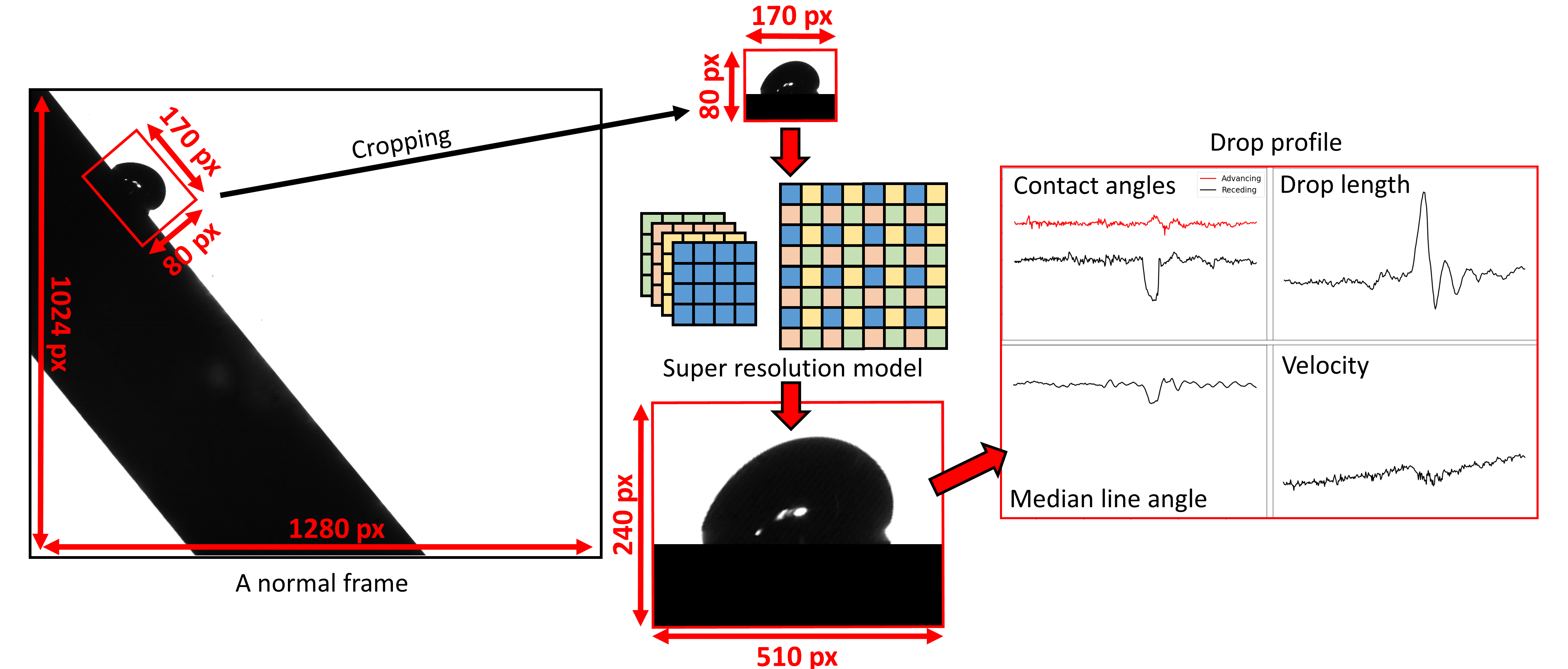
The 4S-SROF toolkit is designed to solve existing challenges in analyzing the sliding motion of drops on tilted plates. It enables researchers to conduct detailed studies by considering a wide range of variables and their correlations.
Key features include:
- Super-Resolution Enhancement: The toolkit enlarges images by an up-scale ratio of 3 using a super-resolution model trained on a dataset of 14,000 sliding drop images.
- Comprehensive Analysis: Extracts various criteria from the super-resolution images to provide precise insights into drop behavior.
- Optimized Contact Angle Measurement: Contact angles are measured using an optimized polynomial method, as described in the accompanying manuscript.
The 4S-SROF toolkit streamlines complex image processing tasks, empowering researchers with high-quality data for in-depth analysis.
Data Information
Drop Profile Video
-
File:
drop_profile.mp4This video illustrates a sliding drop on a sample with a defect in the middle:
- The first drop in the upper part of the video is the real drop image after preprocessing. Key preprocessing steps include:
- Calculating the tilt angle and aligning frames horizontally.
- Removing noise and background.
- Detecting the drop position (marked by red lines).
- The second drop (larger image) represents the drop after applying a super-resolution model.
- Below that, the drop contour is extracted, and parameters such as contact angles (CAs), drop height, and drop length are displayed.
- On the left, four plots analyze how the drop slides over a defected sample.
- The first drop in the upper part of the video is the real drop image after preprocessing. Key preprocessing steps include:
Instructions
-
File:
instructions.mdThis file is a comprehensive guide designed to assist researchers in setting up and using the analysis toolkit. It has two general sections: one focused on setting up the environment and another on effectively using the code.
-
How to Set Up:
This section guides you through the installation of Python, Anaconda, and Jupyter Notebook. It explains how to download the code repository, prepare your working directory, and ensure all necessary libraries are installed for a seamless setup. -
How to Use:
This section provides detailed steps for preparing video frames, creating and marking the slope folder, and running the analysis code. It also explains how to configure experiment-specific variables and interpret the generated outputs, such asresult.xlsxand analyzed frame outputs.
-
Control Panel
-
File:
Control Panel.ipynbThis file contains the main executable code for the toolkit. It acts as a central hub, calling other
.pyfiles and libraries to perform the analysis. The code processes the video frames, extracts features, and generates the finalresult.xlsxfile containing the analyzed time-series data. It integrates all steps of the workflow, making it easy to convert raw video frames into meaningful results.
PFOTS Sample with a Defect
-
Files:
PFOTS sample with a defect.zip.001 - .007These files contain a sample of sliding drop video frame examples that have been processed using the code, including results from all steps of the analysis. You can use this sample to try the code and gain a better understanding of how it works. It serves as a practical example to help you learn more about the workflow and outputs of the analysis toolkit.
Tutorial
-
File:
tutorial.ipynbThis file contains examples that demonstrate how the code's functions work in detail. It is designed for researchers who are familiar with coding and want to leverage the provided functions for tasks such as detecting surface slopes, extracting drop edges, or identifying appropriate video frames where only one droplet is present in the frame automatically.
If you are not familiar with coding or prefer to use the toolkit quickly for analyzing sliding drop videos, you may skip this file.
Dataset
- Description: The dataset contains 14,000 sliding drop images used to train the modified super-resolution model.
- Access: Download the dataset
ESPCN Super-Resolution Model Weights
-
File:
SuperRes_weights.h5This file contains the weights for the modified ESPCN super-resolution model, trained on 14,000 sliding drop images.
Python Files
The following .py files are included in the toolkit and provide functions for related image processing tasks:
angle_detection.pybaseline_detection.pycriteria_definition.pyedge_superres.pytools.pyvisualization.py
These scripts are essential for researchers working with this toolkit.
Libraries and Versions
Below is a list of the libraries and their corresponding versions used in this project:
| Library | Version | Link |
|---|---|---|
| TensorFlow | 2.5.0 | tensorflow |
| Keras | 2.9.0 | keras |
| OpenCV (cv2) | 4.5.4 | opencv-python |
| SciPy | 1.7.1 | scipy |
| Pillow (PIL) | 8.4.0 | Pillow |
| NumPy | 1.20.3 | numpy |
| Pandas | 1.3.4 | pandas |
| Matplotlib | 3.4.3 | matplotlib |
| Natsort | 8.4.0 | natsort |
Each library name links to its official PyPI page for more details.
Citation
If you find "Deep Learning to Analyze Sliding Drops" useful for your research, please consider citing the paper using the following information:
@article{shumaly2023deep,
  title={Deep learning to analyze sliding drops},
  author={Shumaly, Sajjad and Darvish, Fahimeh and Li, Xiaomei and Saal, Alexander and Hinduja, Chirag and Steffen, Werner and Kukharenko, Oleksandra and Butt, Hans-J{\"u}rgen and Berger, R{\"u}diger},
  journal={Langmuir},
  volume={39},
  number={3},
  pages={1111--1122},
  year={2023},
  publisher={ACS Publications}
}
Release history Release notifications | RSS feed


Download files
Download the file for your platform. If you're not sure which to choose, learn more about installing packages.
Source Distribution
Built Distribution
Filter files by name, interpreter, ABI, and platform.
If you're not sure about the file name format, learn more about wheel file names.
Copy a direct link to the current filters
File details
Details for the file sfof4s-1.0.7.tar.gz.
File metadata
- Download URL: sfof4s-1.0.7.tar.gz
- Upload date:
- Size: 17.6 kB
- Tags: Source
- Uploaded using Trusted Publishing? No
- Uploaded via: twine/6.1.0 CPython/3.12.2
File hashes
| Algorithm | Hash digest | |
|---|---|---|
| SHA256 |
359f640cf9ab6356f3ac22e317453003a99a1fd81737448e24a4d504a8436730
|
|
| MD5 |
76d4efe631c4638fb37dd95fbbd57ef5
|
|
| BLAKE2b-256 |
c04bbc17ce38bc923576111bcc87456931296c2e0841a3d4ccf911fa524dd9fe
|
File details
Details for the file SFOF4S-1.0.7-py3-none-any.whl.
File metadata
- Download URL: SFOF4S-1.0.7-py3-none-any.whl
- Upload date:
- Size: 16.9 kB
- Tags: Python 3
- Uploaded using Trusted Publishing? No
- Uploaded via: twine/6.1.0 CPython/3.12.2
File hashes
| Algorithm | Hash digest | |
|---|---|---|
| SHA256 |
be97a85bfae05d1e15577f64b4fbfa4254c3e7193f09164eb036dba136e87950
|
|
| MD5 |
3177e11f2db110523df138676a19df90
|
|
| BLAKE2b-256 |
b926377780aced5c8f99b2820123be394f140a908dc89efc21d185d501dada36
|






