
Simplified 2D/3D modeling for Python with fluent API and boolean operations

Project description
ScadPy




Programmatic CAD in Pure Python. — Documentation
ScadPy provides a fluent, type-safe API for 2D and 3D parametric modeling, built on Shapely and trimesh. Write designs with the conciseness of OpenSCAD and the full power of Python.
Installation
pip install scadpy
Requirements: Python ≥ 3.12.
Quick examples
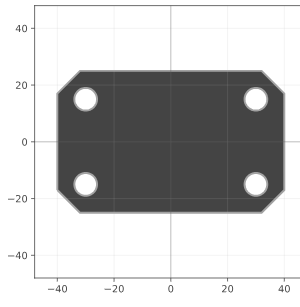
# 2D — chamfered mounting plate
from scadpy import rectangle, circle, text
import numpy as np

PLATE_WIDTH   = 80
PLATE_HEIGHT  = 50
PLATE_THICKNESS = 10
HOLE_RADIUS   = 4
HOLE_MARGIN   = 10
CHAMFER_SIZE  = 8

base  = rectangle([PLATE_WIDTH, PLATE_HEIGHT])
plate = base.chamfer(CHAMFER_SIZE)

for position, normal in zip(base.vertex_coordinates, base.vertex_normals):
    hole_center = position - HOLE_MARGIN * np.sqrt(2) * normal
    plate -= circle(HOLE_RADIUS).translate(hole_center)

plate.to_screen()
# 3D — extruded mounting plate with label (continues from above)
TEXT_THICKNESS = 2

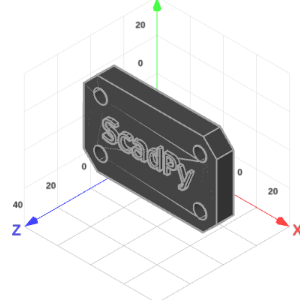
extruded_plate = plate.linear_extrude(PLATE_THICKNESS)
label = text("ScadPy", size=15).linear_extrude(TEXT_THICKNESS)
extruded_plate |= label.translate(z(PLATE_THICKNESS))
extruded_plate.to_screen()
# 3D — parametric ball bearing
from scadpy import circle, rectangle, sphere, x, y, GRAY, ORANGE

BALL_RADIUS    = 3
RACE_RADIUS    = 15
NB_BALLS       = 11
CLEARANCE      = 0.1
RING_HEIGHT    = 7
RACE_THICKNESS = 10

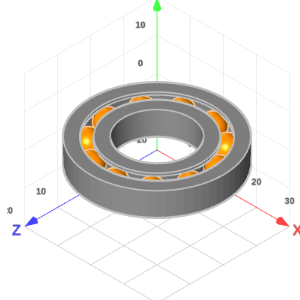
groove  = circle(BALL_RADIUS + CLEARANCE) | rectangle([BALL_RADIUS, RING_HEIGHT])
race    = rectangle([RACE_THICKNESS, RING_HEIGHT]) - groove
bearing = race.radial_extrude(axis=y(), pivot=x(RACE_RADIUS)).color(GRAY)
ball    = sphere(BALL_RADIUS).color(ORANGE)
bearing += ball.radial_pattern(count=NB_BALLS, axis=y(), pivot=x(RACE_RADIUS))

bearing.to_screen()
# 3D — dice
from scadpy import cuboid, sphere, x, y, z

SIZE = 20
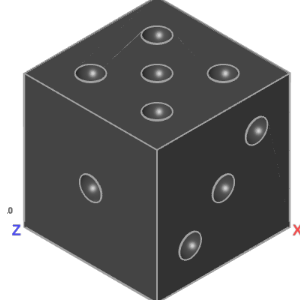
dice = cuboid(SIZE)
pip  = sphere(SIZE / 12).translate(z(SIZE / 2))

one   = pip
two   = pip.translate([SIZE / 4, SIZE / 4, 0]) + pip.translate([-SIZE / 4, -SIZE / 4, 0])
three = one + two
four  = two + two.rotate(90, z())
five  = one + four
six   = four + pip.translate(x(SIZE / 4)) + pip.translate(x(-SIZE / 4))

dice -= (
    one
    + two.rotate(90, x())
    + three.rotate(90, y())
    + four.rotate(-90, y())
    + five.rotate(-90, x())
    + six.rotate(-180, x())
)

dice.to_screen()
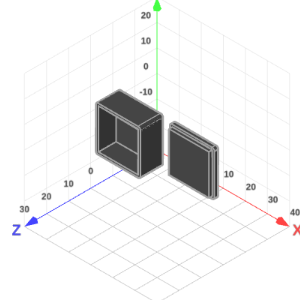
# 3D — storage box
from scadpy import square, x, z

SIZE_OUTER      = 20
SIZE_INNER      = 18
FILLET          = 1
BASE_HEIGHT     = 10
CUT_HEIGHT      = 8
CAP_HEIGHT_OUTER = 1.5
CAP_HEIGHT_INNER = 3
CAP_OFFSET_X    = 25
CUT_OFFSET_Z    = 2

outer_base = square(SIZE_OUTER).fillet(FILLET).linear_extrude(BASE_HEIGHT)
inner_cut  = square(SIZE_INNER).linear_extrude(CUT_HEIGHT).translate(z(CUT_OFFSET_Z))
base       = outer_base - inner_cut

cap_outer = square(SIZE_OUTER).fillet(FILLET).linear_extrude(CAP_HEIGHT_OUTER)
cap_inner = square(SIZE_INNER).linear_extrude(CAP_HEIGHT_INNER)
cap       = (cap_outer | cap_inner).translate(x(CAP_OFFSET_X))

storage_box = base + cap
storage_box.to_screen()
Cheat sheet
Parameters shown in # comments are optional, with their default values.
2D — Shape
from scadpy import *

# primitives
circle(radius=3)                                # segment_count=64
polygon(points=[(-2, -2), (2, -2), (0, 2)])
rectangle(size=[6, 3])
Shape.from_dxf("file.dxf")
Shape.from_svg("file.svg")
square(size=4)

# boolean operations
s = square(size=4);  c = circle(radius=3)
s | c    # union
s - c    # difference
s & c    # intersection
s ^ c    # symmetric difference
s + c    # concat (no merge)

# transforms
s.chamfer(size=0.8)              # vertex_filter=None, epsilon=1e-8
s.color(color=RED)
s.convexify()                    # part_filter=None
s.fill()                         # part_filter=None
s.fillet(size=0.8)               # vertex_filter=None, segment_count=32, epsilon=1e-8
s.grow(distance=0.5)             # part_filter=None
s.linear_cut(axis=x())          # pivot=0
s.linear_pattern(counts=4, steps=x(3))        # counts=[nx, ny], steps=[sx, sy]
s.linear_slice(thickness=2, direction=x())  # pivot=0, part_filter=None
s.mirror(normal=[1, 0])          # pivot=0
s.pull(distance=1.0)             # pivot=0, vertex_filter=None
s.push(distance=1.0)             # pivot=0, vertex_filter=None
s.radial_pattern(count=6)        # angle=360, pivot=0
s.radial_slice(start=0, end=180) # pivot=0, part_filter=None
s.resize(size=[6, None])         # auto=False, pivot=None, vertex_filter=None
s.rotate(angle=30)               # pivot=0, vertex_filter=None
s.scale(scale=[2, 0.5])          # pivot=0, vertex_filter=None
s.shrink(distance=0.5)           # part_filter=None
s.translate(translation=[2, 1])  # vertex_filter=None

# features
s.bounds                         # [min_x, min_y, max_x, max_y]
s.bounding_box                   # → Shape (rectangle)
s.centroid                       # [cx, cy] — geometric centroid
s.is_empty                       # bool

# topology — coordinates & attributes
s.are_vertices_convex            # (n_vertices,)   — convexity mask
s.directed_edge_directions       # (2*n_edges, 2)
s.edge_lengths                   # (n_edges,)
s.edge_midpoints                 # (n_edges,  2)
s.edge_normals                   # (n_edges,  2)
s.ring_types                     # (n_rings,)  — "exterior"|"interior"
s.vertex_angles                  # (n_vertices,)   — interior angles (°)
s.vertex_coordinates             # (n_vertices, 2)
s.vertex_normals                 # (n_vertices, 2) — outward unit normals

# topology — bridges (*_to_*)
s.directed_edge_to_edge             # directed_edge → edge
s.directed_edge_to_vertex           # directed_edge → [start, end]
s.edge_to_vertex                    # edge          → [start, end]
s.ring_to_part                      # ring          → part
s.vertex_to_incoming_directed_edge  # vertex        → directed_edge
s.vertex_to_outgoing_directed_edge  # vertex        → directed_edge
s.vertex_to_neighbor_vertex       # vertex        → [prev, next]
s.vertex_to_part                    # vertex        → part
s.vertex_to_ring                    # vertex        → ring

# extrusions → Solid
s.linear_extrude(height=3)
s.radial_extrude(axis=y(), pivot=x(5))  # start=0, end=360, segment_count=64
s.path_extrude(path)                    # fillet_segments=None, min_fillet_radius=None, intermediate_sections=None, strategy=None

# sweep strategies (for path_extrude strategy= parameter)
scale_sweep(end=3)                      # start=1.0
rotate_sweep(angle=360)                 # start_angle=0.0
resize_sweep(end_size=[2, 4])           # start_size=None
reverse_sweep(strategy=scale_sweep(3))

# export
s.to_dxf_file("output.dxf")
s.to_html_file("output.html")
s.to_screen()
s.to_svg_file("output.svg")
3D — Solid
from scadpy import *

# primitives
cone(radius=2, height=4)         # section_count=32
cuboid(size=[4, 3, 2])
cylinder(radius=2, height=4)     # section_count=32
polyhedron(vertices=vertices, faces=faces)
sphere(radius=3)                 # subdivision_count=4
Solid.from_stl("model.stl")

# boolean operations
a = cuboid(size=[4, 3, 2]);  b = sphere(radius=2)
a | b    # union
a - b    # difference
a & b    # intersection
a ^ b    # symmetric difference
a + b    # concat (no merge)

# transforms
a.color(color=RED)
a.convexify()                    # part_filter=None
a.linear_pattern(counts=4, steps=x(3))        # counts=[nx, ny, nz], steps=[sx, sy, sz]
a.mirror(normal=[1, 0, 0])       # pivot=0
a.pull(distance=1.0)             # pivot=0, vertex_filter=None
a.push(distance=1.0)             # pivot=0, vertex_filter=None
a.radial_pattern(count=6, axis=z())            # angle=360, pivot=0
a.resize(size=[6, None, None])   # auto=False, pivot=None, vertex_filter=None
a.rotate(angle=30, axis=z())    # pivot=0, vertex_filter=None
a.scale(scale=[2, 1, 0.5])       # pivot=0, vertex_filter=None
a.translate(translation=[1, 0, 0])  # vertex_filter=None

# features
a.bounds                         # [min_x, min_y, min_z, max_x, max_y, max_z]
a.bounding_box                   # → Solid (cuboid)
a.centroid                       # [cx, cy, cz] — geometric centroid
a.is_empty                       # bool

# topology — coordinates & bridges (*_to_*)
a.triangle_to_vertex    # triangle → [v0, v1, v2]
a.vertex_coordinates    # (n_vertices,  3)
a.vertex_to_part        # vertex   → part

# export
a.to_html_file("output.html")
a.to_screen()
a.to_stl_file("output.stl")
Roadmap
- Improve documentation
- Richer topology for Shape and Solid
- Richer transformations for Shape and Solid
- Chamfer and fillet on Solid
- New assembly types:
PointCloud2d,Wire2d,PointCloud3d,Wire3d - Better error messages
- More import/export formats
Development
# Create and activate venv
python3 -m venv .venv
source .venv/bin/activate

# Install with dev dependencies
pip install -e .[dev]

# Run doctests & generate documentation
cd docs && make doctest && make html
License
See LICENSE.md.
Release history Release notifications | RSS feed


Download files
Download the file for your platform. If you're not sure which to choose, learn more about installing packages.
Source Distribution
Built Distribution
Filter files by name, interpreter, ABI, and platform.
If you're not sure about the file name format, learn more about wheel file names.
Copy a direct link to the current filters
File details
Details for the file scadpy-0.4.7.tar.gz.
File metadata
- Download URL: scadpy-0.4.7.tar.gz
- Upload date:
- Size: 509.5 kB
- Tags: Source
- Uploaded using Trusted Publishing? Yes
- Uploaded via: twine/6.1.0 CPython/3.13.7
File hashes
| Algorithm | Hash digest | |
|---|---|---|
| SHA256 |
7df3781748b6d7aecbbb6004e1c68aa7293054bd2a4f74fbc15d92447a185b23
|
|
| MD5 |
5dc8712548969408d2b8ccbf9ab0c46d
|
|
| BLAKE2b-256 |
e2631de1694c714a94fee041f4209b9e85cfeaa34c75dc79e9414251c28cfb3f
|
Provenance
The following attestation bundles were made for scadpy-0.4.7.tar.gz:
Publisher:
release.yml on m-fabregue/scadpy
-
Statement:
-
Statement type:
https://in-toto.io/Statement/v1 -
Predicate type:
https://docs.pypi.org/attestations/publish/v1 -
Subject name:
scadpy-0.4.7.tar.gz -
Subject digest:
7df3781748b6d7aecbbb6004e1c68aa7293054bd2a4f74fbc15d92447a185b23 - Sigstore transparency entry: 1154697101
- Sigstore integration time:
-
Permalink:
m-fabregue/scadpy@cb492a0bdcc429ed9156ceaee46ddf820166ae3e -
Branch / Tag:
refs/tags/v0.4.7 - Owner: https://github.com/m-fabregue
-
Access:
public
-
Token Issuer:
https://token.actions.githubusercontent.com -
Runner Environment:
github-hosted -
Publication workflow:
release.yml@cb492a0bdcc429ed9156ceaee46ddf820166ae3e -
Trigger Event:
push
-
Statement type:
File details
Details for the file scadpy-0.4.7-py3-none-any.whl.
File metadata
- Download URL: scadpy-0.4.7-py3-none-any.whl
- Upload date:
- Size: 199.2 kB
- Tags: Python 3
- Uploaded using Trusted Publishing? Yes
- Uploaded via: twine/6.1.0 CPython/3.13.7
File hashes
| Algorithm | Hash digest | |
|---|---|---|
| SHA256 |
ecada76303984e97e1db7f863ee814fff15f34f318e484222fee2219edc4f95e
|
|
| MD5 |
10ca9b207a0afaf6275b740b746e7af2
|
|
| BLAKE2b-256 |
cea648b2b4c6aba33ec6e565923c61eb3e5730e0c7acf81afc1f4179cdcef176
|
Provenance
The following attestation bundles were made for scadpy-0.4.7-py3-none-any.whl:
Publisher:
release.yml on m-fabregue/scadpy
-
Statement:
-
Statement type:
https://in-toto.io/Statement/v1 -
Predicate type:
https://docs.pypi.org/attestations/publish/v1 -
Subject name:
scadpy-0.4.7-py3-none-any.whl -
Subject digest:
ecada76303984e97e1db7f863ee814fff15f34f318e484222fee2219edc4f95e - Sigstore transparency entry: 1154697102
- Sigstore integration time:
-
Permalink:
m-fabregue/scadpy@cb492a0bdcc429ed9156ceaee46ddf820166ae3e -
Branch / Tag:
refs/tags/v0.4.7 - Owner: https://github.com/m-fabregue
-
Access:
public
-
Token Issuer:
https://token.actions.githubusercontent.com -
Runner Environment:
github-hosted -
Publication workflow:
release.yml@cb492a0bdcc429ed9156ceaee46ddf820166ae3e -
Trigger Event:
push
-
Statement type:






