
Fast fitting of 2D- and 3D-Spectra with established routines

Project description






SpectraFit
SpectraFit is a Python tool for quick data fitting based on the regular
expression of distribution and linear functions via the command line (CMD) or
Jupyter Notebook It is designed to be easy to use and
supports all common ASCII data formats. SpectraFit runs on Linux,
Windows, and MacOS.
Scope
- Fitting of 2D data, also with multiple columns as global fitting
- Using established and advanced solver methods
- Extensibility of the fitting function
- Guarantee traceability of the fitting results
- Saving all results in a SQL-like-format (
CSV) for publications - Saving all results in a NoSQL-like-format (
JSON) for project management - Having an API interface for Graph-databases
SpectraFit is a tool designed for researchers and scientists who require
immediate data fitting to a model. It proves to be especially beneficial for
individuals working with vast datasets or who need to conduct numerous fits
within a limited time frame. SpectraFit's adaptability to various platforms
and data formats makes it a versatile tool that caters to a broad spectrum of
scientific applications.
Installation
via pip:
pip install spectrafit

# with support for Jupyter Notebook

pip install spectrafit[jupyter]

# with support for the dashboard in the Jupyter Notebook

pip install spectrafit[jupyter-dash]

# with support to visualize pkl-files as graph

pip install spectrafit[graph]

# with all upcomming features

pip install spectrafit[all]

# Upgrade

pip install spectrafit --upgrade
via conda, see also conda-forge:
conda install -c conda-forge spectrafit

# with support for Jupyter Notebook

conda install -c conda-forge spectrafit-jupyter

# with all upcomming features

conda install -c conda-forge spectrafit-all
Usage
SpectraFit needs as command line tool only two things:
- The reference data, which should be fitted.
- The input file, which contains the initial model.
As model files json,
toml, and
yaml are supported. By making use of the
python **kwargs feature, the input file can call most of the following
functions of LMFIT. LMFIT is the
workhorse for the fit optimization, which is macro wrapper based on:
In case of SpectraFit, we have further extend the package by:
- Pandas
- statsmodels
- numdifftools
- Matplotlib in combination with Seaborn
spectrafit data_file.txt -i input_file.json
usage: spectrafit [-h] [-o OUTFILE] [-i INPUT] [-ov] [-e0 ENERGY_START]
                  [-e1 ENERGY_STOP] [-s SMOOTH] [-sh SHIFT] [-c COLUMN COLUMN]
                  [-sep {       ,,,;,:,|, ,s+}] [-dec {.,,}] [-hd HEADER]
                  [-g {0,1,2}] [-auto] [-np] [-v] [-vb {0,1,2}]
                  infile

Fast Fitting Program for ascii txt files.

positional arguments:
  infile                Filename of the spectra data

optional arguments:
  -h, --help            show this help message and exit
  -o OUTFILE, --outfile OUTFILE
                        Filename for the export, default to set to
                        'spectrafit_results'.
  -i INPUT, --input INPUT
                        Filename for the input parameter, default to set to
                        'fitting_input.toml'.Supported fileformats are:
                        '*.json', '*.yml', '*.yaml', and '*.toml'
  -ov, --oversampling   Oversampling the spectra by using factor of 5;
                        default to False.
  -e0 ENERGY_START, --energy_start ENERGY_START
                        Starting energy in eV; default to start of energy.
  -e1 ENERGY_STOP, --energy_stop ENERGY_STOP
                        Ending energy in eV; default to end of energy.
  -s SMOOTH, --smooth SMOOTH
                        Number of smooth points for lmfit; default to 0.
  -sh SHIFT, --shift SHIFT
                        Constant applied energy shift; default to 0.0.
  -c COLUMN COLUMN, --column COLUMN COLUMN
                        Selected columns for the energy- and intensity-values;
                        default to '0' for energy (x-axis) and '1' for intensity
                        (y-axis). In case of working with header, the column
                        should be set to the column names as 'str'; default
                        to 0 and 1.
  -sep { ,,,;,:,|, ,s+}, --separator { ,,,;,:,|, ,s+}
                        Redefine the type of separator; default to ' '.
  -dec {.,,}, --decimal {.,,}
                        Type of decimal separator; default to '.'.
  -hd HEADER, --header HEADER
                        Selected the header for the dataframe; default to None.
  -cm COMMENT, --comment COMMENT
                        Lines with comment characters like '#' should not be
                        parsed; default to None.
  -g {0,1,2}, --global_ {0,1,2}
                        Perform a global fit over the complete dataframe. The
                        options are '0' for classic fit (default). The
                        option '1' for global fitting with auto-definition
                        of the peaks depending on the column size and '2'
                        for self-defined global fitting routines.
  -auto, --autopeak     Auto detection of peaks in the spectra based on `SciPy`.
                        The position, height, and width are used as estimation
                        for the `Gaussian` models.The default option is 'False'
                        for  manual peak definition.
  -np, --noplot         No plotting the spectra and the fit of `SpectraFit`.
  -v, --version         Display the current version of `SpectraFit`.
  -vb {0,1,2}, --verbose {0,1,2}
                        Display the initial configuration parameters and fit
                        results, as a table '1', as a dictionary '2', or not in
                        the terminal '0'. The default option is set to 1 for
                        table `printout`.
Jupyter Notebook
Open the Jupyter Notebook and run the following code:
spectrafit-jupyter
or via Docker Image for <cpu> with amd64 and arm64:
docker pull ghcr.io/anselmoo/spectrafit-<cpu>:latest
docker run -it -p 8888:8888 spectrafit-<cpu>:latest
or just:
docker run -p 8888:8888 ghcr.io/anselmoo/spectrafit-<cpu>:latest
Next define your initial model and the reference data:
from spectrafit.plugins.notebook import SpectraFitNotebook
import pandas as pd

df = pd.read_csv(
    "https://raw.githubusercontent.com/Anselmoo/spectrafit/main/Examples/data.csv"
)

initial_model = [
    {
        "pseudovoigt": {
            "amplitude": {"max": 2, "min": 0, "vary": True, "value": 1},
            "center": {"max": 2, "min": -2, "vary": True, "value": 0},
            "fwhmg": {"max": 0.4, "min": 0.1, "vary": True, "value": 0.21},
            "fwhml": {"max": 0.4, "min": 0.1, "vary": True, "value": 0.21},
        }
    },
    {
        "pseudovoigt": {
            "amplitude": {"max": 2, "min": 0, "vary": True, "value": 1},
            "center": {"max": 2, "min": -2, "vary": True, "value": 1},
            "fwhmg": {"max": 0.4, "min": 0.1, "vary": True, "value": 0.21},
            "fwhml": {"max": 0.4, "min": 0.1, "vary": True, "value": 0.21},
        }
    },
    {
        "pseudovoigt": {
            "amplitude": {"max": 2, "min": 0, "vary": True, "value": 1},
            "center": {"max": 2, "min": -2, "vary": True, "value": 1},
            "fwhmg": {"max": 0.4, "min": 0.1, "vary": True, "value": 0.21},
            "fwhml": {"max": 0.4, "min": 0.1, "vary": True, "value": 0.21},
        }
    },
]
spf = SpectraFitNotebook(df=df, x_column="Energy", y_column="Noisy")
spf.solver_model(initial_model)
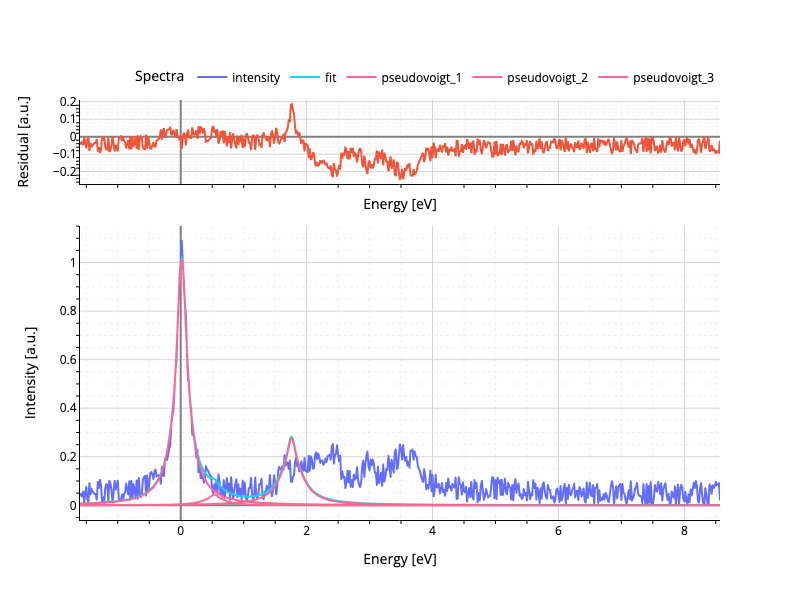
Which results in the following output:
Documentation
Please see the extended documentation
for the full usage of SpectraFit.
Release history Release notifications | RSS feed


Download files
Download the file for your platform. If you're not sure which to choose, learn more about installing packages.
Source Distribution
Built Distribution
Filter files by name, interpreter, ABI, and platform.
If you're not sure about the file name format, learn more about wheel file names.
Copy a direct link to the current filters
File details
Details for the file spectrafit-1.0.0.post1.tar.gz.
File metadata
- Download URL: spectrafit-1.0.0.post1.tar.gz
- Upload date:
- Size: 87.7 kB
- Tags: Source
- Uploaded using Trusted Publishing? No
- Uploaded via: twine/4.0.2 CPython/3.11.8
File hashes
| Algorithm | Hash digest | |
|---|---|---|
| SHA256 |
243f824dd0a4fee1ff159d698cee00e5725082756d298c04c2ecd173c9fcad60
|
|
| MD5 |
6b0531ac10cf9c4c436c2a496d04d773
|
|
| BLAKE2b-256 |
297297f2dd99e8c83d0e1044b0607f0fc4bdacd76e21ce8a01bc5962bce6f651
|
File details
Details for the file spectrafit-1.0.0.post1-py3-none-any.whl.
File metadata
- Download URL: spectrafit-1.0.0.post1-py3-none-any.whl
- Upload date:
- Size: 95.5 kB
- Tags: Python 3
- Uploaded using Trusted Publishing? No
- Uploaded via: twine/4.0.2 CPython/3.11.8
File hashes
| Algorithm | Hash digest | |
|---|---|---|
| SHA256 |
262a7e6035f7a96c7382e1755b3c01ecfd53d990697bb944c58aafbed7e57380
|
|
| MD5 |
629a73bed056aa79ac328e51354a8c8f
|
|
| BLAKE2b-256 |
3ed7ed91c36d0c58268f8c79883835f41fe60d6b95d79ca168516f2777013a09
|






