
SqueakyCleanText


Real-world text is messy: broken encoding, HTML, URLs, and personal data such as names, emails and phone numbers. SqueakyCleanText cleans that text and replaces the personal data with tags, fake values or reversible placeholders, in one call and in 75 languages. It is for teams that feed text into LLMs, training sets, search indexes or classic ML models and need it clean and safe to share first.
It finds most personal data, not all of it. Check its output before you publish sensitive data.
Before and after
from sct import TextCleaner

text = "<p>Hi, I’m John Smith. Mail me at john.smith@example.com or call +31 6 1234 5678.</p>"
print(TextCleaner().process(text).lm_text)
# -> <HTML>Hi, I'm <PERSON>. Mail me at <EMAIL> or call <PHONE>.<HTML>
The broken ’ is repaired to an apostrophe, the HTML tags become <HTML> (set replace_with_html="" to drop them), and the name, email and phone become tags.
Use SCT when
- You send user text (tickets, chats, emails, scraped pages) to an LLM, a RAG index or a training set and must take the personal data out first.
- Your text comes in many languages and scripts, and you want one tool for all of them.
- You need the original values back later: reversible placeholders keep a map you store apart.
- You want to log or report what was found without logging the values (value-free
signals). - Do not use it alone for tables with known PII columns: drop or hash those columns, or use a tool built for structured data such as Presidio structured.
Install
pip install squeakycleantext
Python 3.12 or newer. The base install runs NER with ONNX Runtime; it needs no PyTorch. The extras you are most likely to need:
| Extra | Why you need it |
|---|---|
gpu |
Run NER on an NVIDIA GPU (CUDA ONNX Runtime) |
synthetic |
Replace PII with fake values (Faker) |
gliner |
Zero-shot NER with your own labels, and ner_mode="pii" (58 PII labels) |
datasets, datatrove |
Clean Hugging Face datasets or DataTrove pipelines |
mcp |
Run SCT as an MCP server for AI assistants |
Install with pip install "squeakycleantext[gpu,synthetic]". All extras: docs/INSTALL.md.
Quickstart
from sct import TextCleaner

cleaner = TextCleaner()
result = cleaner.process("Contact John Doe at john.doe@company.com. Meeting on 2023-10-01.")
print(result.lm_text)    # -> Contact <PERSON> at <EMAIL>. Meeting on <DATE>.
print(result.stat_text)  # -> contact person email meeting date
print(result.language)   # -> ENGLISH
lm_text keeps the sentence for LLMs. stat_text is lower-cased, without stopwords and punctuation, for classic ML models. The result also unpacks as lm_text, stat_text, language.
Clean many texts at once with process_batch. It runs documents in threads and batches the NER calls across them:
from sct import TextCleaner

cleaner = TextCleaner()
for r in cleaner.process_batch(["Mail jan@example.nl", "Bel +31 20 123 4567 voor Jan de Vries."]):
    print(r.language, r.lm_text)
# -> ENGLISH Mail <EMAIL>
# -> DUTCH Bel <PHONE> voor <PERSON>.
For more PII types (IDs, bank numbers, health data and more), use the GLiNER PII model with TextCleaner(cfg=TextCleanerConfig(ner_mode="pii")). It needs the gliner extra.
How it works
- Detect language. Lingua reads the raw input and picks one of 75 languages. Pin it with
language="de"or limit it withlanguage=("en", "nl"). - Fix the text. ftfy repairs broken unicode and HTML entities, styled characters such as
𝐣𝐨𝐡𝐧are folded, and HTML tags are replaced. Emoji removal and ASCII folding are off by default. - Regex PII. URLs, emails, IPs, dates, phones, years and numbers become tags. Currency symbols become ISO codes by default (
€100becomesEUR<NUMBER>); setreplace_with_currency_symbols="<CURRENCY>"to get a tag. Then isolated letters and symbols, bracket content and extra whitespace are cleaned up. Each type is counted. - NER. By default an ensemble of ONNX models per language finds persons, locations, organisations and misc entities. Long texts are cut into chunk windows (no overlap unless you set
ner_chunk_overlap). You can switch to PyTorch, GLiNER or the GLiNER PII mode, and apply a privacy policy. - Replace. Found values become
<TAG>s (default), fake values (synthetic) or indexed placeholders such as<PERSON_0>with a map to restore them (reversible). - Output.
lm_text,stat_textandlanguage, plusmetadataandsignals.signalsholds counts, warnings and model ids, never raw values.metadataholds the same counts, and it can hold raw values: the reversible map (anon_map, unless you pass aTokenStore) andfindingswith entity text (withinclude_entities=Trueor a privacy policy).
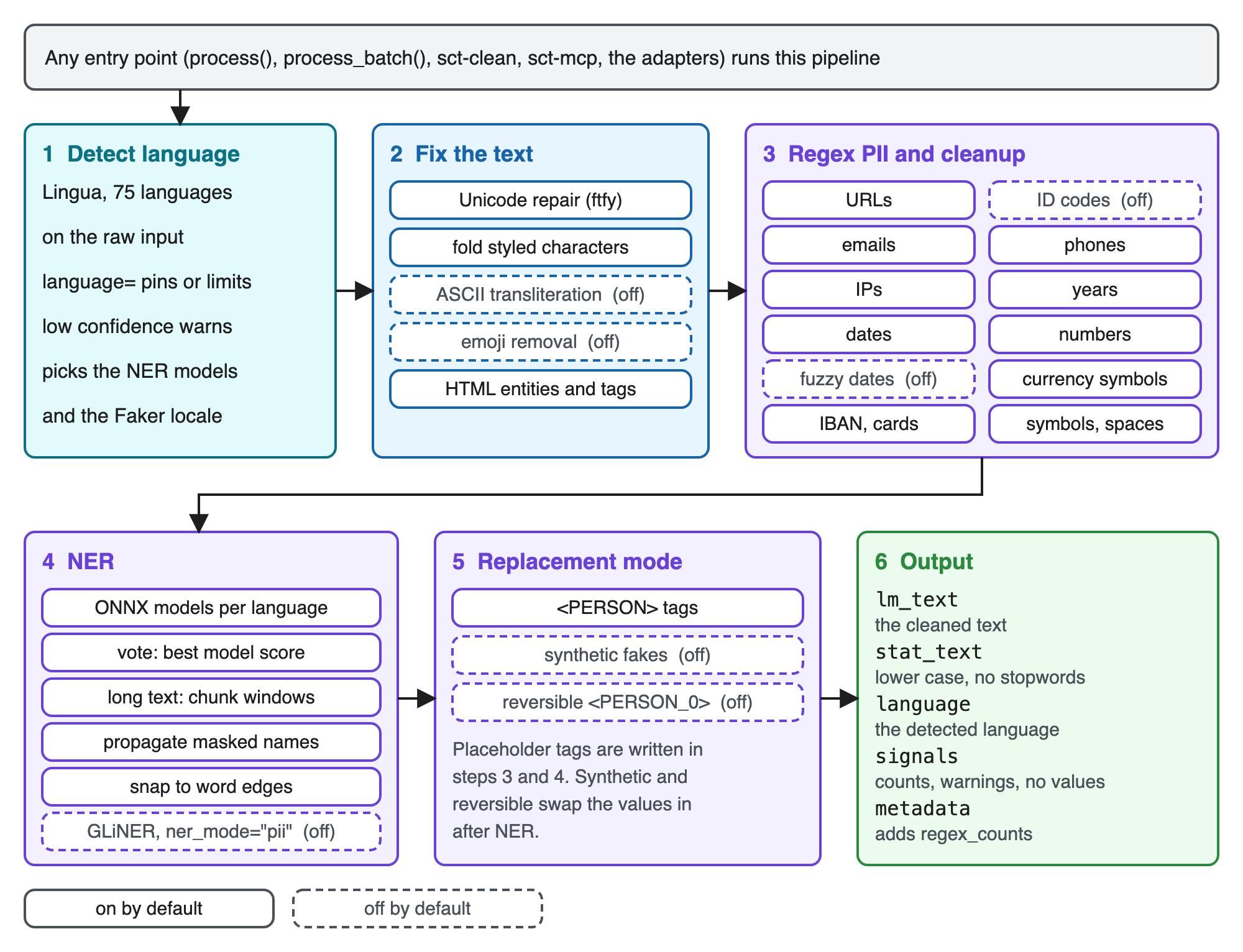
The diagram as text
- Entry points:
process(),process_batch(), thesct-cleanCLI, thesct-mcpserver, the Hugging Facedatasets, DataTrove, LangChain and Haystack adapters, the JSON, DataFrame and RAG adapters, and the streaming redactors. All of them pass text to the same pipeline. - 1 Detect language (Lingua, 75 languages, on the raw input) -> 2 Fix the text -> 3 Regex PII (counted in
regex_counts) -> 4 NER (chunk windows for long text, overlap only withner_chunk_overlap) -> 5 Replace (<TAG>, synthetic fakes, or reversible<PERSON_0>with a map inmetadataor aTokenStore) -> 6 Output (lm_text,stat_text,language) andmetadata/signals(signalshas no raw values;metadatacan hold the reversible map andfindings). - Across all stages:
process_batchruns documents in threads and batches NER across them (ner_batch_size); NER runs on CPU or CUDA (ner_device); thetrainingpreset turns stages on and off.
Every step is a TextCleanerConfig field with a safe default. The source of the diagram is resources/sct_flow.excalidraw.
What you get back
process returns a ProcessResult with lm_text, stat_text, language and metadata:
from sct import TextCleaner

result = TextCleaner().process("Mail jan@example.nl or call +31 20 123 4567.")
print(result.metadata["regex_counts"])
# -> {'EMAIL': {'count': 1, 'chars': 14}, 'PHONE': {'count': 1, 'chars': 15}}
print(result.signals["pii_count"], result.signals["pii_types"], result.signals["sensitive"])
# -> 2 {'EMAIL': 1, 'PHONE': 1} True
metadataalways holdsregex_counts,entity_counts,language_confidence,language_source,warnings(such aslanguage_low_confidenceorner_fallback_models) andprovenance(the NER models and revisions that ran).signalsis the value-free view of the same data, with the same keys for every input. It is safe to log or store next to the cleaned text.- Entity text appears only when you ask for it (
include_entities=Trueor a privacy policy addsmetadata["findings"]) and in the reversible map. Keep those out of logs. Full field list: docs/API.md.
Common recipes
Training or RAG data. The training preset only takes out PII and repairs unicode. Numbers, dates, HTML, case, line breaks and code stay as written:
from sct import TextCleaner, preset_config

cleaner = TextCleaner(cfg=preset_config("training"))
print(cleaner.process("Order 4711 from <b>Anna Berg</b> (anna@example.se) on 2024-05-01.").lm_text)
# -> Order 4711 from <b><PERSON></b> (<EMAIL>) on 2024-05-01.
Reversible placeholders. Keep the map in a TokenStore and restore the values later (docs/REPLACEMENT_MODES.md, docs/PRIVACY.md). replacement_mode="synthetic" (synthetic extra) puts fake values in place instead. The same document always gets the same fakes.
from sct import InMemoryTokenStore, TextCleaner, TextCleanerConfig

store = InMemoryTokenStore()
cleaner = TextCleaner(cfg=TextCleanerConfig(replacement_mode="reversible"), token_store=store)
result = cleaner.process("Maria lives in Utrecht.")
print(result.lm_text)  # -> <PERSON_0> lives in <LOCATION_0>.
print(store.load(result.metadata["anon_map_reference"]).deanonymize(result.lm_text))  # -> Maria lives in Utrecht.
Privacy policy. Decide per entity type what to keep or redact, and get a versioned audit trail (docs/PRIVACY.md):
from sct import EntityRule, PrivacyPolicy, TextCleaner

policy = PrivacyPolicy(name="support-export", version="1", rules={
    "PERSON": EntityRule(action="redact", min_score=0.8),
    "ORGANISATION": EntityRule(action="keep"),
})
print(TextCleaner(privacy_policy=policy).process("Maria Chen from Acme Corp wrote to us.").lm_text)
# -> <REDACTED> from Acme Corp wrote to us.
GPU. Install the gpu extra and set TextCleanerConfig(ner_device="cuda", cuda_device_id=0). If CUDA cannot load, NER runs on CPU and each result gets the cuda_fallback warning (docs/PERFORMANCE.md).
Your own entity labels. With the gliner extra, set ner_backend="gliner", gliner_model="urchade/gliner_multi-v2.1" and gliner_labels=("person", "product", "event"); unmapped labels become tags such as <PRODUCT> (docs/NER_BACKENDS.md).
Use it in your stack
| Integration | Usage | Extra | Docs |
|---|---|---|---|
Hugging Face datasets |
clean_dataset(ds, columns=["text"], num_proc=4) |
datasets |
INTEGRATIONS |
| DataTrove | SCTCleaner() as a pipeline step |
datatrove |
INTEGRATIONS |
| LangChain | SCTDocumentTransformer().transform_documents(docs) |
langchain |
INTEGRATIONS |
| Haystack | pipe.add_component("sct", SCTDocumentCleaner()) |
haystack |
INTEGRATIONS |
| JSON, DataFrame, RAG chunks | process_json(cleaner, value) |
none | ADAPTERS |
| Streams | WindowedStreamingRedactor(cleaner) |
none | ADAPTERS |
| Ray, Spark, Polars, DuckDB, dlt, Daft | clean_columns(handle, batch) |
none | RECIPES |
| Command line | printf 'Email maria@example.com' | sct-clean |
none | ADAPTERS |
| MCP server | sct-mcp |
mcp |
MCP |
The framework adapters use the training preset unless you pass a config, build one cleaner per worker process, and reject reversible mode.
Performance
Default config (full multilingual NER ensemble), release benchmark documents, SCT 0.8.0, AMD Ryzen Threadripper PRO 7985WX and RTX 4090, median of 3 runs:
| Workload | Hardware | Docs/s |
|---|---|---|
process, one document at a time |
16 CPU cores | 5.0 |
process_batch, short documents, 16 workers |
16 CPU cores | 15.5 (0.7.1: 3.7) |
process_batch, short documents, 16 workers |
64 CPU cores | 29.2 |
process_batch, short documents, English only (2 models) |
RTX 4090 | 646 |
Source and method: docs/PERFORMANCE.md and evaluation/results/comparison-0.7.1-0.8.0.md. Measure your own machine with python -m scripts.benchmark_release --batch 256 --batch-size 8 --ner-batch-size 8.
Quality and evaluation
- Release benchmark (30 documents, 84 entities, 9 languages): exact-span F1 0.99 and 0 of 67 PII values leaked in 0.8.0. Run
python -m scripts.benchmark_release. - Multilingual PII eval (220 synthetic records, 11 languages): the default ensemble scores 0.93 recall and 0.95 precision. Run
python -m scripts.run_multilingual_eval(docs/MULTILINGUAL_EVAL.md). - Score columns and data cards:
sct-report data.jsonl --text-column text --out report.jsonwrites counts, shares and hashes, never text (docs/SCORE.md). - Test your own model or data with the PII evaluation harness (docs/EVALUATION.md).
Languages
Language detection covers 75 languages. Full NER models cover 4 (English, Dutch, German, Spanish). The rest use the multilingual WikiNEural model with the English model, or a model you bring with ner_models. Full list: docs/LANGUAGES.md.
Limits and design principles
- Safe defaults, every choice configurable. Each behaviour is a config field; nothing is forced.
- No guarantee that all PII is found. Models miss entities, mostly organisations and non-Latin scripts. Review output before you publish it.
- Reversible maps are personal data. Anyone with the map can restore the values. Store maps apart from the cleaned data, with access control.
- Offsets are post-regex. Finding offsets point into the text after the regex step, not into the raw input.
- Synthetic data is not anonymisation. Fake values keep the data useful; they do not make it anonymous in a legal sense.
Known limits of 0.8.0 (details in CHANGELOG.md)
- Dates: only full dates become one
<DATE>.1990年1月,1月15日, Japanese era years and1990.1.15.do not; the year and number steps still change them (1990年1月becomes<YEAR>年<NUMBER>月,生日1990.1.15谢谢becomes<YEAR><NUMBER>.15). A circled number glued to a unit character (1月⑮日) stays a list marker. Thai month names needcustom_month_names. - In ensembles with GLiNER, windows are sized for the token-classification models, not for GLiNER's own word limit. GLiNER2 runs one chunk per call; torch models and GLiNER keep one lock per model, so they do not run in parallel across threads.
- Only
process_batchis faster;processof one document is not batched across documents. ner_chunk_overlap(off by default) can still cut an entity longer than the overlap that starts at the very end of a chunk.06-12345678becomes06-<PHONE>. Adversarial strings such as+000000000(000)0can leave(000)0after phone replacement.- Two addresses glued with no separator in a script written without spaces can be read as one address or split at the wrong place.
- ORGANISATION is the weakest NER label (0.75 recall in the multilingual eval); Bengali and Tamil name spans can be a few characters off.
- A URL with a path swallows a trailing sentence period (
see https://x.org/a.becomessee <URL>). A URL path that switches from Latin letters or digits straight into a script written without spaces is replaced only up to the switch (https://x.org/a東京secretbecomes<URL>東京secret). Rare styled URL hosts and mail addresses (https://ab。⑧․cd.ex.com/...,INFO@COL·LEGI。CAT) are not fully replaced. - Score B's quality head was tested with a small ONNX graph only; GLiNER PII mode was not run end to end for this release. CI does not install the
mcpextra; FastMCP-only tests skip there. - An unpinned NER model makes one Hub request per worker when the parent never loaded it before forking; pin
ner_model_revisionsor setHF_HUB_OFFLINE=1. - With an empty regex marker (
replace_with_email=""), NER in synthetic or reversible mode can find other entities than in placeholder mode. WindowedStreamingRedactorcan cut an HTML tag that holds a space when the tag reaches pastoverlap_chars. It raisesBufferErrorwhen the buffer passesmax_buffer_chars(default 4096) with no safe whitespace split; raise the limit or useBufferedStreamingRedactor.
Documentation
| Topic | Where |
|---|---|
| Install and all extras, speed and hardware | docs/INSTALL.md, docs/PERFORMANCE.md |
| Every config field, presets, language options | docs/CONFIG.md |
TextCleaner, ProcessResult, signals |
docs/API.md |
| NER backends, default models, GLiNER, PII mode | docs/NER_BACKENDS.md |
| Synthetic and reversible replacement, GLiClass | docs/REPLACEMENT_MODES.md |
Privacy policies, TokenStore, offsets, k-anonymity |
docs/PRIVACY.md |
| JSON, DataFrame, RAG, CLI, streaming, OCR, browser | docs/ADAPTERS.md |
| Framework adapters, other engines, MCP server | docs/INTEGRATIONS.md, docs/RECIPES.md, docs/MCP.md |
Evaluation, score columns, sct-report |
docs/EVALUATION.md, docs/SCORE.md, docs/MULTILINGUAL_EVAL.md |
| Languages and adding a language | docs/LANGUAGES.md, docs/ADDING_LANGUAGES.md |
| The whole API in one file, for AI coding assistants | llms.txt |
What's new in 0.8.0
See CHANGELOG.md (many breaking changes). Highlights of 0.8.0:
process_batchis 4.2x faster on short documents on 16 CPU cores; GPU device options.- Detection of all 75 Lingua languages, with confidence and warnings.
result.signals, a value-free view for logs, score columns and data cards (sct-report).- Adapters for Hugging Face
datasets, DataTrove, LangChain and Haystack, and atrainingpreset. - A reworked MCP server and a multilingual PII eval in 11 languages. Python 3.12 or newer.
Related work
- clean-text normalises text and replaces URLs, emails and phones with rules. SCT adds NER for names and places and works in many languages.
- ftfy repairs broken unicode. SCT uses it as its first fix step.
- Presidio is a PII detection and anonymisation framework you assemble from recognisers. SCT is one call with multilingual defaults and also cleans the text.
- scrubadub removes PII from free text with detectors. SCT adds text cleaning, reversible maps and value-free metadata.
Contributing
Issues and pull requests are welcome. Read AGENTS.md first: model mistakes are fixed with model-driven rules, never with word lists, and every behaviour stays configurable.
Citation
@software{fazal_squeakycleantext,
  author = {Fazal, Rehan},
  title = {SqueakyCleanText},
  url = {https://github.com/rhnfzl/SqueakyCleanText},
  version = {0.8.0},
  year = {2026}
}
License and acknowledgements
MIT. See LICENSE. The package took inspiration from clean-text. It builds on ftfy, Lingua, ONNX Runtime and the NER models listed in docs/NER_BACKENDS.md.
1 maintainer

Metadata
1 maintainer
Release files for SqueakyCleanText 0.8.0
For a detailed explanation of source distributions (sdists) and built distributions (wheels), please see the package formats documentation.
Source distribution (sdist)
| File | Size | Uploaded | Provenance | Actions |
|---|---|---|---|---|
| squeakycleantext-0.8.0.tar.gz | 259.7 kB | With provenance | Details for squeakycleantext-0.8.0.tar.gz |
Built distribution (wheel)
| File | Interpreter | ABI | Platform | Actions Reset |
|---|---|---|---|---|
| squeakycleantext-0.8.0-py3-none-any.whl | Python 3 | none | any | Details for squeakycleantext-0.8.0-py3-none-any.whl |
Total release size: 400.1 kB
Release files / squeakycleantext-0.8.0.tar.gz
| Download URL | squeakycleantext-0.8.0.tar.gz |
|---|---|
| Size | 259.7 kB |
| Tags | Source |
|
SHA-256 checksum How to use checksums |
d55dff04abe182e36b6167256a1d8c32df85c10e747e312c35f8d5e430da8343
|
|
BLAKE2b-256 checksum How to use checksums |
59fd2602a6571fda2db442e1f99f7519a30c94b68906782ff7fe7ecabe118d00
|
| Upload date | |
|
Uploaded using Trusted Publishing? What is trusted publishing? |
Yes |
| Uploaded via |
twine/7.0.0 CPython/3.13.16
|
Provenance
Provenance describes where a file came from. On PyPI, provenance is shared via attestations, which provide a verifiable record of the build or publishing details. View details, limitations and caveats.


PyPI Publish Attestation
PyPI verified that this artifact, at this checksum, originated from the publisher listed below.
Signed by GitHub Actions, verified by PyPI on Nov 1, 2026.
Transparency logRelease files / squeakycleantext-0.8.0-py3-none-any.whl
| Download URL | squeakycleantext-0.8.0-py3-none-any.whl |
|---|---|
| Size | 140.4 kB |
| Tags | Python 3 |
|
SHA-256 checksum How to use checksums |
fa41b7010ab7c37a1cf8919e52dc9edec19f5de0283cf9897f8e4a165d5503cd
|
|
BLAKE2b-256 checksum How to use checksums |
641efda1f3dcc1a30f5e6b3fb6b8542cf4c1c4bd95f53ded1f6312f7a0eebd64
|
| Upload date | |
|
Uploaded using Trusted Publishing? What is trusted publishing? |
Yes |
| Uploaded via |
twine/7.0.0 CPython/3.13.16
|
Provenance
Provenance describes where a file came from. On PyPI, provenance is shared via attestations, which provide a verifiable record of the build or publishing details. View details, limitations and caveats.
PyPI Publish Attestation
PyPI verified that this artifact, at this checksum, originated from the publisher listed below.
Signed by GitHub Actions, verified by PyPI on Nov 1, 2026.
Transparency logSecurity for SqueakyCleanText 0.8.0
Provenance
Provenance describes where a file came from. On PyPI, provenance is shared via attestations, which provide a verifiable record of the build or publishing details. View details, limitations and caveats.
Full provenance
Both files in this release have been uploaded with provenance metadata.
Attestation for squeakycleantext-0.8.0.tar.gz
PyPI Publish Attestation
PyPI verified that this artifact, at this checksum, originated from the publisher listed below.
Signed by GitHub Actions, verified by PyPI on Nov 1, 2026.
Transparency logA note on package security
PyPI is a repository for distributing packages, not a service for auditing them. While third-party security researchers and our staff do their best to detect and remove malicious packages, PyPI cannot guarantee the quality, security or suitability of any given package.
To learn more about protecting yourself from malicious actors, visit our package security documentation.














