






Overview
TCRcloud is an Adaptive Immune Receptor Repertoire (AIRR) visualization and comparison tool. It produces publication-ready plots from AIRR-compliant rearrangement data and can download rearrangements directly from the AIRR Data Commons.
TCRcloud was initially developed for TCR repertoires but is also compatible with BCR repertoires.
Features
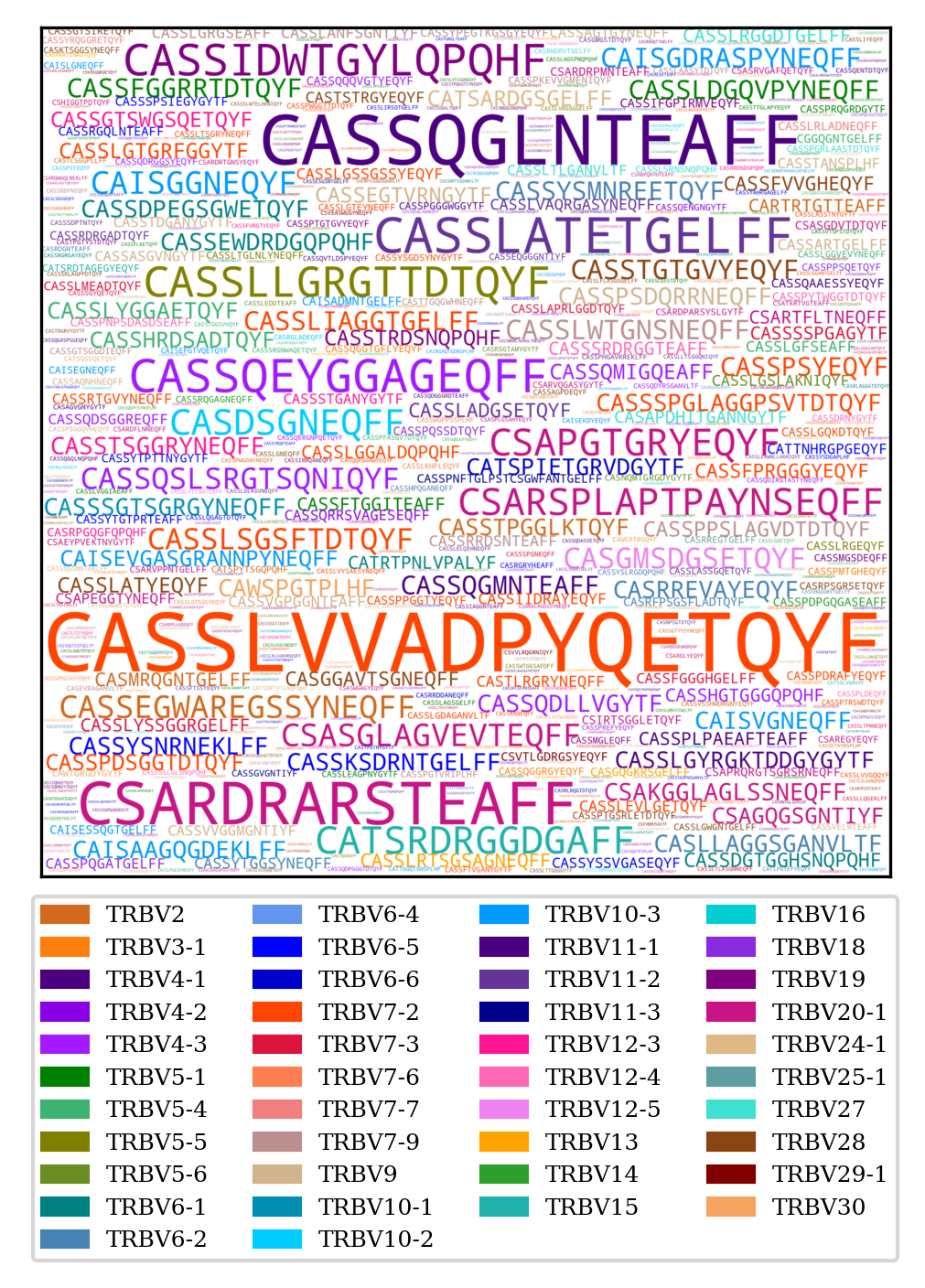
- Word clouds of CDR3 amino acid usage, coloured by V gene
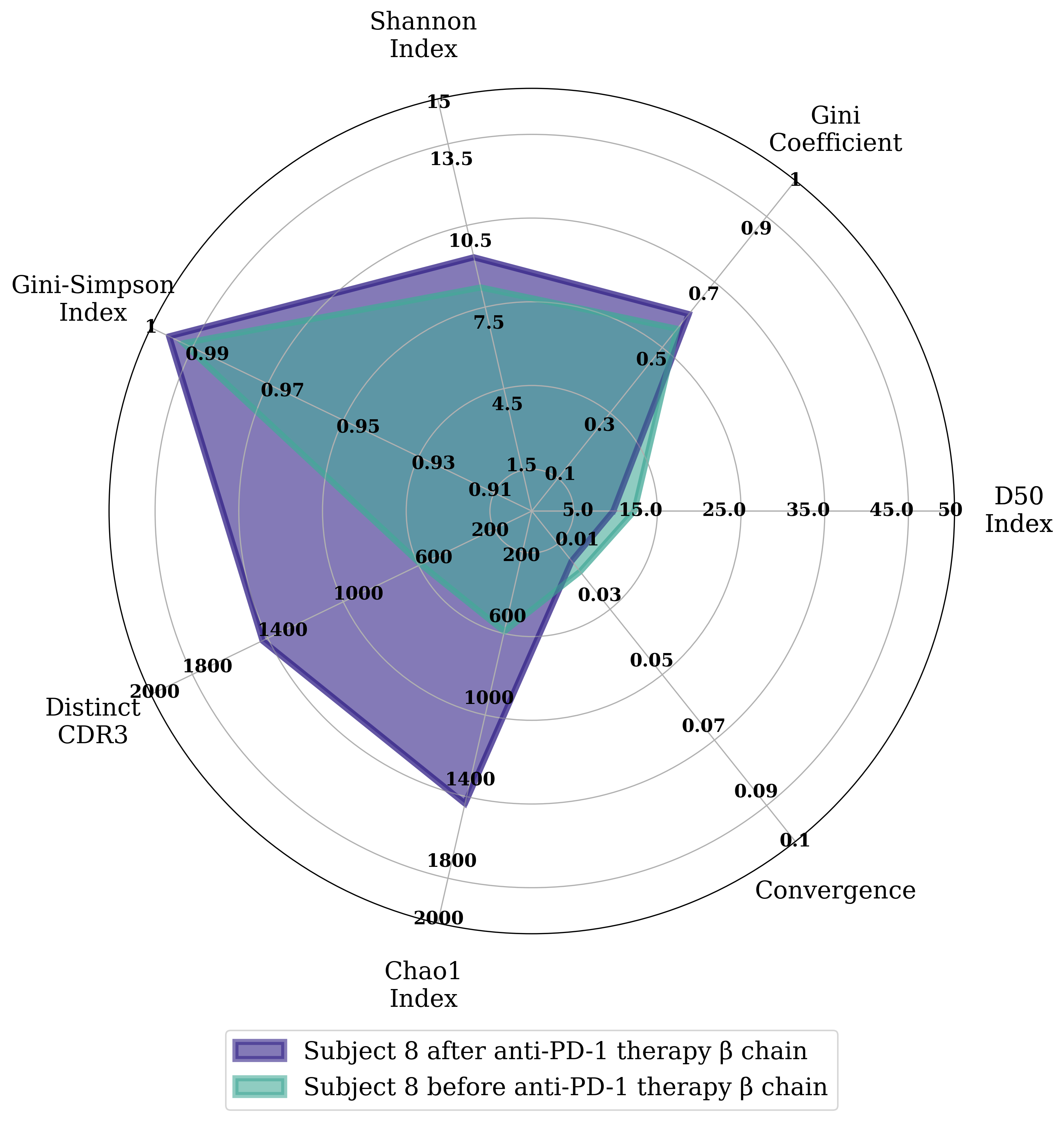
- Radar plots comparing diversity indices across repertoires
- V-gene usage plots
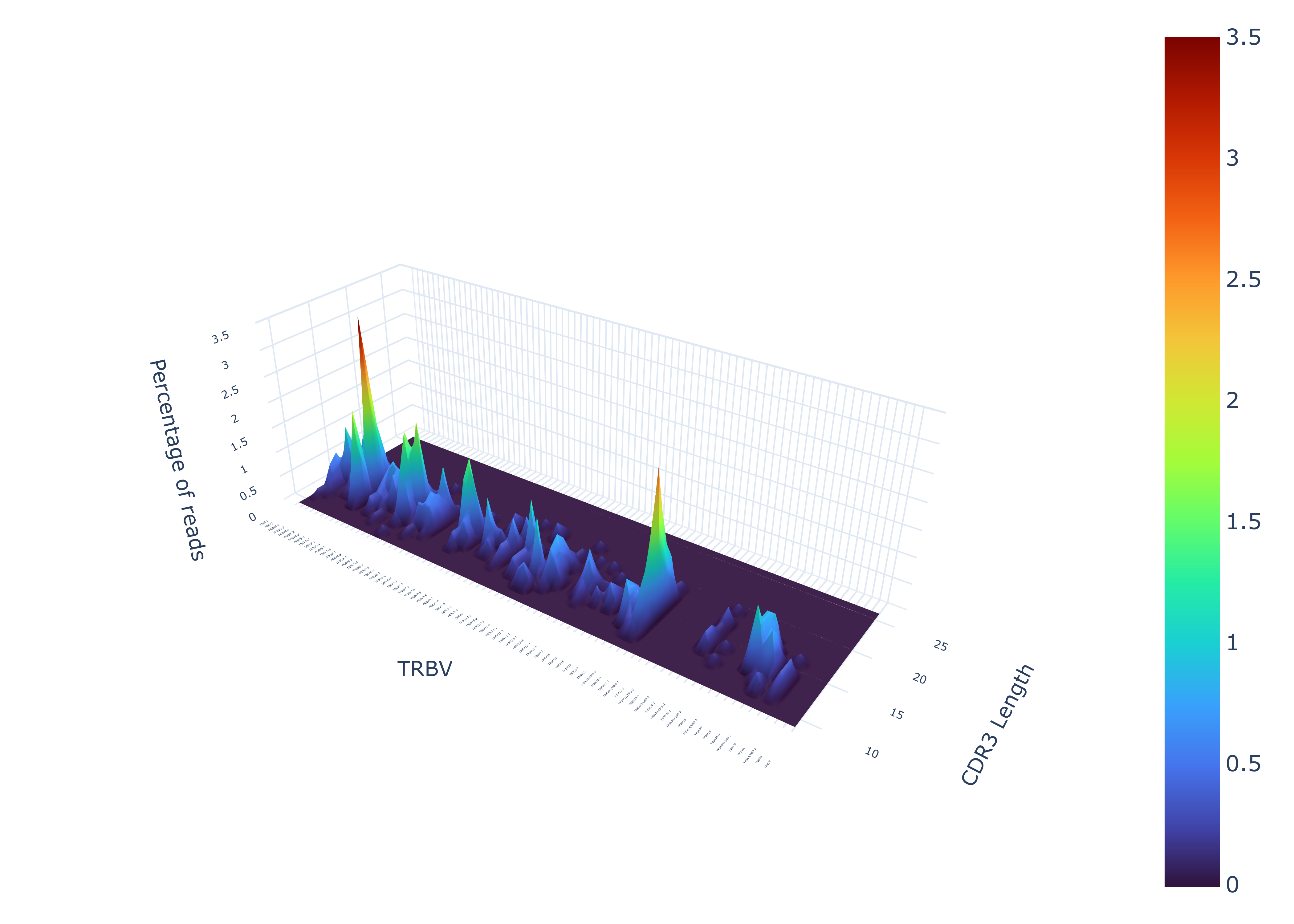
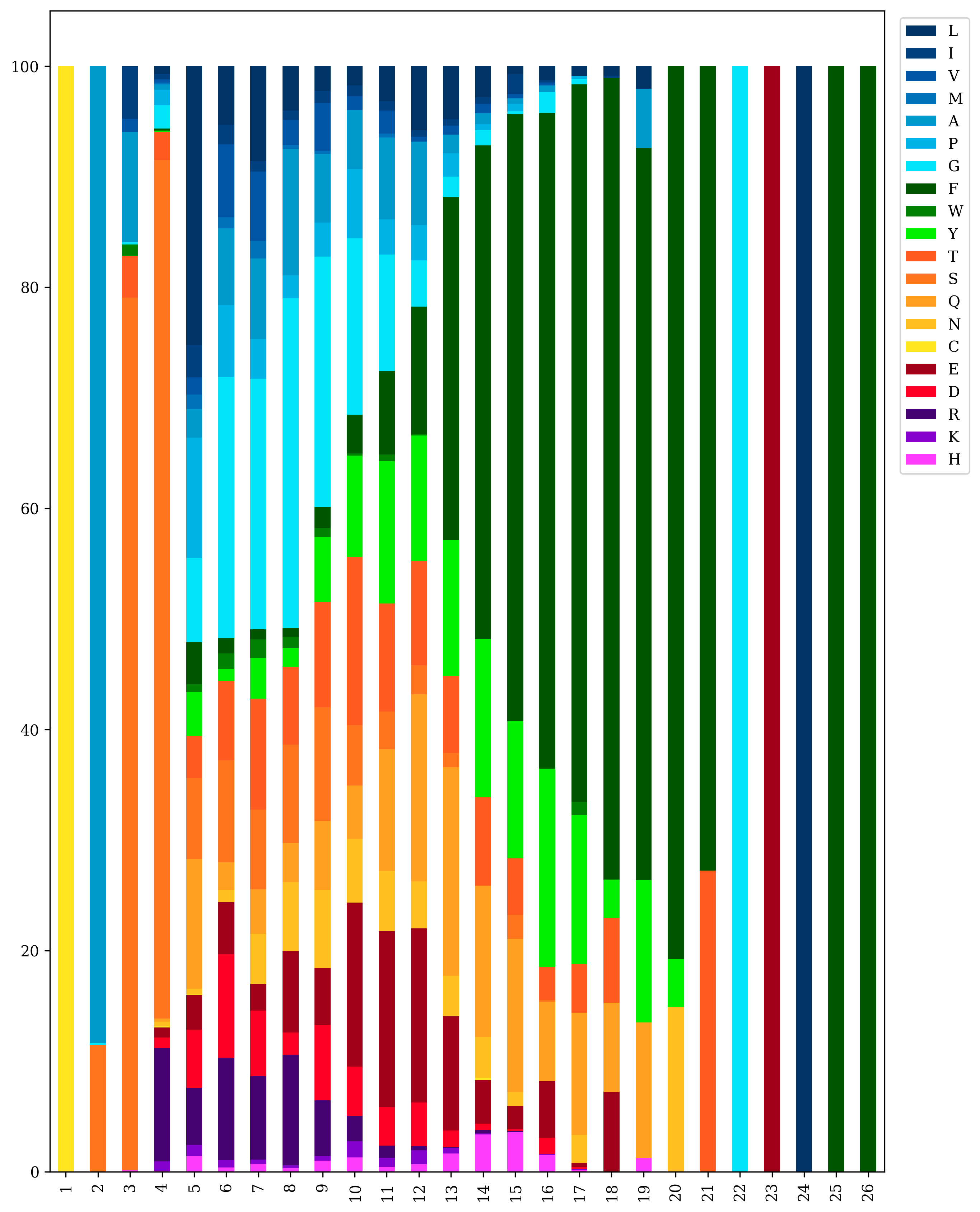
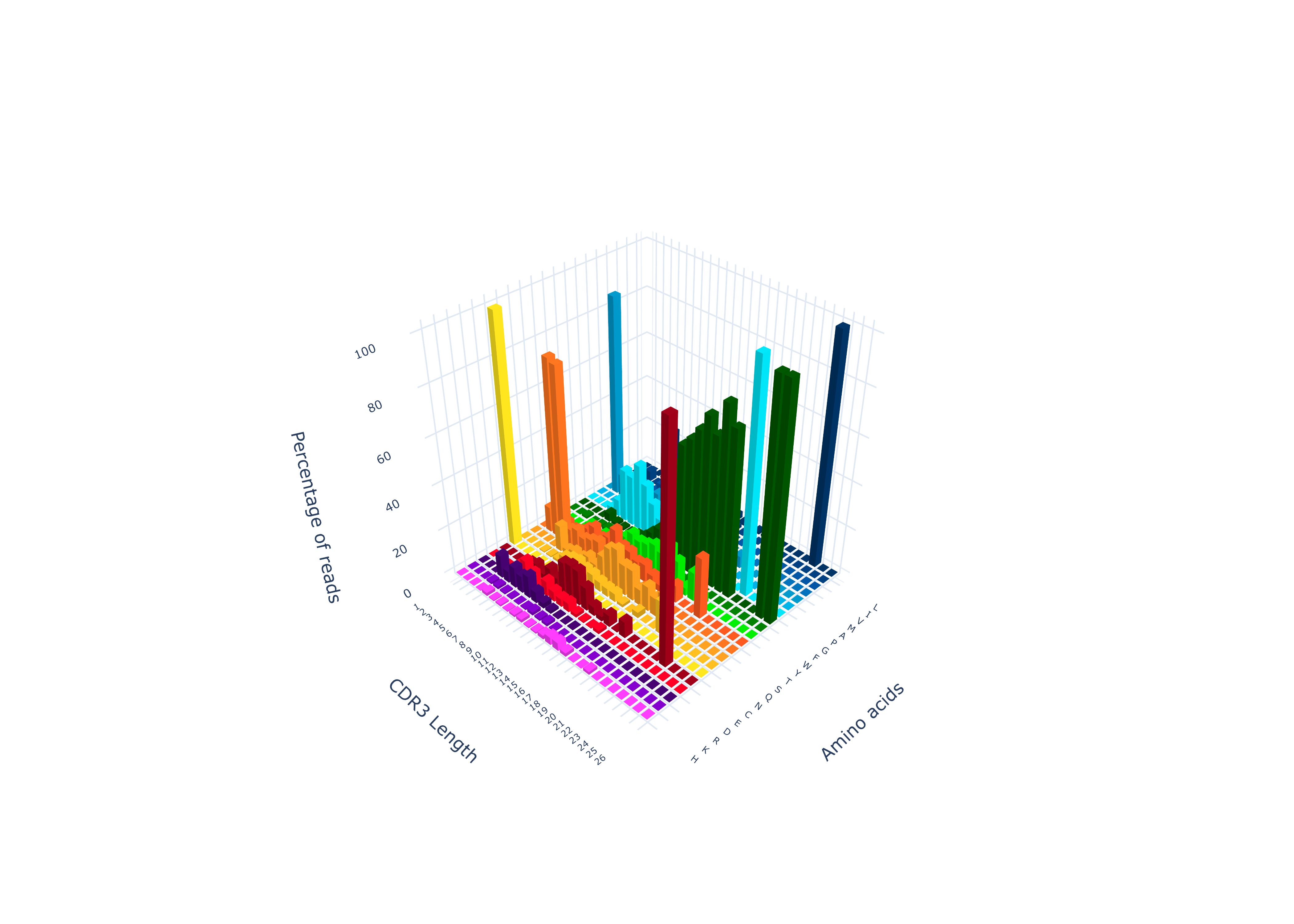
- 2-D and 3-D amino acid composition plots
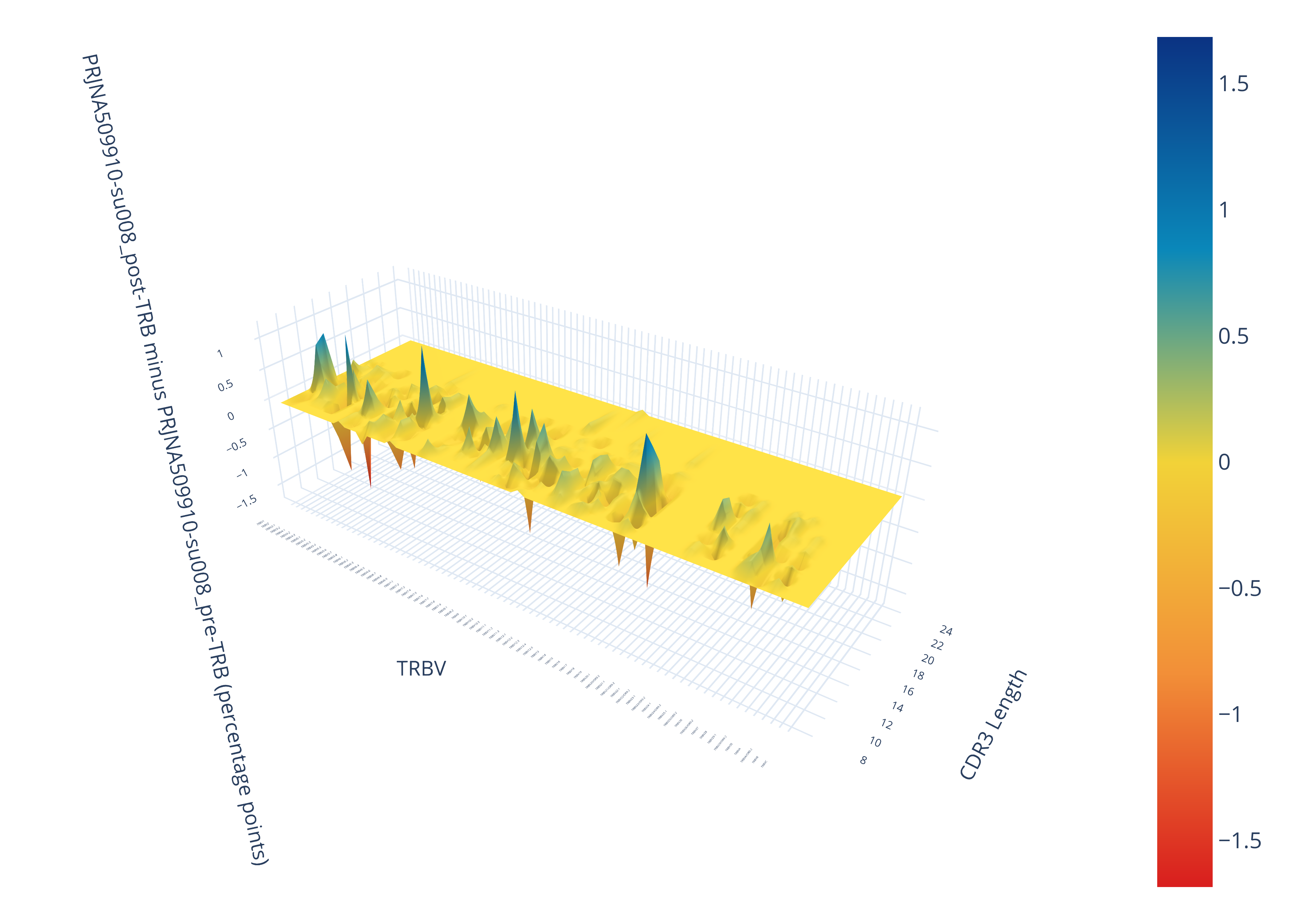
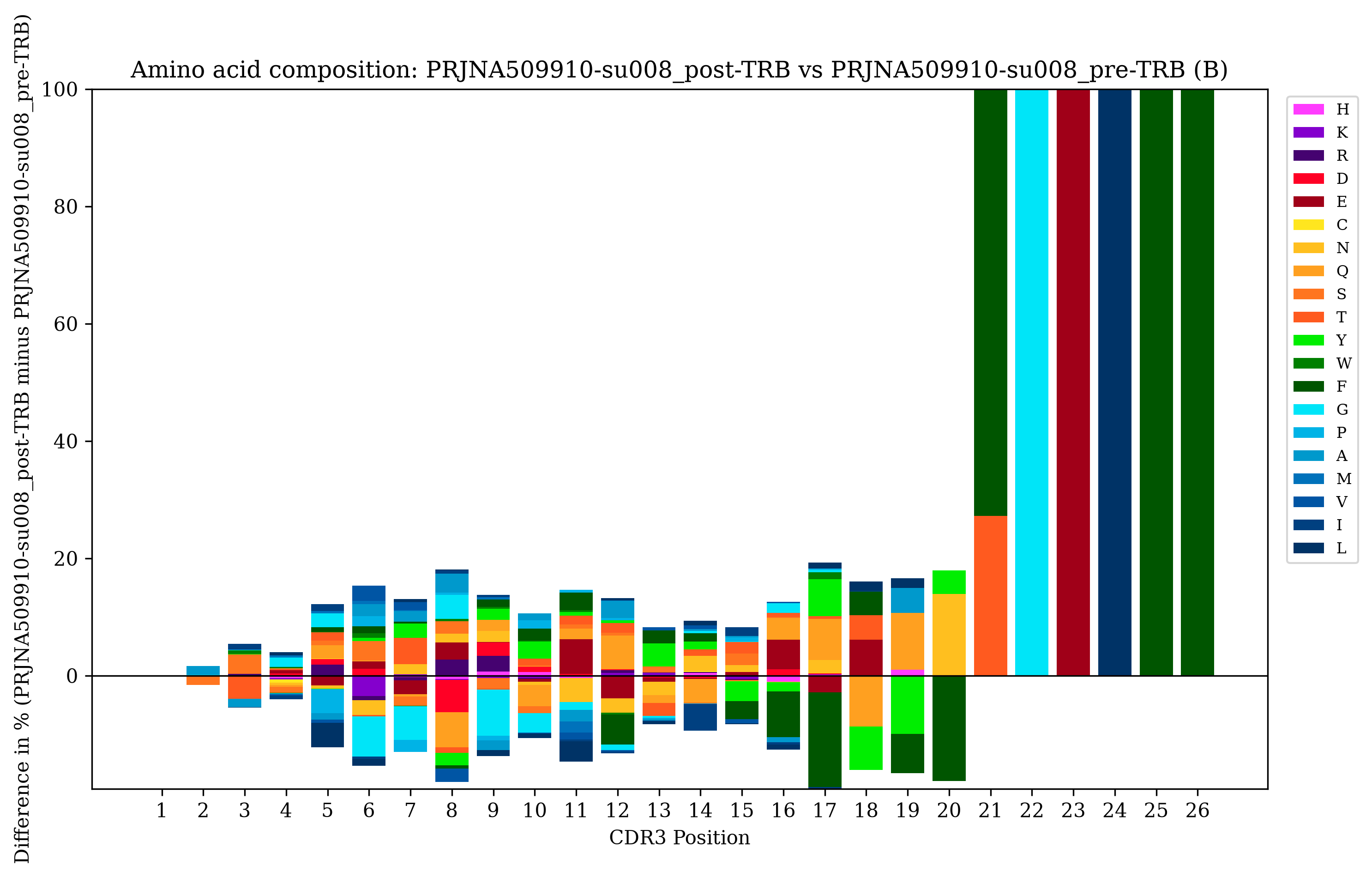
- Repertoire comparison of V-gene and amino acid usage between repertoires sharing the same chain
- Download of rearrangement data from AIRR Data Commons repositories
- Built-in example data to try the tool
Citation
If you use this tool, please cite our paper:
de Sousa et al., TCRcloud: a global visualization tool for T‑ and B‑cell receptor transcripts, Journal of Translational Medicine, 2026. https://doi.org/10.1186/s12967-025-07619-4
Requirements
- Python 3.12 or newer
- The Python development headers (e.g.
python3-devon Debian/Ubuntu,python3-develon Fedora/RHEL), needed to build some dependencies from source - Linux or macOS; on Windows, use the Windows Subsystem for Linux (WSL)
- AIRR-compliant rearrangement files (TSV) as input
- Internet access for the
downloadandtestdatacommands (they query the AIRR Data Commons)
Installation
TCRcloud is written in Python and can be installed from PyPI using pip:
pip3 install TCRcloud
Quickstart
Download the example repertoire metadata, fetch the matching rearrangement file, and create a word cloud:
TCRcloud testdata
TCRcloud download alpharepertoire.airr.json
TCRcloud cloud alpharepertoire.airr.rearrangements.tsv
The testdata command creates alpharepertoire.airr.json and betarepertoire.airr.json (plus a ready-to-use legend.json), download fetches alpharepertoire.airr.rearrangements.tsv from the AIRR Data Commons, and cloud saves one word cloud image per repertoire and chain.
Usage
TCRcloud provides seven subcommands:
| Command | Description |
|---|---|
cloud |
Create a CDR3 word cloud coloured by V gene |
radar |
Create a radar plot comparing diversity indices |
vgenes |
Create a V-gene usage plot |
aminoacids |
Create 2-D or 3-D amino acid composition plots |
compare |
Compare V-gene and amino acid usage between repertoires sharing the same chain |
download |
Download rearrangement files matching an AIRR repertoire metadata file |
testdata |
Download example data (subject su008 from Yost et al., 2019) |
Create a word cloud
TCRcloud cloud repertoire.airr.rearrangements.tsv
By default TCRcloud colours the CDR3 sequences based on the V gene, using the built-in palette for the selected species (human by default). You can also provide a JSON file that attributes colours in Hex format to specific sequences:
{
  "#FF0000": ["CAVSLPTDSWGKLQF", "CASSLVVADPYQETQYF"],
  "#0000FF": ["CAYRSKGSQGNLIF", "CASSLGGQSGNEQFF"]
}
Sequences not present in the JSON file are coloured grey.
To use your custom colours for the word cloud:
TCRcloud cloud repertoire.airr.rearrangements.tsv -c colours.json
To create a word cloud without a legend:
TCRcloud cloud repertoire.airr.rearrangements.tsv -l False
Each input file produces one image per repertoire and chain, named <input>_<repertoire_id>_<chain>.<png|svg>.
Create a radar plot comparing diversity indices
TCRcloud radar repertoire.airr.rearrangements.tsv
By default the legend uses repertoire_id, but you can replace it with your own text by providing a JSON file whose keys match the repertoire_id values in the rearrangements file:
{
  "PRJNA509910-su008_pre-TRA": "Subject 8 pre-treatment",
  "PRJNA509910-su008_post-TRA": "Subject 8 post-treatment",
  "PRJNA509910-su008_pre-TRB": "Subject 8 pre-treatment",
  "PRJNA509910-su008_post-TRB": "Subject 8 post-treatment"
}
To create a radar plot with your desired legend:
TCRcloud radar repertoire.airr.rearrangements.tsv -c legend.json
To create a radar plot without a legend:
TCRcloud radar repertoire.airr.rearrangements.tsv -l False
To export the calculated indices from the radar to a text file (<input>_repertoire_metrics.txt):
TCRcloud radar repertoire.airr.rearrangements.tsv -e True
Diversity indices used in the radar plot
- Distinct CDR3: count of the unique CDR3 sequences in the sample
- D50 Index: developed by Dr Jian Han, this index represents the percent of dominant and unique T or B cell clones that account for the cumulative 50% of the total CDR3 counted in the sample
- 1 - Gini Coefficient: the coefficient originally developed by Dr Corrado Gini to represent the wealth inequality within a social group, inverted so that — like every other axis — a higher value means a more diverse repertoire
- Shannon Index: originally developed by Dr Claude Shannon to quantify the entropy in strings of text; calculated here using log2
- Gini-Simpson Index: a transformation of the index originally developed by Dr Edward H. Simpson to measure diversity in an ecosystem
- Chao1 Index: originally developed by Dr Anne Chao to estimate richness in an ecological community
- Pielou Evenness: developed by Dr Evelyn C. Pielou to measure how evenly distributed the abundances of a community are, calculated as the Shannon Index divided by the logarithm of the number of unique CDR3 sequences
Create a V-genes plot
TCRcloud vgenes repertoire.airr.rearrangements.tsv
To export the processed data from the V-genes plot to a CSV file:
TCRcloud vgenes repertoire.airr.rearrangements.tsv -e True
Create a 2-D amino acid plot
TCRcloud aminoacids repertoire.airr.rearrangements.tsv
Create a 3-D amino acid plot
TCRcloud aminoacids repertoire.airr.rearrangements.tsv -t True
The 3-D plot also saves an interactive HTML version next to the image.
To export the processed data from the amino acid plot to a CSV file:
TCRcloud aminoacids repertoire.airr.rearrangements.tsv -e True
Compare repertoires
Compare all pairs of repertoires that share the same chain within one file:
TCRcloud compare repertoire.airr.rearrangements.tsv
Or compare the repertoires of two files (still restricted to matching chains):
TCRcloud compare repertoire1.airr.rearrangements.tsv repertoire2.airr.rearrangements.tsv
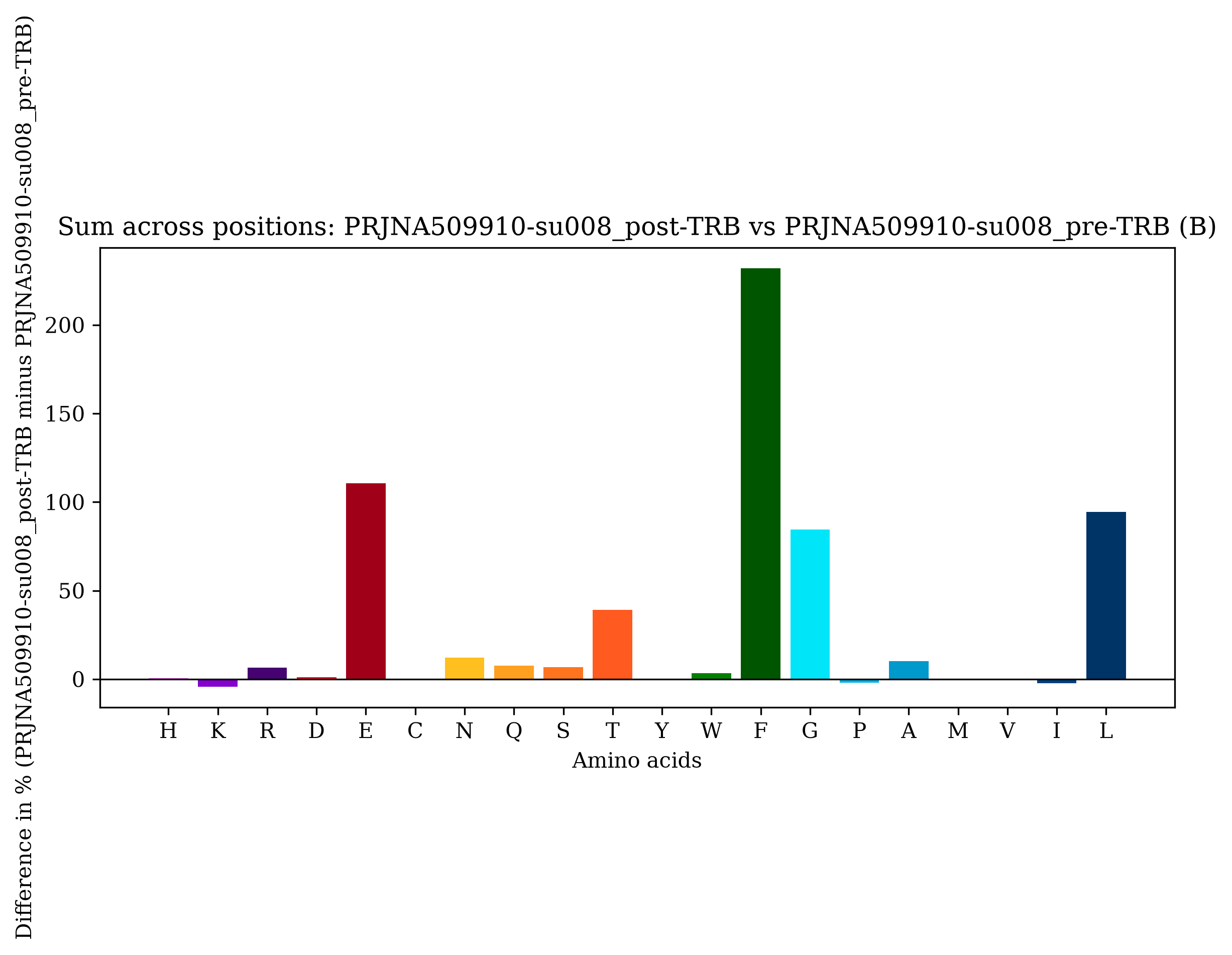
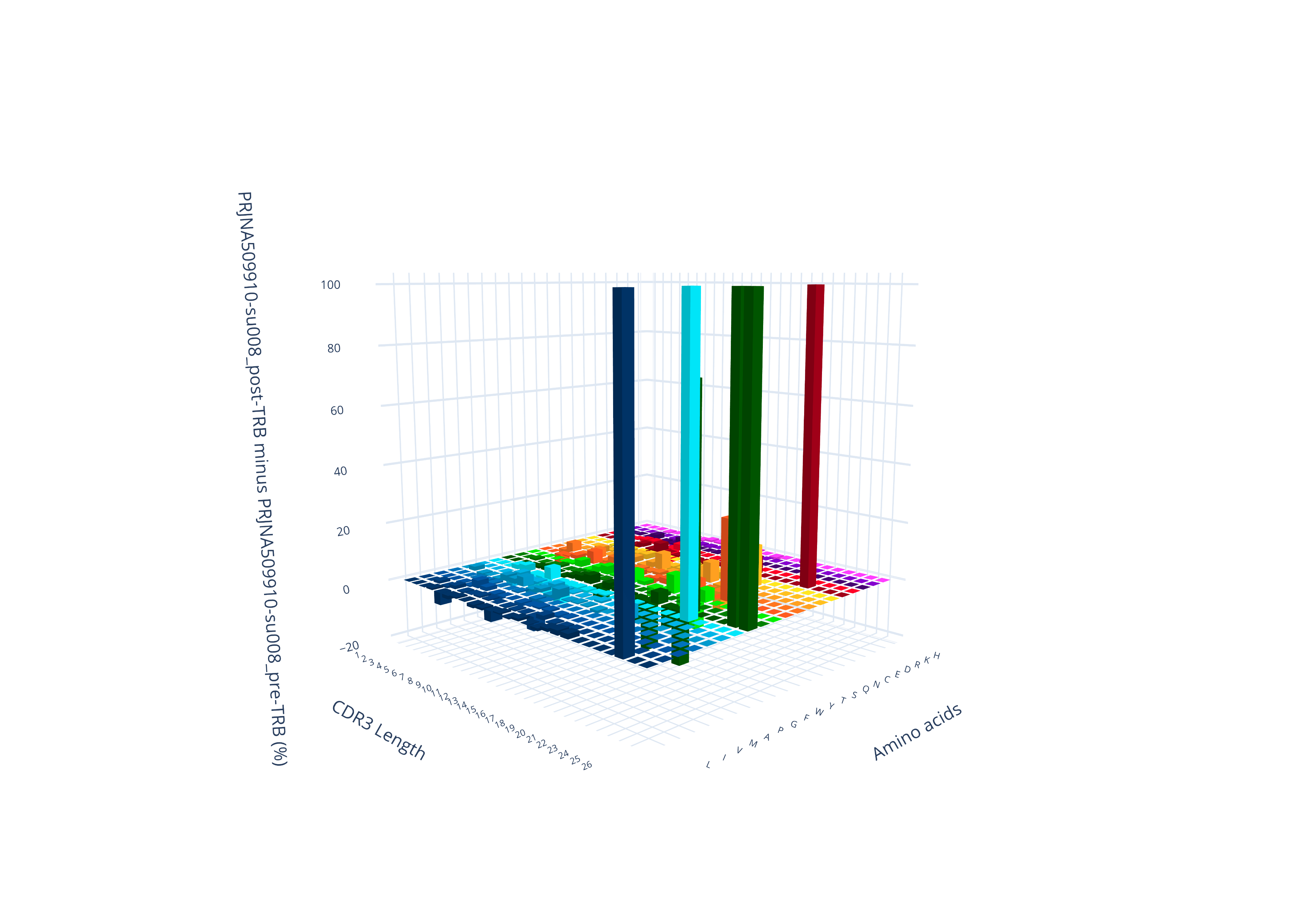
The comparison produces V-gene and 3-D amino acid difference plots; use -e True to also export the difference tables as CSV files.
Download AIRR rearrangement files
TCRcloud can download rearrangement files from AIRR-compliant databases (the AIRR Data Commons) based on an AIRR repertoire metadata file. The output is named after the input, e.g. repertoire.airr.json produces repertoire.airr.rearrangements.tsv:
TCRcloud download repertoire.airr.json
Download the test data
TCRcloud provides test data to experiment with the tool. The data is from subject number 8 of Yost et al. (2019) (DOI: 10.1038/s41591-019-0522-3):
TCRcloud testdata
This creates the alpharepertoire.airr.json and betarepertoire.airr.json repertoire files (plus a legend.json matching their repertoire_id values). You can then use the download command to get the matching rearrangement files.
Examples
TRB CDR3 word cloud
Diversity comparison
V-genes plot
2-D Amino acid plot
3-D Amino acid plot
Comparison plots
Troubleshooting
- Installation fails while building a dependency — install the Python development headers first (
sudo apt install python3-devon Debian/Ubuntu,sudo dnf install python3-develon Fedora/RHEL). - Formatting errors — the input must follow the AIRR Rearrangement schema. Files produced by the
downloadcommand are already compliant. - Windows — run TCRcloud inside WSL; native Windows is not supported.
- Empty or failed downloads —
downloadandtestdataquery public AIRR Data Commons repositories; check your internet connection and retry.
License
TCRcloud is released under the MIT License. See LICENSE for details.
1 maintainer

Metadata
1 maintainer
Release files for TCRcloud 2.0.0
For a detailed explanation of source distributions (sdists) and built distributions (wheels), please see the package formats documentation.
Source distribution (sdist)
| File | Size | Uploaded | |
|---|---|---|---|
| tcrcloud-2.0.0.tar.gz | 75.3 kB | Details |
Built distribution (wheel)
| File | Interpreter | ABI | Platform | Reset |
|---|---|---|---|---|
| tcrcloud-2.0.0-py3-none-any.whl | Python 3 | none | any | Details |
Total release size: 138.2 kB
Release files / tcrcloud-2.0.0.tar.gz
| Download URL | tcrcloud-2.0.0.tar.gz |
|---|---|
| Size | 75.3 kB |
| Tags | Source |
|
SHA-256 checksum How to use checksums |
82b989797dd490bfdb85636a696f8e94ec8c6827cdf0f7d1b93cdc5d32425fab
|
|
BLAKE2b-256 checksum How to use checksums |
0726302af9a49f7f3905ec07feaaa29917f796c6d62a986c3de9d88795eef917
|
| Upload date | |
|
Uploaded using Trusted Publishing? What is trusted publishing? |
Yes |
| Uploaded via |
twine/7.0.0 CPython/3.13.14
|
Provenance
Provenance describes where a file came from. On PyPI, provenance is shared via attestations, which provide a verifiable record of the build or publishing details. View details, limitations and caveats.


PyPI Publish Attestation
PyPI verified that this artifact, at this checksum, originated from the publisher listed below.
Signed by GitHub Actions, verified by PyPI on Sep 22, 2026.
Transparency logRelease files / tcrcloud-2.0.0-py3-none-any.whl
| Download URL | tcrcloud-2.0.0-py3-none-any.whl |
|---|---|
| Size | 62.9 kB |
| Tags | Python 3 |
|
SHA-256 checksum How to use checksums |
132f2985dd3ba0729e3f9195d597123c703665cb2b49ace4e9ce75b8c9116311
|
|
BLAKE2b-256 checksum How to use checksums |
d05a8bfa00fad2c9b80e76a029adf52c2b410a7ea6fc64ce7f5dff25c1f5e962
|
| Upload date | |
|
Uploaded using Trusted Publishing? What is trusted publishing? |
Yes |
| Uploaded via |
twine/7.0.0 CPython/3.13.14
|
Provenance
Provenance describes where a file came from. On PyPI, provenance is shared via attestations, which provide a verifiable record of the build or publishing details. View details, limitations and caveats.
PyPI Publish Attestation
PyPI verified that this artifact, at this checksum, originated from the publisher listed below.
Signed by GitHub Actions, verified by PyPI on Sep 22, 2026.
Transparency log













