
Library to get data from Tableau Viz

Project description
Tableau Scraper



Python library to scrape data from Tableau viz
R library is under development but a script is available to get the worksheets, see this
Python
Install
pip install tableau-scraper
Usage
- Get worksheets data
from tableauscraper import TableauScraper as TS

url = "https://public.tableau.com/views/PlayerStats-Top5Leagues20192020/OnePlayerSummary"

ts = TS()
ts.loads(url)
dashboard = ts.getDashboard()

for t in dashboard.worksheets:
	#show worksheet name
	print(f"WORKSHEET NAME : {t.name}")
	#show dataframe for this worksheet
	print(t.data)
- select a selectable item
from tableauscraper import TableauScraper as TS

url = "https://public.tableau.com/views/PlayerStats-Top5Leagues20192020/OnePlayerSummary"

ts = TS()
ts.loads(url)

#show selectable columns
columns = ts.getWorksheet("ATT MID CREATIVE COMP").getSelectableColumns()
print(columns)

#show values by column name
values = ts.getWorksheet("ATT MID CREATIVE COMP").getValues("ATTR(Player)")
print(values)

#select that value
dashboard = ts.getWorksheet("ATT MID CREATIVE COMP").select("ATTR(Player)", "Vinicius Júnior")

#display worksheets
for t in dashboard.worksheets:
	print(t.data)
- select item in a dropdown
from tableauscraper import TableauScraper as TS

url = "https://public.tableau.com/views/PlayerStats-Top5Leagues20192020/OnePlayerSummary"

ts = TS()
ts.loads(url)
dashboard = ts.getDashboard()

#show dropdown input name
inputNames = dashboard.getDropdownInputs()
print(inputNames)

#show dropdown values for a given input name
values = dashboard.getDropdownValues("P.League 2")
print(values)

#select that value
dashboard = dashboard.setDropdown("P.League 2", "Ligue 1")

#display worksheets
for t in dashboard.worksheets:
	print(t.data)
Important Note
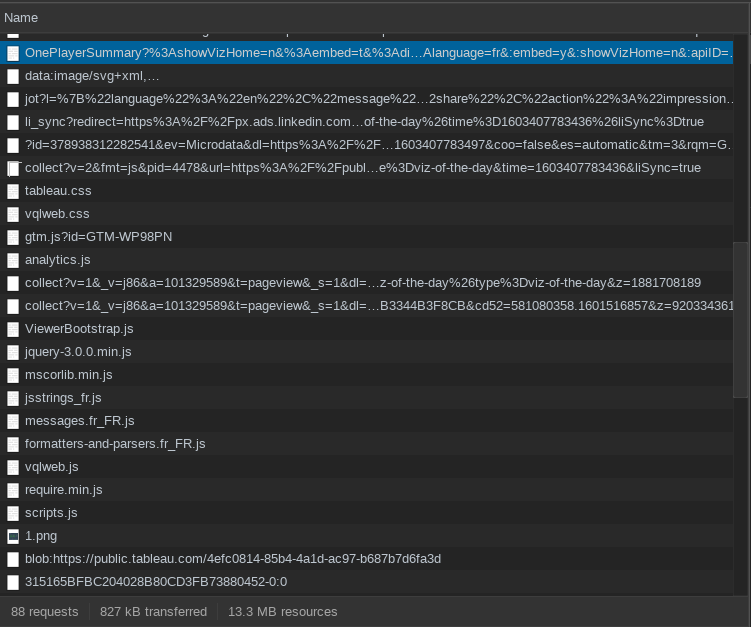
In ts.loads(url) you must input the Tableau URL which can be different from the one you're looking at in the browser. Open the network tab under Chrome Development tools and look for URL with those query params : :embed=y and :showVizHome=no. Before the session query which looks like 315165BFBC204028B80CD3FB73880452-0:0 in the network tabs
In the following screenshot, the first request is the corret URL. The last request is the session query :
Testing Python script
To discover all worksheets, selectable columns and dropdowns, run prompt.py script under scripts directory :
git clone git@github.com:bertrandmartel/tableau-scraping.git
cd tableau-scraping/scripts

#get worksheets data
python3 prompt.py -get dashboard -url "https://public.tableau.com/views/COVID-19inMissouri/COVID-19inMissouri"

#select a selectable item
python3 prompt.py -get select -url "https://public.tableau.com/views/MKTScoredeisolamentosocial/VisoGeral"

#select an item in dropdown
python3 tableau.py -get dropdown -url "https://public.tableau.com/views/COVID-19DailyDashboard_15960160643010/Casesbyneighbourhood"
Settings
TableauScraper class has the following optional parameters :
| Parameters | default value | description |
|---|---|---|
| logLevel | logging.INFO | log level |
| delayMs | 500 | minimum delay in millis between actions (select/dropdown request) |
R
under R directory :
Rscript tableau.R
R library is under development
How it works
Tableau dashboard is rendered get its data from an internal API. In order to get the data, you must get the initial tableau URL which is called with the query parameter :embed=y and :showVizHome=no (checkout networks logs)
In the html body, you have a textarea tag with id tsConfigContainer with a JSON configuration. The session_id field and root path vizql_root makes possible to build the session uri :
POST https://public.tableau.com/ROOT_PATH/bootstrapSession/sessions/SESSION_ID
The result is 2 json objects. One of them contains the data. The JSON object is complex since it dissociates the value indices from the column indices and from the worksheets.
Stackoverflow Questions
Release history Release notifications | RSS feed


Download files
Download the file for your platform. If you're not sure which to choose, learn more about installing packages.
Source Distribution
Built Distribution
Filter files by name, interpreter, ABI, and platform.
If you're not sure about the file name format, learn more about wheel file names.
Copy a direct link to the current filters
File details
Details for the file TableauScraper-0.0.1.tar.gz.
File metadata
- Download URL: TableauScraper-0.0.1.tar.gz
- Upload date:
- Size: 8.1 kB
- Tags: Source
- Uploaded using Trusted Publishing? No
- Uploaded via: twine/3.2.0 pkginfo/1.6.0 requests/2.22.0 setuptools/50.3.2 requests-toolbelt/0.9.1 tqdm/4.43.0 CPython/3.7.6
File hashes
| Algorithm | Hash digest | |
|---|---|---|
| SHA256 |
1fd0d6d2862892116da0127cb05b0a214c6cb45d2a4c30831f4e8a6bd6cf6126
|
|
| MD5 |
bd9bf8456e584ab11c1b981ca27ffebd
|
|
| BLAKE2b-256 |
d9e393af36203d5ddb77a043ad04a44d87e4b56223dbac35ef89876b6b6a591b
|
File details
Details for the file TableauScraper-0.0.1-py3-none-any.whl.
File metadata
- Download URL: TableauScraper-0.0.1-py3-none-any.whl
- Upload date:
- Size: 11.8 kB
- Tags: Python 3
- Uploaded using Trusted Publishing? No
- Uploaded via: twine/3.2.0 pkginfo/1.6.0 requests/2.22.0 setuptools/50.3.2 requests-toolbelt/0.9.1 tqdm/4.43.0 CPython/3.7.6
File hashes
| Algorithm | Hash digest | |
|---|---|---|
| SHA256 |
f337c9bd4c9884b16b91b710795836d51aca7a3c70ad3e4de1d48db8032fff9a
|
|
| MD5 |
640ffe0a2586bdc1289ad138ed9044bb
|
|
| BLAKE2b-256 |
cfe92722dc70f771172a664b04163a7cf60d48f839b4858066e8655deaf4e677
|






