
Library to get data from Tableau Viz

Project description
Tableau Scraper




Python library to scrape data from Tableau viz
R library is under development but a script is available to get the worksheets, see this
Python
Install
pip install TableauScraper
Usage
Get worksheets data
from tableauscraper import TableauScraper as TS

url = "https://public.tableau.com/views/PlayerStats-Top5Leagues20192020/OnePlayerSummary"

ts = TS()
ts.loads(url)
workbook = ts.getWorkbook()

for t in workbook.worksheets:
    print(f"worksheet name : {t.name}") #show worksheet name
    print(t.data) #show dataframe for this worksheet
Get a specific worksheet
from tableauscraper import TableauScraper as TS

url = "https://public.tableau.com/views/PlayerStats-Top5Leagues20192020/OnePlayerSummary"

ts = TS()
ts.loads(url)

ws = ts.getWorksheet("ATT MID CREATIVE COMP")
print(ws.data)
select a selectable item
from tableauscraper import TableauScraper as TS

url = "https://public.tableau.com/views/PlayerStats-Top5Leagues20192020/OnePlayerSummary"

ts = TS()
ts.loads(url)

ws = ts.getWorksheet("ATT MID CREATIVE COMP")

# show selectable values
selections = ws.getSelectableItems()
print(selections)

# select that value
dashboard = ws.select("ATTR(Player)", "Vinicius Júnior")

# display worksheets
for t in dashboard.worksheets:
    print(t.data)
set parameter
Get list of parameters with workbook.getParameters() and set parameter value using workbook.setParameter("column_name", "value") :
from tableauscraper import TableauScraper as TS

url = "https://public.tableau.com/views/PlayerStats-Top5Leagues20192020/OnePlayerSummary"

ts = TS()
ts.loads(url)
workbook = ts.getWorkbook()

# show parameters values / column
parameters = workbook.getParameters()
print(parameters)

# set parameters column / value
workbook = workbook.setParameter("P.League 2", "Ligue 1")

# display worksheets
for t in workbook.worksheets:
    print(t.data)
set filter
Get list of filters with worksheet.getFilters and set filter value using worksheet.setFilter("column_name", "value"):
from tableauscraper import TableauScraper as TS

url = 'https://public.tableau.com/views/WomenInOlympics/Dashboard1'
ts = TS()
ts.loads(url)

# show original data for worksheet
ws = ts.getWorksheet("Bar Chart")
print(ws.data)

# get filters columns and values
filters = ws.getFilters()
print(filters)

# set filter value
wb = ws.setFilter('Olympics', 'Winter')

# show the new data for worksheet
countyWs = wb.getWorksheet("Bar Chart")
print(countyWs.data)
More advanced filtering options
-
You can specify
dashboardFilter=Truein order to usedashboard-categorical-filterAPI instead ofcategorical-filter-by-indexAPI (related) -
You can discard
membershipTargetproperty from being sent insetFilterusingsetFilter('COLUMN','VALUE', membershipTarget=False)(related) -
You can specify multiple filters for filters that enable that feature using
setFilter('COLUMN', ['VALUE1','VALUE2']) -
You can specify a "filter-delta" filter type adding the parameter
filterDelta=Truelike the followingsetFilter('COLUMN','VALUE', filterDelta=True). This will discard all filters and add the one corresponding to['VALUE']in this case. This is helpful when all or some filters are selected by default, and you want to unselect them. The default behaviour (filterDelta=False) isfilter-replacewhich sometimes doesn't work when filter multi-selection is possible in the dashboard.
Story points
Some Tableau dashboard have storypoints where you can navigate. To list the storypoints and go to a specific storypoints:
from tableauscraper import TableauScraper as TS

url = 'https://public.tableau.com/views/EarthquakeTrendStory2/Finished-Earthquakestory'
ts = TS()
ts.loads(url)
wb = ts.getWorkbook()

print(wb.getStoryPoints())
print("go to specific storypoint")
sp = wb.goToStoryPoint(storyPointId=10)

print(sp.getWorksheetNames())
print(sp.getWorksheet("Timeline").data)
Level drill Up/Down
On some graph/table, there is a drill up/down feature used to zoom in or out data like this

from tableauscraper import TableauScraper as TS

url = 'https://tableau.azdhs.gov/views/ELRv2testlevelandpeopletested/PeopleTested'
ts = TS()
ts.loads(url)
wb = ts.getWorkbook()

sheetName = "P1 - Tests by Day W/ % Positivity (Both) (2)"

drillDown1 = wb.getWorksheet(sheetName).levelDrill(drillDown=True, position=1)
drillDown2 = drillDown1.getWorksheet(sheetName).levelDrill(drillDown=True, position=1)
drillDown3 = drillDown2.getWorksheet(sheetName).levelDrill(drillDown=True, position=1)

print(drillDown1.getWorksheet(sheetName).data)
print(drillDown2.getWorksheet(sheetName).data)
print(drillDown3.getWorksheet(sheetName).data)
The position parameter is default to 0. It doesn't seem to be present in the json configuration. If the default is not working try incrementing it or checkout the network tabs using Chrome devtools.
Download CSV data
For Tableau URL that have the download feature enabled, you can download full data using:
from tableauscraper import TableauScraper as TS

url = 'https://public.tableau.com/views/WYCOVID-19Dashboard/WyomingCOVID-19CaseDashboard'
ts = TS()
ts.loads(url)
wb = ts.getWorkbook()
data = wb.getCsvData(sheetName='case map')

print(data)
Note that in some Tableau server, the prefix used in the API url is different. As it's set in the javascript, it must be set manually if it's not the same as public.tableau.com like:
wb.getCsvData(sheetName='worksheet1', prefix="vud")
The prefix values, I've encountered are: vud and vudcsv. The default is vudcsv.
Download Cross Tab data
For Tableau URL that have the crosstab feature enabled, you can download the crosstab using:
from tableauscraper import TableauScraper as TS

url = "https://tableau.soa.org/t/soa-public/views/USPostLevelTermMortalityExperienceInteractiveTool/DataTable2"

ts = TS()
ts.loads(url)
wb = ts.getWorkbook()

wb.setParameter(inputName="Count or Amount", value="Amount")

data = wb.getCrossTabData(
    sheetName="Data Table 2 - Premium Jump & PLT Duration")

print(data)
Go to sheet
Get list of all sheets with subsheets visible or invisible, ability to send a go-to-sheet command (dashboar button) :
from tableauscraper import TableauScraper as TS

url = "https://public.tableau.com/views/COVID-19VaccineTrackerDashboard_16153822244270/Dosesadministered"
ts = TS()
ts.loads(url)
workbook = ts.getWorkbook()

sheets = workbook.getSheets()
print(sheets)

nycAdults = workbook.goToSheet("NYC Adults")
for t in nycAdults.worksheets:
    print(f"worksheet name : {t.name}")  # show worksheet name
    print(t.data)  # show dataframe for this worksheet
Sample usecases
- https://replit.com/@bertrandmartel/TableauOregonCovid
- https://replit.com/@bertrandmartel/TableauCovidIndia
- https://replit.com/@bertrandmartel/TableauCovidArizona
- https://replit.com/@bertrandmartel/TableauIllinoisOpioId
- https://replit.com/@bertrandmartel/TableauCovidNY
- https://replit.com/@bertrandmartel/TableauCovidNCDHHS
- https://replit.com/@bertrandmartel/TableauCovidWisconsin
- https://replit.com/@bertrandmartel/TableauScrapeNewspaper
- https://replit.com/@bertrandmartel/TableauStoryPoints
- https://replit.com/@bertrandmartel/TableauCovidOhio
- https://replit.com/@bertrandmartel/TableauCovidSouthCarolina
- https://replit.com/@bertrandmartel/TableauCovidNewHampshire
- https://replit.com/@bertrandmartel/TableauCovidNewJersey
- https://replit.com/@bertrandmartel/TableauCovid19Wyoming
- https://replit.com/@bertrandmartel/TableauCovid19Louisiana
- https://replit.com/@bertrandmartel/TableauCIESFootball
- https://replit.com/@bertrandmartel/TableauCovid19TestingCommonsASU
- https://replit.com/@bertrandmartel/TableauCovid19Tracker
- https://replit.com/@bertrandmartel/TableauCovid19CbreResidentMigration
- https://replit.com/@bertrandmartel/TableauEarthquakeStorypoint
- https://replit.com/@bertrandmartel/TableauCovid19AzdhsPeopleTested
- https://replit.com/@bertrandmartel/TableauCovidDDCMOPH
Server side rendering
If the tableau url you're working on is using server side rendering, data can't be extracted as is.
You can checkout if your tableau url is using server side rendering by opening chrome development console / network tab. You would notice those API calls when mouse hovering tables or maps render-tooltip-server:

Server side rendering means that no data is sent to the browser. Instead, the server is rendering the tableau chart using images only and detects selection using mouse coordinates.
To extract the data, one thing that has worked with some tableau url was to trigger a specific filter that is not server-side-rendered. You can checkout the network tab on Chrome development console to check if the filter call is using or not server-side rendering or client-side-rendering with renderMode:
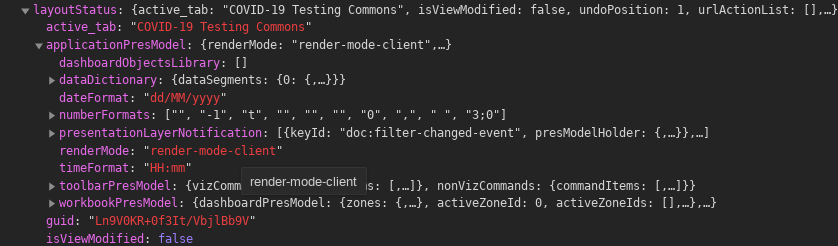
If the filter is only using client side rendering, you can list all filters and perform the filter for each value. This technique only works if the tableau data has "cleared" the filter by default otherwise the data is already cached when the tableau data is loaded, and since it's using server side rendering you can't access this data
Checkout the following repl.it for examples with tableau url using server side rendering:
- https://replit.com/@bertrandmartel/TableauCIESFootball
- https://replit.com/@bertrandmartel/TableauCovid19TestingCommonsASU
Testing Python script
To discover all worksheets, selectable columns and dropdowns, run prompt.py script under scripts directory :
git clone git@github.com:bertrandmartel/tableau-scraping.git
cd tableau-scraping/scripts

#get worksheets data
python3 prompt.py -get workbook -url "https://public.tableau.com/views/COVID-19inMissouri/COVID-19inMissouri"

#select a selectable item
python3 prompt.py -get select -url "https://public.tableau.com/views/MKTScoredeisolamentosocial/VisoGeral"

#set a parameter
python3 prompt.py -get parameter -url "https://public.tableau.com/views/COVID-19DailyDashboard_15960160643010/Casesbyneighbourhood"
Settings
TableauScraper class has the following optional parameters :
| Parameters | default value | description |
|---|---|---|
| logLevel | logging.INFO | log level |
| delayMs | 500 | minimum delay in millis between api calls |
R
under R directory :
Rscript tableau.R
R library is under development
Dependencies
- pandas
- requests
- beautifulsoup4
Stackoverflow Questions
Release history Release notifications | RSS feed


Download files
Download the file for your platform. If you're not sure which to choose, learn more about installing packages.
Source Distribution
Built Distribution
Filter files by name, interpreter, ABI, and platform.
If you're not sure about the file name format, learn more about wheel file names.
Copy a direct link to the current filters
File details
Details for the file TableauScraper-0.1.21.tar.gz.
File metadata
- Download URL: TableauScraper-0.1.21.tar.gz
- Upload date:
- Size: 16.1 kB
- Tags: Source
- Uploaded using Trusted Publishing? No
- Uploaded via: twine/3.4.1 importlib_metadata/4.6.1 pkginfo/1.6.0 requests/2.25.1 requests-toolbelt/0.9.1 tqdm/4.43.0 CPython/3.7.6
File hashes
| Algorithm | Hash digest | |
|---|---|---|
| SHA256 |
16415f8ab57e9ed961cbe750737ca9da9272e630ab146da57c7090bc47af0efe
|
|
| MD5 |
14959db0e34d7852c1ec404057ed5c46
|
|
| BLAKE2b-256 |
54dab25b0d11be19a459c619ca1ba20c9eafe06df9366ecdd484416f26accbc1
|
File details
Details for the file TableauScraper-0.1.21-py3-none-any.whl.
File metadata
- Download URL: TableauScraper-0.1.21-py3-none-any.whl
- Upload date:
- Size: 20.0 kB
- Tags: Python 3
- Uploaded using Trusted Publishing? No
- Uploaded via: twine/3.4.1 importlib_metadata/4.6.1 pkginfo/1.6.0 requests/2.25.1 requests-toolbelt/0.9.1 tqdm/4.43.0 CPython/3.7.6
File hashes
| Algorithm | Hash digest | |
|---|---|---|
| SHA256 |
0b5fe5cdb6159bcf59dc317b6ad9ada2a6b7fac2e850346bd84707da016dc848
|
|
| MD5 |
ddfa70e6031ae8adc61d8b0aa03ce683
|
|
| BLAKE2b-256 |
ae0f64d85b29f7271ed0c0bafa06c7c081dffdff529c473e8f74638eb209e6ea
|






