
Timefeatures add-on for Orange 3 data mining software.

Project description
Orange3 TimeFeatures
Timefeatures add-on for Orange 3 data mining software for generating synthetic data using datasets with time series, generating graphs of relationships between the generated variables and includes another widget to save the data and configuration tables in a database.
Installation
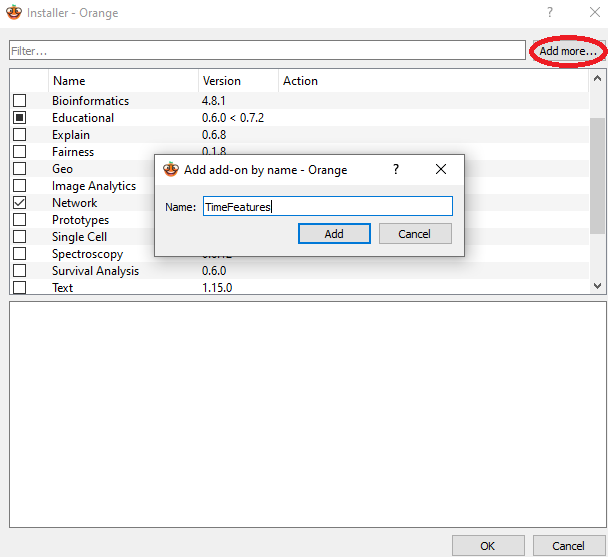
Orange add-on installer
Install from Orange add-on installer through Options -> Add-ons.
Using pip
To install the add-on with pip use
pip install TimeFeatures
To install the add-on from source, run
python setup.py install
To register this add-on with Orange, but keep the code in the development directory (do not copy it to Python's site-packages directory), run
python setup.py develop
You can also run
pip install -e .
which is sometimes preferable as you can pip uninstall packages later.
Anaconda
If using Anaconda Python distribution, simply run
pip install TimeFeatures
Required Dependencies:
- numpy>=1.22.4
- AnyQt>=0.2.0
- Orange3>=3.34.0
- PyQt5>=5.15.6
- PyQtWebEngine>=5.15.6
- scipy>=1.7.3
- Orange3-Network>=1.8.0
Usage
After the installation, the widgets from this add-on are registered with Orange. To run Orange from the terminal, use
orange-canvas
or
python3 -m Orange.canvas
New widgets are in the toolbox bar under Time-Features section.
Documentation
The add-on includes Sphinx documentation for each widget. Orange resolves the local HTML pages through its internal Help panel, not through an internet URL. To rebuild the documentation locally, run
pip install -e ".[docs]"
python -m sphinx -b html docs timefeatures/help_html
Use the widget help action in Orange to open the corresponding page inside the Orange Help window.
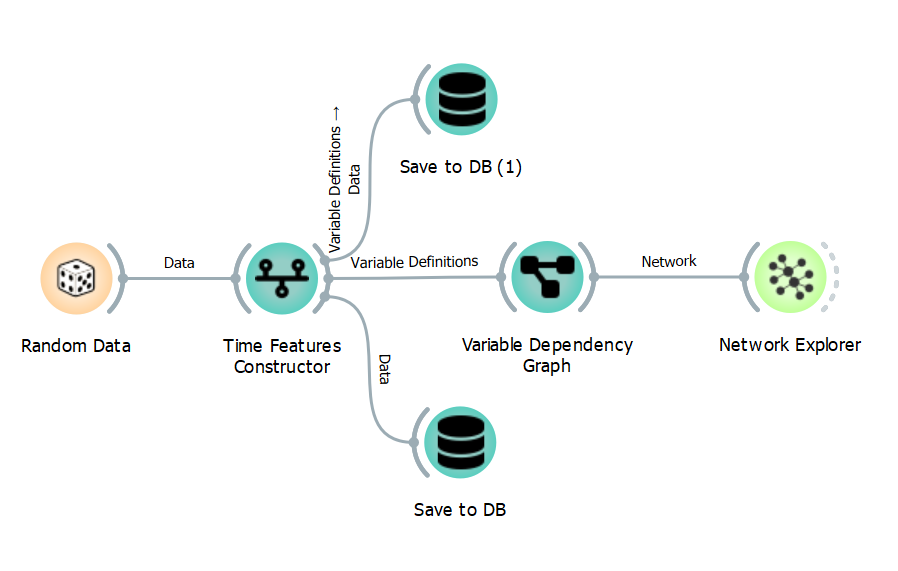
Workflow Example
This is an example of how you can use this add-on.
Release history Release notifications | RSS feed


Download files
Download the file for your platform. If you're not sure which to choose, learn more about installing packages.
Source Distribution
Built Distribution
Filter files by name, interpreter, ABI, and platform.
If you're not sure about the file name format, learn more about wheel file names.
Copy a direct link to the current filters
File details
Details for the file timefeatures-1.0.18.tar.gz.
File metadata
- Download URL: timefeatures-1.0.18.tar.gz
- Upload date:
- Size: 169.3 kB
- Tags: Source
- Uploaded using Trusted Publishing? No
- Uploaded via: twine/6.2.0 CPython/3.10.20
File hashes
| Algorithm | Hash digest | |
|---|---|---|
| SHA256 |
e307ff5bc071116ce0fd6fd687b632cacc23f8363a3b07445f2434cdc8be97c1
|
|
| MD5 |
4dfc622449ce101266de7a3e55d4e199
|
|
| BLAKE2b-256 |
aa5e52adec757bb5d07c096a7fad54bc5591b58c292923e61cd269ffed426304
|
File details
Details for the file timefeatures-1.0.18-py3-none-any.whl.
File metadata
- Download URL: timefeatures-1.0.18-py3-none-any.whl
- Upload date:
- Size: 83.2 kB
- Tags: Python 3
- Uploaded using Trusted Publishing? No
- Uploaded via: twine/6.2.0 CPython/3.10.20
File hashes
| Algorithm | Hash digest | |
|---|---|---|
| SHA256 |
2ca663e0b25c3ece48b692f4167e067ecb7497dfe7331101cead0c8fce23fea7
|
|
| MD5 |
d850e3f358708c7d86bd235420159e86
|
|
| BLAKE2b-256 |
0f600220379a363261dbb9ab0a88bbf346d0b9237eaf68d924c22b2eee084d2e
|






