
Timefeatures add-on for Orange 3 data mining software.

Project description
Orange3 TimeFeatures



TimeFeatures is an add-on for Orange 3 data mining software for generating synthetic data using datasets with time series, generating graphs of relationships between the generated variables, and includes widgets to save and load data and configuration tables from a database.
Features
- 🕐 7 time-window functions —
shift,sum,mean,min,max,count,sdwith full chunk-boundary correctness - 🔗 Chained descriptors — derived variables can reference each other; topological sort resolves the evaluation order automatically
- 🛡️ Secure evaluation — expressions run in a restricted
evalsandbox (__builtins__replaced, curated whitelist only) - 🗄️ PostgreSQL & MySQL — persist and reload datasets via SQLAlchemy with dialect-agnostic SQL generation
- 📊 Directed weighted dependency graphs — edge weights reflect temporal window size; visualise in Network Explorer
- ⚡ Bulk upload performance — pandas
DataFrame.to_sqlwith chunked multi-row INSERTs - 💾 Workflow persistence — variable definitions survive save/reload without clicking Send first
Widgets
| Widget | Description |
|---|---|
| Time Features Constructor | Defines new variables from existing ones using Python-style expressions and time-window functions. Supports chained descriptors with automatic topological sorting. |
| Variable Dependency Graph | Builds a directed, weighted dependency graph from the variable definitions. Edge weights summarise how far back or forward in time each variable looks. |
| Save to DB | Persists the resulting dataset to a SQL database (PostgreSQL or MySQL), with full SQL-injection defences, three write modes (create / overwrite / append) and an optional completion email. |
| Load from DB | Lists datasets previously stored by Save to DB and pulls the chosen one back into Orange, optionally marking the class column directly so no Select Columns widget is needed. |
Installation
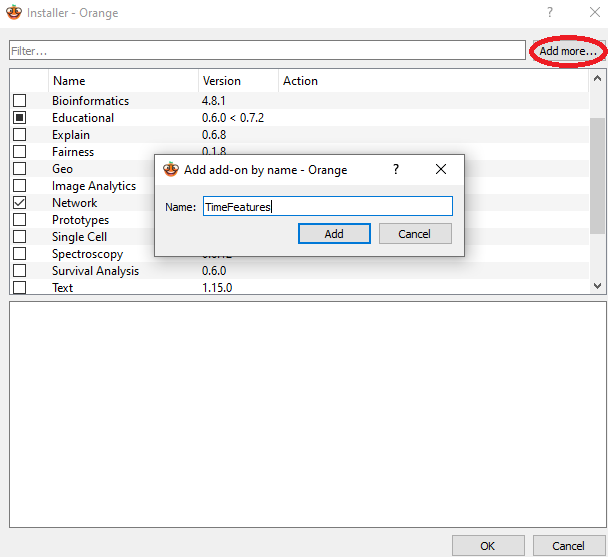
Orange add-on installer
Install from Orange add-on installer through Options -> Add-ons.
Using pip
To install the add-on with pip use
pip install TimeFeatures
To install the add-on from source in editable mode, run
pip install -e .
Anaconda
If using Anaconda Python distribution, simply run
pip install TimeFeatures
Required Dependencies:
- numpy>=1.22.4
- AnyQt>=0.2.0
- PyQt5>=5.15.6
- PyQtWebEngine>=5.15.6
- scipy>=1.7.3
- SQLAlchemy>=1.4.0
- psycopg2-binary>=2.9.9
- PyMySQL>=1.0.0
- Orange3-Network>=1.8.0
Usage
After the installation, the widgets from this add-on are registered with Orange. To run Orange from the terminal, use
orange-canvas
or
python3 -m Orange.canvas
New widgets are in the toolbox bar under Time-Features section.
Documentation
The add-on includes Sphinx documentation for each widget. Orange resolves the local HTML pages through its internal Help panel, not through an internet URL. To rebuild the documentation locally, run
pip install -e ".[docs]"
python -m sphinx -b html docs docs/build/html
The bundled in-app help is pre-built under timefeatures/help_html/. To
regenerate it (e.g. after editing the .rst files), run
python -m sphinx -b html docs timefeatures/help_html
Use the widget help action in Orange to open the corresponding page inside the Orange Help window.
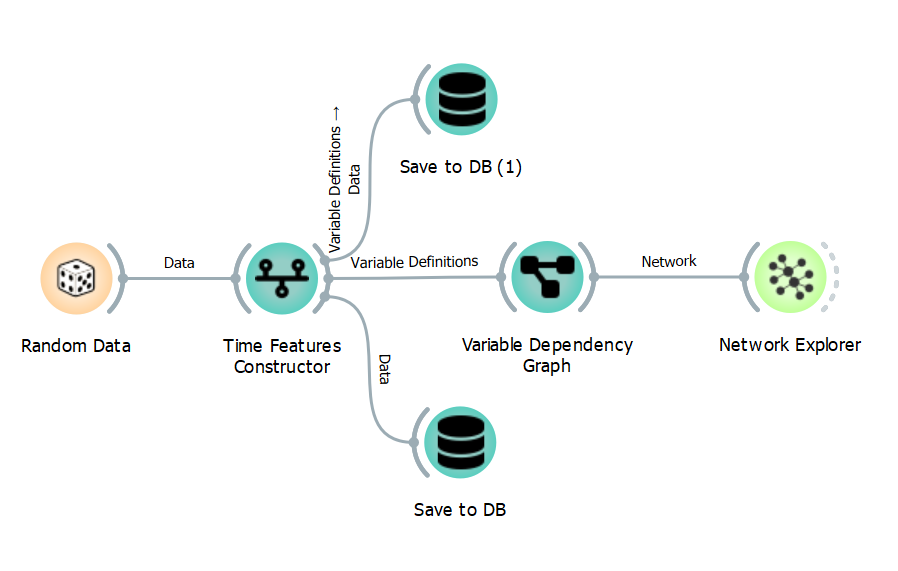
Workflow Example
This is an example of how you can use this add-on.
Release history Release notifications | RSS feed


Download files
Download the file for your platform. If you're not sure which to choose, learn more about installing packages.
Source Distribution
Built Distribution
Filter files by name, interpreter, ABI, and platform.
If you're not sure about the file name format, learn more about wheel file names.
Copy a direct link to the current filters
File details
Details for the file timefeatures-2.1.1.tar.gz.
File metadata
- Download URL: timefeatures-2.1.1.tar.gz
- Upload date:
- Size: 1.4 MB
- Tags: Source
- Uploaded using Trusted Publishing? No
- Uploaded via: twine/6.2.0 CPython/3.10.20
File hashes
| Algorithm | Hash digest | |
|---|---|---|
| SHA256 |
fd27fb7147b7171035b873a1012de85530f726cedcd595331a68bd3fe73a387e
|
|
| MD5 |
386c27c57c38bfffb8db9bff6f07ce3e
|
|
| BLAKE2b-256 |
6814b6cb2d51064179ca8bd55c5595cfed18a633740a3f699f6c903dbdc6663c
|
File details
Details for the file timefeatures-2.1.1-py3-none-any.whl.
File metadata
- Download URL: timefeatures-2.1.1-py3-none-any.whl
- Upload date:
- Size: 496.6 kB
- Tags: Python 3
- Uploaded using Trusted Publishing? No
- Uploaded via: twine/6.2.0 CPython/3.10.20
File hashes
| Algorithm | Hash digest | |
|---|---|---|
| SHA256 |
e67d289de00c13e7be8deee6fe2b3534bb4e8aead591cdd34abe1f31176889b9
|
|
| MD5 |
781593b26e4ce705192ead136d28d3a5
|
|
| BLAKE2b-256 |
68c47334d1f0601278d682a06089467166cc79dfd8f40c6eea4de7809ba00a44
|






