





Tonviewer provides wallet information, parsed TONAPI events, raw TON Center v3 transactions, Jetton balances, NFT metadata, on-chain collectible gifts, Fragment username lookups, TON prices, and a command-line interface.
The SDK has two styles: the synchronous compatibility API (Wallet, HashTx) returns formatted JSON strings, while TonviewerClient exposes asynchronous services and typed Pydantic models. Feature-specific notes, output shapes, and copyable usage examples live in docs/README.md.
Install
python -m pip install --upgrade Tonviewer
Python 3.9 or newer is required. For a source checkout and contributor setup, see Installation.
Quick start
Async client
import asyncio
from tonviewer import TonviewerClient

async def main():
    async with TonviewerClient() as client:
        x = await client.fragment.get_username("yyeeye")
        wallet = await client.wallet.get_info(x.owner_wallet)
        print(wallet.balance.ton, wallet.status.value, wallet.nfts_count)

        txs = await client.wallet.get_transactions(x.owner_wallet, limit=5)
        print(txs["transactions"])

asyncio.run(main())
Synchronous compatibility API
from tonviewer import Wallet, HashTx

wallet = Wallet("UQ...")
print(wallet.info())                         # JSON string
print(wallet.transactions(limit=5))          # JSON string
print(wallet.action("sent ton", limit=5))

print(HashTx("EVENT_OR_TRANSACTION_HASH").get())
The async service methods for NFTs, gifts, Jettons, and Fragment are documented separately. Those services do not all have synchronous counterparts; see Sync and async APIs.
Feature map
| Area | What it returns | Guide |
|---|---|---|
| Wallets | Typed account information, balance, status, optional name and NFT count | Wallets |
| Transactions | Parsed action rows and TON totals; raw TON Center v3 response is separate | Transactions |
| NFTs | Owned items, metadata, attributes, and username/gift/other categories | NFTs |
| Gifts | On-chain collectible gifts represented as NFTs | Gifts |
| Jettons | Token balance records with raw and human-readable amounts | Jettons |
| Fragment | Public username status, sale details, and available owner information | Fragment |
| Prices | TON/USD rate with source attribution | Prices |
| CLI | Wallet, transaction, hash, price, and Fragment commands | CLI |
Configuration, examples, errors, architecture, and the verified fix history are indexed in the documentation home.
Architecture
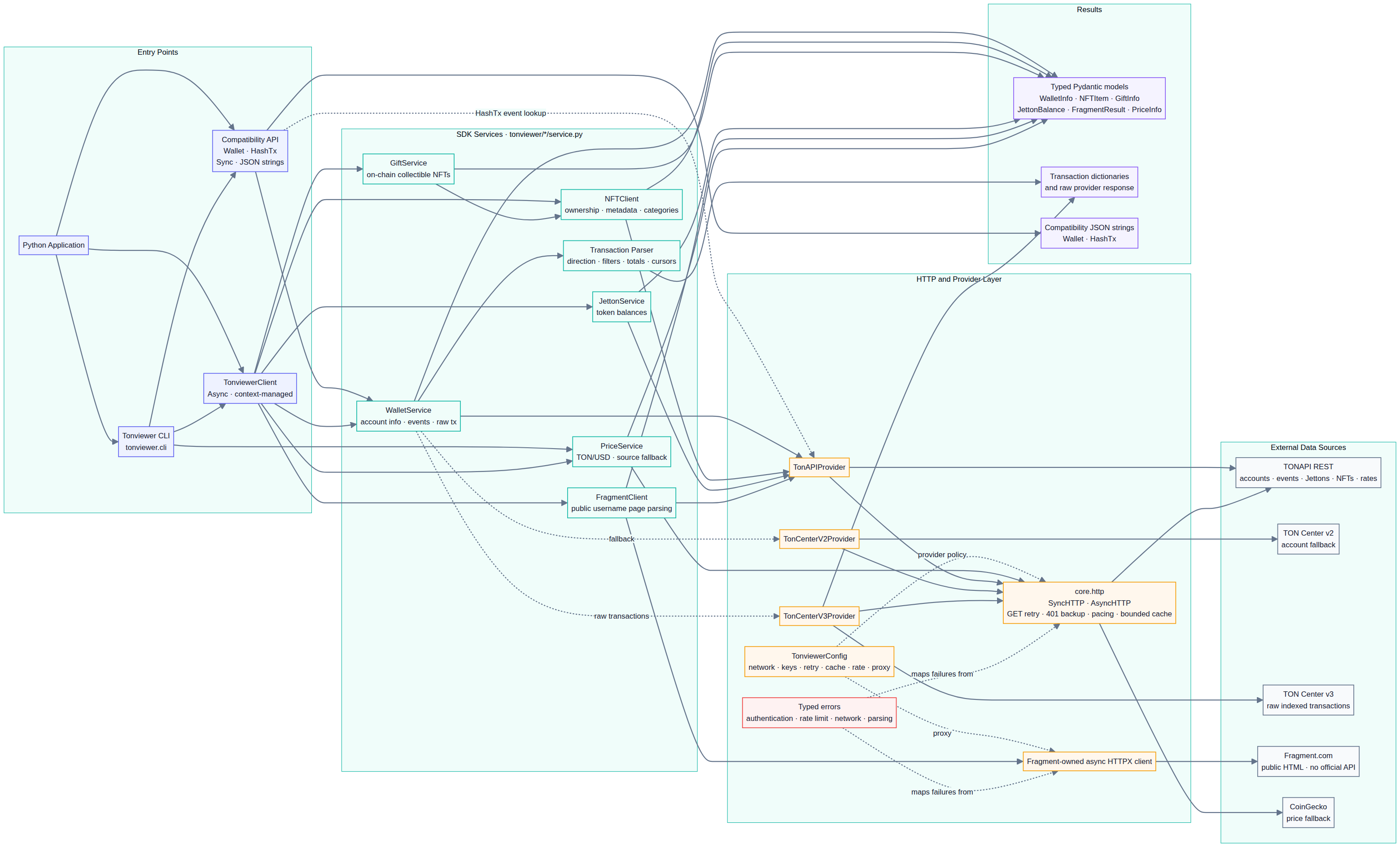
The diagram's editable Mermaid source is docs/architecture.mmd. See the architecture guide for provider and data-source notes.
Configure keys
API keys are optional for public endpoints, subject to the providers' limits. Use environment variables for local development rather than committing secrets:
$env:TONCENTER_API_KEY = "your-toncenter-key"
$env:TONCENTER_API_KEY_BACKUP = "your-optional-backup-key"
$env:TONAPI_KEY = "your-optional-tonapi-key"
On Linux/macOS, use export NAME="value". Network, timeout, retry, rate, cache, and proxy settings are described in Configuration.
Project documents
- Documentation home and navigation
- Installation and development setup
- Quick start and end-to-end examples
- Sync vs async API availability
- Typed output models
- Errors and troubleshooting
- Fixes and behavior notes
Scope notes
Fragment is read from its public web pages, not an official Fragment API; parsing can be affected by page changes or access restrictions. Gift discovery covers on-chain NFTs classified as collectibles, not ordinary off-chain Telegram gifts. Username NFT categories and gift classification are metadata heuristics. Review returned data before making financial or security decisions.
License and community
MIT License. See LICENSE. Questions and bug reports: GitHub Issues. Community: Telegram.
1 maintainer

Metadata
1 maintainer
Release files for Tonviewer 1.3.0
For a detailed explanation of source distributions (sdists) and built distributions (wheels), please see the package formats documentation.
Source distribution (sdist)
| File | Size | Uploaded | Provenance | Actions |
|---|---|---|---|---|
| tonviewer-1.3.0.tar.gz | 42.2 kB | Without provenance | Details for tonviewer-1.3.0.tar.gz |
Built distribution (wheel)
| File | Interpreter | ABI | Platform | Actions Reset |
|---|---|---|---|---|
| tonviewer-1.3.0-py3-none-any.whl | Python 3 | none | any | Details for tonviewer-1.3.0-py3-none-any.whl |
Total release size: 93.5 kB
Release files / tonviewer-1.3.0.tar.gz
| Download URL | tonviewer-1.3.0.tar.gz |
|---|---|
| Size | 42.2 kB |
| Tags | Source |
|
SHA-256 checksum How to use checksums |
2ba07abed5be27ca0bcfc2538bbc4079306986990572e5b0df5af5e529e2aedd
|
|
BLAKE2b-256 checksum How to use checksums |
7d81b95438bb7459bddef29cc568f18e1dd27ca949e0b77a1dc538490c207c71
|
| Upload date | |
|
Uploaded using Trusted Publishing? What is trusted publishing? |
No |
| Uploaded via |
twine/7.0.0 CPython/3.14.7
|
Release files / tonviewer-1.3.0-py3-none-any.whl
| Download URL | tonviewer-1.3.0-py3-none-any.whl |
|---|---|
| Size | 51.4 kB |
| Tags | Python 3 |
|
SHA-256 checksum How to use checksums |
0bcd6e763de2620d9a1ece086bdbeb4d14b30ab76daa4712dd5ba405ed9ee7c3
|
|
BLAKE2b-256 checksum How to use checksums |
89ee0738c0deae4254c51c5571f2ef8850cb6f61f683dfa49daf80a27ff03047
|
| Upload date | |
|
Uploaded using Trusted Publishing? What is trusted publishing? |
No |
| Uploaded via |
twine/7.0.0 CPython/3.14.7
|
Security for Tonviewer 1.3.0
Provenance
Provenance describes where a file came from. On PyPI, provenance is shared via attestations, which provide a verifiable record of the build or publishing details. View details, limitations and caveats.
No provenance found
None of the files in this release were uploaded with provenance metadata.
A note on package security
PyPI is a repository for distributing packages, not a service for auditing them. While third-party security researchers and our staff do their best to detect and remove malicious packages, PyPI cannot guarantee the quality, security or suitability of any given package.
To learn more about protecting yourself from malicious actors, visit our package security documentation.














