
High-performance C++ framework with Python interface for modeling Gamma-Ray Burst (GRB) afterglows.

Project description
VegasAfterglow









VegasAfterglow is a high-performance C++ framework with a user-friendly Python interface designed for the comprehensive modeling of Gamma-Ray Burst (GRB) afterglows. It achieves exceptional computational efficiency, enabling the generation of multi-wavelength light curves in milliseconds and facilitating robust Markov Chain Monte Carlo (MCMC) parameter inference. The framework incorporates advanced models for shock dynamics (both forward and reverse shocks), diverse radiation mechanisms (synchrotron with self-absorption, and inverse Compton scattering with Klein-Nishina corrections), and complex structured jet configurations.
Ecosystem & Integration
- Advanced Inference: While VegasAfterglow includes a standalone fitter, its models are also integrated into Redback for more advanced Bayesian inference, model comparison, and multi-messenger analysis.
- Community Tools: We also recommend checking out PyFRS, Jetsimpy, ASGARD as tool for afterglow modeling.
Quick Start
pip install VegasAfterglow
import numpy as np
import matplotlib.pyplot as plt
from VegasAfterglow import ISM, TophatJet, Observer, Radiation, Model

model = Model(
    jet=TophatJet(theta_c=0.1, E_iso=1e52, Gamma0=300),
    medium=ISM(n_ism=1),
    observer=Observer(lumi_dist=1e26, z=0.1, theta_obs=0),
    fwd_rad=Radiation(eps_e=0.1, eps_B=1e-3, p=2.3),
)

times = np.logspace(2, 8, 100)            # 100 s to ~3 years
bands = [1e9, 1e14, 1e17]                 # radio, near-IR, X-ray
flux = model.flux_density_grid(times, bands).total

for f, nu in zip(flux, bands):
    plt.loglog(times, f, label=f"{nu:.0e} Hz")
plt.xlabel("Time (s)"); plt.ylabel("Flux density (erg/cm²/s/Hz)"); plt.legend()

Prefer no install? Open the interactive web tool — parameter sliders, observational data upload, mobile-friendly.
Table of Contents
- VegasAfterglow
Features
Shock Dynamics
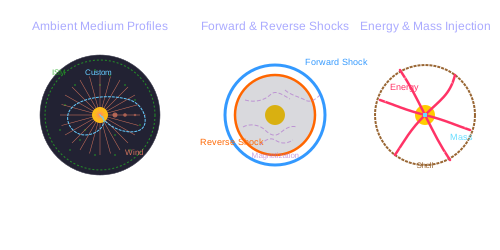
- Forward and Reverse Shock Modeling: Simulates both shocks via shock crossing dynamics with arbitrary magnetization levels and shell thicknesses.
- Relativistic and Non-Relativistic Regimes: Accurately models shock evolution across all velocity regimes.
- Adiabatic and Radiative Blast Waves: Supports smooth transition between adiabatic and radiative blast waves.
- Ambient Medium: Supports uniform Interstellar Medium (ISM), stellar wind environments, and user-defined density profiles.
- Energy and Mass Injection: Supports user-defined profiles for continuous energy and/or mass injection into the blast wave.
Jet Structure & Geometry
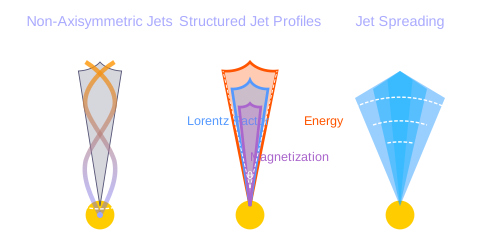
- Structured Jet Profiles: Allows user-defined angular profiles for energy distribution, initial Lorentz factor, and magnetization.
- Arbitrary Viewing Angles: Supports off-axis observers at any viewing angle relative to the jet axis.
- Jet Spreading: Includes lateral expansion dynamics for realistic jet evolution (experimental).
- Non-Axisymmetric Jets: Capable of modeling complex, non-axisymmetric jet structures.
Radiation Mechanisms
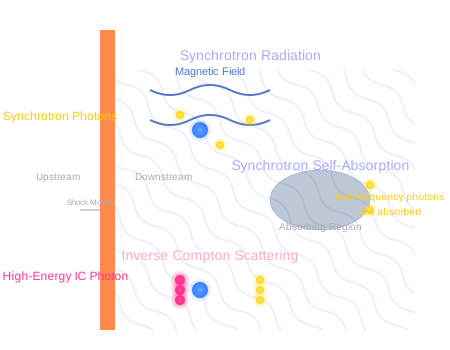
- Synchrotron Radiation: Calculates synchrotron emission from shocked electrons.
- Synchrotron Self-Absorption (SSA): Includes SSA effects, crucial at low frequencies.
- Inverse Compton (IC) Scattering: Models IC processes, including:
- Synchrotron Self-Compton (SSC) from both forward and reverse shocks.
- Pairwise IC between forward and reverse shock electron and photon populations (experimental).
- Includes Klein-Nishina corrections for accurate synchrotron and IC emission.
Installation
VegasAfterglow is available as a Python package with C++ source code also provided for direct use.
Python Installation
To install VegasAfterglow using pip:
pip install VegasAfterglow
This installs the core physics engine. To also install MCMC fitting support:
pip install VegasAfterglow[mcmc]
The interactive web tool is deployed across multiple global regions for low latency. If none of the servers provide a satisfactory experience from your location, you can run the interactive web tool locally for the best responsiveness (FastAPI + Next.js):
# terminal 1: backend
cd webtool/backend
python3 -m venv .venv
source .venv/bin/activate
pip install -e '../..[webtool]'
uvicorn app.main:app --reload --host 0.0.0.0 --port 8000

# terminal 2: frontend
cd webtool/frontend
cp .env.local.example .env.local
npm install
npm run dev
Open http://localhost:3000.
Detailed local/deploy guide: webtool/README.md and webtool/DEPLOY.md.
The hosted Interactive Web Tool provides real-time parameter-tunable afterglow modeling, mobile-phone compatible layout, and observational data input/upload support.
VegasAfterglow requires Python 3.9 or higher.
Alternative: Install from Source (click to expand/collapse)
For cases where pip installation is not viable or when the development version is required:
- Clone this repository:
git clone https://github.com/YihanWangAstro/VegasAfterglow.git
- Navigate to the directory and install the Python package:
cd VegasAfterglow
pip install .
Standard development environments typically include the necessary prerequisites (C++20 compatible compiler). For build-related issues, refer to the prerequisites section in C++ Installation.
C++ Installation
For advanced users who need to compile and use the C++ library directly:
Instructions for C++ Installation (click to expand/collapse)
- Clone the repository (if not previously done):
git clone https://github.com/YihanWangAstro/VegasAfterglow.git
cd VegasAfterglow
- Compile and run tests:
make tests
Upon successful compilation, you can create custom C++ problem generators using the VegasAfterglow interfaces. For implementation details, refer to the Creating Custom Problem Generators with C++ section or examine the example problem generators in tests/demo/.
Build Prerequisites (click to expand for dependency information)
The following development tools are required:
-
C++20 compatible compiler:
- Linux: GCC 10+ or Clang 13+
- macOS: Apple Clang 13+ (with Xcode 13+) or GCC 10+ (via Homebrew)
- Windows: MSVC 19.29+ (Visual Studio 2019 16.10+) or MinGW-w64 with GCC 10+
-
Build tools:
- Make (GNU Make 4.0+ recommended)
Usage
Quick Start
VegasAfterglow can be used in three ways:
- Interactive web tool — real-time, parameter-tunable afterglow modeling for light curves, spectra, and sky images, with mobile-phone compatible UI and observational data input/upload support (CSV/TXT/XLS/XLSX). No installation required.
- Command line — generate light curves instantly with the
vegasgencommand, no code needed. - Python API — full programmatic control for custom analysis, MCMC fitting, and access to internal quantities.
Command-Line Tool (vegasgen)
# Default tophat jet, ISM, on-axis — just run it
vegasgen

# Gaussian jet at z=0.5 with plot output
vegasgen --jet gaussian --z 0.5 --plot

# Use filter names for frequencies, save to file
vegasgen --nu R J 1e18 -o lightcurve.csv

# Wind medium with SSC, save plot as PNG
vegasgen --medium wind --ssc --plot -o lightcurve.png
All parameters have sensible defaults. Run vegasgen --help for the full option list, or see the CLI documentation for detailed usage.
Python API
from VegasAfterglow import ISM, TophatJet, Observer, Radiation, Model
import numpy as np

model = Model(TophatJet(0.1, 1e52, 300), ISM(1), Observer(1e26, 0.1, 0), Radiation(0.1, 1e-3, 2.3))
result = model.flux_density_grid(np.logspace(2, 8, 100), [1e9, 1e14, 1e17])
See the detailed sections below and the example notebooks (script/quick.ipynb, script/details.ipynb, script/vegas-mcmc.ipynb) for Python usage including light curves, spectra, internal quantities, and MCMC fitting.
Light Curve & Spectrum Calculation
The example below walks through the main components needed to model a GRB afterglow, from setting up the physical parameters to producing light curves and spectra via script/quick.ipynb.
Model Setup (click to expand/collapse)
import numpy as np
import matplotlib.pyplot as plt
from VegasAfterglow import ISM, TophatJet, Observer, Radiation, Model

medium = ISM(n_ism=1)                                    # constant density ISM [cm^-3]
jet = TophatJet(theta_c=0.1, E_iso=1e52, Gamma0=300)    # top-hat jet [rad, erg, dimensionless]
obs = Observer(lumi_dist=1e26, z=0.1, theta_obs=0)      # observer [cm, dimensionless, rad]
rad = Radiation(eps_e=1e-1, eps_B=1e-3, p=2.3)          # microphysics

model = Model(jet=jet, medium=medium, observer=obs, fwd_rad=rad)
Light Curve Calculation (click to expand/collapse)
Compute and plot multi-wavelength light curves:
times = np.logspace(2, 8, 100)
bands = np.array([1e9, 1e14, 1e17])  # radio, near-IR, X-ray

# times must be in ascending order; frequencies can be in any order
results = model.flux_density_grid(times, bands)

plt.figure(figsize=(4.8, 3.6), dpi=200)
for i, nu in enumerate(bands):
    exp = int(np.floor(np.log10(nu)))
    base = nu / 10**exp
    plt.loglog(times, results.total[i,:], label=fr'${base:.1f} \times 10^{{{exp}}}$ Hz')

plt.xlabel('Time (s)')
plt.ylabel('Flux Density (erg/cm²/s/Hz)')
plt.legend()
plt.title('Light Curves')
Spectrum Analysis (click to expand/collapse)
Broadband spectra at different epochs:
frequencies = np.logspace(5, 22, 100)
epochs = np.array([1e2, 1e3, 1e4, 1e5, 1e6, 1e7, 1e8])

# times must be in ascending order
results = model.flux_density_grid(epochs, frequencies)

plt.figure(figsize=(4.8, 3.6), dpi=200)
colors = plt.cm.viridis(np.linspace(0, 1, len(epochs)))
for i, t in enumerate(epochs):
    exp = int(np.floor(np.log10(t)))
    base = t / 10**exp
    plt.loglog(frequencies, results.total[:,i], color=colors[i], label=fr'${base:.1f} \times 10^{{{exp}}}$ s')

plt.xlabel('Frequency (Hz)')
plt.ylabel('Flux Density (erg/cm²/s/Hz)')
plt.legend(ncol=2)
plt.title('Synchrotron Spectra')

Time-Frequency Pairs Calculation (click to expand/collapse)
For paired time-frequency points (t_i, nu_i) instead of a grid:
times = np.logspace(2, 8, 200)
frequencies = np.logspace(9, 17, 200)  # same length as times

results = model.flux_density(times, frequencies)  # times must be ascending
Three flux methods:
flux_density_grid(times, freqs): NxM grid outputflux_density(times, freqs): paired points (N output from N pairs)flux_density_exposures(times, freqs, expo): paired with exposure-time averaging
All return a FluxDict with .total, .fwd (.sync, .ssc), and .rvs (.sync, .ssc).
Internal Quantities Evolution
The example below walks through how you can check the evolution of internal quantities under various reference frames via script/details.ipynb.
Model Setup (click to expand/collapse)
import numpy as np
import matplotlib.pyplot as plt
from VegasAfterglow import ISM, TophatJet, Observer, Radiation, Model

z = 0.1
medium = ISM(n_ism=1)
jet = TophatJet(theta_c=0.3, E_iso=1e52, Gamma0=100)
obs = Observer(lumi_dist=1e26, z=z, theta_obs=0.)
rad = Radiation(eps_e=1e-1, eps_B=1e-3, p=2.3)

model = Model(jet=jet, medium=medium, observer=obs, fwd_rad=rad, resolutions=(0.1, 0.25, 10))
Get the simulation quantities (click to expand/collapse)
details = model.details(t_min=1e0, t_max=1e8)
Returns a SimulationDetails object. All quantities are 3D numpy arrays with shape (n_phi, n_theta, n_time), where axis 0 is the azimuthal angle, axis 1 is the polar angle, and axis 2 is the time step. For example, details.fwd.Gamma[0, 0, :] gives the Lorentz factor time evolution along the jet symmetry axis. Access forward shock via details.fwd (reverse shock via details.rvs when enabled).
| Category | Attributes |
|---|---|
| Grid | phi, theta, t_src (source frame), fwd.t_comv (comoving), fwd.t_obs (observer) |
| Dynamics | Gamma, Gamma_th, r, theta, Doppler |
| Microphysics | B_comv [G], N_p, N_e, I_nu_max [erg/cm²/s/Hz] |
| Electron Lorentz factors | gamma_a, gamma_m, gamma_c, gamma_M |
| Characteristic frequencies | nu_a, nu_m, nu_c, nu_M [Hz] |
| Spectra (callable) | sync_spectrum, ssc_spectrum, Y_spectrum |
Frame:
gamma_*,nu_*,I_nu_max, andB_comvare all in the comoving (rest) frame of the shocked fluid. Convert a comoving frequency to the observer frame withnu_obs = nu_comv * Doppler / (1 + z)(the inverse applies for observer → comoving). See the internal-quantities docs for details and the inline example below for usage.
Checking the evolution of various parameters (click to expand/collapse)
Plot shock quantities across source, comoving, and observer frames:
attrs =['Gamma', 'B_comv', 'N_p','r','N_e','I_nu_max']
ylabels = [r'$\Gamma$', r'$B^\prime$ [G]', r'$N_p$', r'$r$ [cm]', r'$N_e$', r'$I_{\nu, \rm max}^\prime$ [erg/s/Hz]']

frames = ['t_src', 't_comv', 't_obs']
titles = ['source frame', 'comoving frame', 'observer frame']
colors = ['C0', 'C1', 'C2']
xlabels = [r'$t_{\rm src}$ [s]', r'$t^\prime$ [s]', r'$t_{\rm obs}$ [s]']
plt.figure(figsize= (4.2*len(frames), 3*len(attrs)))

# All 3D arrays have shape (n_phi, n_theta, n_time).
# Using [0, 0, :] extracts the time evolution at the first azimuthal and
# polar bin, i.e. along the jet symmetry axis.
for i, frame in enumerate(frames):
    for j, attr in enumerate(attrs):
        plt.subplot(len(attrs), len(frames) , j * len(frames) + i + 1)
        if j == 0:
            plt.title(titles[i])
        value = getattr(details.fwd, attr)
        if frame == 't_src':
            t = getattr(details, frame)
        else:
            t = getattr(details.fwd, frame)
        plt.loglog(t[0, 0, :], value[0, 0, :], color='k',lw=2.5)
        plt.loglog(t[0, 0, :], value[0, 0, :], color=colors[i])

        plt.xlabel(xlabels[i])
        plt.ylabel(ylabels[j])

plt.tight_layout()
plt.savefig('shock_quantities.png', dpi=300,bbox_inches='tight')

See script/details.ipynb for additional plots including characteristic electron energies, synchrotron frequencies, Doppler factor maps, and equal arrival time surfaces.
Per-Cell Spectrum Evaluation (click to expand/collapse)
In addition to scalar quantities, details() provides callable spectrum accessors that let you evaluate the comoving-frame synchrotron, SSC, and Compton-Y spectra at arbitrary frequencies for each grid cell. To use SSC and Y spectrum, enable SSC in the radiation model:
rad = Radiation(eps_e=1e-1, eps_B=1e-3, p=2.3, ssc=True)
model = Model(jet=jet, medium=medium, observer=obs, fwd_rad=rad, resolutions=(0.1, 0.25, 10))
details = model.details(t_min=1e0, t_max=1e8)

nu_comv = np.logspace(8, 20, 200)  # comoving frame frequency [Hz]

# Synchrotron spectrum at cell (phi=0, theta=0, t=5)
I_syn = details.fwd.sync_spectrum[0, 0, 5](nu_comv)   # erg/s/Hz/cm²/sr

# SSC spectrum at the same cell (requires ssc=True)
I_ssc = details.fwd.ssc_spectrum[0, 0, 5](nu_comv)    # erg/s/Hz/cm²/sr

# Compton-Y parameter as a function of electron Lorentz factor
gamma = np.logspace(1, 8, 200)
Y = details.fwd.Y_spectrum[0, 0, 5](gamma)            # dimensionless
These callable accessors are also available on details.rvs when a reverse shock is configured. The sync_spectrum and Y_spectrum are always available; ssc_spectrum is None unless ssc=True.
Sky Image
Generate spatially resolved images of the afterglow at any observer time and frequency. See script/sky-image.ipynb for the full example.
Single Frame (click to expand/collapse)
from matplotlib.colors import LogNorm
from VegasAfterglow.units import uas

img = model.sky_image([1e6], nu_obs=1e9, fov=500 * uas, npixel=256)

fig, ax = plt.subplots(dpi=100)
im = ax.imshow(
    img.image[0].T,
    origin="lower",
    extent=img.extent / uas,
    cmap="inferno",
    norm=LogNorm(),
)
ax.set_xlabel(r"$\Delta x$ ($\mu$as)")
ax.set_ylabel(r"$\Delta y$ ($\mu$as)")
fig.colorbar(im, label=r"Surface brightness (erg/cm$^2$/s/Hz/sr)")
The return value is a SkyImage object with:
img.image: 3D array(n_frames, npixel, npixel)— surface brightness in erg/cm²/s/Hz/srimg.extent: angular extent in radians (pass toimshow(extent=...))img.pixel_solid_angle: pixel solid angle in sr
Multi-Frame Movie (click to expand/collapse)
Pass an array of observer times to generate an image sequence efficiently — dynamics are solved once, each frame only re-renders the sky projection:
times = np.logspace(4, 8, 60)
imgs = model.sky_image(times, nu_obs=1e9, fov=2000 * uas, npixel=128)
# imgs.image.shape == (60, 128, 128)

Off-Axis Observer (click to expand/collapse)
For off-axis observers, the image centroid drifts across the sky (superluminal apparent motion):
model_offaxis = Model(
    jet=TophatJet(theta_c=0.1, E_iso=1e52, Gamma0=200),
    medium=ISM(n_ism=1),
    observer=Observer(lumi_dist=1e26, z=0.1, theta_obs=0.4),
    fwd_rad=Radiation(eps_e=1e-1, eps_B=1e-3, p=2.3),
)

times_oa = np.logspace(5, 8, 30)
imgs_oa = model_offaxis.sky_image(times_oa, nu_obs=1e9, fov=5000 * uas, npixel=128)
MCMC Parameter Fitting
We provide some example data files in the data folder. Remember to keep your copy in the same directory as the original to ensure all data paths work correctly.
1. Configuring the Model (click to expand/collapse)
# Requires: pip install VegasAfterglow[mcmc]
import numpy as np
import pandas as pd
import matplotlib.pyplot as plt
import corner
from VegasAfterglow import Fitter, ParamDef, Scale

# Create the fitter with model configuration and add data
fitter = Fitter(
    z=1.58,
    lumi_dist=3.364e28,
    jet="powerlaw",
    medium="wind",
)
All model configuration is passed directly to the Fitter constructor as keyword arguments. Check the documentation for all available options.
2. Defining Parameters and Running MCMC (click to expand/collapse)
Define parameters with ParamDef(name, min, max, scale). Use Scale.log for parameters spanning orders of magnitude, Scale.linear for narrow ranges, and Scale.fixed to hold a parameter constant:
mc_params = [
    ParamDef("E_iso",      1e50,  1e54,  Scale.log),       # Isotropic energy [erg]
    ParamDef("Gamma0",        5,  1000,  Scale.log),       # Lorentz factor at the core
    ParamDef("theta_c",     0.0,   0.5,  Scale.linear),    # Core half-opening angle [rad]
    ParamDef("k_e",           2,     2,  Scale.fixed),     # Energy power law index
    ParamDef("k_g",           2,     2,  Scale.fixed),     # Lorentz factor power law index
    ParamDef("theta_v",     0.0,   0.0,  Scale.fixed),     # Viewing angle [rad]
    ParamDef("p",             2,     3,  Scale.linear),    # Shocked electron power law index
    ParamDef("eps_e",      1e-2,   0.5,  Scale.log),       # Electron energy fraction
    ParamDef("eps_B",      1e-4,   0.5,  Scale.log),       # Magnetic field energy fraction
    ParamDef("A_star",     1e-3,     1,  Scale.log),       # Wind parameter
    ParamDef("xi_e",       1e-3,     1,  Scale.log),       # Electron acceleration fraction
]
Add observational data and run the fit:
# Add light curves at specific frequencies (all quantities in CGS units)
t_data = [1e3, 2e3, 5e3, 1e4, 2e4]  # Time in seconds
flux_data = [1e-26, 8e-27, 5e-27, 3e-27, 2e-27]  # erg/cm²/s/Hz
flux_err = [1e-28, 8e-28, 5e-28, 3e-28, 2e-28]    # erg/cm²/s/Hz
fitter.add_flux_density(nu=4.84e14, t=t_data, f_nu=flux_data, err=flux_err)

# Load from CSV files
import pandas as pd
bands = [2.4e17, 4.84e14, 1.4e14]
lc_files = ["data/ep.csv", "data/r.csv", "data/vt-r.csv"]
for nu, fname in zip(bands, lc_files):
    df = pd.read_csv(fname)
    fitter.add_flux_density(nu=nu, t=df["t"], f_nu=df["Fv_obs"], err=df["Fv_err"])

# Add spectra at specific times
fitter.add_spectrum(t=3000, nu=nu_data, f_nu=spectrum_data, err=spectrum_err)

# Option 1: Nested sampling with dynesty (computes evidence, robust for multimodal posteriors)
result = fitter.fit(
    mc_params,
    resolution=(0.1, 0.25, 10),    # Grid resolution (phi, theta, t)
    sampler="dynesty",             # Nested sampling algorithm
    nlive=1000,                    # Number of live points
    walks=100,                     # Number of random walks per live point
    dlogz=0.5,                     # Stopping criterion (evidence tolerance)
    npool=8,                       # Number of parallel threads
    top_k=10,                      # Number of best-fit parameters to return
)

# Option 2: MCMC with emcee (faster, good for unimodal posteriors, not optimal for multimodal posteriors)
result = fitter.fit(
    mc_params,
    resolution=(0.1, 0.25, 10),    # Grid resolution (phi, theta, t)
    sampler="emcee",               # MCMC sampler
    nsteps=50000,                  # Number of steps per walker
    nburn=10000,                   # Burn-in steps to discard
    thin=1,                        # Save every nth sample
    npool=8,                       # Number of parallel threads
    top_k=10,                      # Number of best-fit parameters to return
)
The result object contains samples, labels, latex_labels, top_k_params, top_k_log_probs, and bilby_result. It also exposes summary(), save(), and load() for inspecting and persisting fits — see below.
3. Analyzing Results and Generating Predictions (click to expand/collapse)
Inspect the top-K best fits:
print(result.summary())
Generate predictions with the best-fit parameters:
best_params = result.top_k_params[0]

t_out = np.logspace(2, 9, 150)
nu_out = np.logspace(16, 20, 150)

lc = fitter.flux_density_grid(best_params, t_out, bands)
spec = fitter.flux_density_grid(best_params, times, nu_out)
Corner plot:
flat_chain = result.samples.reshape(-1, result.samples.shape[-1])
corner.corner(flat_chain, labels=result.latex_labels, quantiles=[0.16, 0.5, 0.84], show_titles=True)
Persist the fit to disk and reload later (bilby-native HDF5 / JSON — interoperable with bilby.read_in_result(path)):
# After fitting -- saves the full Fitter state (constructor args, observation
# data, parameter definitions) alongside the samples.
fitter.save("my_fit.h5")

# Later session: one classmethod call reloads the configured Fitter and the
# FitResult. No manual reconfiguration, no MCMC re-run.
from VegasAfterglow import Fitter
fitter = Fitter.load("my_fit.h5")
result = fitter.result
print(result.summary())
lc = fitter.flux_density_grid(result.top_k_params[0], t_out, bands)
See script/vegas-mcmc.ipynb for a complete working example with data loading, fitting, and visualization.
Parameter Fitting with Redback
For parameter estimation and Bayesian inference, VegasAfterglow models are integrated into redback, which provides a unified interface for fitting all transient types.
Loading Data & Fitting: (click to expand/collapse)
import redback

# Multiple ways to load data:
GRB = 'GRB070809'

# Method 1: From Swift BAT+XRT (recommended for Swift GRBs)
redback.get_data.get_bat_xrt_afterglow_data_from_swift(grb=GRB, data_mode="flux")
afterglow = redback.afterglow.SGRB.from_swift_grb(name=GRB, data_mode='flux')

# Method 2: From open access catalogs
afterglow = redback.afterglow.Afterglow.from_open_access_catalogue(
    GRB, data_mode='flux_density'
)

# Method 3: From your own data files
import pandas as pd
data = pd.read_csv('my_grb_data.csv')
afterglow = redback.transient.Afterglow(
    name=GRB,
    data_mode='flux_density',
    time=data['time'].values,
    flux_density=data['flux'].values,
    flux_density_err=data['flux_err'].values,
    frequency=data['frequency'].values
)

# Fit with VegasAfterglow tophat model
result = redback.fit_model(
    transient=afterglow,
    model='vegas_tophat',  # VegasAfterglow tophat jet model
    sampler='dynesty',
    nlive=1000
)

result.plot_corner()
result.plot_lightcurve()
result.plot_residuals()
Available VegasAfterglow models in redback:
vegas_tophat- Tophat jet + ISMvegas_gaussian- Gaussian jet + ISMvegas_powerlaw- Power-law jet + ISMvegas_two_component- Two-component jet + ISMvegas_tophat_wind- Tophat jet + Wind medium- ... and more
Why use the Redback interface?
Data Management: Seamlessly load data from Swift, Fermi, BATSE, or custom files. Supports flux, flux_density, magnitude, and luminosity.Advanced Statistics: Access multiple samplers (dynesty, emcee, ultranest), parallel sampling, and Bayesian model comparison.Visualization: Generate publication-ready corner plots and multi-band light curves automatically.
For complete documentation on the API, visit the redback documentation.
Performance Highlights
VegasAfterglow is designed for speed. A tophat synchrotron light curve completes in under 1 ms; even the most demanding case — a structured jet with full SSC off-axis — finishes in ~180 ms. This makes MCMC parameter estimation lightning fast on a laptop:
- Tophat jet: 10,000 MCMC steps, 8 parameters, 15 data points for ~0.3 M samples ~15 s (Apple M2, 8 cores).
- Structured jet: same setup ~1 minute.
The charts below benchmark single-core wall-clock time by stage across four jet profiles (Tophat, Gaussian, Power-law, Two-component), two media (ISM/Wind), and $\theta_v/\theta_c = 0, 1, 2, 4$, all at the default fiducial resolution — conservatively set to ensure convergence across a wide range of physical parameters. Cost scales with two factors: off-axis observers require a full 3D equal-arrival-time grid vs. 2D on-axis, and structured jets compute radiation independently at each $\theta$ vs. reusing one solution for tophat. Reverse shock adds a second shocked shell, roughly doubling the dynamics cost.


Architecture

Validation & Testing
The validation suite includes benchmark tests (resolution convergence, performance timing) and regression tests (shock dynamics scaling laws, characteristic frequency evolution, spectral power-law indices across Blandford-McKee and Sedov-Taylor phases). The default fiducial resolution (0.1, 0.25, 10) achieves < 5% mean error for most configurations.
See the Validation Report (PDF) for full results. To run locally:
pip install -e ".[test]" --config-settings=cmake.define.AFTERGLOW_PROFILE=ON
python validation/run_validation.py --all        # full suite (timing + convergence + regression)
python validation/run_validation.py --all --fast  # fast mode: skip convergence scans
Powered by Claude Code
Documentation
Full documentation — installation, examples, MCMC fitting guide, parameter reference, Python/C++ API, and troubleshooting — is available at Documentation.
For a history of changes and new features, see the Changelog.
Contributing
If you encounter any issues, have questions about the code, or want to request new features:
-
GitHub Issues - The most straightforward and fastest way to get help:
- Open an issue at Issues
- You can report bugs, suggest features, or ask questions
- This allows other users to see the problem/solution as well
- Can be done anonymously if preferred
-
Pull Requests - If you've implemented a fix or feature:
- Fork the repository
- Create a branch for your changes
- Submit a pull request with your changes
-
Email - For private questions or discussions:
- Contact the maintainers directly via email
- Yihan Wang: yihan.astro@gmail.com
- Bing Zhang: bing.zhang@unlv.edu
- Connery Chen: connery.chen@unlv.edu
We value all contributions and aim to respond to issues promptly. All communications are extremely welcome!
License
VegasAfterglow is released under the BSD-3-Clause License.
Acknowledgments & Citation
We would like to thank the contributors who helped improve VegasAfterglow. Special thanks to Weihua Lei, Shaoyu Fu, Liang-Jun Chen, Iris Yin, Cuiyuan Dai, Binbin Zhang and Nikhil Sarin for their invaluable work as beta testers, providing feedback and helping with bug fixes during development. We also thank the broader community for their suggestions and support.
If you find VegasAfterglow useful, please consider giving us a star — it helps others discover the project!

If you use VegasAfterglow in your research, we would be grateful if you could cite:
Wang, Y., Chen, C., & Zhang, B. (2026). VegasAfterglow: A high-performance framework for gamma-ray burst afterglows. Journal of High Energy Astrophysics, 50, 100490. ADS
@ARTICLE{2026JHEAp..5000490W,
       author = {{Wang}, Yihan and {Chen}, Connery and {Zhang}, Bing},
        title = "{VegasAfterglow: A high-performance framework for gamma-ray burst afterglows}",
      journal = {Journal of High Energy Astrophysics},
     keywords = {Gamma-ray bursts, Shocks, Relativistic jets, Computational methods, Open source software, High Energy Astrophysical Phenomena},
         year = 2026,
        month = feb,
       volume = {50},
          eid = {100490},
        pages = {100490},
          doi = {10.1016/j.jheap.2025.100490},
archivePrefix = {arXiv},
       eprint = {2507.10829},
 primaryClass = {astro-ph.HE},
       adsurl = {https://ui.adsabs.harvard.edu/abs/2026JHEAp..5000490W},
      adsnote = {Provided by the SAO/NASA Astrophysics Data System}
}
Zhang, B. (2018). The Physics of Gamma-Ray Bursts. Cambridge University Press. ADS
@book{Zhang2018,
  author    = {Zhang, Bing},
  title     = {{The Physics of Gamma-Ray Bursts}},
  publisher = {Cambridge University Press},
  year      = {2018},
  doi       = {10.1017/9781139226530}
}

 |
 |
 |
Release history Release notifications | RSS feed


Download files
Download the file for your platform. If you're not sure which to choose, learn more about installing packages.
Source Distribution
Built Distributions
Filter files by name, interpreter, ABI, and platform.
If you're not sure about the file name format, learn more about wheel file names.
Copy a direct link to the current filters
File details
Details for the file vegasafterglow-2.0.5.tar.gz.
File metadata
- Download URL: vegasafterglow-2.0.5.tar.gz
- Upload date:
- Size: 35.6 MB
- Tags: Source
- Uploaded using Trusted Publishing? No
- Uploaded via: twine/6.1.0 CPython/3.13.12
File hashes
| Algorithm | Hash digest | |
|---|---|---|
| SHA256 |
a6e438dd1965b91a358ede31960dd124362a835d5253f3758508809254b6e0bc
|
|
| MD5 |
005519167546c1eb082f2260f705b82a
|
|
| BLAKE2b-256 |
fdf9d52262c0e213a92494df2cd7625c865d75fb754fca82bb994dc21d96c507
|
File details
Details for the file vegasafterglow-2.0.5-cp314-cp314-win_arm64.whl.
File metadata
- Download URL: vegasafterglow-2.0.5-cp314-cp314-win_arm64.whl
- Upload date:
- Size: 434.4 kB
- Tags: CPython 3.14, Windows ARM64
- Uploaded using Trusted Publishing? No
- Uploaded via: twine/6.1.0 CPython/3.13.12
File hashes
| Algorithm | Hash digest | |
|---|---|---|
| SHA256 |
1a12a1b0da8e9f6867fd4dd329f45b74f3bf32aac3e015089fbf144c831a8da7
|
|
| MD5 |
ff2a7eb9fce2a70ff95994885417549e
|
|
| BLAKE2b-256 |
3d8da93a2e5bc6053988676c3d6c1f4828f7fc24bcddd8a67d475ad75e5e0007
|
File details
Details for the file vegasafterglow-2.0.5-cp314-cp314-win_amd64.whl.
File metadata
- Download URL: vegasafterglow-2.0.5-cp314-cp314-win_amd64.whl
- Upload date:
- Size: 450.3 kB
- Tags: CPython 3.14, Windows x86-64
- Uploaded using Trusted Publishing? No
- Uploaded via: twine/6.1.0 CPython/3.13.12
File hashes
| Algorithm | Hash digest | |
|---|---|---|
| SHA256 |
918f7340be01d25c3c40517dbde20773322d65834a7d2b14619cd6ace4404aa7
|
|
| MD5 |
918a58903b31f926807a34429d253d9e
|
|
| BLAKE2b-256 |
0ba275822df0bf3d820221323009b4b2c4af132c23e516928f194f96f4773436
|
File details
Details for the file vegasafterglow-2.0.5-cp314-cp314-manylinux_2_27_x86_64.manylinux_2_28_x86_64.whl.
File metadata
- Download URL: vegasafterglow-2.0.5-cp314-cp314-manylinux_2_27_x86_64.manylinux_2_28_x86_64.whl
- Upload date:
- Size: 770.3 kB
- Tags: CPython 3.14, manylinux: glibc 2.27+ x86-64, manylinux: glibc 2.28+ x86-64
- Uploaded using Trusted Publishing? No
- Uploaded via: twine/6.1.0 CPython/3.13.12
File hashes
| Algorithm | Hash digest | |
|---|---|---|
| SHA256 |
dbc8a37083f80c6c4b2cc02c3b66d55acdc57d8522b624b87f09baef0b186df1
|
|
| MD5 |
4787be19168fc87106aacc77cee8d2fd
|
|
| BLAKE2b-256 |
044f71ce763f575962f2c6528e7deffa15f10c6e86733d79bc200f980dbcb21b
|
File details
Details for the file vegasafterglow-2.0.5-cp314-cp314-macosx_11_0_x86_64.whl.
File metadata
- Download URL: vegasafterglow-2.0.5-cp314-cp314-macosx_11_0_x86_64.whl
- Upload date:
- Size: 618.3 kB
- Tags: CPython 3.14, macOS 11.0+ x86-64
- Uploaded using Trusted Publishing? No
- Uploaded via: twine/6.1.0 CPython/3.13.12
File hashes
| Algorithm | Hash digest | |
|---|---|---|
| SHA256 |
371cb018e7634bb9b94f1d99597d33c33a5f82531d6ab6b1089f6c353a5b8972
|
|
| MD5 |
e77cc360c192e1a62285e102092257bf
|
|
| BLAKE2b-256 |
6d7c012a7d97dced3d3e2cbbcde8f2fbfc3bdada96a05ce7a0996128ab029492
|
File details
Details for the file vegasafterglow-2.0.5-cp314-cp314-macosx_11_0_arm64.whl.
File metadata
- Download URL: vegasafterglow-2.0.5-cp314-cp314-macosx_11_0_arm64.whl
- Upload date:
- Size: 537.1 kB
- Tags: CPython 3.14, macOS 11.0+ ARM64
- Uploaded using Trusted Publishing? No
- Uploaded via: twine/6.1.0 CPython/3.13.12
File hashes
| Algorithm | Hash digest | |
|---|---|---|
| SHA256 |
b48f45317e933334d73e7ed1f3efcda5fbcecd6b7554bee32843110a99909ae9
|
|
| MD5 |
305bcab29f70993b8876b0d389343241
|
|
| BLAKE2b-256 |
472f37f82bc9f61b0af08a92603cc473c374e89f9159cc1cf9bf84be388bf050
|
File details
Details for the file vegasafterglow-2.0.5-cp313-cp313-win_arm64.whl.
File metadata
- Download URL: vegasafterglow-2.0.5-cp313-cp313-win_arm64.whl
- Upload date:
- Size: 421.6 kB
- Tags: CPython 3.13, Windows ARM64
- Uploaded using Trusted Publishing? No
- Uploaded via: twine/6.1.0 CPython/3.13.12
File hashes
| Algorithm | Hash digest | |
|---|---|---|
| SHA256 |
55327de52c597241790677d19a2cf934f43b2a8152bd124af68902556b0a6f73
|
|
| MD5 |
59d0432abee251698185f8e1c88ddff1
|
|
| BLAKE2b-256 |
6639befbbffa24ecba366122057c2fdcbe05f7598f747a0295cf361305676669
|
File details
Details for the file vegasafterglow-2.0.5-cp313-cp313-win_amd64.whl.
File metadata
- Download URL: vegasafterglow-2.0.5-cp313-cp313-win_amd64.whl
- Upload date:
- Size: 438.5 kB
- Tags: CPython 3.13, Windows x86-64
- Uploaded using Trusted Publishing? No
- Uploaded via: twine/6.1.0 CPython/3.13.12
File hashes
| Algorithm | Hash digest | |
|---|---|---|
| SHA256 |
4ec5fb6cc681d3be05a346f3457a69d173e0fbf080f6756d4ecd7e0ee11f3fd8
|
|
| MD5 |
90f9db32ea706c032f3743031d8e0db6
|
|
| BLAKE2b-256 |
4fdc47c3cd98396008554c0586de96a204f7866b03e8c5c494bfdeb0832b98a0
|
File details
Details for the file vegasafterglow-2.0.5-cp313-cp313-manylinux_2_27_x86_64.manylinux_2_28_x86_64.whl.
File metadata
- Download URL: vegasafterglow-2.0.5-cp313-cp313-manylinux_2_27_x86_64.manylinux_2_28_x86_64.whl
- Upload date:
- Size: 770.3 kB
- Tags: CPython 3.13, manylinux: glibc 2.27+ x86-64, manylinux: glibc 2.28+ x86-64
- Uploaded using Trusted Publishing? No
- Uploaded via: twine/6.1.0 CPython/3.13.12
File hashes
| Algorithm | Hash digest | |
|---|---|---|
| SHA256 |
894377336291710d3f397494e2cea835ec9935747400286cd165468a3b465bf3
|
|
| MD5 |
b060908beb77f52d680c0bd9d7659be3
|
|
| BLAKE2b-256 |
8e6630a745ff648df246f0d42b6cf110e5406dcde7e884ae9a9be3483fa16d63
|
File details
Details for the file vegasafterglow-2.0.5-cp313-cp313-macosx_11_0_x86_64.whl.
File metadata
- Download URL: vegasafterglow-2.0.5-cp313-cp313-macosx_11_0_x86_64.whl
- Upload date:
- Size: 618.1 kB
- Tags: CPython 3.13, macOS 11.0+ x86-64
- Uploaded using Trusted Publishing? No
- Uploaded via: twine/6.1.0 CPython/3.13.12
File hashes
| Algorithm | Hash digest | |
|---|---|---|
| SHA256 |
806fe26a62f51bebf54405ed479e0f2a2be32961397ca1522d77006418eff437
|
|
| MD5 |
83fe769b072a0b46d4e336f418bb46c7
|
|
| BLAKE2b-256 |
a9eb77e34aaefd6077c52901b55ad87683981d793c17c745fb459176f19f4163
|
File details
Details for the file vegasafterglow-2.0.5-cp313-cp313-macosx_11_0_arm64.whl.
File metadata
- Download URL: vegasafterglow-2.0.5-cp313-cp313-macosx_11_0_arm64.whl
- Upload date:
- Size: 536.6 kB
- Tags: CPython 3.13, macOS 11.0+ ARM64
- Uploaded using Trusted Publishing? No
- Uploaded via: twine/6.1.0 CPython/3.13.12
File hashes
| Algorithm | Hash digest | |
|---|---|---|
| SHA256 |
722f6338163970e7a3f33e83d26bb9dfb487e0705793c9cfbf7f96f15e9cf623
|
|
| MD5 |
4e2439b17d32e55036e7e18d72bb226a
|
|
| BLAKE2b-256 |
b1e15dff6d392d97cf47719ed9caeeaa0ce8a1c5f55a0af4337e1d2de345fc7f
|
File details
Details for the file vegasafterglow-2.0.5-cp312-cp312-win_arm64.whl.
File metadata
- Download URL: vegasafterglow-2.0.5-cp312-cp312-win_arm64.whl
- Upload date:
- Size: 421.7 kB
- Tags: CPython 3.12, Windows ARM64
- Uploaded using Trusted Publishing? No
- Uploaded via: twine/6.1.0 CPython/3.13.12
File hashes
| Algorithm | Hash digest | |
|---|---|---|
| SHA256 |
77ae20c7e68858759c9e8f418c336ee4ec04da9b73112d48223a932a36f8c53c
|
|
| MD5 |
2bfaef65c62362bb2c7c22e1edee8718
|
|
| BLAKE2b-256 |
def0e9d18f2b7a0b3153375194cca8e03dc73fcbd621d782f5bd2c01e5c19d1d
|
File details
Details for the file vegasafterglow-2.0.5-cp312-cp312-win_amd64.whl.
File metadata
- Download URL: vegasafterglow-2.0.5-cp312-cp312-win_amd64.whl
- Upload date:
- Size: 438.6 kB
- Tags: CPython 3.12, Windows x86-64
- Uploaded using Trusted Publishing? No
- Uploaded via: twine/6.1.0 CPython/3.13.12
File hashes
| Algorithm | Hash digest | |
|---|---|---|
| SHA256 |
5a6e79eef7c010852a1c112e6e762aadc51dabf140343b91aa26b10e850713a7
|
|
| MD5 |
3fe17e342df0615c7eb7f91a2f962303
|
|
| BLAKE2b-256 |
c05e04c6dd4bcfc6da82fc8f5e8fc1ffd2ca3396df61d85e1f08d791c9cf36a1
|
File details
Details for the file vegasafterglow-2.0.5-cp312-cp312-manylinux_2_27_x86_64.manylinux_2_28_x86_64.whl.
File metadata
- Download URL: vegasafterglow-2.0.5-cp312-cp312-manylinux_2_27_x86_64.manylinux_2_28_x86_64.whl
- Upload date:
- Size: 770.2 kB
- Tags: CPython 3.12, manylinux: glibc 2.27+ x86-64, manylinux: glibc 2.28+ x86-64
- Uploaded using Trusted Publishing? No
- Uploaded via: twine/6.1.0 CPython/3.13.12
File hashes
| Algorithm | Hash digest | |
|---|---|---|
| SHA256 |
dc943789de01220d88336ecbacfafa55513296f2954a48f1dfe6e124190d7b38
|
|
| MD5 |
9a0366115a04e5c168f74d6427a935da
|
|
| BLAKE2b-256 |
8c9a13df74d34989ece8711b929a34a5e649fa82de9276f6eb0c3739bfd79178
|
File details
Details for the file vegasafterglow-2.0.5-cp312-cp312-macosx_11_0_x86_64.whl.
File metadata
- Download URL: vegasafterglow-2.0.5-cp312-cp312-macosx_11_0_x86_64.whl
- Upload date:
- Size: 618.0 kB
- Tags: CPython 3.12, macOS 11.0+ x86-64
- Uploaded using Trusted Publishing? No
- Uploaded via: twine/6.1.0 CPython/3.13.12
File hashes
| Algorithm | Hash digest | |
|---|---|---|
| SHA256 |
f5b2e106f58ad220a0c1c42964fec907c24104fac737723715fe33cd86f1c498
|
|
| MD5 |
a1d59fa12e4eeae9aa11d2d1b3763273
|
|
| BLAKE2b-256 |
ee721a2e69e13d6a9bce09229919e11e27b580f470f7cda16dcc0313cf348429
|
File details
Details for the file vegasafterglow-2.0.5-cp312-cp312-macosx_11_0_arm64.whl.
File metadata
- Download URL: vegasafterglow-2.0.5-cp312-cp312-macosx_11_0_arm64.whl
- Upload date:
- Size: 536.6 kB
- Tags: CPython 3.12, macOS 11.0+ ARM64
- Uploaded using Trusted Publishing? No
- Uploaded via: twine/6.1.0 CPython/3.13.12
File hashes
| Algorithm | Hash digest | |
|---|---|---|
| SHA256 |
6e879a23c0a11d140bb5c9c7eb4d4f5699fb6b2d500bb62eaa8132e05c8223b8
|
|
| MD5 |
095f7f5b878f05b97e70ae76b695ddbf
|
|
| BLAKE2b-256 |
e900703bb98f0cc613e218f4c7d9445f03e77633e67db65943efc58adee2d66e
|
File details
Details for the file vegasafterglow-2.0.5-cp311-cp311-win_arm64.whl.
File metadata
- Download URL: vegasafterglow-2.0.5-cp311-cp311-win_arm64.whl
- Upload date:
- Size: 420.4 kB
- Tags: CPython 3.11, Windows ARM64
- Uploaded using Trusted Publishing? No
- Uploaded via: twine/6.1.0 CPython/3.13.12
File hashes
| Algorithm | Hash digest | |
|---|---|---|
| SHA256 |
e0acf7d1166407a02b623931b4bcd0daf48b39d2699df5c24aed107aa49a4b2e
|
|
| MD5 |
13bb19f7b62601f072832861801288da
|
|
| BLAKE2b-256 |
6ec8b0ec7ec17856daa7fc69be036601eaa20718504f19f51cb7c04c7474ab38
|
File details
Details for the file vegasafterglow-2.0.5-cp311-cp311-win_amd64.whl.
File metadata
- Download URL: vegasafterglow-2.0.5-cp311-cp311-win_amd64.whl
- Upload date:
- Size: 436.9 kB
- Tags: CPython 3.11, Windows x86-64
- Uploaded using Trusted Publishing? No
- Uploaded via: twine/6.1.0 CPython/3.13.12
File hashes
| Algorithm | Hash digest | |
|---|---|---|
| SHA256 |
6e3c6bdb7285b27a2b2e57e3934613b28de83ed5f4a48d6f91fb29f134b119b0
|
|
| MD5 |
3ff1371d4b56e3d0cc1b16bf3307d543
|
|
| BLAKE2b-256 |
191524bd927f525e979847e5e0f81911fe724ac1eb7b1778d732be01bccd0d65
|
File details
Details for the file vegasafterglow-2.0.5-cp311-cp311-manylinux_2_27_x86_64.manylinux_2_28_x86_64.whl.
File metadata
- Download URL: vegasafterglow-2.0.5-cp311-cp311-manylinux_2_27_x86_64.manylinux_2_28_x86_64.whl
- Upload date:
- Size: 772.0 kB
- Tags: CPython 3.11, manylinux: glibc 2.27+ x86-64, manylinux: glibc 2.28+ x86-64
- Uploaded using Trusted Publishing? No
- Uploaded via: twine/6.1.0 CPython/3.13.12
File hashes
| Algorithm | Hash digest | |
|---|---|---|
| SHA256 |
4c0da81109555bcc857cdafefa64bb3e53048e0c1def8fb528487b38646f8083
|
|
| MD5 |
043510e53f4b4e9cd43dd1c3fff2f99d
|
|
| BLAKE2b-256 |
6ee32258f5284bad3b06881eceea2df6f1e80868cf98e3addc0d339ccc811ee0
|
File details
Details for the file vegasafterglow-2.0.5-cp311-cp311-macosx_11_0_x86_64.whl.
File metadata
- Download URL: vegasafterglow-2.0.5-cp311-cp311-macosx_11_0_x86_64.whl
- Upload date:
- Size: 615.1 kB
- Tags: CPython 3.11, macOS 11.0+ x86-64
- Uploaded using Trusted Publishing? No
- Uploaded via: twine/6.1.0 CPython/3.13.12
File hashes
| Algorithm | Hash digest | |
|---|---|---|
| SHA256 |
d0e04739f26712d54c023800741b468c8bfc00a8aafc0336680bb2e98c8cbd21
|
|
| MD5 |
ebdd4065821b43881b862bb0ada1ff69
|
|
| BLAKE2b-256 |
cfb9d874cb59065d60372b22392091e3dfa5d6c4e3ca6388ac65d5795aafea5f
|
File details
Details for the file vegasafterglow-2.0.5-cp311-cp311-macosx_11_0_arm64.whl.
File metadata
- Download URL: vegasafterglow-2.0.5-cp311-cp311-macosx_11_0_arm64.whl
- Upload date:
- Size: 535.2 kB
- Tags: CPython 3.11, macOS 11.0+ ARM64
- Uploaded using Trusted Publishing? No
- Uploaded via: twine/6.1.0 CPython/3.13.12
File hashes
| Algorithm | Hash digest | |
|---|---|---|
| SHA256 |
7858075f709cd3a3588614be543e381bd21dc1213c9f5336d4e3ad3dbd7a59e4
|
|
| MD5 |
c34fdc542697da52cf83ecdb0b3e4c32
|
|
| BLAKE2b-256 |
179759e9ca6c97e18a24a6abe16ad3223f26289026625a8896b125eec572879f
|
File details
Details for the file vegasafterglow-2.0.5-cp310-cp310-win_arm64.whl.
File metadata
- Download URL: vegasafterglow-2.0.5-cp310-cp310-win_arm64.whl
- Upload date:
- Size: 418.9 kB
- Tags: CPython 3.10, Windows ARM64
- Uploaded using Trusted Publishing? No
- Uploaded via: twine/6.1.0 CPython/3.13.12
File hashes
| Algorithm | Hash digest | |
|---|---|---|
| SHA256 |
de99d006fc7162227d499de0ed173cf5ee4c9018b075bcee8cd5d44b4dc5218e
|
|
| MD5 |
7c528108c6b7f14c9995747f8b21883e
|
|
| BLAKE2b-256 |
4a8180c5a4cd3b3b2d9f5fe0489a94014b8553dc3e73dfe38884018bfdb070e6
|
File details
Details for the file vegasafterglow-2.0.5-cp310-cp310-win_amd64.whl.
File metadata
- Download URL: vegasafterglow-2.0.5-cp310-cp310-win_amd64.whl
- Upload date:
- Size: 435.8 kB
- Tags: CPython 3.10, Windows x86-64
- Uploaded using Trusted Publishing? No
- Uploaded via: twine/6.1.0 CPython/3.13.12
File hashes
| Algorithm | Hash digest | |
|---|---|---|
| SHA256 |
2beee1a12ad1164dd87d9f59dfe94d95636e8dc7260f0fc0aeeb66df347ef1d6
|
|
| MD5 |
74f5fff12eb2e8788d500d89c909278a
|
|
| BLAKE2b-256 |
7aa8cbbce4a9a5835e5d7ac6dcdab7f5b2896432ebf7e9535e7b2dd76e2a7223
|
File details
Details for the file vegasafterglow-2.0.5-cp310-cp310-manylinux_2_27_x86_64.manylinux_2_28_x86_64.whl.
File metadata
- Download URL: vegasafterglow-2.0.5-cp310-cp310-manylinux_2_27_x86_64.manylinux_2_28_x86_64.whl
- Upload date:
- Size: 771.1 kB
- Tags: CPython 3.10, manylinux: glibc 2.27+ x86-64, manylinux: glibc 2.28+ x86-64
- Uploaded using Trusted Publishing? No
- Uploaded via: twine/6.1.0 CPython/3.13.12
File hashes
| Algorithm | Hash digest | |
|---|---|---|
| SHA256 |
c3ae9fe3d279ec7be365002ed989de4fa107bc999ee8c2ad073349b9f188b8cd
|
|
| MD5 |
fee29701562ac50a5050f8a3f09f2d11
|
|
| BLAKE2b-256 |
6be58398d9926d2acba14b1da0472369ecf4f3c8d6129623181757477910b5e9
|
File details
Details for the file vegasafterglow-2.0.5-cp310-cp310-macosx_11_0_x86_64.whl.
File metadata
- Download URL: vegasafterglow-2.0.5-cp310-cp310-macosx_11_0_x86_64.whl
- Upload date:
- Size: 613.6 kB
- Tags: CPython 3.10, macOS 11.0+ x86-64
- Uploaded using Trusted Publishing? No
- Uploaded via: twine/6.1.0 CPython/3.13.12
File hashes
| Algorithm | Hash digest | |
|---|---|---|
| SHA256 |
445858f847d520bf0c80b51529de1096f29b50a9e41c41c92ddc5ee76ae86c84
|
|
| MD5 |
15805122abb930b7486d5f5b98871d4f
|
|
| BLAKE2b-256 |
c3952bfd669e0dcb89ee6d545a600faf5795426651057ada803db56c03ad9a6f
|
File details
Details for the file vegasafterglow-2.0.5-cp310-cp310-macosx_11_0_arm64.whl.
File metadata
- Download URL: vegasafterglow-2.0.5-cp310-cp310-macosx_11_0_arm64.whl
- Upload date:
- Size: 534.3 kB
- Tags: CPython 3.10, macOS 11.0+ ARM64
- Uploaded using Trusted Publishing? No
- Uploaded via: twine/6.1.0 CPython/3.13.12
File hashes
| Algorithm | Hash digest | |
|---|---|---|
| SHA256 |
7988f5f93ebab9284829e1c518881216fc8f3ed428a7bf2c8f9465abd457275f
|
|
| MD5 |
37722c364d3d0e83af578779be306753
|
|
| BLAKE2b-256 |
c4c16fb2f51284de72a51b238455738948c7f51f955abbdd92f9f12652947f1a
|
File details
Details for the file vegasafterglow-2.0.5-cp39-cp39-win_arm64.whl.
File metadata
- Download URL: vegasafterglow-2.0.5-cp39-cp39-win_arm64.whl
- Upload date:
- Size: 419.1 kB
- Tags: CPython 3.9, Windows ARM64
- Uploaded using Trusted Publishing? No
- Uploaded via: twine/6.1.0 CPython/3.13.12
File hashes
| Algorithm | Hash digest | |
|---|---|---|
| SHA256 |
aa262d7ba350a0e0817e74a3e30a798a0b064bbae1db6e2870e9ac8c7dcf0280
|
|
| MD5 |
0b1b259290985969bf799f2ace70bc75
|
|
| BLAKE2b-256 |
94b15a791de838b6c4a6a77f7bd4361baff9ad55f13b727da7b4bcdbf5163b08
|
File details
Details for the file vegasafterglow-2.0.5-cp39-cp39-win_amd64.whl.
File metadata
- Download URL: vegasafterglow-2.0.5-cp39-cp39-win_amd64.whl
- Upload date:
- Size: 435.9 kB
- Tags: CPython 3.9, Windows x86-64
- Uploaded using Trusted Publishing? No
- Uploaded via: twine/6.1.0 CPython/3.13.12
File hashes
| Algorithm | Hash digest | |
|---|---|---|
| SHA256 |
e05dbcc65d94445b34d96fbd266615e802a3bb3e739bb6b23149d90125dd92c2
|
|
| MD5 |
02add38e9cc7ac51d04b80b2aef09c88
|
|
| BLAKE2b-256 |
aa3e892bacc8affd59baf8523864e52ab91579d09607ecea4ab86da8a62550fa
|
File details
Details for the file vegasafterglow-2.0.5-cp39-cp39-manylinux_2_27_x86_64.manylinux_2_28_x86_64.whl.
File metadata
- Download URL: vegasafterglow-2.0.5-cp39-cp39-manylinux_2_27_x86_64.manylinux_2_28_x86_64.whl
- Upload date:
- Size: 771.6 kB
- Tags: CPython 3.9, manylinux: glibc 2.27+ x86-64, manylinux: glibc 2.28+ x86-64
- Uploaded using Trusted Publishing? No
- Uploaded via: twine/6.1.0 CPython/3.13.12
File hashes
| Algorithm | Hash digest | |
|---|---|---|
| SHA256 |
8da2a74101ca5aea6491ece194d9b54b488ab04ca8e6d76d5b3c20ff61991ec8
|
|
| MD5 |
f62505737fb210aabda4e459dd4b5b3e
|
|
| BLAKE2b-256 |
47450e42ead6950d821c2fb997b82e013bf5f59778ef3fd022b5c903d9d36dd9
|
File details
Details for the file vegasafterglow-2.0.5-cp39-cp39-macosx_11_0_x86_64.whl.
File metadata
- Download URL: vegasafterglow-2.0.5-cp39-cp39-macosx_11_0_x86_64.whl
- Upload date:
- Size: 613.7 kB
- Tags: CPython 3.9, macOS 11.0+ x86-64
- Uploaded using Trusted Publishing? No
- Uploaded via: twine/6.1.0 CPython/3.13.12
File hashes
| Algorithm | Hash digest | |
|---|---|---|
| SHA256 |
07f1ac8f76a9c3074e77aa0c80e75c42870407589e767356dd4dadcc74711f1b
|
|
| MD5 |
250daa867ebd2c23d815102aba447011
|
|
| BLAKE2b-256 |
3a3f65e3441ba20ed485862c439f4b93d58856a330b243735d33b6c2ce77d8c5
|
File details
Details for the file vegasafterglow-2.0.5-cp39-cp39-macosx_11_0_arm64.whl.
File metadata
- Download URL: vegasafterglow-2.0.5-cp39-cp39-macosx_11_0_arm64.whl
- Upload date:
- Size: 534.4 kB
- Tags: CPython 3.9, macOS 11.0+ ARM64
- Uploaded using Trusted Publishing? No
- Uploaded via: twine/6.1.0 CPython/3.13.12
File hashes
| Algorithm | Hash digest | |
|---|---|---|
| SHA256 |
e4cb439dcb066a79aa75ca985ae8b3e6553eaab04830afb13f1a9babd4a3b3d7
|
|
| MD5 |
8c317bf4b517d15731c5b077daee8629
|
|
| BLAKE2b-256 |
2b004d7f25714c0247b60dd89928216a13fb34047d951b02e3ac07e0e275bccf
|






