
WeTextProcessing
Rule-based text normalization and inverse text normalization for speech applications.
Quick start · Languages · Python API · Rule architecture · C++ runtime

WeTextProcessing converts between written and spoken text using weighted finite-state transducers (WFSTs), built with Pynini and OpenFst.
- TN and ITN — normalize numbers, dates, times, currencies, units, and other structured expressions.
- Multilingual rules — language-specific grammars for every language in Supported languages.
- Explainable output — inspect raw tagged fields, trace input/output spans, and request unique n-best results.
- Reusable graphs — automatic, configuration-aware FST caching and a separate C++ deployment runtime.
For background and motivation, read WeTextProcessing: Production First & Production Ready Text Processing Toolkit (Chinese).
What are TN and ITN?
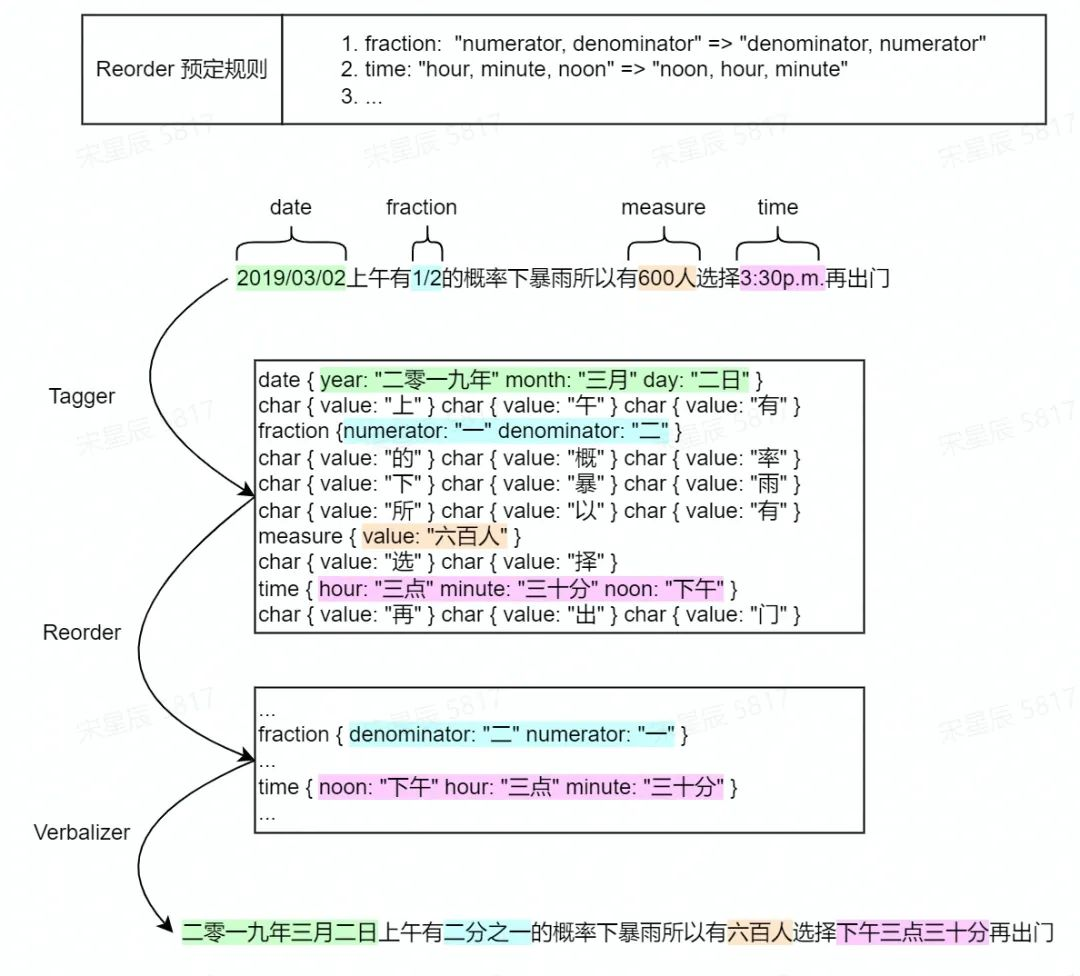
Text normalization
TN converts written expressions into their spoken forms, for example 12 → 十二. It is commonly used before speech synthesis.
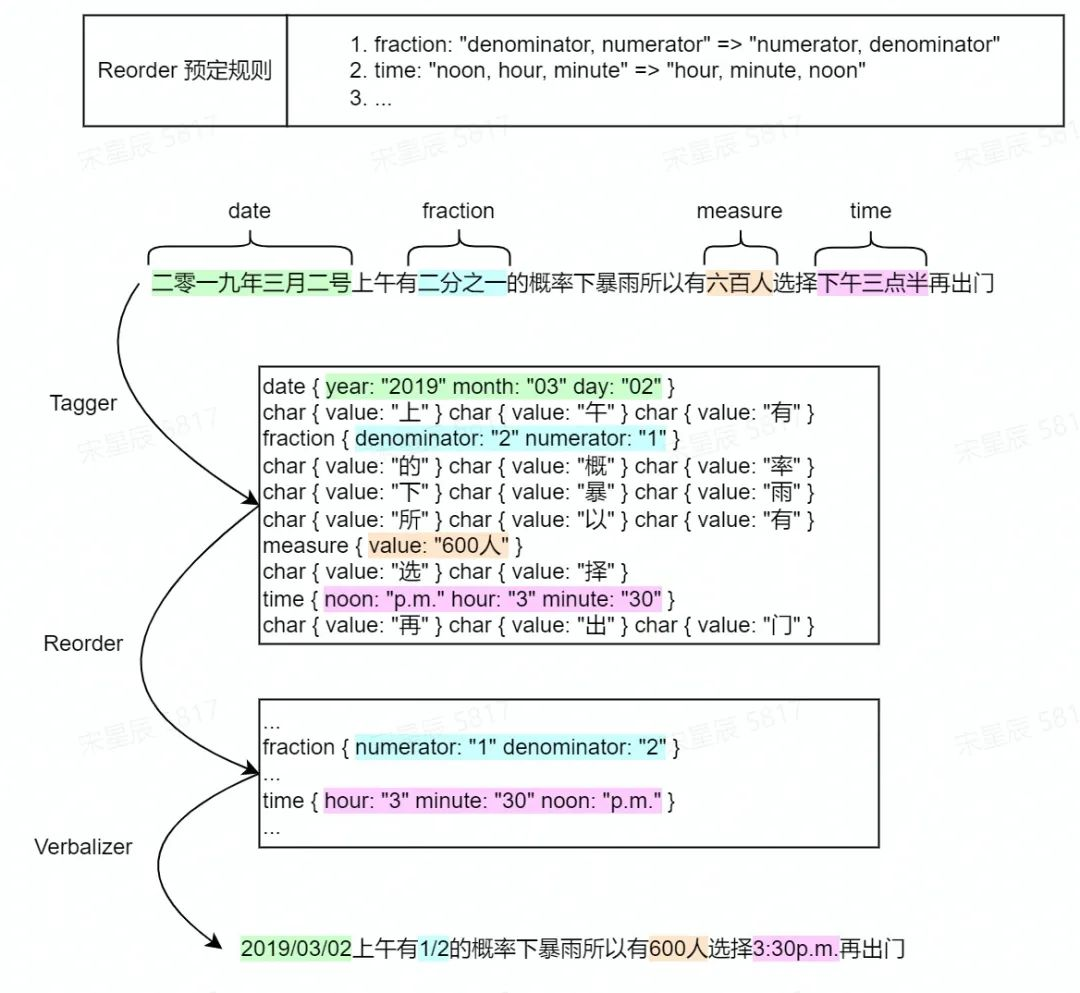
Inverse text normalization
ITN converts spoken expressions into written forms, for example 十二 → 12. It is commonly used after speech recognition.
Supported languages
| Language | CLI code | TN | ITN | Python package |
|---|---|---|---|---|
| Arabic | ar |
Yes | Yes | arabic |
| Armenian | hy |
Yes | Yes | armenian |
| Chinese | zh |
Yes | Yes | chinese |
| English | en |
Yes | Yes | english |
| French | fr |
Yes | Yes | french |
| German | de |
Yes | Yes | german |
| Hebrew | he |
Yes | Yes | hebrew |
| Hindi | hi |
Yes | Yes | hindi |
| Hindi–English (code-mixed) | hi_en |
No | Yes | hindi_english |
| Hungarian | hu |
Yes | Yes | hungarian |
| Italian | it |
Yes | Yes | italian |
| Japanese | ja |
Yes | Yes | japanese |
| Kinyarwanda | rw |
Yes | Yes | kinyarwanda |
| Korean | ko |
Yes | Yes | korean |
| Marathi | mr |
Yes | Yes | marathi |
| Portuguese | pt |
Yes | Yes | portuguese |
| Russian | ru |
Yes | Yes | russian |
| Spanish | es |
Yes | Yes | spanish |
| Spanish–English (code-mixed) | es_en |
No | Yes | spanish_english |
| Swedish | sv |
Yes | Yes | swedish |
| Vietnamese | vi |
Yes | Yes | vietnamese |
Chinese is the CLI default. Rule coverage and configurable options vary by language and direction.
The published package includes Chinese, English, and Japanese. The other languages are included in this source checkout; install from source to use them before the next package release.
Quick start
Install
Install the published package:
pip install WeTextProcessing
For the latest rules, including every language beyond Chinese, English, and Japanese, install from source:
git clone https://github.com/wenet-e2e/WeTextProcessing.git
cd WeTextProcessing
pip install -e .
Pynini/OpenFst must be available in your Python environment. If a compatible wheel is unavailable, follow the Pynini installation instructions. On Windows, the project's CI uses conda install -c conda-forge pynini before installing WeTextProcessing.
Run the CLI
wetn --text "2.5平方电线"
weitn --text "二点五平方电线"

wetn --language en --text "13 dollars"
weitn --language en --text "thirteen dollars"

wetn --language de --text "23"
weitn --language de --text "dreiundzwanzig"

wetn --language ja --text "12時"
weitn --language ja --text "十二時"

wetn --language ko --text "오후 3시 30분"
weitn --language ko --text "오천원"
Each input produces two lines: the tagged representation, then the verbalized result. The tagger preserves raw field values; the verbalizer performs the conversion.
The same interfaces are available as python -m tn and python -m itn. Both accept --text, --file PATH, or UTF-8 text from standard input when neither option is supplied:
python -m tn --language en --file input.txt
python -m itn --language ko < input.txt
Only input line endings are removed before processing. Other spaces are passed to the selected language's rules.
Language-specific options
Inspect the options for the selected language and direction:
wetn --language zh --help
weitn --language ko --help
For example:
wetn --language zh --no-remove-erhua --text "这儿"
weitn --language zh --enable-0-to-9 --text "一二三"
Boolean options accept --option / --no-option and the legacy --option True|False form. Options from another language or direction are not accepted.
Python API
Import the normalizer for the language you need and reuse the instance:
from tn.chinese.normalizer import Normalizer
from itn.chinese.inverse_normalizer import InverseNormalizer

normalizer = Normalizer()
inverse_normalizer = InverseNormalizer()

print(normalizer.normalize("今天中午12点"))
print(inverse_normalizer.normalize("二点五平方电线"))
Other languages use the same class names under their packages. For example, Korean:
from tn.korean.normalizer import Normalizer
from itn.korean.inverse_normalizer import InverseNormalizer

normalizer = Normalizer()
inverse_normalizer = InverseNormalizer()

print(normalizer.normalize("오후 3시 30분"))
print(inverse_normalizer.normalize("오천원"))
Inspect tags
Tagging and verbalization are independently accessible:
tagged = normalizer.tag("오후 3시 30분")
print(tagged)
print(normalizer.verbalize(tagged))
The hours and minutes remain written values in the tags, rather than being replaced with their Korean readings.
Input/output span mapping
normalize_with_mapping() returns normalized text and the spans matched by grammar rules:
from tn.chinese.normalizer import Normalizer

normalizer = Normalizer()
result = normalizer.normalize_with_mapping("今天中午12点")

print(result.output_text)
for mapping in result.mappings:
    print(mapping.token_type, mapping.input_text, "=>", mapping.output_text)
Output:
今天中午十二点
math 12 => 十二
Offsets are half-open Unicode character offsets, not UTF-8 byte offsets. Use include_identity=True to include unchanged tokens, or result.as_dict() to obtain a serializable representation. Mappings are traced through the WFSTs, not inferred from a text diff.
N-best results
outputs = normalizer.normalize("3/4", nbest=3)
results = normalizer.normalize_with_mapping("3/4", nbest=3)
nbest=1 returns a string or a single NormalizationResult; nbest>1 returns a list of up to that many unique outputs. The mapping API follows the same output ranking.
FST caching
Graphs are cached automatically outside the source tree. Cache bundles record the pipeline's configuration and grammar-source fingerprint; changing either causes a new bundle to be built.
| Setting | Behavior |
|---|---|
cache_dir=None |
Use the platform's default user cache |
cache_dir="/path/to/cache" |
Choose an explicit cache root |
cache_dir=False |
Build in memory without persistent caching |
overwrite_cache=True |
Force rebuilding the selected bundle |
from tn.chinese.normalizer import Normalizer

normalizer = Normalizer(cache_dir="/path/to/wetext-cache")
uncached = Normalizer(cache_dir=False)
The CLI exposes --cache-dir PATH and --overwrite-cache. Normal use does not require forced rebuilds.
Development and deployment
Install development dependencies and run the tests:
pip install -e '.[dev]'
pre-commit install
pytest -q
Before adding or changing a language rule, read the Python rule architecture guide. Rules preserve raw fields in the tagger, apply semantic conversion in the verbalizer, and use pipeline-owned rule inventories and field-order schemas.
| Guide | Scope |
|---|---|
| TN rules | Text normalization rules and examples |
| ITN rules | Inverse text normalization rules and examples |
| Python rule architecture | Tagging, verbalization, registration, and span mapping contracts |
| C++ runtime | Native build and deployment instructions |
Python cache bundles are not C++ runtime exports. Follow the runtime's model and build instructions for native deployment.
Community
Use GitHub Issues for questions, bug reports, and feature requests.
For Chinese users, follow the WeNet official account using the QR code on the left. Scan the personal QR code on the right to contact the person who can invite you to the WeChat discussion group.
 |
 |
|---|
Acknowledgments
- OpenFst and Pynini for the finite-state toolkit.
- The NeMo Text Processing team and community for text-processing grammars and resources, including the Chinese TN reference.
- Zhenxiang Ma, Jiayu Du, and SpeechColab for their contributions.
- Pynini for reference implementations of FAR loading and shortest-path decoding in the C++ runtime.
- chinese_text_normalization for Chinese ITN grammar resources.
License


Release files for WeTextProcessing 1.3.0
For a detailed explanation of source distributions (sdists) and built distributions (wheels), please see the package formats documentation.
Source distribution (sdist)
| File | Size | Uploaded | Provenance | Actions |
|---|---|---|---|---|
| wetextprocessing-1.3.0.tar.gz | 1.2 MB | Without provenance | Details for wetextprocessing-1.3.0.tar.gz |
Built distribution (wheel)
| File | Interpreter | ABI | Platform | Actions Reset |
|---|---|---|---|---|
| wetextprocessing-1.3.0-py3-none-any.whl | Python 3 | none | any | Details for wetextprocessing-1.3.0-py3-none-any.whl |
Total release size: 3.0 MB
Release files / wetextprocessing-1.3.0.tar.gz
| Download URL | wetextprocessing-1.3.0.tar.gz |
|---|---|
| Size | 1.2 MB |
| Tags | Source |
|
SHA-256 checksum How to use checksums |
217a939201fc1e3324c67bc9983c4f4e56dc9dc37b850845b3d2e0a1daf6fb5e
|
|
BLAKE2b-256 checksum How to use checksums |
d12189a79ba5d8dee4e1038b0ed41495ffd1087a52392d225ca893058128231d
|
| Upload date | |
|
Uploaded using Trusted Publishing? What is trusted publishing? |
No |
| Uploaded via |
twine/6.2.0 CPython/3.9.25
|
Release files / wetextprocessing-1.3.0-py3-none-any.whl
| Download URL | wetextprocessing-1.3.0-py3-none-any.whl |
|---|---|
| Size | 1.8 MB |
| Tags | Python 3 |
|
SHA-256 checksum How to use checksums |
47ea413097163658fb254f1d657a0efd2ac0c9bbf29b1aa4db48902783a3f694
|
|
BLAKE2b-256 checksum How to use checksums |
65a5706c0b9499bc3c5592f32b2bb4a4963c30397cf7e45978eeec02d723f567
|
| Upload date | |
|
Uploaded using Trusted Publishing? What is trusted publishing? |
No |
| Uploaded via |
twine/6.2.0 CPython/3.9.25
|
Security for WeTextProcessing 1.3.0
Provenance
Provenance describes where a file came from. On PyPI, provenance is shared via attestations, which provide a verifiable record of the build or publishing details. View details, limitations and caveats.
No provenance found
None of the files in this release were uploaded with provenance metadata.
A note on package security
PyPI is a repository for distributing packages, not a service for auditing them. While third-party security researchers and our staff do their best to detect and remove malicious packages, PyPI cannot guarantee the quality, security or suitability of any given package.
To learn more about protecting yourself from malicious actors, visit our package security documentation.














