










AA Belt Radar module for AllianceAuth.
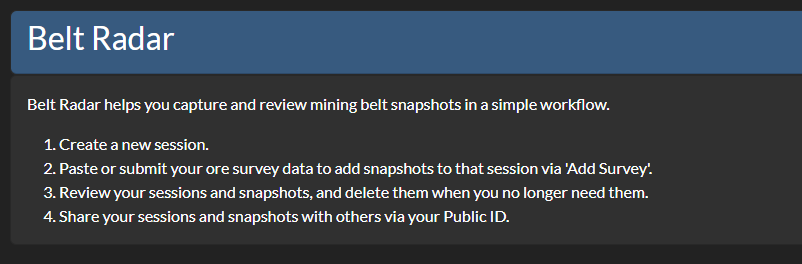
A Belt Survey Analyser to track how fast you mine your belt.
Features
- Interactive Live Sessions & Mining Analytics
- Dynamic live session updates: new survey scans and mining data are automatically loaded and immediately visible
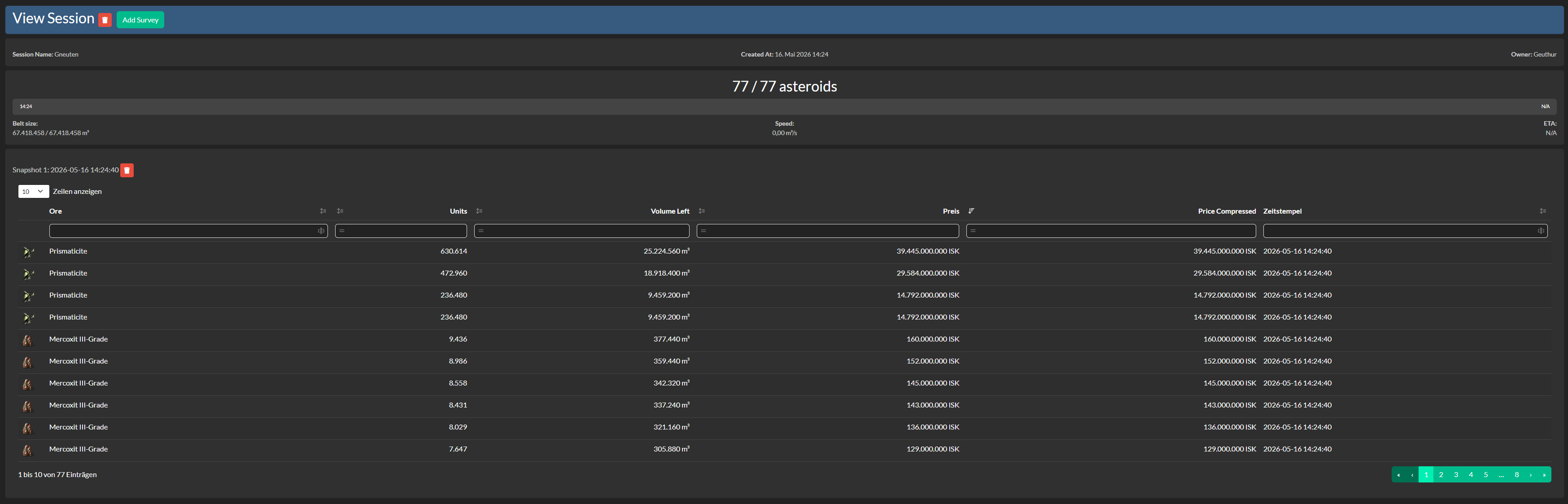
- Real-time mining speed tracking in m³/s
- Estimated completion time (ETA) for belt mining
- Remaining volume and belt size calculation
- Compressed ore price estimation
- Visual Analytics & Diagrams
- Ore Progression: Visual chart tracking the progress and composition of mined ore
- Mining Speed & Volume Chart: XY line & column diagram displaying remaining volume (m³) alongside mining speed (m³/s) over time
- Belt Automation & Timers
- Automatic belt type and size detection
- Automatic respawn timer creation when only 10% of the belt volume is left
- Public and private belt respawn timers
- Collaboration & Notifications
- Optional session sharing with fleet members or corporation
- Configurable Discord webhook notifications for belt respawn timers
Highlights

Installation
Step 1 - Install the Package
Make sure you're in your virtual environment (venv) of your Alliance Auth then install the pakage.
pip install aa-beltradar
Step 2 - Configure Alliance Auth
Configure your Alliance Auth settings (local.py) as follows:
INSTALLED_APPS = [
    # other apps
    "eve_sde",  # only if it not already existing
    "beltradar",
    # other apps?
]

# This line is right below the `INSTALLED_APPS` list, if not already exist!
INSTALLED_APPS = ["modeltranslation"] + INSTALLED_APPS
Step 3 - Add the Scheduled Tasks
To set up the Scheduled Tasks add following code to your local.py
CELERYBEAT_SCHEDULE["AA Belt Radar :: Update Belt Radar"] = {
    "task": "beltradar.tasks.update_all_belt_radar",
    "schedule": 600,
}
CELERYBEAT_SCHEDULE["AA Belt Radar :: Update Market Price"] = {
    "task": "beltradar.tasks.update_market_prices",
    "schedule": 86400,
}
Step 3.1 - (Optional) Add own Logger File
To set up the Logger add following code to your local.py
Ensure that you have writing permission in logs folder.
LOGGING["handlers"]["beltradar_file"] = {
    "level": "INFO",
    "class": "logging.handlers.RotatingFileHandler",
    "filename": os.path.join(BASE_DIR, "log/beltradar.log"),
    "formatter": "verbose",
    "maxBytes": 1024 * 1024 * 5,
    "backupCount": 5,
}
LOGGING["loggers"]["extensions.beltradar"] = {
    "handlers": ["beltradar_file"],
    "level": "DEBUG",
}
Step 4 - Migrate & Preload EVE SDE Data
AA Skillfarm uses EVE SDE data to map IDs to names for EveTypes. You will need to preload some data from SDE once.
python manage.py migrate eve_sde
python manage.py esde_load_sde
Step 4.1 - Migrate App and collect static
Migrate the app and collect static.
python manage.py migrate beltradar
python manage.py aabeltradar_migrate_market_data
python manage.py collectstatic --noinput
Step 5 - Setting up Permissions
With the Following IDs you can set up the permissions for the Belt Radar
| ID | Description | |
|---|---|---|
basic_access |
Can access the Belt Radar module | All Members with the Permission can access the Belt Radar. |
manage_access |
Can Manage Belt Radar module | Can manage Application |
admin_access |
Has access to all Survey Sessions | Can see all Survey Sessions |
Step 6 - (Optional) Setting up Compatibilies
The Following Settings can be setting up in the local.py
| Setting Name | Descriptioon | Default |
|---|---|---|
BELT_RADAR_APP_NAME |
Set the name of the APP | "Belt Radar" |
BELT_RADAR_TASK_TIME_LIMIT |
Defines the time (in seconds) a task will timeout | 1200 |
BELT_RADAR_WEBHOOK_URL |
Defines URL for Webhook notification | None |
Translations

Help us translate this app into your language or improve existing translations. Join our team!"
The texts of the app live in the namespace translation (frontend/i18n/<lng>/translation.json). The shared frontend components (tables, modals, menu, loaders) come from the npm package aa-geuthur-react and are translated once in its own Weblate component; the package bundles these translations and registers them with i18next itself, so the app neither copies nor loads them. Only en is maintained by the scanner (make react-translations). The other language files hold only real translations, exactly as Weblate writes them; a missing key falls back to English at runtime (fallbackLng: "en").
Contributing
You want to improve the project? Please ensure you read the Contribution Guidelines
1 maintainer

Metadata
1 maintainer
Release files for aa-beltradar 2.1.0
For a detailed explanation of source distributions (sdists) and built distributions (wheels), please see the package formats documentation.
Source distribution (sdist)
| File | Size | Uploaded | Provenance | Actions |
|---|---|---|---|---|
| aa_beltradar-2.1.0.tar.gz | 2.3 MB | With provenance | Details for aa_beltradar-2.1.0.tar.gz |
Built distribution (wheel)
| File | Interpreter | ABI | Platform | Actions Reset |
|---|---|---|---|---|
| aa_beltradar-2.1.0-py3-none-any.whl | Python 3 | none | any | Details for aa_beltradar-2.1.0-py3-none-any.whl |
Total release size: 4.7 MB
Release files / aa_beltradar-2.1.0.tar.gz
| Download URL | aa_beltradar-2.1.0.tar.gz |
|---|---|
| Size | 2.3 MB |
| Tags | Source |
|
SHA-256 checksum How to use checksums |
36cdd11fc0bd38479a5efda2bd846f1fe3406ce7548450540cd6f85912efdf88
|
|
BLAKE2b-256 checksum How to use checksums |
5f64c5403e383add93ffca6b5279430328944eec3b44b7d70ded684cc35e9d0d
|
| Upload date | |
|
Uploaded using Trusted Publishing? What is trusted publishing? |
Yes |
| Uploaded via |
twine/7.0.0 CPython/3.13.16
|
Provenance
Provenance describes where a file came from. On PyPI, provenance is shared via attestations, which provide a verifiable record of the build or publishing details. View details, limitations and caveats.


PyPI Publish Attestation
PyPI verified that this artifact, at this checksum, originated from the publisher listed below.
Signed by GitHub Actions, verified by PyPI on Nov 10, 2026.
Transparency logRelease files / aa_beltradar-2.1.0-py3-none-any.whl
| Download URL | aa_beltradar-2.1.0-py3-none-any.whl |
|---|---|
| Size | 2.4 MB |
| Tags | Python 3 |
|
SHA-256 checksum How to use checksums |
3f02ff3ef74ce39b745c8f664d8fb7a755243e69cfdabe18ba38e708f0fb2e1e
|
|
BLAKE2b-256 checksum How to use checksums |
1e179c5d4cfa23d4dd0f47ffcc65354053592bbd8ed3176123cc0c80f594b4f5
|
| Upload date | |
|
Uploaded using Trusted Publishing? What is trusted publishing? |
Yes |
| Uploaded via |
twine/7.0.0 CPython/3.13.16
|
Provenance
Provenance describes where a file came from. On PyPI, provenance is shared via attestations, which provide a verifiable record of the build or publishing details. View details, limitations and caveats.
PyPI Publish Attestation
PyPI verified that this artifact, at this checksum, originated from the publisher listed below.
Signed by GitHub Actions, verified by PyPI on Nov 10, 2026.
Transparency logSecurity for aa-beltradar 2.1.0
Provenance
Provenance describes where a file came from. On PyPI, provenance is shared via attestations, which provide a verifiable record of the build or publishing details. View details, limitations and caveats.
Full provenance
Both files in this release have been uploaded with provenance metadata.
Attestation for aa_beltradar-2.1.0.tar.gz
PyPI Publish Attestation
PyPI verified that this artifact, at this checksum, originated from the publisher listed below.
Signed by GitHub Actions, verified by PyPI on Nov 10, 2026.
Transparency logA note on package security
PyPI is a repository for distributing packages, not a service for auditing them. While third-party security researchers and our staff do their best to detect and remove malicious packages, PyPI cannot guarantee the quality, security or suitability of any given package.
To learn more about protecting yourself from malicious actors, visit our package security documentation.














