
aa-captrack
AllianceAuth plugin for tracking and alerting on capital ship activity (and other configured ship groups) across characters/accounts, with an operational dashboard, snoozing, and Discord notifications.
Version: v1.1.0
Status: Stable
Compatibility: AllianceAuth v5.0.0+ | AllianceAuth-corptools v3.0.0+
What's new in v1.1.0 (highlights)
- AllianceAuth v5.0.0 compatibility
- Full support for AllianceAuth v5.0.0 and Django 5.2
- Updated hook patterns for AA v5 compatibility
- AllianceAuth-corptools v3.0.0 support
- Compatible with Corptools v3.0.0 stable release
- Fully tested with eve_sde backed schema
- Production-ready
- All beta features now stable
- Corptools 3.x integration fully validated
- SDE-backed region selection mature
Overview
aa-captrack monitors capital ship activity (and other configured ship groups) using Corptools asset/audit data, presenting:
- Real-time dashboard visibility grouped by main
- Threshold-based alerting (per ship class/group)
- Discord webhook notifications (critical and standard)
- Per-pilot snoozing + Snooze All
- Clean separation between Critical, Alerting, and Informational states
The plugin prioritises operational clarity and avoids unnecessary alert noise.
Capital Tracking Logic
| Ship Class | Behavior |
|---|---|
| Titans | Always alerting |
| Supercarriers | Always alerting |
| Dreadnoughts | Alert when ≥ threshold (default: 5) under same main |
| Lancer Dreads | Alert when ≥ threshold |
| Carriers | Alert when ≥ threshold |
| Force Auxiliaries | Alert when ≥ threshold |
| Capital Industrials | Tracked only (no alerts) |
Threshold logic is applied consistently across:
- Dashboard
- Discord alerts
- Background tasks
Notes:
- “Capital Industrials” are tracked for visibility but do not generate alerts by default.
- Group IDs and thresholds are configurable in Admin.
Dashboard
- Collapsible cards with rotating chevrons
- Card header shows:
- Main (character) name
- Corporation name + logo
- Alliance name + logo (if present)
- Audit button (Corptools audit link)
- Snooze All controls
- Status badge (Critical/Alerting/Info)
- Clear separation of:
- Critical
- Alerting
- Informational
- Optional display of unclassified ships
- Configurable refresh interval
- Optional remembered collapse state per user
Audit button format
Audit link for a main character uses Corptools’ route format:
/audit/r/<main_character_id>/account/overview
Example:
/audit/r/2114270226/account/overview
Snoozing
- Snoozing is per pilot (by design)
- Supports multiple durations (e.g. 1h / 6h / 24h)
- ∞ (Infinite) snooze supported (until cleared)
- Snooze All applies a duration to all pilots listed in the card
- Snoozed pilots are excluded from:
- Dashboard alerts
- Discord notifications
Discord Integration
- Alerts include only alerting ships
- Separate webhooks for:
- Critical alerts
- Standard alerts
- Optional mention support:
- Role mention:
<@&ROLE_ID> - User mention:
<@USER_ID>
- Role mention:
- Uses
allowed_mentionsto ensure only configured mentions are allowed (prevents accidental @everyone/@here).
Permissions
| Permission | Description |
|---|---|
captrack.basic_access |
View dashboard |
captrack.admin_access |
Configure settings |
Installation
Requirements
- AllianceAuth: 5.0.0+
- Django: 5.2+
- Corptools: 3.0.0+
- Database: MySQL/MariaDB recommended
If you are running Corptools 3.x, you also need the SDE stack working:
eve_sdeinstalled and inINSTALLED_APPSmodeltranslationinstalled and first inINSTALLED_APPS- SDE data synced using:
python manage.py esde_load_sde
Install the plugin
pip install aa-captrack
Add to INSTALLED_APPS
INSTALLED_APPS += [
    "captrack",
]
If you are on Corptools 3.x + eve_sde:
- Ensure
modeltranslationis first inINSTALLED_APPS- Ensure
eve_sdeis present inINSTALLED_APPS
Migrate + collect static
python manage.py migrate captrack
python manage.py collectstatic --noinput
Restart services
Restart AllianceAuth web and celery services.
Configuration
Configuration is managed via the AllianceAuth Admin Panel:
Admin → Captrack → CapTrack Settings
Only one settings row is expected.
Configurable options include
- Enabled / disabled state
- Tracked group IDs
- Industrial group IDs
- Alert thresholds per ship class/group
- Discord webhook URLs (critical + standard)
- Discord mention configuration (role IDs and/or user IDs)
- Dashboard behavior options
- Snooze durations / visibility preferences
Background tasks
CapTrack uses periodic tasks to refresh/watch data and drive alerts.
In v1.0.9b4, watchlist refresh was updated to handle Corptools 3.x task changes (celery-once signature validation, task name changes, and b7 single-character asset refresh).
Compatibility
AllianceAuth / Corptools
- AllianceAuth: 4.x (4.13+)
- Corptools: 3.0.0b7 (target), other 3.x betas may work
SDE / eve_sde
If you use Corptools 3.x (SDE-backed), ensure:
eve_sdeandmodeltranslationare installedmodeltranslationis first inINSTALLED_APPS- Run and schedule SDE sync:
python manage.py esde_load_sde
Corptools migrations may refuse to apply if eve_sde data is stale (>24h).
CapTrack’s Blacklisted Regions feature also uses eve_sde.Region, so SDE data must be present for region search/autocomplete.
Versioning policy
- v1.0.9b4: Beta/pre-release focusing on Corptools 3.x + SDE migration + region blacklist fixes
- Future versions will:
- Avoid destructive migrations where possible
- Prefer additive schema changes
- Be tested against existing installs
Screenshots
Screenshots are placeholders and may change as the UI evolves.
Dashboard — Overview
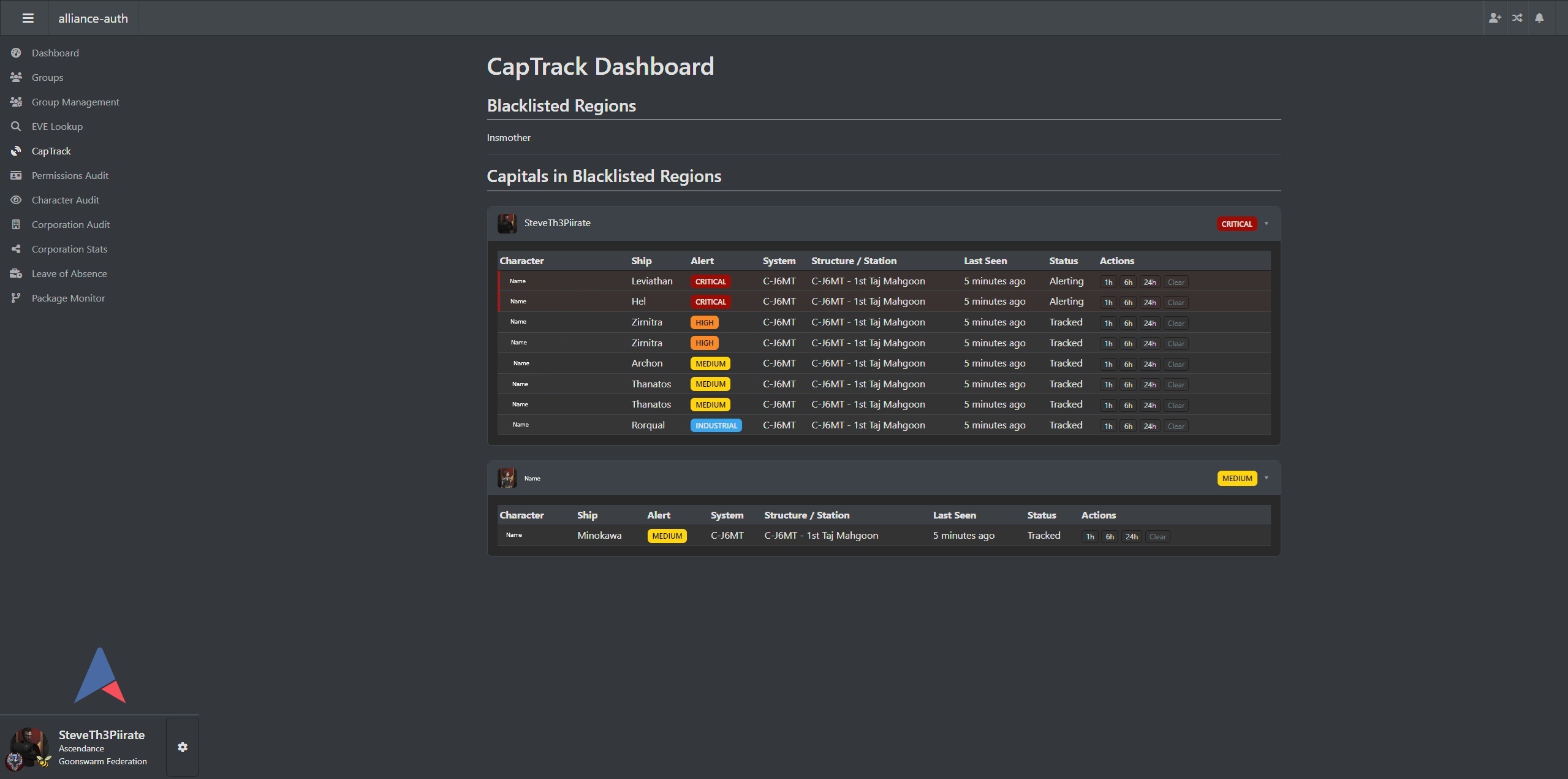
Displays all tracked capital activity grouped by main character, with clear visual separation between critical, alerting, and informational states.
Dashboard — Collapsed / Expanded States
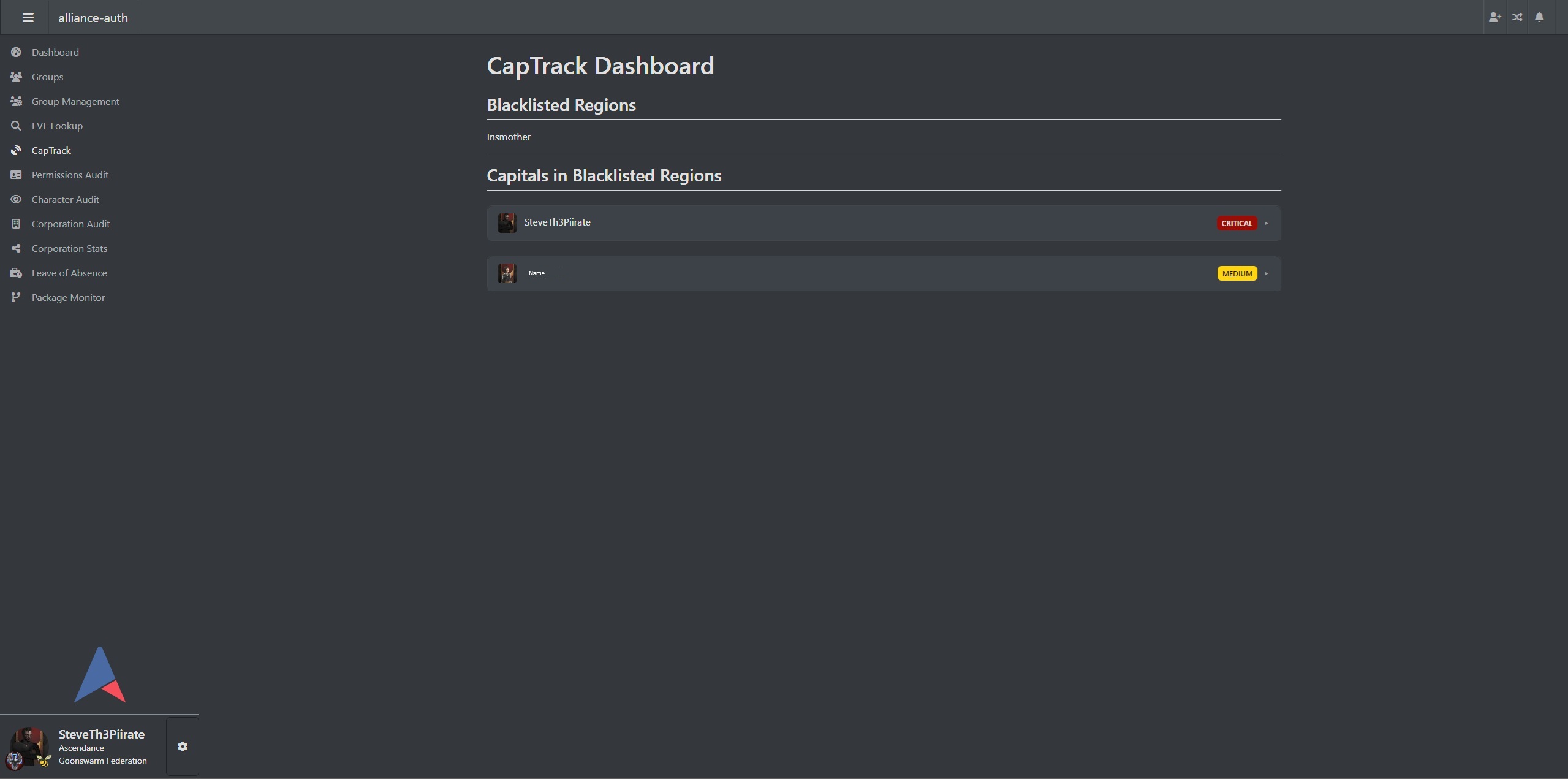
Cards can be collapsed to reduce noise. Collapse state can optionally be remembered per user.
Dashboard — Snoozed Pilots
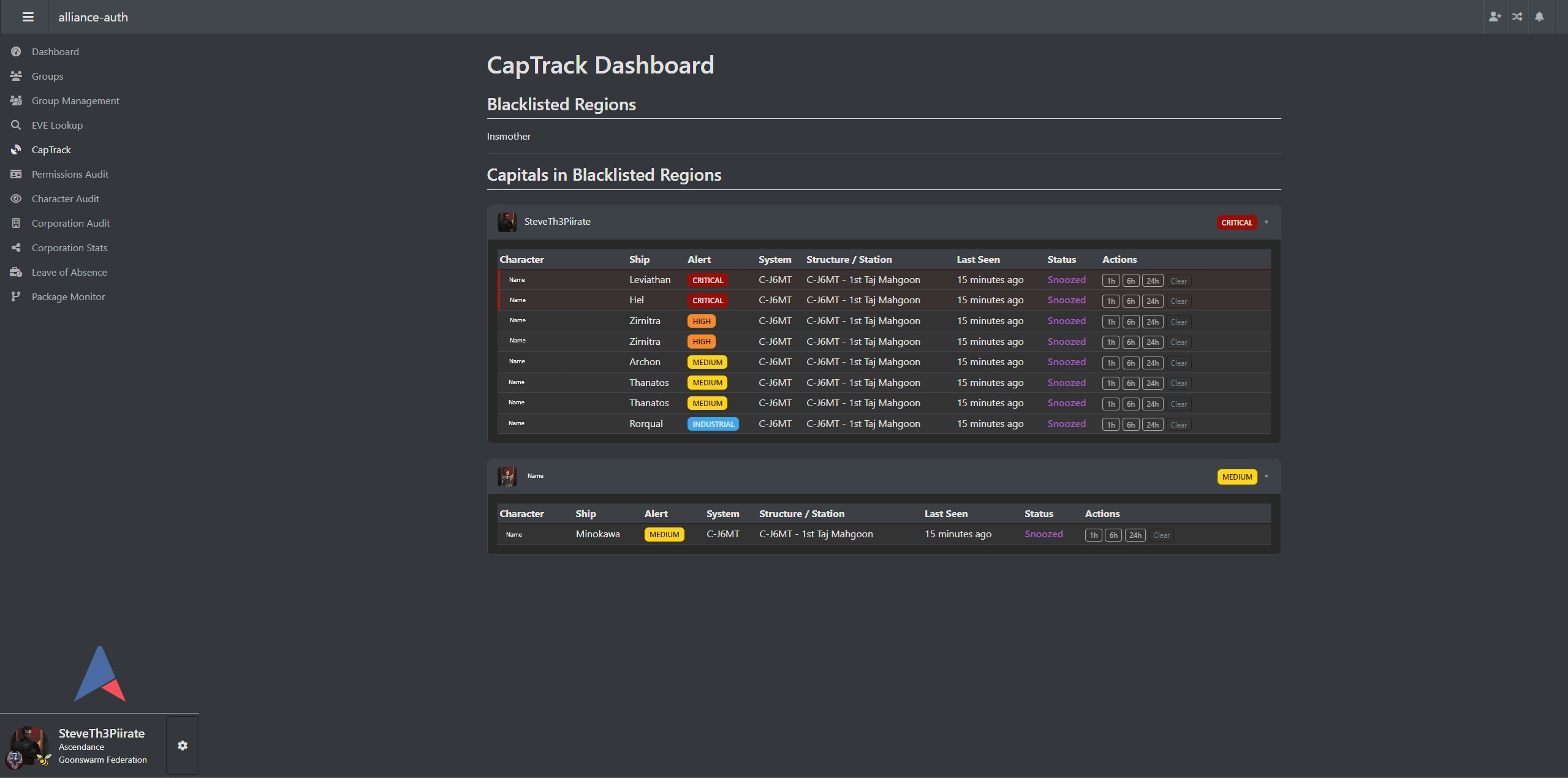
Pilots can be snoozed individually to suppress alerts and notifications for a configurable duration.
Admin — CapTrack Settings
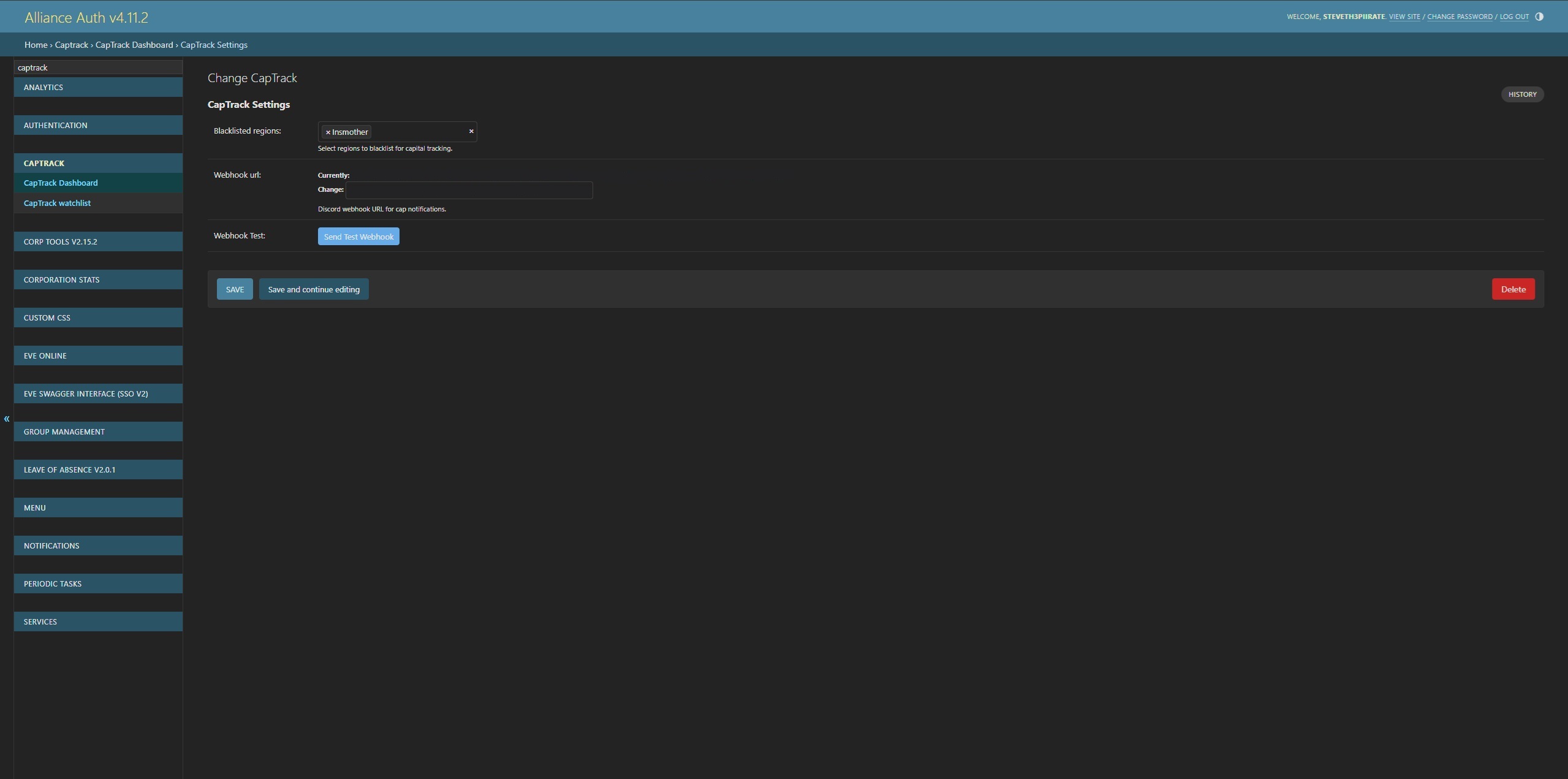
All configuration is managed through a single settings entry in the AllianceAuth admin panel.
Discord — Critical Alert Example
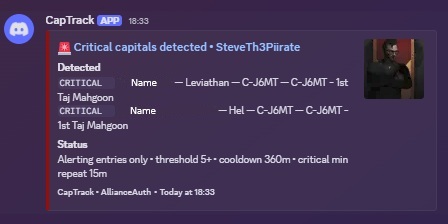
Critical alerts (Titans, Supercarriers) are always sent immediately.
License
MIT License
1 maintainer

Metadata
1 maintainer
Release files for aa-captrack 1.1.0
For a detailed explanation of source distributions (sdists) and built distributions (wheels), please see the package formats documentation.
Source distribution (sdist)
| File | Size | Uploaded | Provenance | Actions |
|---|---|---|---|---|
| aa_captrack-1.1.0.tar.gz | 785.0 kB | Without provenance | Details for aa_captrack-1.1.0.tar.gz |
Built distribution (wheel)
| File | Interpreter | ABI | Platform | Actions Reset |
|---|---|---|---|---|
| aa_captrack-1.1.0-py3-none-any.whl | Python 3 | none | any | Details for aa_captrack-1.1.0-py3-none-any.whl |
Total release size: 827.5 kB
Release files / aa_captrack-1.1.0.tar.gz
| Download URL | aa_captrack-1.1.0.tar.gz |
|---|---|
| Size | 785.0 kB |
| Tags | Source |
|
SHA-256 checksum How to use checksums |
37e70d5a6e3242c12455f712dd5414b12474e553c185085ffe7106f9713f4016
|
|
BLAKE2b-256 checksum How to use checksums |
485bd993fb703b0c0595ca2e5a5963a16e999b835486be00ffc47df1be8f7aee
|
| Upload date | |
|
Uploaded using Trusted Publishing? What is trusted publishing? |
No |
| Uploaded via |
twine/6.2.0 CPython/3.12.10
|
Release files / aa_captrack-1.1.0-py3-none-any.whl
| Download URL | aa_captrack-1.1.0-py3-none-any.whl |
|---|---|
| Size | 42.6 kB |
| Tags | Python 3 |
|
SHA-256 checksum How to use checksums |
76abefbe38d6fb05f96df12512cef15a80ce1b16e195d24c1a0b8f688f23e202
|
|
BLAKE2b-256 checksum How to use checksums |
a7d08d86e6a8d6973b906d8997ba028c1ab2eaea5c60b7a600aa067e3705f4cd
|
| Upload date | |
|
Uploaded using Trusted Publishing? What is trusted publishing? |
No |
| Uploaded via |
twine/6.2.0 CPython/3.12.10
|
Security for aa-captrack 1.1.0
Provenance
Provenance describes where a file came from. On PyPI, provenance is shared via attestations, which provide a verifiable record of the build or publishing details. View details, limitations and caveats.
No provenance found
None of the files in this release were uploaded with provenance metadata.
A note on package security
PyPI is a repository for distributing packages, not a service for auditing them. While third-party security researchers and our staff do their best to detect and remove malicious packages, PyPI cannot guarantee the quality, security or suitability of any given package.
To learn more about protecting yourself from malicious actors, visit our package security documentation.














