
Capital ship movement early warning plugin for AllianceAuth

Project description
aa-captrack
AllianceAuth plugin for tracking and alerting on capital ship activity (and other configured ship groups) across characters/accounts, with an operational dashboard, snoozing, and Discord notifications.
Version: v1.0.9b10
Status: Pre-release (beta)
What’s new in v1.0.9b10 (highlights)
-
Corptools 3.x / eve_sde compatibility (b8 target)
- Updated lookups for Type/Group and Region ID fields under the SDE-backed schema.
- Watchlist asset refresh updated for Corptools 3.x task API changes (signature-safe enqueue + b7 single-character
update_char_assetssupport).
-
Move region blacklist to SDE
- “Blacklisted Regions” now uses
eve_sde.Region(instead of EveUniverse/legacy region models) so region search/autocomplete works on SDE-backed installs.
- “Blacklisted Regions” now uses
-
Dashboard UX improvements
- Card header includes Main + Corporation + Alliance names and logos.
- Audit button links to Corptools audit:
/audit/r/<character_id>/account/overview - Snooze All controls per card (1h / 6h / 24h / ∞ / clear)
- Infinite snooze option (until cleared)
-
Discord improvements
- Optional role and/or user mentions for alerts (safe
allowed_mentionsusage)
If running AllianceAuth V5.0.0a4 you will need to downgrade django-esi to django-esi==8.3.1 to avoid compatibility issues with Corptools 3.x (which requires django-esi 8.3.1). This is a temporary measure until Corptools supports django-esi 9.x.
- Optional role and/or user mentions for alerts (safe
Overview
aa-captrack monitors capital ship activity (and other configured ship groups) using Corptools asset/audit data, presenting:
- Real-time dashboard visibility grouped by main
- Threshold-based alerting (per ship class/group)
- Discord webhook notifications (critical and standard)
- Per-pilot snoozing + Snooze All
- Clean separation between Critical, Alerting, and Informational states
The plugin prioritises operational clarity and avoids unnecessary alert noise.
Capital Tracking Logic
| Ship Class | Behavior |
|---|---|
| Titans | Always alerting |
| Supercarriers | Always alerting |
| Dreadnoughts | Alert when ≥ threshold (default: 5) under same main |
| Lancer Dreads | Alert when ≥ threshold |
| Carriers | Alert when ≥ threshold |
| Force Auxiliaries | Alert when ≥ threshold |
| Capital Industrials | Tracked only (no alerts) |
Threshold logic is applied consistently across:
- Dashboard
- Discord alerts
- Background tasks
Notes:
- “Capital Industrials” are tracked for visibility but do not generate alerts by default.
- Group IDs and thresholds are configurable in Admin.
Dashboard
- Collapsible cards with rotating chevrons
- Card header shows:
- Main (character) name
- Corporation name + logo
- Alliance name + logo (if present)
- Audit button (Corptools audit link)
- Snooze All controls
- Status badge (Critical/Alerting/Info)
- Clear separation of:
- Critical
- Alerting
- Informational
- Optional display of unclassified ships
- Configurable refresh interval
- Optional remembered collapse state per user
Audit button format
Audit link for a main character uses Corptools’ route format:
/audit/r/<main_character_id>/account/overview
Example:
/audit/r/2114270226/account/overview
Snoozing
- Snoozing is per pilot (by design)
- Supports multiple durations (e.g. 1h / 6h / 24h)
- ∞ (Infinite) snooze supported (until cleared)
- Snooze All applies a duration to all pilots listed in the card
- Snoozed pilots are excluded from:
- Dashboard alerts
- Discord notifications
Discord Integration
- Alerts include only alerting ships
- Separate webhooks for:
- Critical alerts
- Standard alerts
- Optional mention support:
- Role mention:
<@&ROLE_ID> - User mention:
<@USER_ID>
- Role mention:
- Uses
allowed_mentionsto ensure only configured mentions are allowed (prevents accidental @everyone/@here).
Permissions
| Permission | Description |
|---|---|
captrack.basic_access |
View dashboard |
captrack.admin_access |
Configure settings |
Installation
Requirements
- AllianceAuth: 4.13+ (v4.x supported; v5 migration path is the motivation for this beta)
- Django: 4.2+
- Corptools: 3.0.0b7 (or compatible 3.x beta)
- Database: MySQL/MariaDB recommended
If you are running Corptools 3.x, you also need the SDE stack working:
eve_sdeinstalled and inINSTALLED_APPSmodeltranslationinstalled and first inINSTALLED_APPS- SDE data synced using:
python manage.py esde_load_sde
Install the plugin
pip install aa-captrack==1.0.9b4
Add to INSTALLED_APPS
INSTALLED_APPS += [
    "captrack",
]
If you are on Corptools 3.x + eve_sde:
- Ensure
modeltranslationis first inINSTALLED_APPS- Ensure
eve_sdeis present inINSTALLED_APPS
Migrate + collect static
python manage.py migrate captrack
python manage.py collectstatic --noinput
Restart services
Restart AllianceAuth web and celery services.
Configuration
Configuration is managed via the AllianceAuth Admin Panel:
Admin → Captrack → CapTrack Settings
Only one settings row is expected.
Configurable options include
- Enabled / disabled state
- Tracked group IDs
- Industrial group IDs
- Alert thresholds per ship class/group
- Discord webhook URLs (critical + standard)
- Discord mention configuration (role IDs and/or user IDs)
- Dashboard behavior options
- Snooze durations / visibility preferences
Background tasks
CapTrack uses periodic tasks to refresh/watch data and drive alerts.
In v1.0.9b4, watchlist refresh was updated to handle Corptools 3.x task changes (celery-once signature validation, task name changes, and b7 single-character asset refresh).
Compatibility
AllianceAuth / Corptools
- AllianceAuth: 4.x (4.13+)
- Corptools: 3.0.0b7 (target), other 3.x betas may work
SDE / eve_sde
If you use Corptools 3.x (SDE-backed), ensure:
eve_sdeandmodeltranslationare installedmodeltranslationis first inINSTALLED_APPS- Run and schedule SDE sync:
python manage.py esde_load_sde
Corptools migrations may refuse to apply if eve_sde data is stale (>24h).
CapTrack’s Blacklisted Regions feature also uses eve_sde.Region, so SDE data must be present for region search/autocomplete.
Versioning policy
- v1.0.9b4: Beta/pre-release focusing on Corptools 3.x + SDE migration + region blacklist fixes
- Future versions will:
- Avoid destructive migrations where possible
- Prefer additive schema changes
- Be tested against existing installs
Screenshots
Screenshots are placeholders and may change as the UI evolves.
Dashboard — Overview
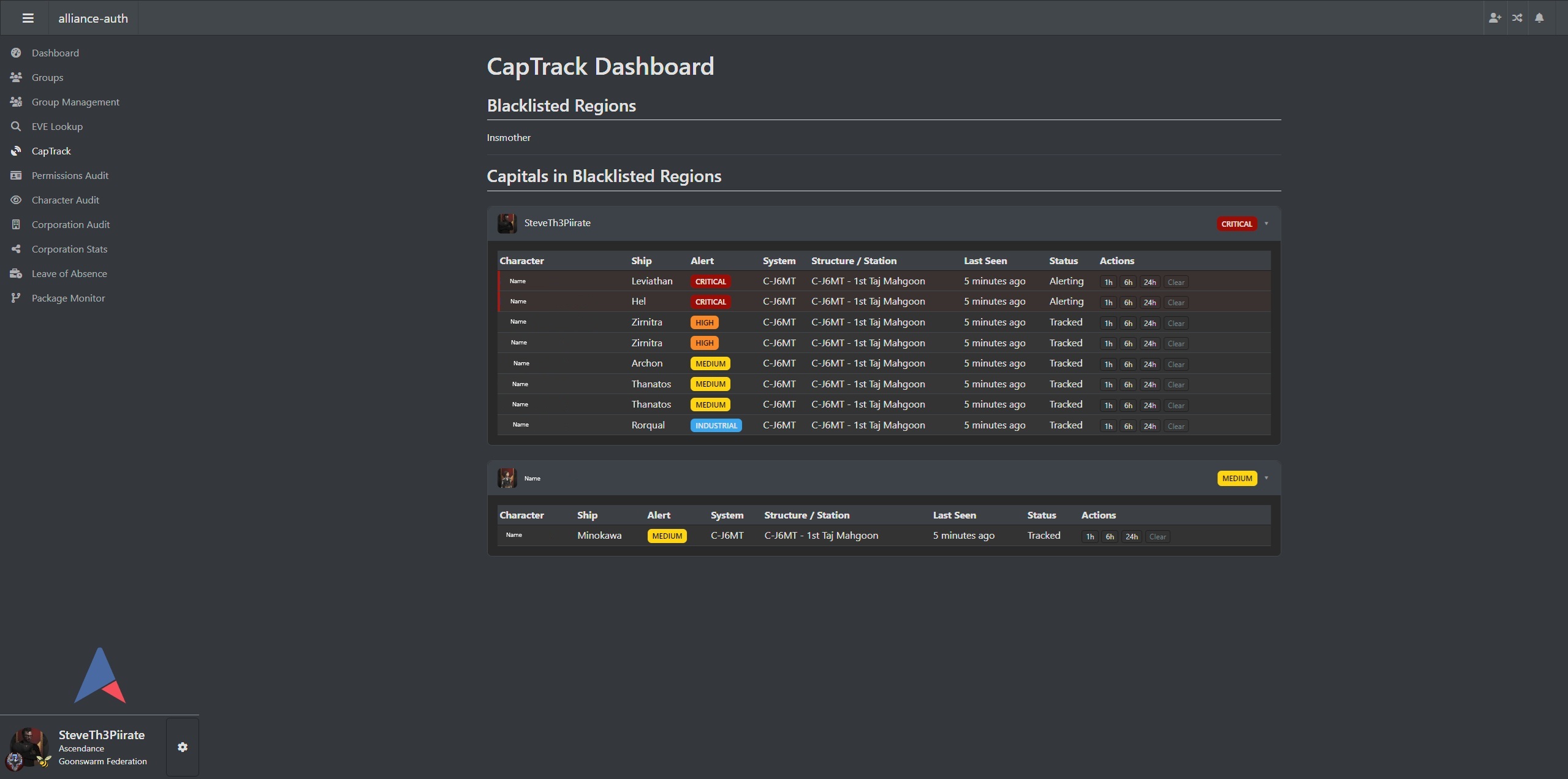
Displays all tracked capital activity grouped by main character, with clear visual separation between critical, alerting, and informational states.
Dashboard — Collapsed / Expanded States
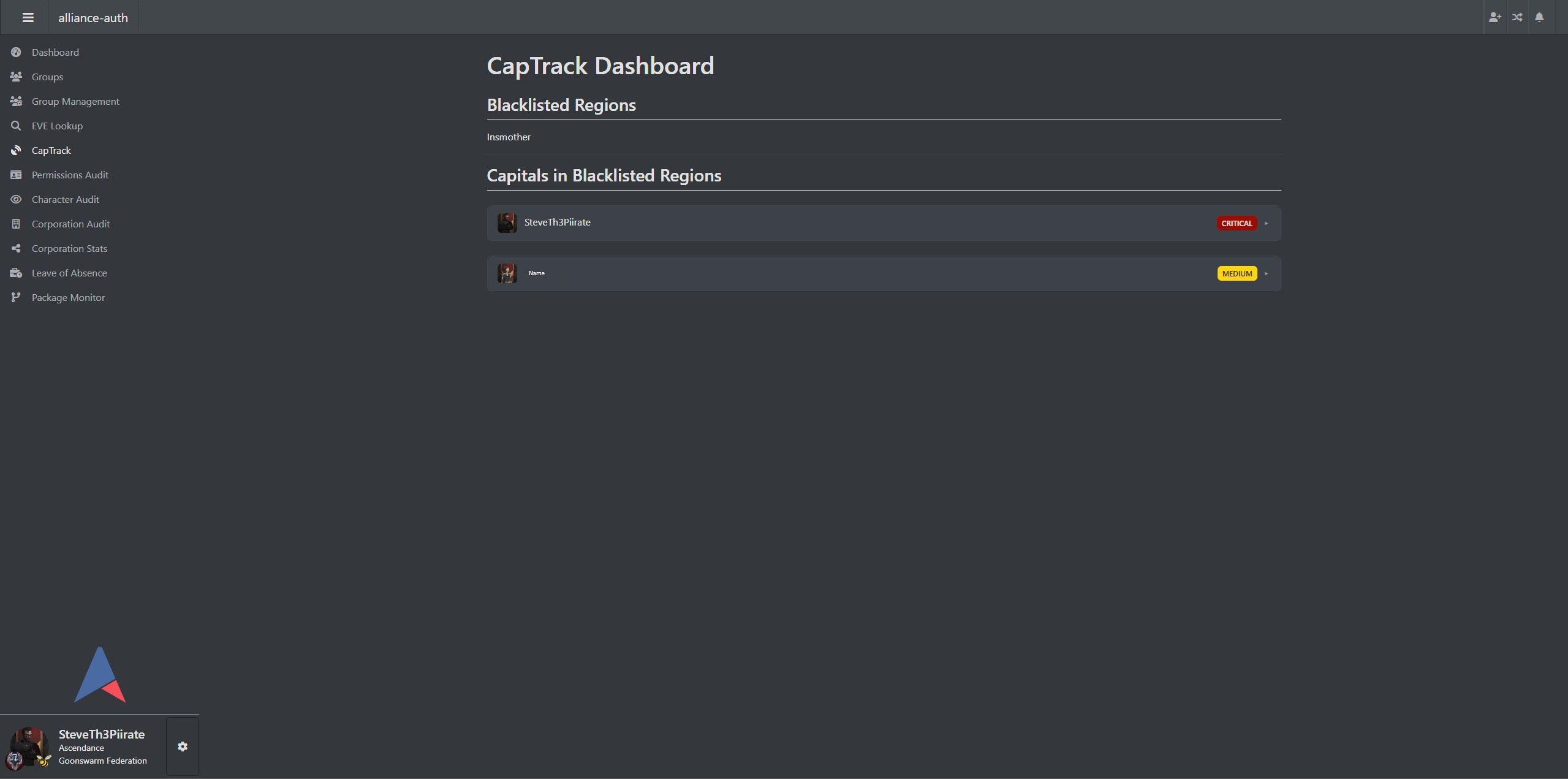
Cards can be collapsed to reduce noise. Collapse state can optionally be remembered per user.
Dashboard — Snoozed Pilots
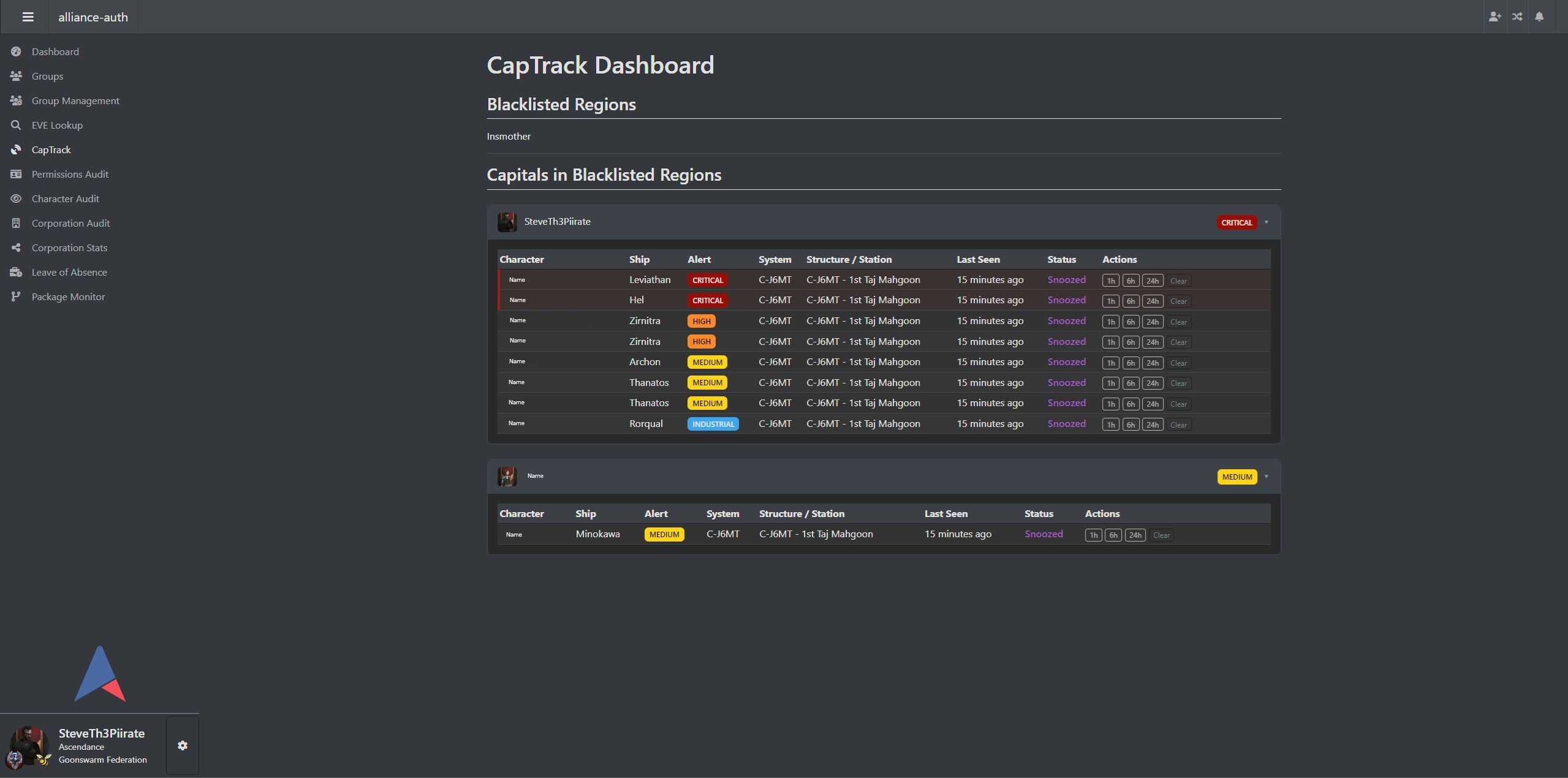
Pilots can be snoozed individually to suppress alerts and notifications for a configurable duration.
Admin — CapTrack Settings
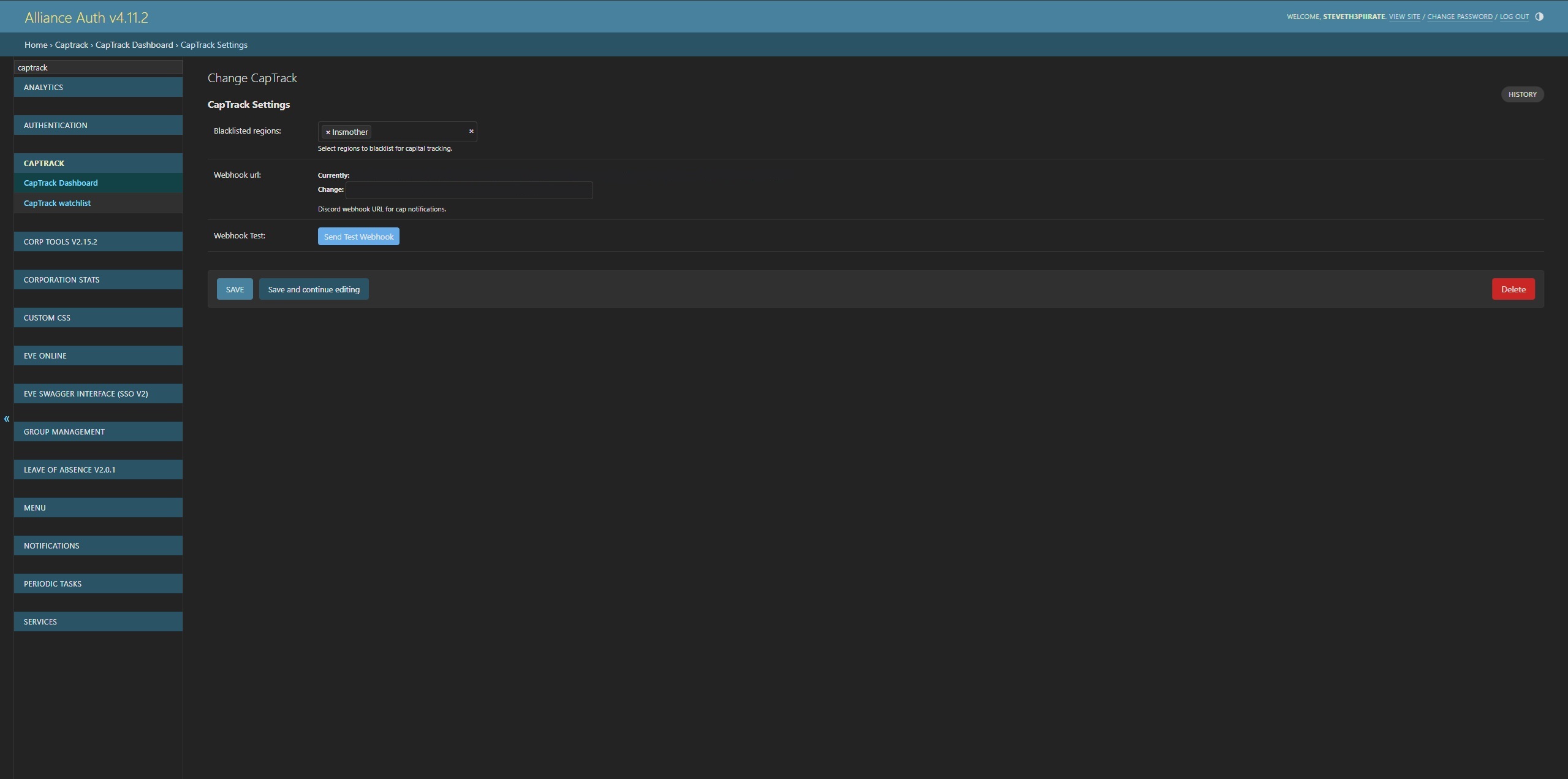
All configuration is managed through a single settings entry in the AllianceAuth admin panel.
Discord — Critical Alert Example
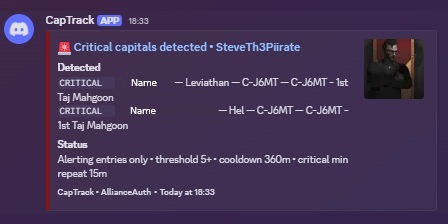
Critical alerts (Titans, Supercarriers) are always sent immediately.
License
MIT License
Release history Release notifications | RSS feed


Download files
Download the file for your platform. If you're not sure which to choose, learn more about installing packages.
Source Distribution
Built Distribution
Filter files by name, interpreter, ABI, and platform.
If you're not sure about the file name format, learn more about wheel file names.
Copy a direct link to the current filters
File details
Details for the file aa_captrack-1.0.9b10.tar.gz.
File metadata
- Download URL: aa_captrack-1.0.9b10.tar.gz
- Upload date:
- Size: 784.3 kB
- Tags: Source
- Uploaded using Trusted Publishing? No
- Uploaded via: twine/6.2.0 CPython/3.12.10
File hashes
| Algorithm | Hash digest | |
|---|---|---|
| SHA256 |
dc1ae28a4693184ac57de348022b31461b9806ccf4b4d9b26d7277f5d8b1733c
|
|
| MD5 |
3c7ec826da788c96862dbc616304b232
|
|
| BLAKE2b-256 |
816bd934e36a7af08512948a23620be8e379c65f29f4eb62b0f38219996bbf11
|
File details
Details for the file aa_captrack-1.0.9b10-py3-none-any.whl.
File metadata
- Download URL: aa_captrack-1.0.9b10-py3-none-any.whl
- Upload date:
- Size: 41.7 kB
- Tags: Python 3
- Uploaded using Trusted Publishing? No
- Uploaded via: twine/6.2.0 CPython/3.12.10
File hashes
| Algorithm | Hash digest | |
|---|---|---|
| SHA256 |
947b6ef7c14b175c7820bcf9f57abb62f6505585c9c8ab01c84e158e88804973
|
|
| MD5 |
abf9accf27718abb8be9ae74dc537d2f
|
|
| BLAKE2b-256 |
f7e27f0271f6cad44091681dc9e748784a6a38c184e5d90a18c83764a7a8bf4d
|






