
Branding & customization plugin for Alliance Auth — custom logos, login backgrounds, favicons, and more.
Verified details
These details have been verified by PyPIProject links
GitHub Statistics
Maintainers

Project description
AA Customizer
A branding & customization plugin for Alliance Auth.
Gives administrators a simple admin-panel UI to customize their Alliance Auth installation without touching code or replacing static files.
Screenshots
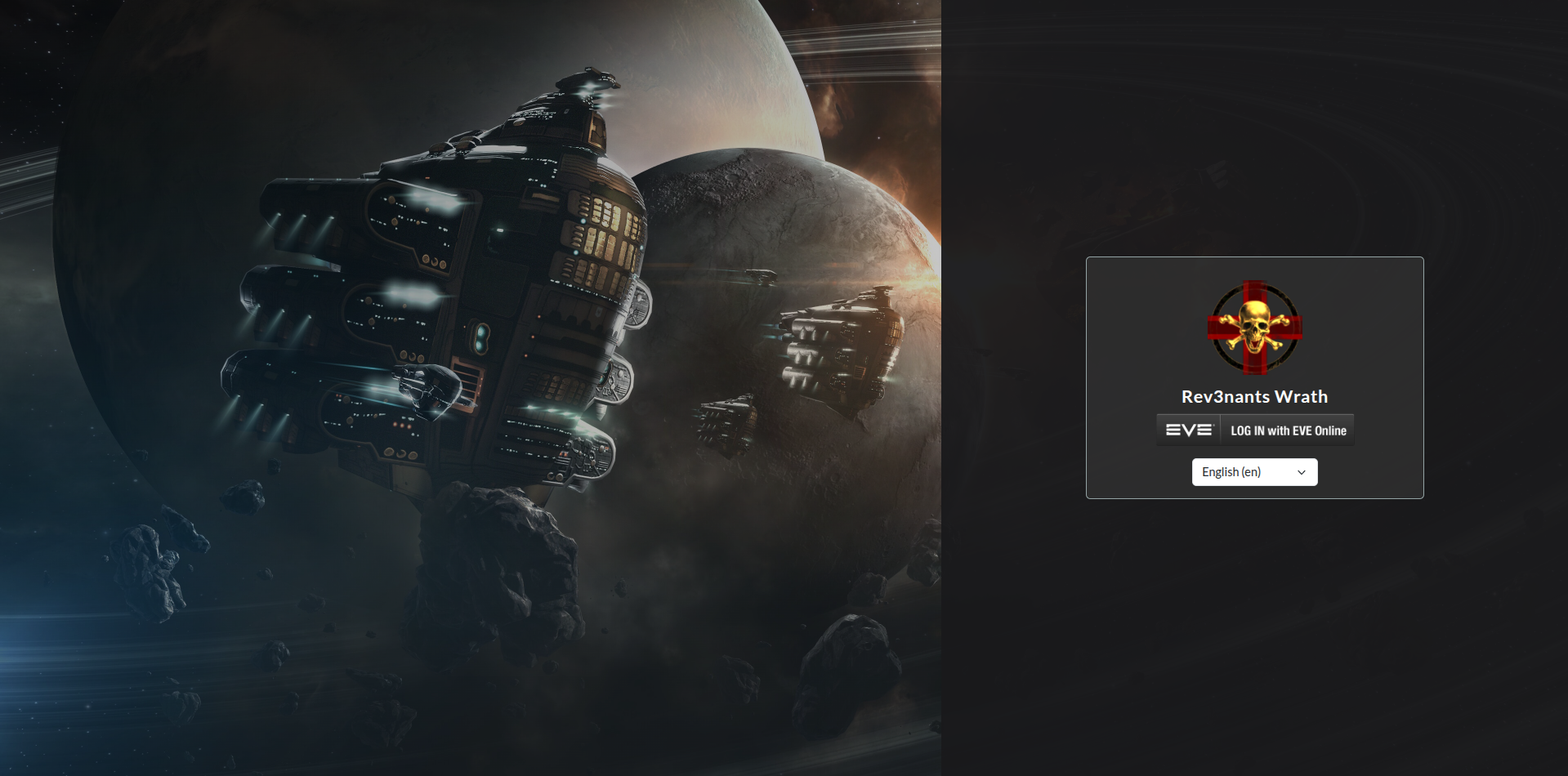
Split Screen layout
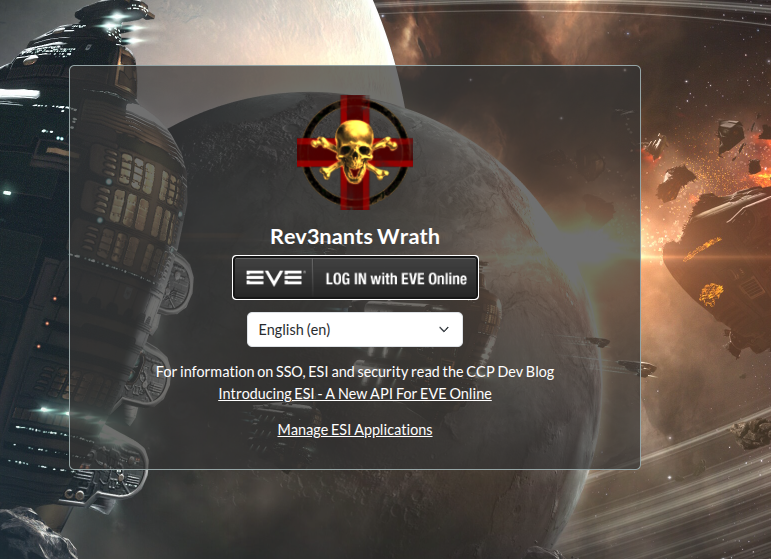
Centered Card layout (default)
Side Bar Icon
Features
| Feature | What it does |
|---|---|
| Custom site name | Overrides SITE_NAME from local.py across the whole site |
| Login background | URL or uploaded image; falls back to a CSS color, then the default AA space background |
| Login layout | Centered Card, Split Screen (background left), or Split Screen (login left) |
| Login logo | URL or uploaded image shown at the top of the login card |
| Login title & subtitle | Welcome heading and description text on the login card |
| Login extra HTML | Raw HTML injected below the EVE SSO button (notices, Discord links, etc.) |
| Custom favicon | URL or uploaded image replacing all Alliance Auth browser-tab icons |
| Navbar logo | URL or uploaded image alongside the site name in the top navigation bar |
| Sidebar logo | URL or uploaded image replacing the Alliance Auth logo in the sidebar |
| Custom CSS — URL | External stylesheet linked in every page <head>, loaded after the active theme |
| Custom CSS — inline | CSS text injected via <style> on every page, loaded after the active theme |
Extra <head> HTML |
Raw HTML at the end of <head> on every page (analytics, font imports, meta tags) |
Requirements
- Alliance Auth ≥ 4.0.0 (Bootstrap 5 template set)
django-soloPillow
Installation
Bare Metal install
1 — Install the package
# Activate your Alliance Auth virtualenv first, then:
pip install aa-customizer
2 — Add to INSTALLED_APPS
Open your local.py and add above INSTALLED_APPS =:
INSTALLED_APPS.insert(0, 'aa_customizer')
Django searches each app's
templates/folder inINSTALLED_APPSorder and uses the first match. Placingaa_customizerfirst ensures its template overrides are picked up before the Alliance Auth originals.
3 — Add the context processor
In local.py, add to the settings section to append the existing TEMPLATES list:
TEMPLATES[0]["OPTIONS"]["context_processors"].append(
    "aa_customizer.context_processors.aa_customizer"
)
4 — Run migrations
python manage.py migrate aa_customizer
5 — Collect static files
python manage.py collectstatic
6 — (Optional) Configure media file serving
Only needed if you want to use file uploads instead of image URLs.
In local.py:
MEDIA_ROOT = "/path/to/your/media/"
MEDIA_URL  = "/media/"
Make sure your web server (nginx, Apache, etc.) is configured to serve files from MEDIA_ROOT at MEDIA_URL.
Docker install
The recommended approach for Docker is to use URL fields for all images (point at an external CDN, Imgur, GitHub raw assets, etc.) so you don't need to mount a media volume just to serve a few files.
1 — Install the package inside the container
# Activate your Alliance Auth virtualenv first, then:
pip install aa-customizer
Add aa-customizer to your pip requirements file (e.g. requirements.txt or the equivalent in your Docker setup), then rebuild:
auth migrate
auth collectstatic
exit
2 — Add to INSTALLED_APPS
Open your local.py and add above INSTALLED_APPS =:
INSTALLED_APPS.insert(0, 'aa_customizer')
Django searches each app's
templates/folder inINSTALLED_APPSorder and uses the first match. Placingaa_customizerfirst ensures its template overrides are picked up before the Alliance Auth originals.
3 — Add the context processor
In local.py, add to the settings section to append the existing TEMPLATES list:
TEMPLATES[0]["OPTIONS"]["context_processors"].append(
    "aa_customizer.context_processors.aa_customizer"
)
4 — (Optional) Media file uploads
If you want to upload images through the admin instead of using URLs, you need a media volume:
In local.py:
MEDIA_ROOT = "/home/allianceserver/aa-docker/media/"
MEDIA_URL  = "/media/"
Mount the volume in docker-compose.yml for both the gunicorn and nginx services:
volumes:
  - ./media:/home/allianceserver/aa-docker/media
And configure nginx to serve it:
location /media/ {
    alias /home/allianceserver/aa-docker/media/;
}
For most Docker installs, using URL fields is simpler — just paste an image link and skip all of the above.
Usage
- Log in to the Alliance Auth admin panel (
/admin/). - Find AA Customizer → Custom Branding in the left-hand sidebar.
- Fill in whichever fields you want to customize and click Save.
Changes take effect immediately on the next page load — no server restart needed.
Field reference
Site
| Field | Description |
|---|---|
| Site Name | Overrides SITE_NAME from local.py |
Login Page — Background
| Field | Description |
|---|---|
| Login Background — URL | URL of a background image (takes priority over an upload) |
| Login Background — Upload | Uploaded background image (bare metal / media volume only) |
| Login Background Color | CSS color fallback when no image is set (e.g. #1a1a2e) |
Login Page — Layout
| Field | Description |
|---|---|
| Login Page Layout | Centered Card — login card centered over the full-page background (default). Split Screen — Background Left — background on the left, dark login panel on the right. Split Screen — Login Left — mirrors it. |
| Split Panel — Show Overlay Text | Tick to show text on the background panel; untick to hide it entirely |
| Split Panel — Overlay Text | Text shown on the background panel. Leave blank to auto-display the site name |
| Split Panel — Text Position | Vertical position of the overlay text: Top, Center, or Bottom |
Login Page — Branding
| Field | Description |
|---|---|
| Login Logo — URL | URL of a logo image (takes priority) |
| Login Logo — Upload | Uploaded logo image |
| Login Logo Max Width (px) | Maximum display width of the login logo |
| Login Page Title | Custom heading shown above the SSO button |
| Login Page Subtitle | Optional description text below the title |
| Login Page Extra HTML | Raw HTML injected below the EVE SSO button (notices, links, etc.) |
Favicon
| Field | Description |
|---|---|
| Favicon — URL | URL of a favicon image (takes priority) |
| Favicon — Upload | Uploaded favicon image |
Navigation Bar Logo
| Field | Description |
|---|---|
| Navbar Logo — URL | URL of a navbar logo image (takes priority) |
| Navbar Logo — Upload | Uploaded navbar logo image |
| Navbar Logo Height (px) | Display height of the navbar logo |
Sidebar Logo
| Field | Description |
|---|---|
| Sidebar Logo — URL | URL of an image to replace the AA logo in the sidebar (takes priority) |
| Sidebar Logo — Upload | Uploaded sidebar logo image |
| Sidebar Logo Width (px) | Display width of the sidebar logo |
Custom CSS
| Field | Description |
|---|---|
| Custom CSS — URL | External stylesheet URL linked in every page <head> |
| Custom CSS | Inline CSS injected via <style> on every page |
Extra HTML
| Field | Description |
|---|---|
Extra <head> HTML |
Raw HTML injected at the end of <head> on every page |
Image recommendations
| Field | Recommended size / format |
|---|---|
| Login background | ≥ 1920 × 1080 px, JPEG or PNG |
| Login logo | ≥ 256 × 256 px, transparent PNG |
| Favicon | ≥ 192 × 192 px, PNG or ICO |
| Navbar logo | Transparent PNG, height ≤ 64 px |
| Sidebar logo | Transparent PNG, width ≤ 256 px |
Security notes
- Raw HTML fields (
Login Page Extra HTML,Extra <head> HTML) are rendered without sanitization and are only editable by Django admin users (staff/superusers). - Custom CSS URL is validated as a URL by Django's field validator; only
http/httpsschemes are accepted. - AA Customizer works alongside Alliance Auth's built-in Custom CSS admin (
/admin/custom_css/customcss/). The customizer's CSS loads after the built-in one, so it takes precedence.
License
MIT
Project details
Verified details
These details have been verified by PyPIProject links
GitHub Statistics
Maintainers
Release history Release notifications | RSS feed


Download files
Download the file for your platform. If you're not sure which to choose, learn more about installing packages.
Source Distribution
Built Distribution
Filter files by name, interpreter, ABI, and platform.
If you're not sure about the file name format, learn more about wheel file names.
Copy a direct link to the current filters
File details
Details for the file aa_customizer-1.0.13.tar.gz.
File metadata
- Download URL: aa_customizer-1.0.13.tar.gz
- Upload date:
- Size: 21.1 kB
- Tags: Source
- Uploaded using Trusted Publishing? Yes
- Uploaded via: twine/6.1.0 CPython/3.13.7
File hashes
| Algorithm | Hash digest | |
|---|---|---|
| SHA256 |
4d21965d0d738575a0f2e9748aa2fec8e32885a7ac249a00521af8319711f13f
|
|
| MD5 |
0e2cd1179a2241a584a3453ecd7a63a5
|
|
| BLAKE2b-256 |
95e15e5f17bf50d0ad05a9be0f2a119193a26ad59865bed644204949267721d3
|
Provenance
The following attestation bundles were made for aa_customizer-1.0.13.tar.gz:
Publisher:
publish.yml on Thrainkrilleve/aa-customizer
-
Statement:
-
Statement type:
https://in-toto.io/Statement/v1 -
Predicate type:
https://docs.pypi.org/attestations/publish/v1 -
Subject name:
aa_customizer-1.0.13.tar.gz -
Subject digest:
4d21965d0d738575a0f2e9748aa2fec8e32885a7ac249a00521af8319711f13f - Sigstore transparency entry: 1153977820
- Sigstore integration time:
-
Permalink:
Thrainkrilleve/aa-customizer@25ba26171f8eccd04ee46b1ea26f274f6569803f -
Branch / Tag:
refs/tags/v1.0.15 - Owner: https://github.com/Thrainkrilleve
-
Access:
public
-
Token Issuer:
https://token.actions.githubusercontent.com -
Runner Environment:
github-hosted -
Publication workflow:
publish.yml@25ba26171f8eccd04ee46b1ea26f274f6569803f -
Trigger Event:
push
-
Statement type:
File details
Details for the file aa_customizer-1.0.13-py3-none-any.whl.
File metadata
- Download URL: aa_customizer-1.0.13-py3-none-any.whl
- Upload date:
- Size: 27.4 kB
- Tags: Python 3
- Uploaded using Trusted Publishing? Yes
- Uploaded via: twine/6.1.0 CPython/3.13.7
File hashes
| Algorithm | Hash digest | |
|---|---|---|
| SHA256 |
6bb9b0052b64e7627a3815c073e703357f6b19f7e2712b7ca5ec2de5decbce97
|
|
| MD5 |
35408b5f02e632378e7785723701d7a0
|
|
| BLAKE2b-256 |
a5d6f28062b5e7f2c99b32b8d1b4309b63869e56a5eb5bcb11fc2d60cc449abd
|
Provenance
The following attestation bundles were made for aa_customizer-1.0.13-py3-none-any.whl:
Publisher:
publish.yml on Thrainkrilleve/aa-customizer
-
Statement:
-
Statement type:
https://in-toto.io/Statement/v1 -
Predicate type:
https://docs.pypi.org/attestations/publish/v1 -
Subject name:
aa_customizer-1.0.13-py3-none-any.whl -
Subject digest:
6bb9b0052b64e7627a3815c073e703357f6b19f7e2712b7ca5ec2de5decbce97 - Sigstore transparency entry: 1153977821
- Sigstore integration time:
-
Permalink:
Thrainkrilleve/aa-customizer@25ba26171f8eccd04ee46b1ea26f274f6569803f -
Branch / Tag:
refs/tags/v1.0.15 - Owner: https://github.com/Thrainkrilleve
-
Access:
public
-
Token Issuer:
https://token.actions.githubusercontent.com -
Runner Environment:
github-hosted -
Publication workflow:
publish.yml@25ba26171f8eccd04ee46b1ea26f274f6569803f -
Trigger Event:
push
-
Statement type:






