
Ableton Live MCP Server
📌 Overview
The Ableton Live MCP Server is a server implementing the Model Context Protocol (MCP) to facilitate communication between LLMs and Ableton Live. It uses OSC (Open Sound Control) to send and receive messages to/from Ableton Live. It is based on AbletonOSC implementation and exhaustively maps available OSC adresses to tools accessible to MCP clients.
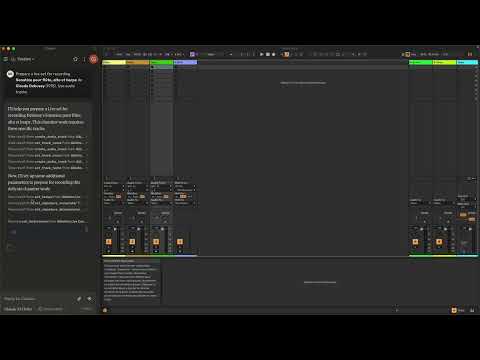
This project consists of two main components:
mcp_ableton_server.py: The MCP server handling the communication between clients and the OSC daemon.osc_daemon.py: The OSC daemon responsible for relaying commands to Ableton Live and processing responses.
✨ Features
- Provides an MCP-compatible API for controlling Ableton Live from MCP clients.
- Uses python-osc for sending and receiving OSC messages.
- Based on the OSC implementation from AbletonOSC.
- Implements request-response handling for Ableton Live commands.
⚡ Installation
Option 1: Install with UV (Recommended)
-
Install UV if you don't have it already:
pip install uv
-
Install directly from PyPI:
uv install ableton-live-mcp-server
-
Or install from GitHub:
uv install git+https://github.com/mrmos/ableton-live-mcp-server.git
Option 2: Manual Installation
- Install
uvpip install uv
- Clone the repository:
git clone https://github.com/your-username/mcp_ableton_server.git
cd mcp_ableton_server
- Install dependencies:
uv install python-osc fastmcp
- Install the MCP Server
This assumes that you're using Claude Desktop
mcp install mcp_ableton_server.py
- Install AbletonOSC Follow the instructions at AbletonOSC
🚀 Usage
Running with a Single Command (Recommended)
The easiest way to start the Ableton Live MCP Server is with the included launcher script:
# Basic usage (runs both components with default settings)
ableton-mcp-start

# Show debug output from both components
ableton-mcp-start --debug

# Customize ports if needed
ableton-mcp-start --osc-port 65432 --mcp-port 8000 --ableton-port 11000 --receive-port 11001
The launcher automatically:
- Starts the OSC daemon first
- Verifies that it's running properly
- Starts the MCP server
- Monitors both processes and shuts them down gracefully on exit
Manual Starting (Advanced)
Alternatively, you can manually start each component in separate terminal windows:
Step 1: Run the OSC Daemon
First, start the OSC daemon to handle OSC communication between the MCP server and Ableton Live:
ableton-osc-daemon
This will:
- Listen for MCP client connections on port 65432.
- Forward messages to Ableton Live via OSC on port 11000.
- Receive OSC responses from Ableton on port 11001.
Step 2: Run the MCP Server
In a separate terminal window, start the MCP server to enable LLMs to control Ableton:
ableton-mcp-server
Example Usage
In Claude desktop, ask Claude: Prepare a set to record a rock band Set the input routing channel of all tracks that have "voice" in their name to Ext. In 2
⚙️ Configuration
By default, the server and daemon run on localhost (127.0.0.1) with the following ports:
- MCP Server Socket: 65432
- Ableton Live OSC Port (Send): 11000
- Ableton Live OSC Port (Receive): 11001
To modify these, edit the AbletonOSCDaemon class in osc_daemon.py or use command-line parameters:
ableton-osc-daemon --socket-port 65432 --ableton-port 11000 --receive-port 11001
Claude Desktop Configuration
To configure Claude Desktop to use Ableton Live MCP Server:
-
Edit the Claude Desktop configuration file:
- macOS:
~/Library/Application Support/Claude/claude_desktop_config.json - Windows:
%APPDATA%/Claude/claude_desktop_config.json
- macOS:
-
Add the following to your configuration:
"mcpServers": {
  "Ableton Live Controller": {
    "command": "ableton-mcp-start",
    "args": []
  }
}
- For debugging with visible output:
"mcpServers": {
  "Ableton Live Controller": {
    "command": "ableton-mcp-start",
    "args": ["--debug"]
  }
}
- Restart Claude Desktop
Contributing
Feel free to submit issues, feature requests, or pull requests to improve this project.
Publishing Updates
To publish new versions using UV:
- Update the version in
pyproject.toml - Build the package:
uv build - Publish to PyPI:
uv publish
License
This project is licensed under the MIT License. See the LICENSE file for details.
Acknowledgments
- Model Context Protocol (MCP)
- python-osc for OSC handling
- Daniel John Jones for OSC implementation with AbletonOSC
- Ableton Third Party Remote Scripts
- Julien Bayle @Structure Void for endless inspirations and resources.
TODO
- Explore resources and prompts primitives opportunities.
- Build a standalone Ableton Live MCP client.
1 maintainer

Release files for ableton-live-mcp-server 0.2.1
For a detailed explanation of source distributions (sdists) and built distributions (wheels), please see the package formats documentation.
Source distribution (sdist)
| File | Size | Uploaded | |
|---|---|---|---|
| ableton_live_mcp_server-0.2.1.tar.gz | 23.6 kB | Details |
Built distribution (wheel)
| File | Interpreter | ABI | Platform | Reset |
|---|---|---|---|---|
| ableton_live_mcp_server-0.2.1-py3-none-any.whl | Python 3 | none | any | Details |
Total release size: 56.3 kB
Release files / ableton_live_mcp_server-0.2.1.tar.gz
| Download URL | ableton_live_mcp_server-0.2.1.tar.gz |
|---|---|
| Size | 23.6 kB |
| Tags | Source |
|
SHA-256 checksum How to use checksums |
3646482130d482343b7e75e554ad85e1a71fe87ed7b3be9bfe625a0f7d5a8c74
|
|
BLAKE2b-256 checksum How to use checksums |
166f9bff592f425311d5d5005756a538b011b1f82030cace30eb98a41f2ae484
|
| Upload date | |
|
Uploaded using Trusted Publishing? What is trusted publishing? |
No |
| Uploaded via |
uv/0.6.8
|
Release files / ableton_live_mcp_server-0.2.1-py3-none-any.whl
| Download URL | ableton_live_mcp_server-0.2.1-py3-none-any.whl |
|---|---|
| Size | 32.7 kB |
| Tags | Python 3 |
|
SHA-256 checksum How to use checksums |
1a6183a34596980cf4d92b40e32769011e619b85a5ed48845ca967e6390d3669
|
|
BLAKE2b-256 checksum How to use checksums |
cecab47410f76f59aaf47d6fb7f0028d38eb6dc7953ce1428969fc0d997326b3
|
| Upload date | |
|
Uploaded using Trusted Publishing? What is trusted publishing? |
No |
| Uploaded via |
uv/0.6.8
|














