
MCP Server for Ableton Live

Project description
Ableton Live MCP Server
📌 Overview
The Ableton Live MCP Server is a server implementing the Model Context Protocol (MCP) to facilitate communication between LLMs and Ableton Live. It uses OSC (Open Sound Control) to send and receive messages to/from Ableton Live. It is based on AbletonOSC implementation and exhaustively maps available OSC adresses to tools accessible to MCP clients.
This project consists of two main components:
mcp_ableton_server.py: The MCP server handling the communication between clients and the OSC daemon.osc_daemon.py: The OSC daemon responsible for relaying commands to Ableton Live and processing responses.
✨ Features
- Provides an MCP-compatible API for controlling Ableton Live from MCP clients.
- Uses python-osc for sending and receiving OSC messages.
- Based on the OSC implementation from AbletonOSC.
- Implements request-response handling for Ableton Live commands.
- Supports working with Ableton devices and VST plugins, including browsing and controlling parameters.
⚡ Installation
Option 1: Install with UV (Recommended)
-
Install UV if you don't have it already:
pip install uv
-
Install directly from PyPI:
uv install ableton-live-mcp-server
-
Or install from GitHub:
uv install git+https://github.com/mrmos/ableton-live-mcp-server.git
Option 2: Manual Installation
- Install
uvpip install uv
- Clone the repository:
git clone https://github.com/your-username/mcp_ableton_server.git
cd mcp_ableton_server
- Install dependencies:
uv install python-osc fastmcp
- Install the MCP Server
This assumes that you're using Claude Desktop
mcp install mcp_ableton_server.py
- Install AbletonOSC Follow the instructions at AbletonOSC
🚀 Usage
Running with a Single Command (Recommended)
The easiest way to start the Ableton Live MCP Server is with the included launcher script:
# Basic usage (runs both components with default settings)
ableton-mcp-start

# Show debug output from both components
ableton-mcp-start --debug

# Customize ports if needed
ableton-mcp-start --osc-port 65432 --mcp-port 8000 --ableton-port 11000 --receive-port 11001
The launcher automatically:
- Starts the OSC daemon first
- Verifies that it's running properly
- Starts the MCP server
- Monitors both processes and shuts them down gracefully on exit
Manual Starting (Advanced)
Alternatively, you can manually start each component in separate terminal windows:
Step 1: Run the OSC Daemon
First, start the OSC daemon to handle OSC communication between the MCP server and Ableton Live:
ableton-osc-daemon
This will:
- Listen for MCP client connections on port 65432.
- Forward messages to Ableton Live via OSC on port 11000.
- Receive OSC responses from Ableton on port 11001.
Step 2: Run the MCP Server
In a separate terminal window, start the MCP server to enable LLMs to control Ableton:
ableton-mcp-server
Example Usage
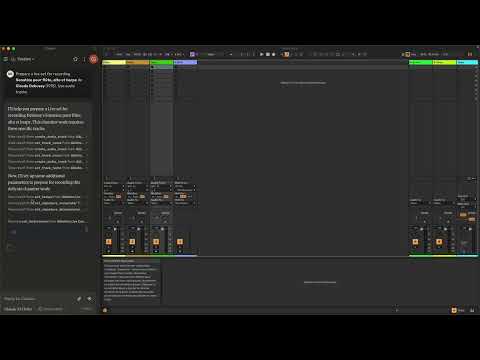
In Claude desktop, ask Claude: Prepare a set to record a rock band Set the input routing channel of all tracks that have "voice" in their name to Ext. In 2
Working with Devices and VST Plugins
The Ableton Live MCP Server provides tools to work with Ableton's devices and third-party VST plugins:
- Browse and Load Devices: Browse Ableton's device library and load instruments or effects onto tracks.
- Get Device Information: Retrieve detailed information about devices on tracks, including name, type, and parameters.
- Control Device Parameters: Get and set parameter values for any device, including VST plugins.
- Browse VST Categories: Navigate through Ableton's browser to find VST plugins.
- Browse and Load Presets: Find and load presets for instruments and effects.
Example Device and VST Usage
Here are some example prompts you can use with Claude:
- Get all devices on track 1 and show me their parameters
- Set the filter cutoff parameter on the VST in track 3 to 0.7
- Browse available VST plugins and load Serum on a new MIDI track
- Show me all device parameters on the first track and set the filter cutoff to 120Hz
- Find all presets for Operator and load the "Bells" preset
- Browse presets for Serum and load one that sounds atmospheric
- Adjust the reverb on track 2 to be more dramatic
Under the hood, the server uses AbletonOSC's device API to communicate with Ableton Live's devices:
- Device types are represented as: 1 = audio_effect, 2 = instrument, 4 = midi_effect
- External VST plugins are identified by their class_name (e.g., "PluginDevice", "AuPluginDevice")
- Parameters typically have normalized values between 0.0 and 1.0
- The browser API is used to locate and load VST plugins and presets
⚙️ Configuration
By default, the server and daemon run on localhost (127.0.0.1) with the following ports:
- MCP Server Socket: 65432
- Ableton Live OSC Port (Send): 11000
- Ableton Live OSC Port (Receive): 11001
To modify these, edit the AbletonOSCDaemon class in osc_daemon.py or use command-line parameters:
ableton-osc-daemon --socket-port 65432 --ableton-port 11000 --receive-port 11001
Claude Desktop Configuration
To configure Claude Desktop to use Ableton Live MCP Server:
-
Edit the Claude Desktop configuration file:
- macOS:
~/Library/Application Support/Claude/claude_desktop_config.json - Windows:
%APPDATA%/Claude/claude_desktop_config.json
- macOS:
-
Add the following to your configuration:
"mcpServers": {
  "Ableton Live Controller": {
    "command": "ableton-mcp-start",
    "args": []
  }
}
- For debugging with visible output:
"mcpServers": {
  "Ableton Live Controller": {
    "command": "ableton-mcp-start",
    "args": ["--debug"]
  }
}
- Restart Claude Desktop
Contributing
Feel free to submit issues, feature requests, or pull requests to improve this project.
Publishing Updates
To publish new versions using UV:
- Update the version in
pyproject.toml - Build the package:
uv build - Publish to PyPI:
uv publish
License
This project is licensed under the MIT License. See the LICENSE file for details.
Acknowledgments
- Model Context Protocol (MCP)
- python-osc for OSC handling
- Daniel John Jones for OSC implementation with AbletonOSC
- Ableton Third Party Remote Scripts
- Julien Bayle @Structure Void for endless inspirations and resources.
TODO
- Explore resources and prompts primitives opportunities.
- Build a standalone Ableton Live MCP client.
Release history Release notifications | RSS feed


Download files
Download the file for your platform. If you're not sure which to choose, learn more about installing packages.
Source Distribution
Built Distribution
Filter files by name, interpreter, ABI, and platform.
If you're not sure about the file name format, learn more about wheel file names.
Copy a direct link to the current filters
File details
Details for the file ableton_live_mcp_server-0.1.7.tar.gz.
File metadata
- Download URL: ableton_live_mcp_server-0.1.7.tar.gz
- Upload date:
- Size: 27.7 kB
- Tags: Source
- Uploaded using Trusted Publishing? No
- Uploaded via: uv/0.6.8
File hashes
| Algorithm | Hash digest | |
|---|---|---|
| SHA256 |
c6a55d5543382306c8b695d71f68e4f7f1e1f1c131c5330e19b0571f9fa30fa8
|
|
| MD5 |
164ad5f521a678d6b30a43934cf18712
|
|
| BLAKE2b-256 |
0f866740d89844a4a96537d468c052c598ab55742ee8420017a95f169f22dafe
|
File details
Details for the file ableton_live_mcp_server-0.1.7-py3-none-any.whl.
File metadata
- Download URL: ableton_live_mcp_server-0.1.7-py3-none-any.whl
- Upload date:
- Size: 38.9 kB
- Tags: Python 3
- Uploaded using Trusted Publishing? No
- Uploaded via: uv/0.6.8
File hashes
| Algorithm | Hash digest | |
|---|---|---|
| SHA256 |
b9aab6fe6248df0dc2b431a952a1ebe2f6e546c111f258e9aaaa64fcf4b8571c
|
|
| MD5 |
686fe93031c9b33e5578b0788b01262a
|
|
| BLAKE2b-256 |
f7dad4423ce44951b96a0c3712d0e53c2ab350cca21f40a88a9091d94db91caa
|






