
⬇️ abx-dl
A simple all-in-one CLI tool to auto-detect and download everything available from a URL.
uvx abx-dl --plugins=title,wget 'https://example.com'
set -Eeuo pipefail
output_dir="$(mktemp -d)"
image="${ABXDL_IMAGE:-archivebox/abx-dl:latest}"
trap 'rm -rf "$output_dir"' EXIT
docker run --rm \
  --env OUTPUT_UID="$(id -u)" \
  --env OUTPUT_GID="$(id -g)" \
  --volume "$output_dir:/out" \
  --entrypoint bash \
  "$image" \
  -c 'set -Eeuo pipefail
cleanup() { chown -R "$OUTPUT_UID:$OUTPUT_GID" /out; }
trap cleanup EXIT
/venv/bin/abx-dl "$@"' \
  -- --no-install --max-urls=1 --plugins=title,wget 'https://example.com'
test -s "$output_dir/index.jsonl"
test -s "$output_dir/title/title.txt"
test -s "$output_dir/wget/example.com/index.html"
grep -q 'Example Domain' "$output_dir/title/title.txt"
grep -q 'Example Domain' "$output_dir/wget/example.com/index.html"
✨ Ever wish you could yt-dlp, gallery-dl, wget, curl, puppeteer, etc. all in one command?
abx-dl is an all-in-one CLI tool for downloading URLs "by any means necessary".
It's useful for scraping, downloading, OSINT, digital preservation, and more.
abx-dl provides a simpler one-shot CLI interface to the ArchiveBox plugin ecosystem.
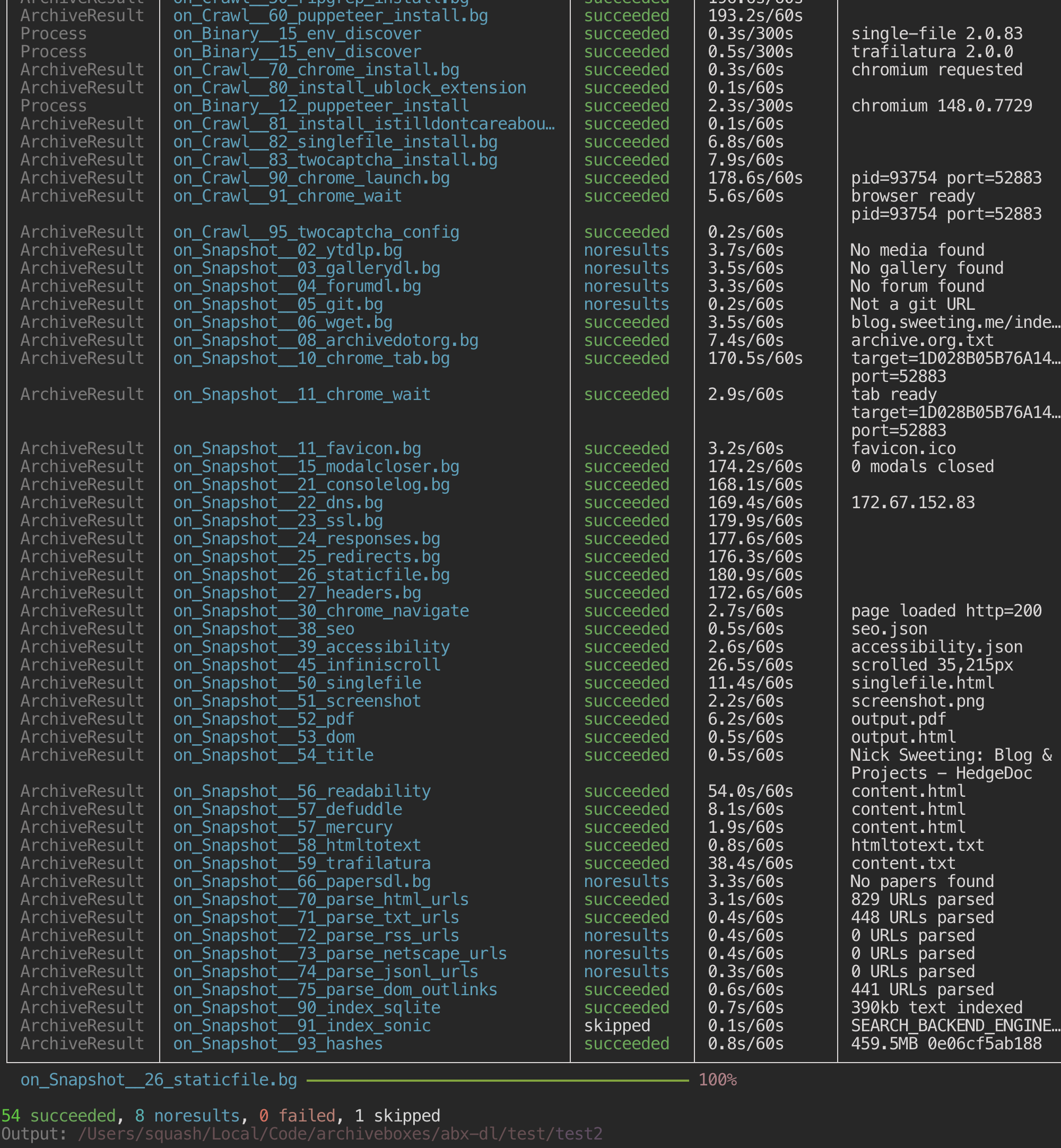
🍜 What does it save?
abx-dl --plugins=wget,title,screenshot,pdf,readability 'https://example.com'
abx-dl runs all plugins by default (and auto installs dependencies). You can specify --plugins=wget,favicon,title or filters like --output=html,pdf,ico,text/ to limit plugin selection.
- HTML, JS, CSS, images, etc. rendered with a headless browser
- title, favicon, headers, outlinks, and other metadata
- audio, video, subtitles, playlists, comments
- snapshot of the page as a PDF, screenshot, and Singlefile HTML
- article text,
gitsource code - and much more...
🧩 How does it work?
abx-dl uses the Plugin Library (shared with ArchiveBox) to run a collection of downloading and scraping tools.
Plugins are loaded from the installed abx-plugins package (or from ABX_PLUGINS_DIR if you override it) and execute in distinct phases:
- Install phase runner reads plugins
config.json:required_binariesand emitsBinaryRequestEvents forabxpkg.binary_service.BinaryService, which resolves or installs binaries using built-in providers such as env, pip, npm, brew, apt, cargo, and browser-specific providers.BinaryCacheServiceand theabx-dlcache backend then project resolved state intoderived.env. - CrawlSetup hooks (
on_CrawlSetup__*) launch/configure expensive crawl-scoped processes like chrome, or trigger side effects. they emit no stdout JSONL records. - Snapshot hooks (
on_Snapshot__*) run per URL to extract content and emit onlyArchiveResult,Snapshot, andTagrecords
⚙️ Configuration
Configuration is handled via environment variables plus a user config file under the platformdirs user config path (<user-config>/abx/config.env). Runtime-derived cache entries such as resolved binary paths are stored separately in <user-config>/abx/derived.env:
abx-dl config                        # show all config (global + per-plugin)
abx-dl config --get WGET_TIMEOUT     # get a specific value
abx-dl config --set TIMEOUT=120      # set persistently (resolves aliases)
Output is grouped by section:
# GLOBAL
TIMEOUT=60
USER_AGENT="Mozilla/5.0 ..."
...

# plugins/wget
WGET_BINARY="wget"
WGET_TIMEOUT=60
...

# plugins/chrome
CHROME_BINARY="chromium"
...
Common options:
TIMEOUT=60- default timeout for hooksUSER_AGENT- default user agent string{PLUGIN}_BINARY- path or name of the binary to use (e.g.WGET_BINARY=wgetorCHROME_BINARY=/usr/bin/chromium){PLUGIN}_ENABLED=True/False- enable/disable specific plugins{PLUGIN}_TIMEOUT=120- per-plugin timeout overrides
Aliases are automatically resolved (e.g. --set USE_WGET=false saves as WGET_ENABLED=false).
One-off config is easy via env vars or CLI args:
env \
  TIMEOUT=120 \
  WGET_TIMEOUT=120 \
  abx-dl \
    --dir=./config-example \
    --plugins=title,wget \
    --timeout=90 \
    'https://example.com'
📦 Install
uv tool install abx-dl
abx-dl version
uvx abx-dl version
abx-dl install wget title
🔠 Usage
abx-dl --plugins=title,wget --dir=./downloads --timeout=120 'https://example.com'
# Default command - a bare URL archives with all enabled plugins:
abx-dl 'https://example.com'

# Select plugins by output type (mimetypes, categories, or file extensions):
abx-dl --output=html,pdf,video/ 'https://example.com'
abx-dl -o text -o image -o mp4 'https://example.com'

# Limit work to a subset of plugins by name:
abx-dl --plugins=wget,title,screenshot,pdf 'https://example.com'

# Skip auto-installing missing dependencies (emit warnings instead):
abx-dl --no-install 'https://example.com'

# Specify output directory (default is current working dir):
abx-dl --dir=./downloads 'https://example.com'

# Set timeout:
abx-dl --timeout=120 'https://example.com'
Commands
abx-dl <url>                              # Download URL (default shorthand)
abx-dl plugins                            # Check + show info for all plugins
abx-dl plugins wget ytdlp git             # Check + show info for specific plugins
abx-dl install wget ytdlp git             # Pre-install plugin dependencies
abx-dl config                             # Show all config values
abx-dl config --get TIMEOUT               # Get a specific config value
abx-dl config --set TIMEOUT=120           # Set a config value persistently
Installing Dependencies
Many plugins require external binaries (e.g., wget, chrome, yt-dlp, single-file).
By default, abx-dl lazily installs missing dependencies as needed when you download a URL.
Use --no-install to skip plugins with missing dependencies instead. install runs only the pre-run dependency pipeline (required_binaries → BinaryRequestEvent → BinaryEvent) without starting crawl setup or snapshot extraction:
abx-dl install wget title
abx-dl plugins wget title
abx-dl 'https://example.com'              # auto-installs missing deps on-the-fly
abx-dl --no-install 'https://example.com' # skips plugins with missing deps and emits warnings
abx-dl install wget singlefile ytdlp      # installs dependencies for specific plugins only
abx-dl plugins                            # checks which dependencies are available/missing
Every hook executable declares its dependencies in an abxpkg run --script --deps-from=... shebang. Compatible host binaries are selected first and projected into ABXPKG_LIB_DIR/env/bin; otherwise the configured managed provider installs and projects the dependency. The explicit install command and --no-install dependency check use the same abxpkg resolution path.
The normal runtime flow is:
CrawlEvent(internal lifecycle root)CrawlSetupEvent→ pluginon_CrawlSetup__*hooksCrawlStartEvent→SnapshotEventSnapshotEvent→ pluginon_Snapshot__*hooksSnapshotCleanupEvent/CrawlCleanupEvent
Hook output contract:
- hook dependencies are driven by plugin
required_binariesand resolved by each hook's abxpkg shebang on_CrawlSetup__*hooks emit no stdout JSONL recordson_Snapshot__*hooks emit onlyArchiveResult,Snapshot, andTag- the TUI and services consume structured events derived from those hook records
Dependencies are installed to <user-config>/abx/lib/{arch}/ using the appropriate package manager:
- pip packages →
<user-config>/abx/lib/{arch}/pip/venv/ - npm packages →
<user-config>/abx/lib/{arch}/npm/ - brew/apt packages → system locations
You can override the install location with ABXPKG_LIB_DIR=/path/to/lib abx-dl install wget.
Output Structure
By default, abx-dl writes results into the current working directory. Each run creates an index.jsonl manifest plus one subdirectory per plugin that produced output. If you want to keep runs isolated, cd into a scratch directory first or pass --dir=/path/to/run.
mkdir -p /tmp/abx-run && cd /tmp/abx-run
uvx --from abx-dl abx-dl --plugins=title,wget 'https://example.com'
./
├── index.jsonl             # Snapshot metadata and results (JSONL format)
├── title/
│   └── title.txt
├── favicon/
│   └── favicon.ico
├── screenshot/
│   └── screenshot.png
├── pdf/
│   └── output.pdf
├── dom/
│   └── output.html
├── wget/
│   └── example.com/
│       └── index.html
├── singlefile/
│   └── output.html
└── ...
All Outputs
index.jsonl- snapshot metadata and plugin results (JSONL format, ArchiveBox-compatible)title/title.txt- page titlefavicon/favicon.ico- site faviconscreenshot/screenshot.png- full page screenshot (Chrome)pdf/output.pdf- page as PDF (Chrome)dom/output.html- rendered DOM (Chrome)wget/example.com/...- mirrored site filessinglefile/output.html- single-file HTML snapshot- ... and more via plugin library ...
Available Plugins
See the abx-plugins marketplace.
Snapshot / Extraction Plugins
ytdlp- downloads media plus sidecars: audio, video, images/thumbnails, subtitles (.srt,.vtt), JSON metadata, and text descriptions.gallerydl- downloads gallery/media sets as images, videos, JSON sidecars, text sidecars, and ZIP archives.forumdl- exports forum/thread archives as JSONL, WARC, and mailbox-style message archives.git- clones repository contents including text, binaries, images, audio, video, fonts, and other tracked files.wget- mirrors pages and requisites as HTML, WARC, images, CSS, JavaScript, fonts, audio, and video.archivedotorg- saves a Wayback Machine archive link as plain text.favicon- saves site favicons and touch icons as image files.modalcloser- setup helper only; no direct archive files.consolelog- saves browser console events as JSONL.dns- saves observed DNS activity as JSONL.ssl- saves TLS certificate/connection metadata as JSONL.responses- saves HTTP response metadata as JSONL and can record referenced text, images, audio, video, apps, and fonts.redirects- saves redirect chains as JSONL.staticfile- saves non-HTML direct file responses such as PDF, EPUB, images, audio, video, JSON, XML, CSV, ZIP, and generic binary files.headers- saves main-document HTTP headers as JSON.chrome- manages shared browser state and emits plain-text and JSON runtime metadata.seo- saves SEO metadata such as meta tags and Open Graph fields as JSON.accessibility- saves the browser accessibility tree as JSON.infiniscroll- page-expansion helper only; no direct archive files.claudechrome- saves Claude-computer-use interaction results as JSON plus PNG screenshots.singlefile- saves a full self-contained page snapshot as HTML.screenshot- saves rendered page screenshots as PNG.pdf- saves rendered pages as PDF.dom- saves fully rendered DOM output as HTML.title- saves the final page title as plain text.readability- extracts article HTML, plain text, and JSON metadata.defuddle- extracts cleaned article HTML, plain text, and JSON metadata.mercury- extracts article HTML, plain text, and JSON metadata.claudecodeextract- generates cleaned Markdown from other extractor outputs.htmltotext- converts archived HTML into plain text.trafilatura- extracts article content as plain text, Markdown, HTML, CSV, JSON, and XML/TEI.papersdl- downloads academic papers as PDF.parse_html_urls- emits discovered links from HTML as JSONL records.parse_txt_urls- emits discovered links from text files as JSONL records.parse_rss_urls- emits discovered feed entry URLs from RSS/Atom as JSONL records.parse_netscape_urls- emits discovered bookmark URLs from Netscape bookmark exports as JSONL records.parse_jsonl_urls- emits discovered bookmark URLs from JSONL exports as JSONL records.parse_dom_outlinks- emits crawlable rendered-DOM outlinks as JSONL records.search_backend_sqlite- writes a searchable SQLite FTS index database.search_backend_sonic- pushes content into Sonic search; no local archive files declared.claudecodecleanup- writes cleanup/deduplication results as plain text.hashes- writes file hash manifests as JSON.- and more via the
abx-pluginsmarketplace...
AI Skill
This repo includes an abx-dl skill for coding agents that need to run the standalone ArchiveBox extractor pipeline without a full ArchiveBox install.
- Skill source:
skills/abx-dl/SKILL.md - skills.sh page: https://skills.sh/archivebox/abx-dl/abx-dl
Architecture
abx-dl is built on these components:
abx_dl/plugins.py- Plugin discovery fromabx-pluginsorABX_PLUGINS_DIRabx_dl/executor.py- Hook execution engine with config propagationabx_dl/config.py- Environment variable configurationabx_dl/cli.py- Rich CLI with live progress display
Related Projects
abxbushttps://abxbus.archivebox.io https://github.com/archiveBox/abxbusabxpkghttps://abxpkg.archivebox.io https://github.com/archiveBox/abxpkgabx-pluginshttps://abx-plugins.archivebox.io https://github.com/ArchiveBox/abx-pluginsarchiveboxhttps://archivebox.io https://github.com/ArchiveBox/ArchiveBox- And lots more...
For more advanced use with collections, parallel downloading, a Web UI + REST API, etc.
See: ArchiveBox/ArchiveBox
Download files
Download the file for your platform. If you're not sure which to choose, learn more about installing packages.
Source Distribution
Built Distribution
Filter files by name, interpreter, ABI, and platform.
If you're not sure about the file name format, learn more about wheel file names.
Copy a direct link to the current filters
File details
Details for the file abx_dl-1.12.53.tar.gz.
File metadata
- Download URL: abx_dl-1.12.53.tar.gz
- Upload date:
- Size: 87.2 kB
- Tags: Source
- Uploaded using Trusted Publishing? Yes
- Uploaded via: uv/0.10.6 {"installer":{"name":"uv","version":"0.10.6","subcommand":["publish"]},"python":null,"implementation":{"name":null,"version":null},"distro":{"name":"Ubuntu","version":"24.04","id":"noble","libc":null},"system":{"name":null,"release":null},"cpu":null,"openssl_version":null,"setuptools_version":null,"rustc_version":null,"ci":true}
File hashes
| Algorithm | Hash digest | |
|---|---|---|
| SHA256 |
3f9bf184f7bacdf5408cfa145eef77d8cc4cda54546a022f38734e322477b677
|
|
| MD5 |
9293b7f38c1f80072c98f775dc575e02
|
|
| BLAKE2b-256 |
dde6e1fc033df2b23a31e449c2bc638fb2278c6a20a46cb01c8ca04f90d3d0f8
|
File details
Details for the file abx_dl-1.12.53-py3-none-any.whl.
File metadata
- Download URL: abx_dl-1.12.53-py3-none-any.whl
- Upload date:
- Size: 91.2 kB
- Tags: Python 3
- Uploaded using Trusted Publishing? Yes
- Uploaded via: uv/0.10.6 {"installer":{"name":"uv","version":"0.10.6","subcommand":["publish"]},"python":null,"implementation":{"name":null,"version":null},"distro":{"name":"Ubuntu","version":"24.04","id":"noble","libc":null},"system":{"name":null,"release":null},"cpu":null,"openssl_version":null,"setuptools_version":null,"rustc_version":null,"ci":true}
File hashes
| Algorithm | Hash digest | |
|---|---|---|
| SHA256 |
674ddae0847ab23fbe7602652245aafe65ccd4b3e67446f0b3b6df4d225ad055
|
|
| MD5 |
3d1218ebbd511e3f7236546705fbdffa
|
|
| BLAKE2b-256 |
9e3ea1528350f8b13a76fcf991601ba1d8b612bd836649ecbd3888b8775f4748
|







