
This release is a pre-release and may not be stable for production use.


Activity Browser
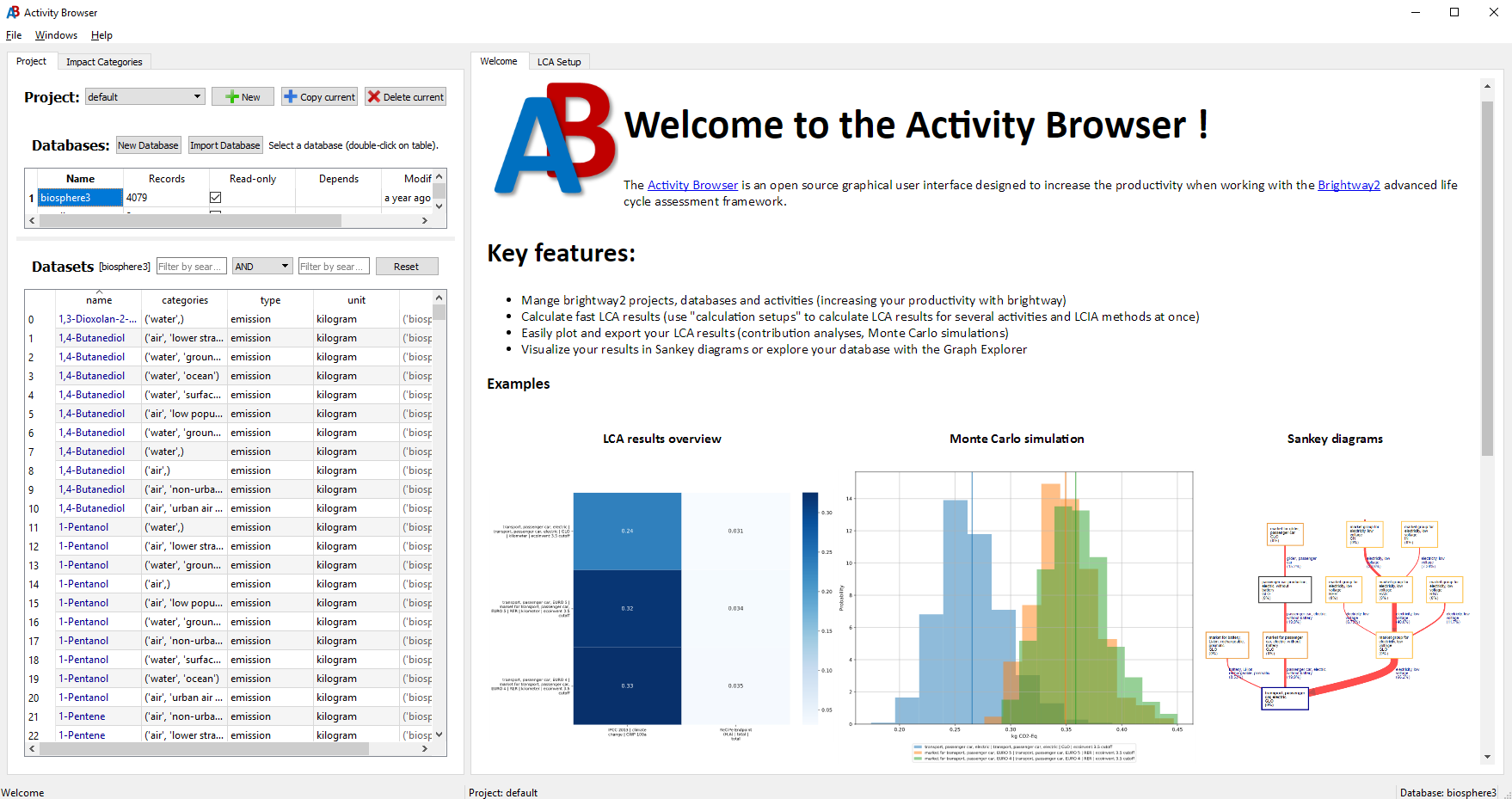
The Activity Browser (AB) is an open-source GUI for Life Cycle Assessment on Brightway.
Highlights
- Fast LCA calculations: for multiple reference flows, impact categories, and scenarios
- A productivity tool for Brightway: model in Brightway (Python) and see the results in the AB or vice versa
- Advanced modeling: Use parameters, scenarios (including prospective LCI databases from premise), uncertainties and our Graph Explorer
- Advanced analyses: Contribution analyses, Sankey Diagrams, Monte Carlo, and Global Sensitivity Analysis
- Plugins: Extend the functionality of Activity Browser with Plugins
Contents
- Installation (recommended: AB3 beta)
- First Steps
- Contributing
- Developers
- Activity Browser 2 (legacy)
- Copyright
- License
Installation (recommended: AB3 beta)
See the Installation Guide for a step-by-step walkthrough (PyPI or Anaconda).
Quick install — PyPI (recommended)
# CREATE the virtual environment (in directory you can remember,
# a good default is ...user\virtualenvs\):
python -m venv ab-beta

# ACTIVATE the virtual environment:
# on Windows:
ab-beta\Scripts\activate

# on macOS/Linux:
source ab-beta/bin/activate

# INSTALL the Activity Browser:
pip install activity-browser

# RUN the Activity Browser:
activity-browser
Quick install — Conda
conda create -n ab_beta -c conda-forge -c lca -c cmutel lca::activity-browser
conda activate ab_beta
activity-browser
Note: Pin
lca::activity-browser. An unpinnedactivity-browserwith-c conda-forgefirst resolves to Activity Browser 2 from conda-forge (Brightway2 + PySide2). Keep-c cmutelsobw_simapro_csvandpyside6/qt6-webengineresolve with the ecoinvent stack. For AB2, see Activity Browser 2 (legacy).
First Steps
See our Getting Started wiki page to learn how to get started using Activity Browser.
Contributing
The Activity Browser is a community project. Your contribution counts!
If you have ideas for improvements to the code or documentation or want to propose new features, please take a look at our contributing guidelines and open issues and/or pull-requests.
If you experience problems or are suffering from a specific bug, please raise an issue here on github.
Developers
Current maintainers
- Bernhard Steubing (creator, maintainer)
- Marc van der Meide (maintainer)
Important contributors
Activity Browser 2 (legacy)
Activity Browser 2 is the previous stable version, but not actively maintained anymore (Brightway2). Prefer AB3 beta for new work.
Installation (see also: Installation Guide (wiki)):
conda create -n ab -c conda-forge activity-browser
conda activate ab
activity-browser
License and Copyright
This project is licensed under the terms of the GNU Lesser General Public License (LGPL v3 or later), see license file.
- Copyright (c) 2014-2026: Bernhard Steubing
- Copyright (c) 2014-2016: ETH Zürich
- Copyright (c) 2018-2024: Universiteit Leiden
3 maintainers


Metadata
3 maintainers
Release files for activity-browser 3.0.0b202611151932
For a detailed explanation of source distributions (sdists) and built distributions (wheels), please see the package formats documentation.
Source distribution (sdist)
| File | Size | Uploaded | Provenance | Actions |
|---|---|---|---|---|
| activity_browser-3.0.0b202611151932.tar.gz | 4.3 MB | Without provenance | Details for activity_browser-3.0.0b202611151932.tar.gz |
Built distribution (wheel)
| File | Interpreter | ABI | Platform | Actions Reset |
|---|---|---|---|---|
| activity_browser-3.0.0b202611151932-py3-none-any.whl | Python 3 | none | any | Details for activity_browser-3.0.0b202611151932-py3-none-any.whl |
Total release size: 8.7 MB
Release files / activity_browser-3.0.0b202611151932.tar.gz
| Download URL | activity_browser-3.0.0b202611151932.tar.gz |
|---|---|
| Size | 4.3 MB |
| Tags | Source |
|
SHA-256 checksum How to use checksums |
86331d22ca871289b4de100e43d835313d25c8c6982bc6ca38a6092ba8864258
|
|
BLAKE2b-256 checksum How to use checksums |
22b1655ddbd61bd1b5f3396ee6db66fc335ef34a6dfad1b3c09007a4a0f5b58d
|
| Upload date | |
|
Uploaded using Trusted Publishing? What is trusted publishing? |
Yes |
| Uploaded via |
twine/7.0.0 CPython/3.13.16
|
Release files / activity_browser-3.0.0b202611151932-py3-none-any.whl
| Download URL | activity_browser-3.0.0b202611151932-py3-none-any.whl |
|---|---|
| Size | 4.4 MB |
| Tags | Python 3 |
|
SHA-256 checksum How to use checksums |
31df94c79b8a49353c424abe5667a3b61175968fc20e08aa400d1ee88960aee1
|
|
BLAKE2b-256 checksum How to use checksums |
b85bdea365b2a8bf1fd589e6a8bea103185b7684c662d8e6c670c05357466cdc
|
| Upload date | |
|
Uploaded using Trusted Publishing? What is trusted publishing? |
Yes |
| Uploaded via |
twine/7.0.0 CPython/3.13.16
|
Security for activity-browser 3.0.0b202611151932
Provenance
Provenance describes where a file came from. On PyPI, provenance is shared via attestations, which provide a verifiable record of the build or publishing details. View details, limitations and caveats.
No provenance found
None of the files in this release were uploaded with provenance metadata.
A note on package security
PyPI is a repository for distributing packages, not a service for auditing them. While third-party security researchers and our staff do their best to detect and remove malicious packages, PyPI cannot guarantee the quality, security or suitability of any given package.
To learn more about protecting yourself from malicious actors, visit our package security documentation.














