
Official ActivitySmith Python SDK
Verified details
These details have been verified by PyPIProject links
GitHub Statistics
Maintainers

Project description
ActivitySmith Python Library
The ActivitySmith Python library provides convenient access to the ActivitySmith API from Python applications.
Documentation
See the API reference.
Table of Contents
Installation
This package is available on PyPI:
pip install activitysmith
Alternatively, install from source with:
python -m pip install .
Setup
import os
from activitysmith import ActivitySmith

activitysmith = ActivitySmith(
    api_key=os.environ["ACTIVITYSMITH_API_KEY"],
)
Push Notifications
Send a Push Notification
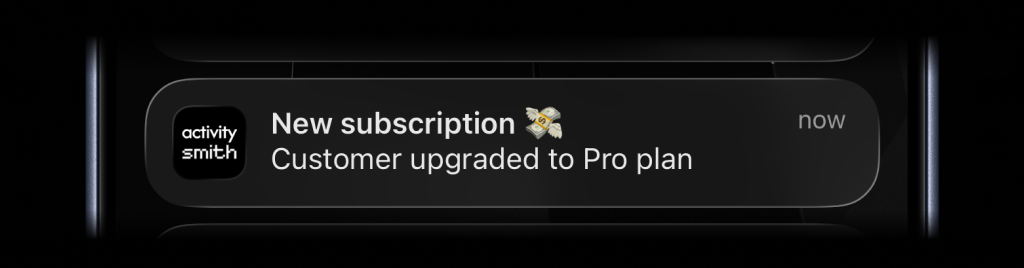
activitysmith.notifications.send(
    {
        "title": "New subscription 💸",
        "message": "Customer upgraded to Pro plan",
    }
)
Rich Push Notifications with Media
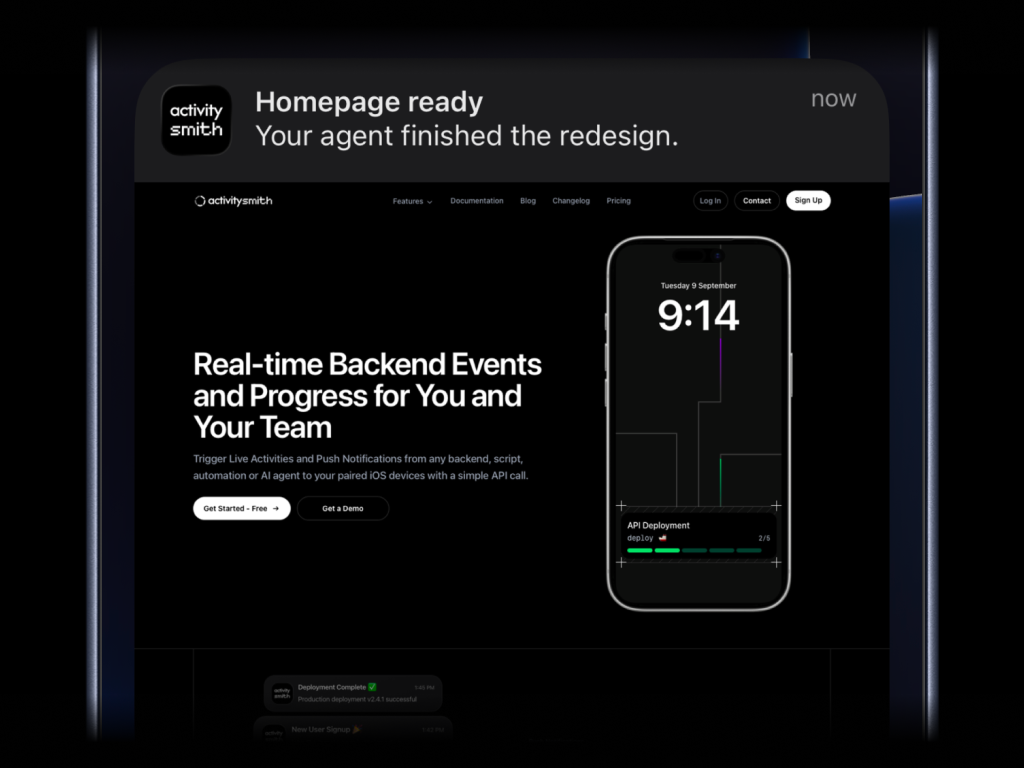
activitysmith.notifications.send(
    {
        "title": "Homepage ready",
        "message": "Your agent finished the redesign.",
        "media": "https://cdn.example.com/output/homepage-v2.png",
        "redirection": "https://github.com/acme/web/pull/482",
    }
)
Send images, videos, or audio with your push notifications, press and hold to preview media directly from the notification, then tap through to open the linked content.
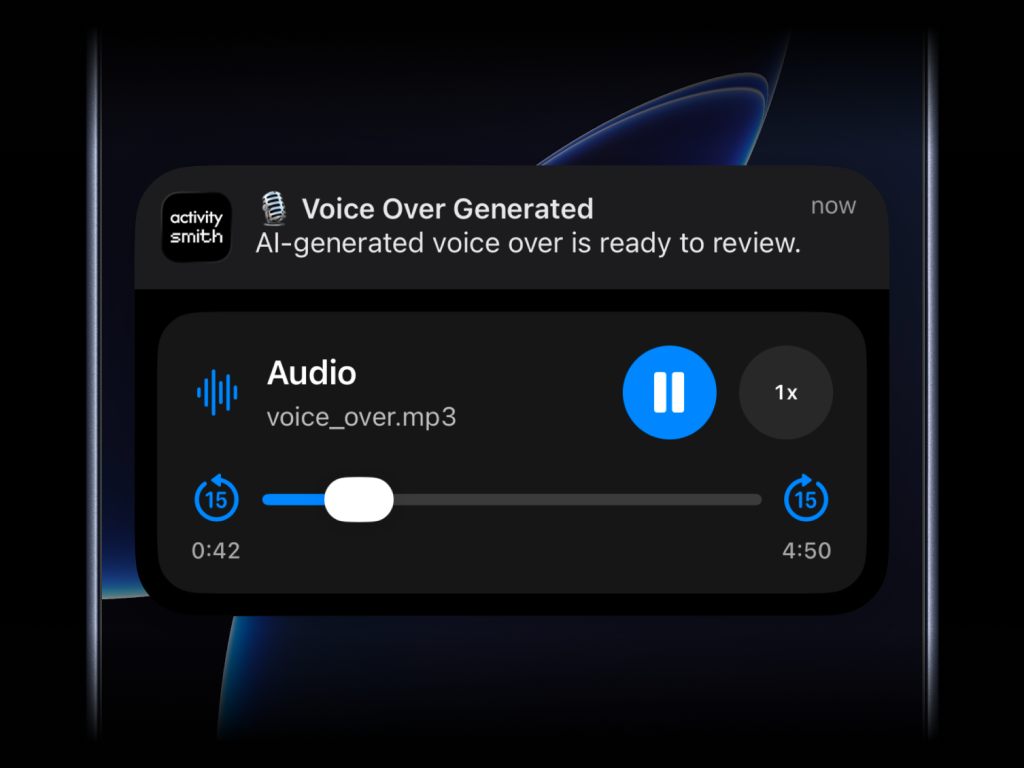
What will work:
- direct image URL:
.jpg,.png,.gif, etc. - direct audio file URL:
.mp3,.m4a, etc. - direct video file URL:
.mp4,.mov, etc. - URL that responds with a proper media
Content-Type, even if the path has no extension
Actionable Push Notifications
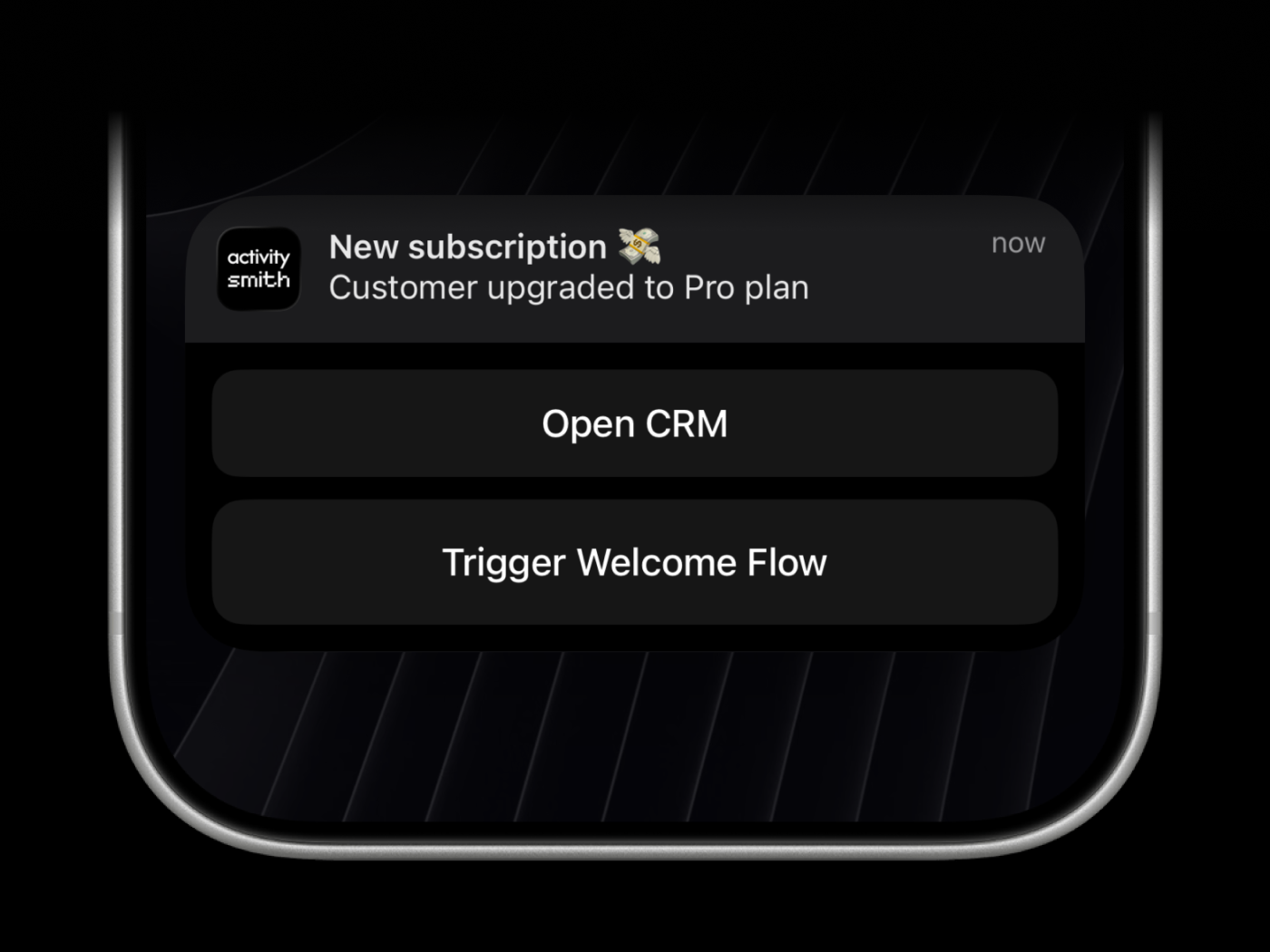
Actionable push notifications can open a URL on tap or trigger actions when someone long-presses the notification. Webhooks are executed by the ActivitySmith backend.
activitysmith.notifications.send(
    {
        "title": "New subscription 💸",
        "message": "Customer upgraded to Pro plan",
        "redirection": "https://crm.example.com/customers/cus_9f3a1d",  # Optional
        "actions": [  # Optional (max 4)
            {
                "title": "Open CRM Profile",
                "type": "open_url",
                "url": "https://crm.example.com/customers/cus_9f3a1d",
            },
            {
                "title": "Start Onboarding Workflow",
                "type": "webhook",
                "url": "https://hooks.example.com/activitysmith/onboarding/start",
                "method": "POST",
                "body": {
                    "customer_id": "cus_9f3a1d",
                    "plan": "pro",
                },
            },
        ],
    }
)
Live Activities
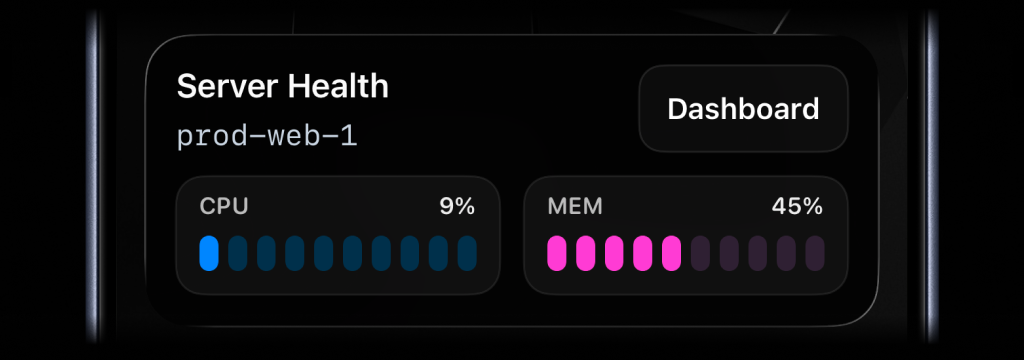
There are four types of Live Activities:
stats: best for compact business or product stats like revenue, orders, conversion, and average order valuemetrics: best for live operational stats like server CPU and memory, queue depth, or replica lagsegmented_progress: best for step-based workflows like deployments, backups, and ETL pipelinesprogress: best for continuous jobs like uploads, reindexes, and long-running migrations tracked as a percentage
When working with Live Activities via our API, you have two approaches tailored to different needs. First, the stateless mode is the simplest path - one API call can initiate or update an activity, and another ends it - no state tracking on your side.
This is ideal if you want minimal complexity, perfect for automated workflows like cron jobs.
In contrast, if you need precise lifecycle control, the classic approach offers distinct calls for start, updates, and end, giving you full control over the activity's state.
In the following sections, we'll break down how to implement each method so you can choose what fits your use case best.
Simple: Let ActivitySmith manage the Live Activity for you
Use a stable stream_key to identify the system or workflow you are tracking,
such as a server, deployment, build pipeline, cron job, or charging session.
This is especially useful for cron jobs and other scheduled tasks where you do
not want to store activity_id between runs.
Stats
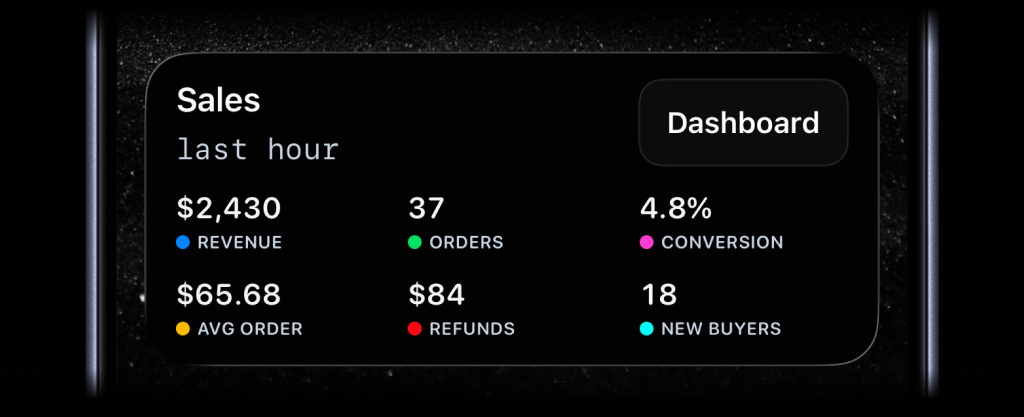
status = activitysmith.live_activities.stream(
    "sales-hourly",
    {
        "content_state": {
            "title": "Sales",
            "subtitle": "last hour",
            "type": "stats",
            "metrics": [
                {"label": "Revenue", "value": "$2430", "color": "blue"},
                {"label": "Orders", "value": "37", "color": "green"},
                {"label": "Conversion", "value": "4.8%", "color": "magenta"},
                {"label": "Avg Order", "value": "$65.68", "color": "yellow"},
                {"label": "Refunds", "value": "$84", "color": "red"},
                {"label": "New Buyers", "value": "18", "color": "cyan"},
            ],
        },
    },
)
Metrics
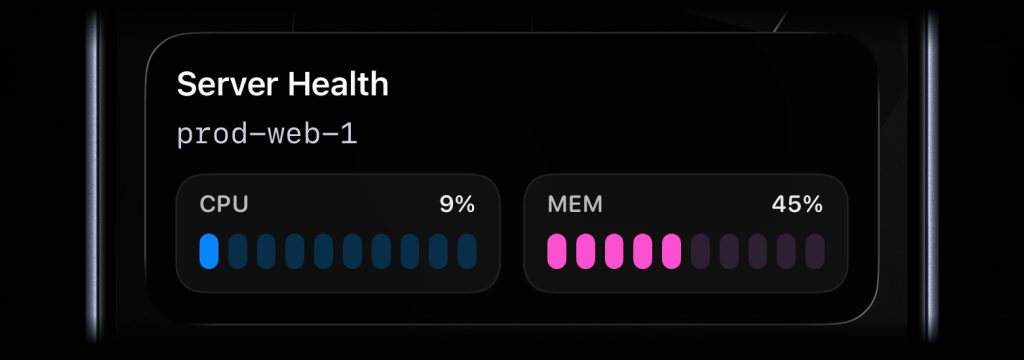
status = activitysmith.live_activities.stream(
    "prod-web-1",
    {
        "content_state": {
            "title": "Server Health",
            "subtitle": "prod-web-1",
            "type": "metrics",
            "metrics": [
                {"label": "CPU", "value": 9, "unit": "%"},
                {"label": "MEM", "value": 45, "unit": "%"},
            ],
        },
    },
)
Segmented progress
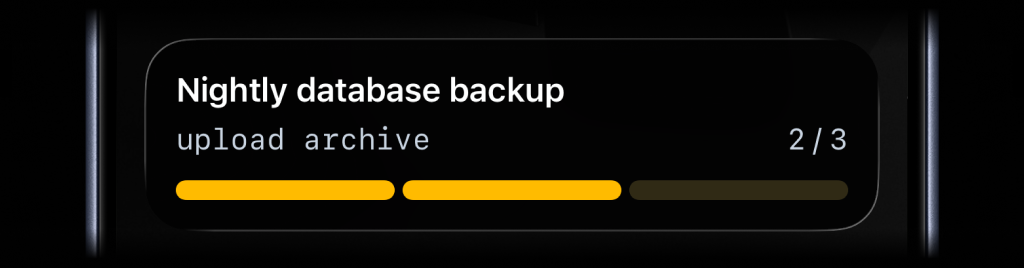
activitysmith.live_activities.stream(
    "nightly-backup",
    {
        "content_state": {
            "title": "Nightly Backup",
            "subtitle": "upload archive",
            "type": "segmented_progress",
            "number_of_steps": 3,
            "current_step": 2,
        },
    },
)
Progress
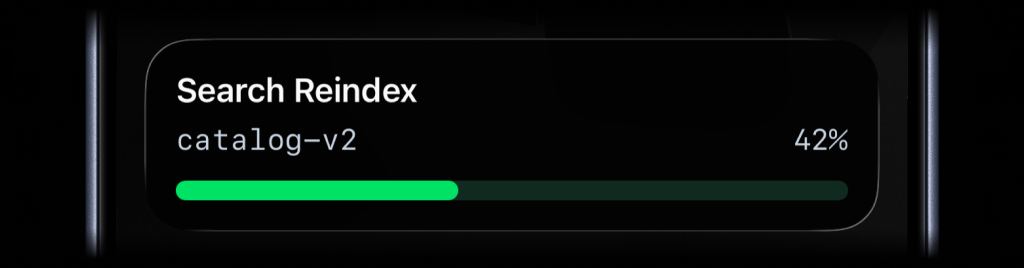
activitysmith.live_activities.stream(
    "search-reindex",
    {
        "content_state": {
            "title": "Search Reindex",
            "subtitle": "catalog-v2",
            "type": "progress",
            "percentage": 42,
        },
    },
)
Call stream(...) again with the same stream_key whenever the state changes.
End a stream
Use this when the tracked process is finished and you no longer want the Live
Activity on devices. content_state is optional here; include it if you want
to end the stream with a final state.
activitysmith.live_activities.end_stream(
    "prod-web-1",
    {
        "content_state": {
            "title": "Server Health",
            "subtitle": "prod-web-1",
            "type": "metrics",
            "metrics": [
                {"label": "CPU", "value": 7, "unit": "%"},
                {"label": "MEM", "value": 38, "unit": "%"},
            ],
        },
    },
)
If you later send another stream(...) request with the same stream_key,
ActivitySmith starts a new Live Activity for that stream again.
Stream responses include an operation field:
started: ActivitySmith started a new Live Activity for thisstream_keyupdated: ActivitySmith updated the current Live Activityrotated: ActivitySmith ended the previous Live Activity and started a new onenoop: the incoming state matched the current state, so no update was sentpaused: the stream is paused, so no Live Activity was started or updatedended: returned byend_stream(...)after the stream is ended
Advanced: Full lifecycle control
Use these methods when you want to manage the Live Activity lifecycle yourself:
- Call
activitysmith.live_activities.start(...). - Save the returned
activity_id. - Call
activitysmith.live_activities.update(...)as progress changes. - Call
activitysmith.live_activities.end(...)when the work is finished.
Stats Type
Keep your key numbers on your Lock Screen. stats fits 1 to 8 labeled values,
such as revenue, orders, conversion, uptime, or any other business metric you
want visible at a glance. Each metric can use a formatted string or number as
its value. Add color to a metric to show an accent dot next to its label;
omit color to show the label without a dot.
Start
start = activitysmith.live_activities.start(
    {
        "content_state": {
            "title": "Sales",
            "subtitle": "last hour",
            "type": "stats",
            "metrics": [
                {"label": "Revenue", "value": "$2430", "color": "blue"},
                {"label": "Orders", "value": "37", "color": "green"},
                {"label": "Conversion", "value": "4.8%", "color": "magenta"},
                {"label": "Avg Order", "value": "$65.68", "color": "yellow"},
                {"label": "Refunds", "value": "$84", "color": "red"},
                {"label": "New Buyers", "value": "18", "color": "cyan"},
            ],
        },
    }
)

activity_id = start.activity_id
Update
activitysmith.live_activities.update(
    {
        "activity_id": activity_id,
        "content_state": {
            "title": "Sales",
            "subtitle": "last hour",
            "type": "stats",
            "metrics": [
                {"label": "Revenue", "value": "$3180", "color": "blue"},
                {"label": "Orders", "value": "51", "color": "green"},
                {"label": "Conversion", "value": "5.2%", "color": "magenta"},
                {"label": "Avg Order", "value": "$62.35", "color": "yellow"},
                {"label": "Refunds", "value": "$126", "color": "red"},
                {"label": "New Buyers", "value": "24", "color": "cyan"},
            ],
        },
    }
)
End
activitysmith.live_activities.end(
    {
        "activity_id": activity_id,
        "content_state": {
            "title": "Sales",
            "subtitle": "last hour",
            "type": "stats",
            "metrics": [
                {"label": "Revenue", "value": "$3460", "color": "blue"},
                {"label": "Orders", "value": "58", "color": "green"},
                {"label": "Conversion", "value": "5.4%", "color": "magenta"},
                {"label": "Avg Order", "value": "$59.66", "color": "yellow"},
                {"label": "Refunds", "value": "$92", "color": "red"},
                {"label": "New Buyers", "value": "31", "color": "cyan"},
            ],
            "auto_dismiss_minutes": 2,
        },
    }
)
Metrics Type
Use metrics when you want to keep a small set of live stats visible, such as
server health, queue pressure, or database load.
Start
start = activitysmith.live_activities.start(
    {
        "content_state": {
            "title": "Server Health",
            "subtitle": "prod-web-1",
            "type": "metrics",
            "metrics": [
                {"label": "CPU", "value": 9, "unit": "%"},
                {"label": "MEM", "value": 45, "unit": "%"},
            ],
        },
    }
)

activity_id = start.activity_id
Update
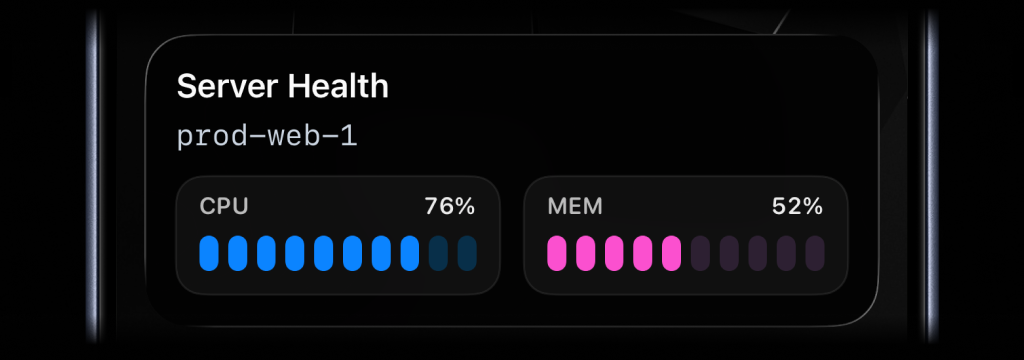
activitysmith.live_activities.update(
    {
        "activity_id": activity_id,
        "content_state": {
            "title": "Server Health",
            "subtitle": "prod-web-1",
            "type": "metrics",
            "metrics": [
                {"label": "CPU", "value": 76, "unit": "%"},
                {"label": "MEM", "value": 52, "unit": "%"},
            ],
        },
    }
)
End
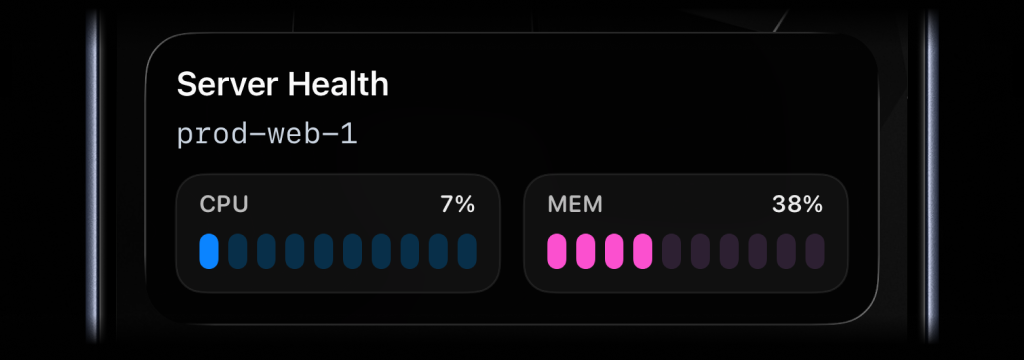
activitysmith.live_activities.end(
    {
        "activity_id": activity_id,
        "content_state": {
            "title": "Server Health",
            "subtitle": "prod-web-1",
            "type": "metrics",
            "metrics": [
                {"label": "CPU", "value": 7, "unit": "%"},
                {"label": "MEM", "value": 38, "unit": "%"},
            ],
            "auto_dismiss_minutes": 2,
        },
    }
)
Segmented Progress Type
Use segmented_progress for jobs and workflows that move through clear steps or
phases. It fits jobs like backups, deployments, ETL pipelines, and checklists.
number_of_steps is dynamic, so you can increase or decrease it later if the
workflow changes.
Start
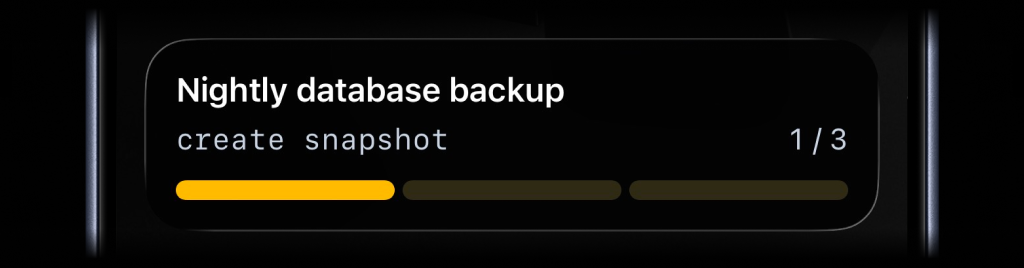
start = activitysmith.live_activities.start(
    {
        "content_state": {
            "title": "Nightly database backup",
            "subtitle": "create snapshot",
            "number_of_steps": 3,
            "current_step": 1,
            "type": "segmented_progress",
            "color": "yellow",
        },
    }
)

activity_id = start.activity_id
Update
activitysmith.live_activities.update(
    {
        "activity_id": activity_id,
        "content_state": {
            "title": "Nightly database backup",
            "subtitle": "upload archive",
            "number_of_steps": 3,
            "current_step": 2,
        },
    }
)
End
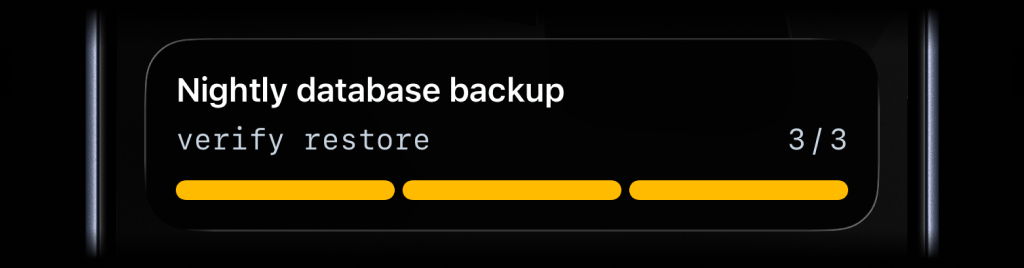
activitysmith.live_activities.end(
    {
        "activity_id": activity_id,
        "content_state": {
            "title": "Nightly database backup",
            "subtitle": "verify restore",
            "number_of_steps": 3,
            "current_step": 3,
            "auto_dismiss_minutes": 2,
        },
    }
)
Progress Type
Use progress when the state is naturally continuous. It fits charging,
downloads, sync jobs, uploads, timers, and any flow where a percentage or
numeric range is the clearest signal.
Start
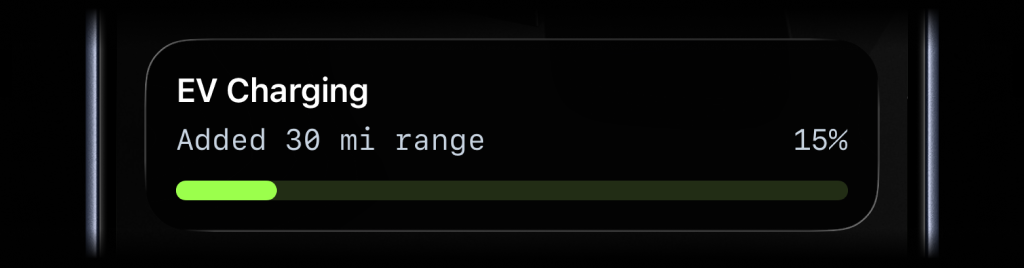
start = activitysmith.live_activities.start(
    {
        "content_state": {
            "title": "EV Charging",
            "subtitle": "Added 30 mi range",
            "type": "progress",
            "percentage": 15,
        }
    }
)

activity_id = start.activity_id
Update
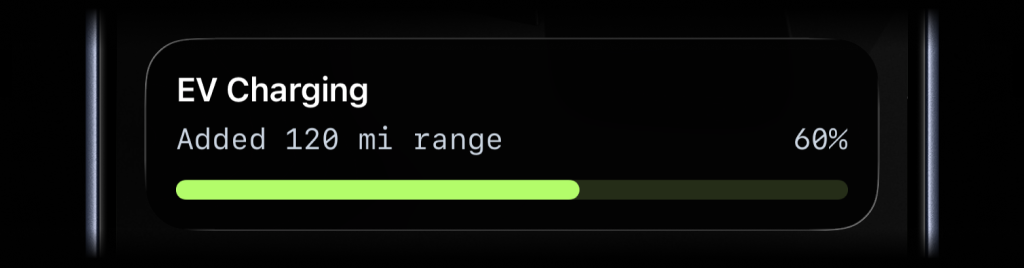
activitysmith.live_activities.update(
    {
        "activity_id": activity_id,
        "content_state": {
            "title": "EV Charging",
            "subtitle": "Added 120 mi range",
            "percentage": 60,
        }
    }
)
End
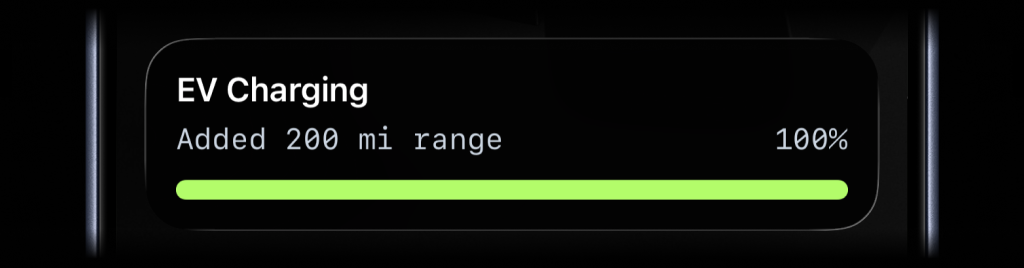
activitysmith.live_activities.end(
    {
        "activity_id": activity_id,
        "content_state": {
            "title": "EV Charging",
            "subtitle": "Added 200 mi range",
            "percentage": 100,
            "auto_dismiss_minutes": 2,
        }
    }
)
Live Activity Action
Just like Actionable Push Notifications, Live Activities can have a button that opens provided URL in a browser or triggers a webhook. Webhooks are executed by the ActivitySmith backend.
Open URL action
start = activitysmith.live_activities.start(
    {
        "content_state": {
            "title": "Server Health",
            "subtitle": "prod-web-1",
            "type": "metrics",
            "metrics": [
                {"label": "CPU", "value": 76, "unit": "%"},
                {"label": "MEM", "value": 52, "unit": "%"},
            ],
        },
        "action": {
            "title": "Open Dashboard",
            "type": "open_url",
            "url": "https://ops.example.com/servers/prod-web-1",
        },
    }
)

activity_id = start.activity_id
Webhook action
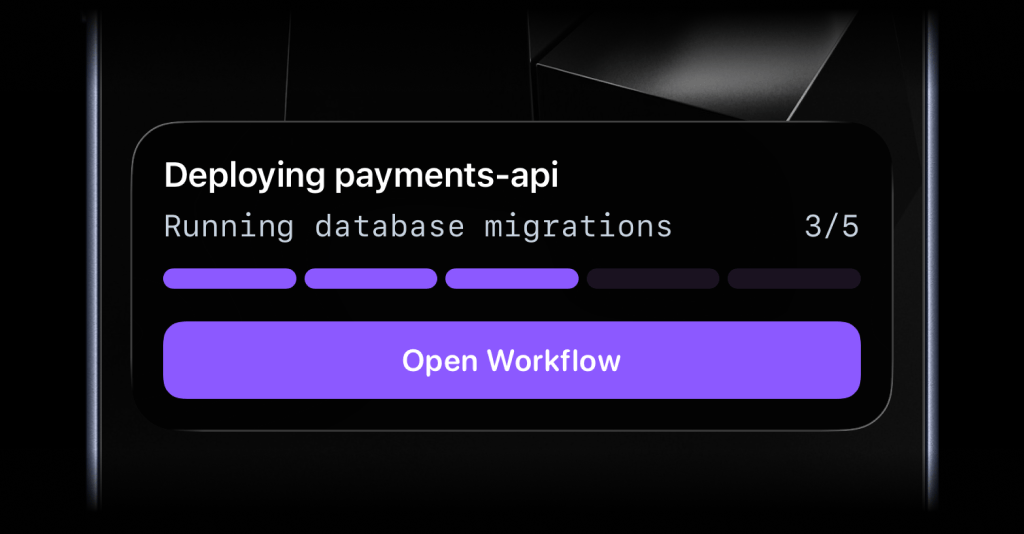
activitysmith.live_activities.update(
    {
        "activity_id": activity_id,
        "content_state": {
            "title": "Reindexing product search",
            "subtitle": "Shard 7 of 12",
            "number_of_steps": 12,
            "current_step": 7,
        },
        "action": {
            "title": "Pause Reindex",
            "type": "webhook",
            "url": "https://ops.example.com/hooks/search/reindex/pause",
            "method": "POST",
            "body": {
                "job_id": "reindex-2026-03-19",
                "requested_by": "activitysmith-python",
            },
        },
    }
)
Channels
Channels are used to target specific team members or devices. Can be used for both push notifications and live activities.
activitysmith.notifications.send(
    {
        "title": "New subscription 💸",
        "message": "Customer upgraded to Pro plan",
        "channels": ["sales", "customer-success"],  # Optional
    }
)
Widgets
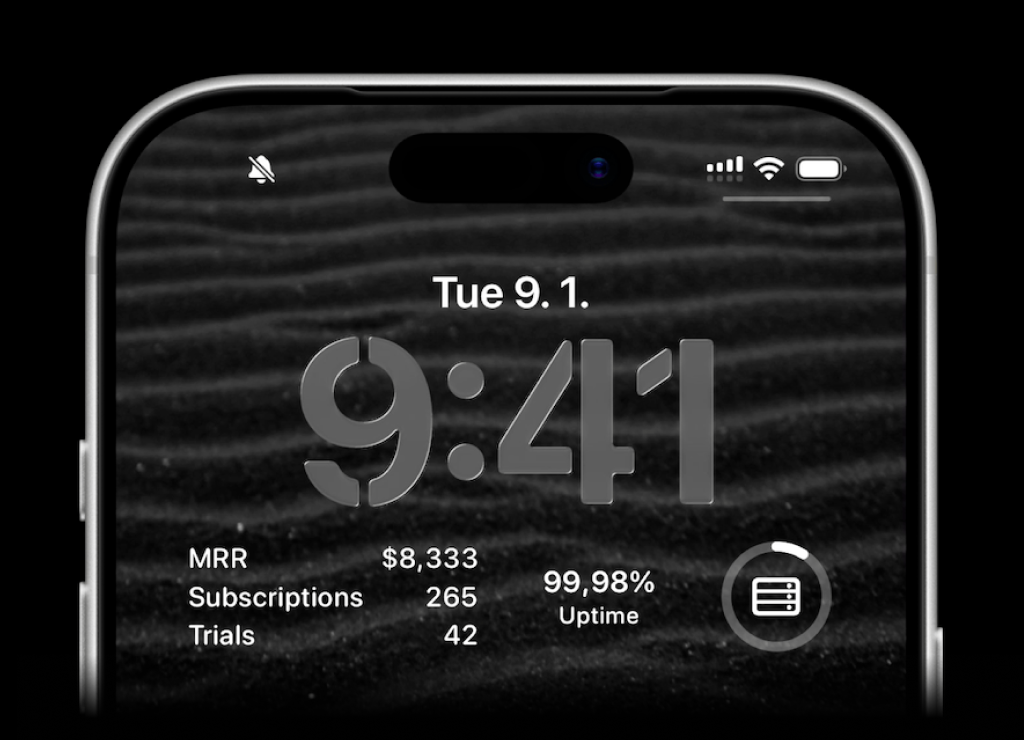
ActivitySmith lets you display any value on your Lock Screen with widgets - SaaS metrics, revenue, signups, uptime, habits, or anything else you want to track. Create a metric in the web app, then update the metric value using our API, add a widget to your lock screen and it will fetch the latest update automatically.
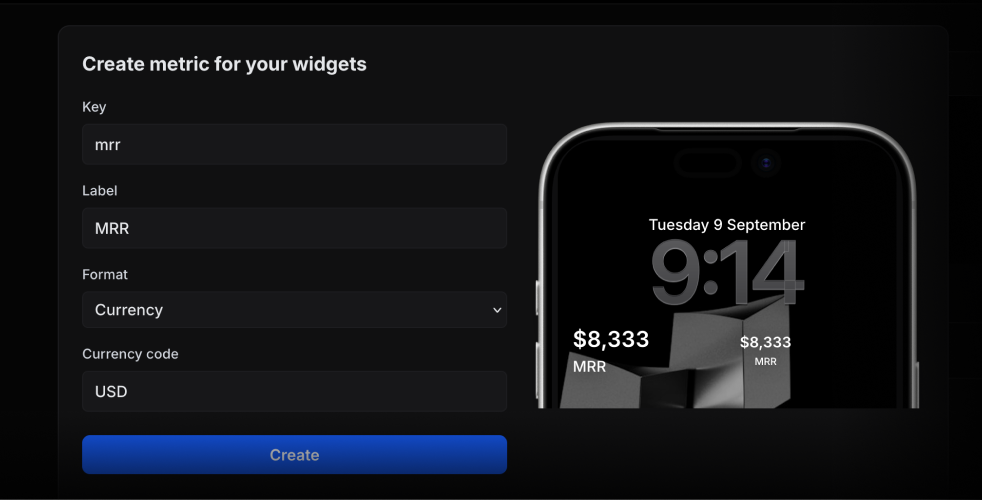
activitysmith.metrics.update("deploy.success_rate", 99.9)
String metric values work too.
activitysmith.metrics.update("prod.status", "healthy")
Error Handling
try:
    activitysmith.notifications.send(
        {
            "title": "New subscription 💸",
        }
    )
except Exception as err:
    print("Request failed:", err)
Request/response models are included and can be imported from activitysmith_openapi.models.
Requirements
- Python 3.9 or newer
License
MIT
Project details
Verified details
These details have been verified by PyPIProject links
GitHub Statistics
Maintainers
Release history Release notifications | RSS feed


Download files
Download the file for your platform. If you're not sure which to choose, learn more about installing packages.
Source Distribution
Built Distribution
Filter files by name, interpreter, ABI, and platform.
If you're not sure about the file name format, learn more about wheel file names.
Copy a direct link to the current filters
File details
Details for the file activitysmith-1.3.0.tar.gz.
File metadata
- Download URL: activitysmith-1.3.0.tar.gz
- Upload date:
- Size: 52.2 kB
- Tags: Source
- Uploaded using Trusted Publishing? Yes
- Uploaded via: twine/6.1.0 CPython/3.13.12
File hashes
| Algorithm | Hash digest | |
|---|---|---|
| SHA256 |
99c2a4f5847e8905a8d51fef52489de8c250a636c916fc54db619e5df452cff0
|
|
| MD5 |
1e9ebb65dcfb3de86bb476b16b4805e7
|
|
| BLAKE2b-256 |
1ad431a1ff3602f5935dd24f1a41465b355b827b2420c5c7882b46f582fcffbe
|
Provenance
The following attestation bundles were made for activitysmith-1.3.0.tar.gz:
Publisher:
publish.yml on ActivitySmithHQ/activitysmith-python
-
Statement:
-
Statement type:
https://in-toto.io/Statement/v1 -
Predicate type:
https://docs.pypi.org/attestations/publish/v1 -
Subject name:
activitysmith-1.3.0.tar.gz -
Subject digest:
99c2a4f5847e8905a8d51fef52489de8c250a636c916fc54db619e5df452cff0 - Sigstore transparency entry: 1503124947
- Sigstore integration time:
-
Permalink:
ActivitySmithHQ/activitysmith-python@f0d4d2d6528f9c8456229192ad8be131626eaa03 -
Branch / Tag:
refs/tags/v1.3.0 - Owner: https://github.com/ActivitySmithHQ
-
Access:
public
-
Token Issuer:
https://token.actions.githubusercontent.com -
Runner Environment:
github-hosted -
Publication workflow:
publish.yml@f0d4d2d6528f9c8456229192ad8be131626eaa03 -
Trigger Event:
push
-
Statement type:
File details
Details for the file activitysmith-1.3.0-py3-none-any.whl.
File metadata
- Download URL: activitysmith-1.3.0-py3-none-any.whl
- Upload date:
- Size: 128.7 kB
- Tags: Python 3
- Uploaded using Trusted Publishing? Yes
- Uploaded via: twine/6.1.0 CPython/3.13.12
File hashes
| Algorithm | Hash digest | |
|---|---|---|
| SHA256 |
6d60bbbb8beba71f6ac96e7cf988377f540c5684abc928494039dda79583e733
|
|
| MD5 |
ee215bdb874a0adf642855cc7c033639
|
|
| BLAKE2b-256 |
05b697bb7e050537bc87047cfa52f74bf1ebdf44729205872e54c250dcf97353
|
Provenance
The following attestation bundles were made for activitysmith-1.3.0-py3-none-any.whl:
Publisher:
publish.yml on ActivitySmithHQ/activitysmith-python
-
Statement:
-
Statement type:
https://in-toto.io/Statement/v1 -
Predicate type:
https://docs.pypi.org/attestations/publish/v1 -
Subject name:
activitysmith-1.3.0-py3-none-any.whl -
Subject digest:
6d60bbbb8beba71f6ac96e7cf988377f540c5684abc928494039dda79583e733 - Sigstore transparency entry: 1503125142
- Sigstore integration time:
-
Permalink:
ActivitySmithHQ/activitysmith-python@f0d4d2d6528f9c8456229192ad8be131626eaa03 -
Branch / Tag:
refs/tags/v1.3.0 - Owner: https://github.com/ActivitySmithHQ
-
Access:
public
-
Token Issuer:
https://token.actions.githubusercontent.com -
Runner Environment:
github-hosted -
Publication workflow:
publish.yml@f0d4d2d6528f9c8456229192ad8be131626eaa03 -
Trigger Event:
push
-
Statement type:






