
ADIF file utilities
Verified details
These details have been verified by PyPIProject links
GitHub Statistics
Maintainers

Project description

adiftools: adif file utility tools for all amateur radio stations
| Item | Status |
|---|---|
| Testing |     |
| Package |   |
| Meta |   |
| Stats |    |
What is it?
adiftools is a Python package that provides utilities for ADIF data which is used for the QSO logging file format.
This tool allows you to easily load all QSO data from an ADIF file into a pandas DataFrame. Additionally, it provides functions for graphing the loaded data, as well as utility functions for Grid Locator-related latitude and longitude conversion and distance measurement.
Main Features
-
ADIF file parser: Read ADIF file and convert to pandas DataFrame
- Supported ADIF record layouts:
- Single-line records (all fields for one QSO on one line ending with
<EOR>) - Multi-line records (fields split across multiple lines, one record ending with
<EOR>), such as QRZ.com exports
- Single-line records (all fields for one QSO on one line ending with
- Call signature:
ADIFParser.read_adi(file_path, enable_timestamp=False)
- Parameters:
file_path: str or path-like or binary file-like- A path or a Python file-like object representing the ADIF file to read.
- Returns:
pd.DataFrame- The created pandas DataFrame instance includes QSO data from the ADIF file.
- Other Parameters:
enable_timestamp: bool, default:False- If True, adds a row named ['timestamp'] to the DataFrame, generated from the ADIF file. The ['timestamp'] row is of type
datetime64[ns]and is based on the'QSO_DATE'and'TIME_ON'fields.
- If True, adds a row named ['timestamp'] to the DataFrame, generated from the ADIF file. The ['timestamp'] row is of type
- Supported ADIF record layouts:
-
Save ADIF data as adi file
- Saves the loaded ADIF data as an adi file conforming to the ADIF standard. adiftools adds a new header to the beginning of the adi file.
- Fields with no data are filled with
nan. - The header will contain information on the following two fields, CREATED_TIMESTAMP, and PROGRAMID.
- Call signature:
ADIFParser.to_adi(file_path)
- Parameter:
file_path: str or path-like or binary file-like- A path, or a Python file-like object of adi file to save
- Returns:
None
-
Save ADIF data as pickle file: Save the DataFrame with the ADIF loaded to a pickle file.
- Loading an ADIF file into a DataFrame can be quite time consuming.
- It is especially long if there are many QSOs in the ADIF file, and it is very cumbersome to read the data every time.
- It is recommended to serialize the ADIF data once loaded and save it in a pickle format, which is expected to be 50 times faster than loading a raw ADIF file.
- Call signature:
ADIFParser.to_pickle(file_path)
- Parameter:
file_path: str or path-like or binary file-like- A path, or a Python file-like object of pickle file to save
- Returns:
None
-
Load Pickle data
- Provides a way to read ADIF data once it has been loaded by ADIFParser and saved in a pickle file.
- The read_pickle method does not check whether the QSO data is saved in the read pickle file.
- Call signature:
ADIFParser.read_pickle(file_path)
- Parameter:
file_path: str or path-like or binary file-like- A path, or a Python file-like object of pickle file to read
- Returns:
pd.DataFrame- The created
pandas DataFrameinstance includes QSO data from the ADIF file.
- The created
-
Save ADIF data as excel file: Save the DataFrame with the ADIF loaded to an excel file.
- Call signature:
ADIFParser.to_excel(file_path)
- Parameter:
file_path: str or path-like or binary file-like- A path, or a Python file-like object of excel file to save
- Returns:
None
- Call signature:
-
Generate Callsign file
- Outputs call sign data without duplicates from data read from an ADIF file as a text file. The text file will contain one callsign per line.
- If the ADIF file has not been read, i.e.,
read_adi()has not been performed, it returns the errorAdifParserError. - Call signature:
ADIFParser.call_to_txt(file_path)
- Parameter:
file_path: str or path-like or binary file-like- A path of output txt file
- Returns:
None
-
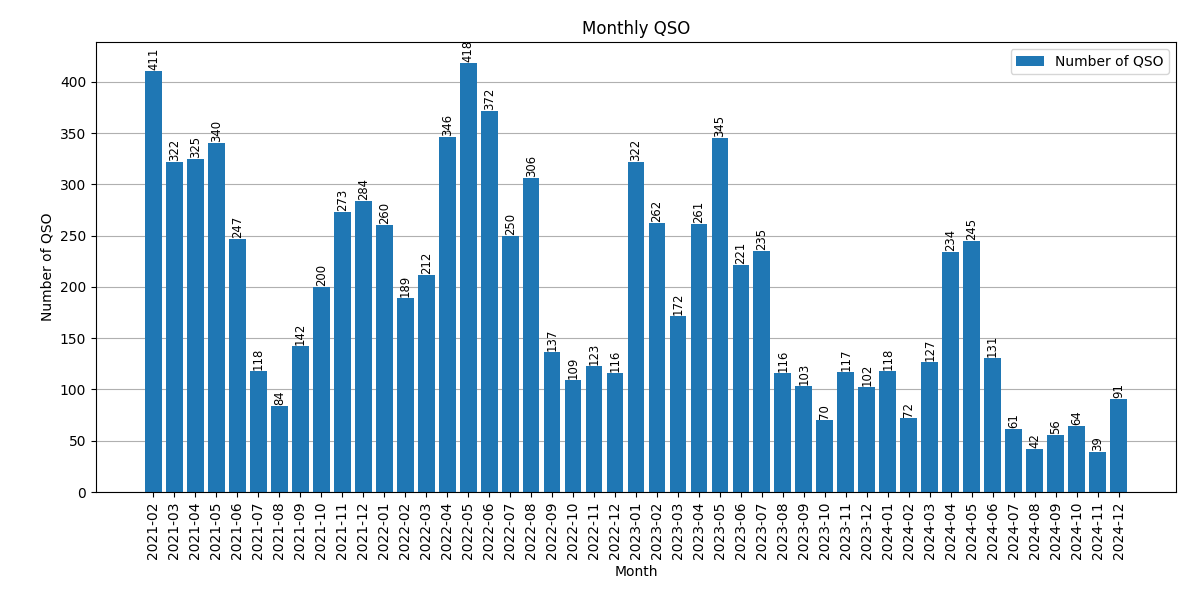
ADIF data monthly plot: Generate monthly QSO plot
-
Call signature:
ADIFParser.plot_monthly(file_path)
Generates a bar plot of monthly QSOs and saves a PNG or JPG file.
-
Parameters:
file_path: str or path-like or binary file-like- A path or a Python file-like object of the plot's PNG or JPG file.
-
Returns:
None
-
-
Monthly Band QSO Stacked Bar Plot: Generate stacked bar plot of monthly QSO counts by band
- Call signature:
ADIFParser.plot_monthly_band(file_path)
Generates a stacked bar plot of monthly QSO counts by band and saves a PNG or JPG file. Each band is assigned a unique color for clarity. The color table for each BAND is defined inside the function, and if a BAND is not listed, a unique color is automatically assigned from a colormap to avoid duplication.
The color codes are inspired by the color scheme used on the website PSKReporter. We would like to acknowledge and thank PSKReporter for their excellent and informative color palette.
If you wish to customize the color assignment, please edit the color table in the source code of the function
monthly_band_qsoinadifgraph.py.- Parameters:
file_path: str or path-like or binary file-like- A path or a Python file-like object of the plot's PNG or JPG file.
- Returns:
None
BAND Color Code 2M #FF1493 4M #CC0044 5M #E0E0E0 6M #FF0000 8M #7F00F1 10M #FF69B4 11M #00FF00 12M #B22222 15M #CCA166 17M #F2F261 20M #F2C40C 30M #62D962 40M #5959FF 80M #E550E5 160M #7CFC00 Any BAND not listed above will be assigned a unique color from the colormap automatically.
- Call signature:
-
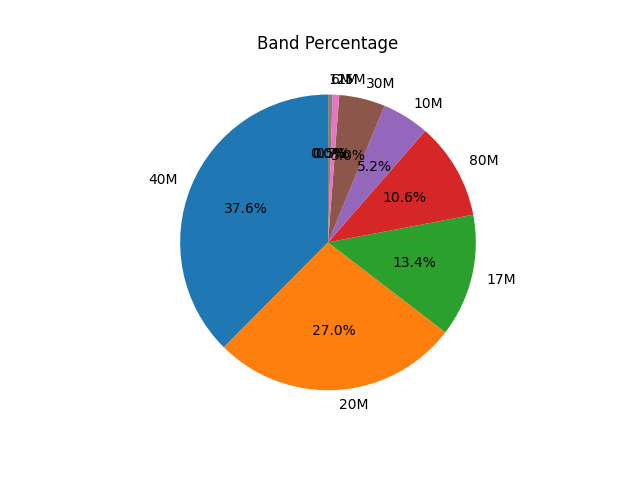
Band percentage plot: Generate pie plot to show QSO-Band percentage
-
Call signature:
ADIFParser.plot_band_percentage(file_path)
Generates a pie plot of QSO-band counts and saves a PNG or JPG file.
-
Parameters:
file_path: str or path-like or binary file-like- A path or a Python file-like object of the plot's PNG or JPG file.
-
Returns:
None
-
-
Grid Locator utilities
-
Calculate geographic coordination from GL
- Call signature:
adiftools.gl2latlon(gridlocator)
- Parameter:
gridlocator: str of grid locator. 4 or 6 digits, regardless of upper or lower case.
- Returns:
(latitude, longitude): tuple of latitude and longitude in decimal degree unit (DD/DEG format).
- Call signature:
-
Calculate grid locators from latitude and longitude
- Call signature
adiftools.latlon2gl(latitude, longitude, fourdigit=False)
- Parameters:
latitudein decimal degree unitlongitudein decimal degree unitfourdigitif True, returns 4-digit grid square
- Call signature
-
Reference
-
Calculate distance from two places' latitude and longitude
- Call signature
adiftools.get_dist(lat1, lon1, lat2, lon2)
- Parameters:
lat1– latitude of the first point in degreeslon1– longitude of the first point in degreeslat2– latitude of the second point in degreeslon2– longitude of the second point in degrees
- Returns:
- the distance from the first point to the second in meters
- Reference
- Call signature
-
-
Call Sign Utility
- Check JA call sign
- Call signature
adiftools.is_ja(call_sign)
- Parameter:
call_signcall sign in string
- Returns:
True: JA call,False: other
- Call signature
- Check Area
- Call signature
adiftools.get_area(call_sign)
- Parameter:
call_signcall sign in string
- Returns:
number: area number,None: n/a
- Call signature
- Check JA call sign

Note: adiftools does not support ADX file format at this moment.
Install
adiftools has been tested against Python 3.11, 3.12, and 3.13. It may work with Python 3 prior to 3.10, but we recommend using 3.11 or higher versions.
It is recommended to create a virtual environment and install adiftools inside the virtual environment.
Binary installers for the latest released version are available via PyPI: adiftools · PyPI.
pip install adiftools
If you are using an older version of adiftools, please use the following command to update it to the latest version.
pip install -U adiftools
If you no longer need adiftools, you can uninstall it with the following command.
pip uninstall adiftools
Testing version
We have decided not to update adiftools on the TestPyPI site anymore.
For detail, please see TestPyPI website: adiftools · TestPyPI
pip install -i https://test.pypi.org/simple/ adiftools==0.0.5
Getting Started
The first step in utilizing adiftools is to load an ADIF file; files that follow the ADIF standard can be loaded. After loading an adif file, you can perform graphing and other operations. Please refer to this page for ADIF standard. The Independent ADIF Site
Example:
import adiftools.adiftools as adiftools

adi = adiftools.ADIFParser()

df_adi = adi.read_adi('sample.adi') # Use your own adi file
print(df_adi)
Dependencies
adiftools requires the following Python packages (recommended versions):
- pandas (>=1.5)
- numpy
- matplotlib (>=3.5)
- GeographicLib API
You can install all dependencies with:
pip install adiftools
FAQ / Troubleshooting
- If you encounter an error related to subprocess or wheel, please try installing
wheelwithpip install wheel. - For other common issues, please refer to the adiftools issue tracker or open a new issue for support.
License
日本語での情報提供
Information in Japanese is available on the following blogs. Information updates are prioritized on GitHub, and information updates on the following blogs are slightly delayed.
TU de JS2IIU 73
Project details
Verified details
These details have been verified by PyPIProject links
GitHub Statistics
Maintainers
Release history Release notifications | RSS feed


Download files
Download the file for your platform. If you're not sure which to choose, learn more about installing packages.
Source Distribution
Built Distribution
Filter files by name, interpreter, ABI, and platform.
If you're not sure about the file name format, learn more about wheel file names.
Copy a direct link to the current filters
File details
Details for the file adiftools-0.1.12.tar.gz.
File metadata
- Download URL: adiftools-0.1.12.tar.gz
- Upload date:
- Size: 19.1 kB
- Tags: Source
- Uploaded using Trusted Publishing? Yes
- Uploaded via: twine/6.1.0 CPython/3.13.12
File hashes
| Algorithm | Hash digest | |
|---|---|---|
| SHA256 |
b242d488ea2398e17084261db355c4feebcc06d42761b09797222a4cd0ad35bf
|
|
| MD5 |
646f2302391556263d11542077383cb5
|
|
| BLAKE2b-256 |
23cbd659c8f194fe549b341a82d7bcca25a842588d253d5ffcf3813d889b0741
|
Provenance
The following attestation bundles were made for adiftools-0.1.12.tar.gz:
Publisher:
publish-to-pypi.yml on JS2IIU-MH/adiftools-dev
-
Statement:
-
Statement type:
https://in-toto.io/Statement/v1 -
Predicate type:
https://docs.pypi.org/attestations/publish/v1 -
Subject name:
adiftools-0.1.12.tar.gz -
Subject digest:
b242d488ea2398e17084261db355c4feebcc06d42761b09797222a4cd0ad35bf - Sigstore transparency entry: 1462009393
- Sigstore integration time:
-
Permalink:
JS2IIU-MH/adiftools-dev@f0ed4e30885c0b2cd0525a9de00fe48ad62edcd3 -
Branch / Tag:
refs/heads/main - Owner: https://github.com/JS2IIU-MH
-
Access:
public
-
Token Issuer:
https://token.actions.githubusercontent.com -
Runner Environment:
github-hosted -
Publication workflow:
publish-to-pypi.yml@f0ed4e30885c0b2cd0525a9de00fe48ad62edcd3 -
Trigger Event:
push
-
Statement type:
File details
Details for the file adiftools-0.1.12-py3-none-any.whl.
File metadata
- Download URL: adiftools-0.1.12-py3-none-any.whl
- Upload date:
- Size: 13.9 kB
- Tags: Python 3
- Uploaded using Trusted Publishing? Yes
- Uploaded via: twine/6.1.0 CPython/3.13.12
File hashes
| Algorithm | Hash digest | |
|---|---|---|
| SHA256 |
30ebeb0c4a3a9b4dee33fc8e00c6ccf7054e4ab8d29cb36cbae6606d552adf58
|
|
| MD5 |
17da4a8be7ffe83a0a77d0f1880e59ad
|
|
| BLAKE2b-256 |
e3eae7b4b3716f6803d3f59e65de8c89d239e6a6c1de741ef2973377f0d059dd
|
Provenance
The following attestation bundles were made for adiftools-0.1.12-py3-none-any.whl:
Publisher:
publish-to-pypi.yml on JS2IIU-MH/adiftools-dev
-
Statement:
-
Statement type:
https://in-toto.io/Statement/v1 -
Predicate type:
https://docs.pypi.org/attestations/publish/v1 -
Subject name:
adiftools-0.1.12-py3-none-any.whl -
Subject digest:
30ebeb0c4a3a9b4dee33fc8e00c6ccf7054e4ab8d29cb36cbae6606d552adf58 - Sigstore transparency entry: 1462009402
- Sigstore integration time:
-
Permalink:
JS2IIU-MH/adiftools-dev@f0ed4e30885c0b2cd0525a9de00fe48ad62edcd3 -
Branch / Tag:
refs/heads/main - Owner: https://github.com/JS2IIU-MH
-
Access:
public
-
Token Issuer:
https://token.actions.githubusercontent.com -
Runner Environment:
github-hosted -
Publication workflow:
publish-to-pypi.yml@f0ed4e30885c0b2cd0525a9de00fe48ad62edcd3 -
Trigger Event:
push
-
Statement type:






